---
title: Self-hosted product search in 5 min
description: "Amazon-style search powered by three SDK calls: extract attributes, encode descriptions, score rerank candidates."
canonical_url: https://superlinked.com/docs/examples/ecommerce-product-search
last_updated: 2026-05-18
---
## What this is
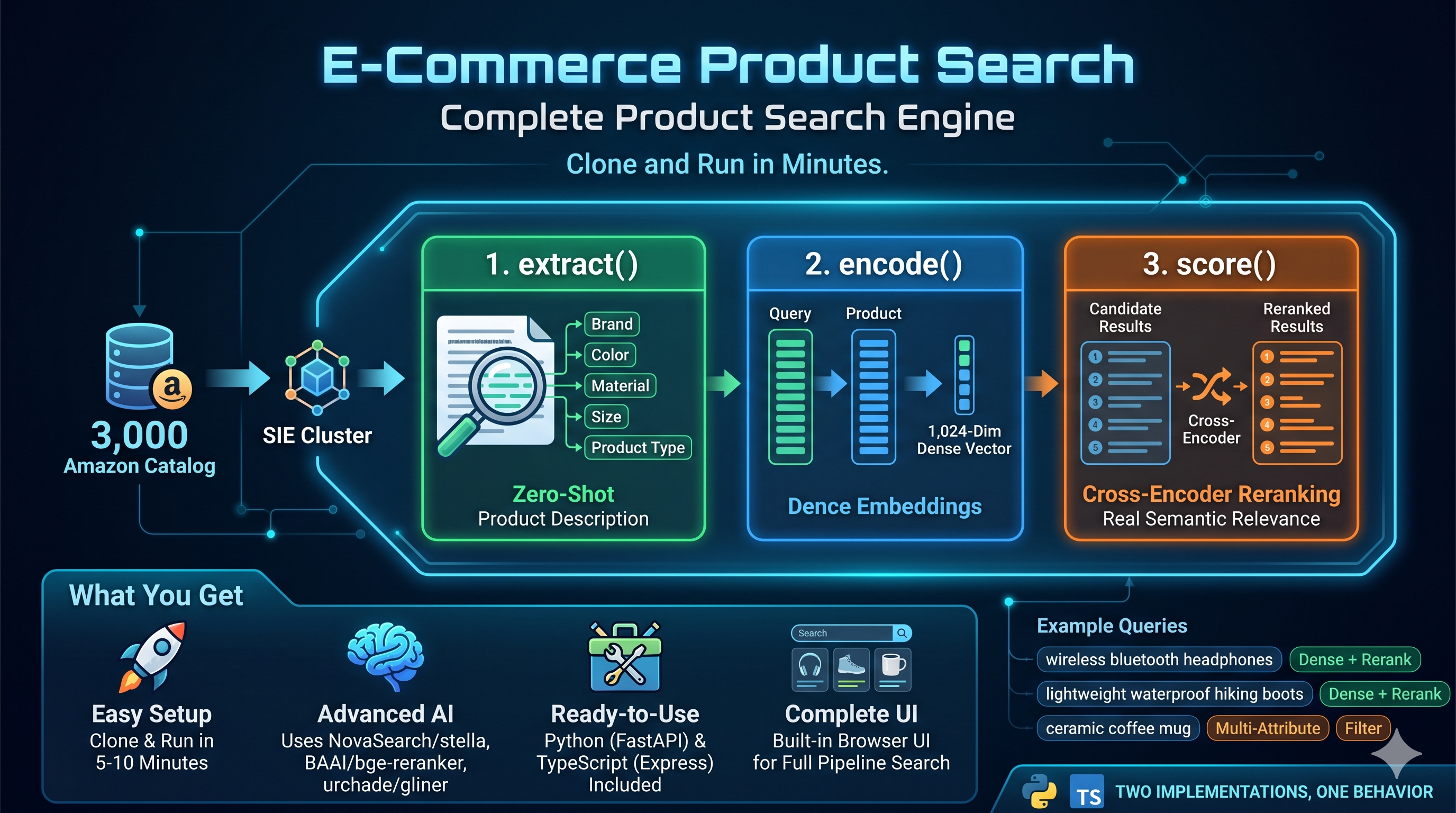
A complete product search demo you can clone and run on a laptop in five minutes. Type `wireless bluetooth headphones` and get ranked Amazon products back with extracted brand, color, and material filters. The whole pipeline (zero-shot attribute extraction, dense embeddings, cross-encoder reranking) runs through one local SIE server with three SDK calls. No vector DB to provision, no separate reranker service, no hand-rolled regex for attributes.
*Built by [Vipul Maheshwari](https://github.com/viplismism).*
## Try these queries
Once the server is running at `http://localhost:8888`, open it in your browser and try:
| Query | Filter | What it exercises |
|---|---|---|
| `wireless bluetooth headphones` | `All Electronics` | Dense retrieval plus cross-encoder rerank |
| `lightweight waterproof hiking boots` | none | Multi-attribute semantic match |
| `gold jewelry for women` | none | Style and material phrasing, rerank matters |
| `ceramic coffee mug` | `Amazon Home` | Category filter applied to extracted attributes |
| `power drill cordless` | `brand=DEWALT` | Filter on an attribute that was extracted zero-shot |
Each query flows through the full pipeline: `encode()` the query, vector search against the saved matrix, filter by extracted attributes, `score()` rerank with a cross-encoder, return the top 10.
## Run it locally (5 minutes)
You need Docker, Python 3.12, and roughly 3 GB of disk for the model weights. No API keys, no signup, no cluster.
```bash
# 1. Start a local SIE server on CPU.
docker run -p 8080:8080 ghcr.io/superlinked/sie-server:latest-cpu-default
# With an NVIDIA GPU:
# docker run --gpus all -p 8080:8080 ghcr.io/superlinked/sie-server:latest-cuda12-default
# 2. In another terminal: clone, install, fetch data.
git clone https://github.com/superlinked/sie
cd sie/examples/ecommerce-product-search
pip install -r python/requirements.txt
python data/fetch_dataset.py
# 3. Build the index and start the search server.
python python/ingest.py
uvicorn --app-dir python server:app --port 8888
```
Open `http://localhost:8888` and start searching.
> **Note — What to expect on the first run:**
>
> `ingest.py` triggers a one-time pull of three model weights (GLiNER for extraction, Stella for embeddings, BGE-reranker for scoring, roughly 3 GB in total). On CPU this takes 5 to 10 minutes. On GPU it is closer to 2 minutes. Subsequent runs are instant because the models stay loaded.
>
> **Want faster feedback?** Edit `config.yaml` and change `dataset.sample_size` from `3000` to `300`. Ingest finishes in about a minute, and the demo still showcases the full pipeline.
### Got a managed SIE cluster?
```bash
export SIE_CLUSTER_URL="https://your-cluster-url"
export SIE_API_KEY="your-api-key"
```
Everything else stays identical. The defaults in `config.yaml` point at `http://localhost:8080` so env vars are only needed when you are hitting something remote.
### Prefer TypeScript?
Same flow, Node 22+ and `pnpm` required. See the [TypeScript README](https://github.com/superlinked/sie/blob/main/examples/ecommerce-product-search/typescript/README.md) for the Express version.
## How it works
Ingest builds a searchable index once:
1. **`extract()`** pulls structured attributes (`brand`, `color`, `material`, `size`, `product_type`) from raw product descriptions with `urchade/gliner_multi-v2.1`. Zero-shot, no training data, no custom schema work.
2. **`encode()`** embeds every product's title and description into 1,024-dim dense vectors with `NovaSearch/stella_en_400M_v5`.
The index is just two files on disk (`data/embeddings.npy` and `data/metadata.json`).
Search runs this on every incoming query:
1. **`encode()`** the query with a query-side prefix (Stella is asymmetric).
2. Cosine similarity against the in-memory matrix gives the top 100 candidates.
3. Filter by extracted attributes if the request specifies any.
4. **`score()`** reranks the candidates with the `BAAI/bge-reranker-v2-m3` cross-encoder and returns the top 10.
Three model families, three roles, one endpoint. No per-model container to ship, no GPU scheduling to babysit, no separate reranker service.
## API reference
Both backends expose the same three endpoints.
### `GET /api/search`
| Parameter | Required | Description |
|---|---|---|
| `q` | yes | Search query |
| `category` | no | Category filter (matches against the product category) |
| `brand` | no | Brand filter (matches against the extracted `brand` attribute) |
```bash
curl "http://localhost:8888/api/search?q=waterproof+boots&brand=Columbia"
```
Response:
```json
{
"query": "waterproof boots",
"filters": { "brand": "Columbia" },
"results": [
{
"id": "",
"title": "",
"description": "",
"category": "AMAZON FASHION",
"price": "",
"rating": "",
"image": "",
"features": ["", ""],
"attributes": {
"brand": "Columbia",
"color": ""
},
"scores": {
"vector": "",
"rerank": ""
}
}
]
}
```
### `GET /api/categories`
Returns category counts as `[name, count]` tuples (feeds the dropdown in the UI).
### `GET /api/stats`
Returns index size, embedding dims, and the three model names.
## Troubleshooting
| Symptom | Fix |
|---|---|
| `Connection refused` on port 8080 | `docker run` is not running or crashed. Check `docker ps`. |
| Ingest seems stuck | First run is downloading ~3 GB of model weights. Check `docker logs` for progress. |
| Port 8888 already in use | Pick another: `uvicorn --app-dir python server:app --port 9000` |
| Filter returns 0 matches | Server logs a warning and falls back to unfiltered top-k so the UI still shows something. |
| On CPU, ingest is too slow | Edit `config.yaml`, set `dataset.sample_size: 300`. |
## Customize
Both implementations read the same `config.yaml`. The defaults work out of the box for local Docker. Tune only when you need to.
```yaml
cluster:
url: "http://localhost:8080"
api_key: ""
gpu: "" # set to "l4-spot" or similar when targeting a managed multi-GPU cluster
provision_timeout_s: 600
models:
embedding: "NovaSearch/stella_en_400M_v5"
reranker: "BAAI/bge-reranker-v2-m3"
extractor: "urchade/gliner_multi-v2.1"
extract_labels:
- brand
- color
- material
- size
- product_type
search:
top_k_candidates: 100
top_k_results: 10
ingest:
batch_size_extraction: 8
batch_size_encoding: 32
confidence_threshold: 0.5
junk_text_max_len: 15
dataset:
name: "milistu/AMAZON-Products-2023"
sample_size: 3000
min_description_length: 100
```
Swap any of the three models for another one in the SIE catalog and the pipeline keeps working. That is the point.
## Project layout
```text
examples/ecommerce-product-search/
├── config.yaml
├── data/
│ ├── fetch_dataset.py
│ └── products.json # generated by fetch_dataset.py
├── python/
│ ├── ingest.py
│ ├── search.py
│ ├── server.py
│ └── requirements.txt
├── static/
│ └── index.html # shared browser UI
└── typescript/
├── package.json
└── src/
├── ingest.ts
├── search.ts
└── server.ts
```
By Vipul Maheshwari.