This is the full developer documentation for SIE
# What is SIE?
> SIE (Superlinked Inference Engine) is an open-source inference server for AI models. It runs encoders, rerankers, extractors, and generation models on your own GPU, serving 100+ models through four simple API primitives.
**SIE (Superlinked Inference Engine) is an open-source inference server for AI models.** It runs encoders, rerankers, entity extractors, and generation models on your own infrastructure, from a laptop to a production Kubernetes cluster, without managing per-model deployments or paying per-token API costs.
SIE exposes four primitives:
* **[Encode](https://superlinked.com/docs/encode/)** converts text or images to vectors for semantic search and RAG
* **[Score](https://superlinked.com/docs/score/)** reranks query-document pairs for higher-precision retrieval
* **[Extract](https://superlinked.com/docs/extract/)** pulls entities and structured data from unstructured text
* **[Generate](https://superlinked.com/docs/generate/)** runs text generation on open LLMs you host yourself
100+ models are supported out of the box. The server handles batching, GPU sharing, and model switching automatically. Browse the full [model catalog](https://superlinked.com/models).
> SIE is built by [Superlinked](https://superlinked.com/), the team behind the Superlinked vector compute framework. [Read the launch post](https://superlinked.com/blog/launch).
***
## Get Started
[Section titled “Get Started”](#get-started)
| I want to… | Go to |
| -------------------------------------- | --------------------------------------------------------------- |
| **Get my first vectors in 2 minutes** | [Quickstart](https://superlinked.com/docs/quickstart/) |
| **Embed text or images** | [Encode Overview](https://superlinked.com/docs/encode/) |
| **Rerank search results** | [Score Overview](https://superlinked.com/docs/score/) |
| **Extract entities from text** | [Extract Overview](https://superlinked.com/docs/extract/) |
| **Generate text with a small LLM** | [Generate Overview](https://superlinked.com/docs/generate/) |
| **Choose the right model** | [Model Selection Guide](https://superlinked.com/docs/choosing/) |
| **See all 100+ models** | [Model Catalog](https://superlinked.com/models) |
| **Deploy to production** | [Deployment Overview](https://superlinked.com/docs/deployment/) |
| **Connect to LangChain or LlamaIndex** | [Integrations](https://superlinked.com/docs/integrations/) |
***
## Why Does SIE Exist?
[Section titled “Why Does SIE Exist?”](#why-does-sie-exist)
LLM inference tools are designed for one large model spread across many GPUs. Small model inference is the opposite problem: you run many models (encoders, rerankers, extractors) on one GPU and need fast switching between them.
**What makes SIE different from other inference servers:**
1. **Compute engine abstraction.** SIE wraps PyTorch, SGLang, Flash Attention, and Apple MLX behind four uniform primitives. The server picks the best engine per model automatically.
2. **Multi-model GPU sharing.** Many models can share one GPU via LRU eviction. One SIE instance serves any model at query time without pre-loading everything.
3. **Same code, laptop to cloud.** The same Docker image runs locally and in a production Kubernetes cluster. There is no separate production mode.
4. **Validated correctness.** Every supported model has quality and latency targets checked in CI.
***
## How Does SIE Compare to Alternatives?
[Section titled “How Does SIE Compare to Alternatives?”](#how-does-sie-compare-to-alternatives)
| | SIE | TEI (HuggingFace) | OpenAI API |
| ----------------------------------- | --- | ------------------------- | ---------------------- |
| Self-hosted | Yes | Yes | No |
| Multi-model on one GPU | Yes | No (one model per server) | N/A |
| Encode + Score + Extract + Generate | Yes | Encode only | Encode + generate only |
| 100+ supported models | Yes | Varies | Limited |
| Open source | Yes | Yes | No |
| No per-token cost | Yes | Yes | No |
See the [retrieval strategy benchmark](https://superlinked.com/docs/examples/benchmark/) for a worked evaluation of eight retrieval strategies on SIE with measured NDCG\@10 numbers.
***
## Frequently Asked Questions
[Section titled “Frequently Asked Questions”](#frequently-asked-questions)
**What is SIE used for?** SIE is used to generate embeddings for semantic search and RAG pipelines, rerank search results to improve precision, extract entities from unstructured text, and run text generation on small self-hosted LLMs. All of this runs on your own infrastructure. See [superlinked.com](https://superlinked.com/) for more on what you can build.
**Does SIE support GPU inference?** Yes. SIE runs on CPU or GPU. For production inference at scale, a GPU is strongly recommended. See [Hardware and Capacity](https://superlinked.com/docs/deployment/resources/) for GPU sizing guidance.
**How many models can SIE run at the same time?** SIE loads models on demand and evicts the least-recently-used models when GPU memory fills up. An L4 GPU (24GB) holds several standard models resident at once; the exact count depends on model size and batch settings. The full catalog stays addressable at query time: models load on demand, and each requested model still has to fit in the GPU’s memory to load.
**Is SIE open source?** Yes. SIE is open source and available on [GitHub](https://github.com/superlinked/sie). The core inference server is free to use. Superlinked also offers managed cloud deployment. [Contact us](https://superlinked.com/) to learn more.
**How is SIE different from the Superlinked framework?** The [Superlinked framework](https://superlinked.com/) is a higher-level Python SDK for building multi-attribute search and recommendation systems. SIE is the inference layer underneath it. You can use SIE standalone or as part of a full Superlinked stack.
# Quickstart
> First embeddings in 2 minutes.
## Start the Server
[Section titled “Start the Server”](#start-the-server)
SIE’s primary target is x86 Linux nodes with NVIDIA GPUs. The CPU image lets you try everything locally; for production deployment with autoscaling and multi-GPU, see [Deployment](/docs/deployment/).
* macOS (Apple Silicon)
Native install, served on Metal, no Docker (requires Python 3.12):
```bash
# embeddings + reranking (torch-MPS)
pip install "sie-server[local]" && sie-server serve # http://localhost:8080
# generation (Apple MLX) runs in its own env; uv makes it a one-liner
# (or pip install "sie-server" "mlx-lm>=0.30.7" into a fresh venv)
uvx --with "mlx-lm>=0.30.7" --from sie-server sie-server serve -b sglang -p 8081
```
Or run the Linux CPU image under emulation:
```bash
docker run --platform linux/amd64 -p 8080:8080 \
-v sie-hf-cache:/app/.cache/huggingface \
ghcr.io/superlinked/sie-server:latest-cpu-default
```
* Linux (CPU)
```bash
docker run -p 8080:8080 \
-v sie-hf-cache:/app/.cache/huggingface \
ghcr.io/superlinked/sie-server:latest-cpu-default
```
* Linux (NVIDIA GPU)
```bash
docker run --gpus all -p 8080:8080 \
-v sie-hf-cache:/app/.cache/huggingface \
ghcr.io/superlinked/sie-server:latest-cuda12-default
```
The server starts on port 8080 with all models available. Models load on first request.
Apple Silicon runs natively
`pip install "sie-server[local]"` serves embeddings and reranking on torch-MPS; generation runs as a separate Apple MLX process (`-b sglang` selects MLX on macOS). This is the recommended local experience on Apple Silicon. The `[local]` extra matters: it pins `transformers>=4.57,<5`, the version the embedding and reranking adapters need; a bare `pip install sie-server` can resolve transformers 5.x and fail at runtime. The `--platform linux/amd64` Docker image still works but runs under QEMU/Rosetta emulation. For production, run on x86 Linux with CUDA.
Kubernetes clusters
If connecting to a Kubernetes cluster with scale-to-zero, first requests may return `503 Service Unavailable` with an `X-SIE-Error-Code: PROVISIONING` header and `Retry-After: 60` while workers provision. Use `wait_for_capacity=True` (Python) or `waitForCapacity: true` (TypeScript) in the SDK, or expect 3-7 minute cold starts. See [Scale-from-Zero](/docs/deployment/autoscaling/).
## Install the SDK
[Section titled “Install the SDK”](#install-the-sdk)
* Python
```bash
pip install sie-sdk
```
* TypeScript
```bash
npm install @superlinked/sie-sdk # pnpm and yarn work too
```
## Generate Embeddings
[Section titled “Generate Embeddings”](#generate-embeddings)
* Python
```python
from sie_sdk import SIEClient
from sie_sdk.types import Item
client = SIEClient("http://localhost:8080")
# Single item
result = client.encode("sentence-transformers/all-MiniLM-L6-v2", Item(text="Hello world"))
print(result["dense"].shape) # (384,)
# Batch
results = client.encode("sentence-transformers/all-MiniLM-L6-v2", [
Item(text="First document"),
Item(text="Second document"),
])
print(len(results)) # 2
```
* TypeScript
```typescript
import { SIEClient } from "@superlinked/sie-sdk";
const client = new SIEClient("http://localhost:8080");
// Single item
const result = await client.encode("sentence-transformers/all-MiniLM-L6-v2", { text: "Hello world" });
console.log(result.dense?.length); // 384
// Batch
const results = await client.encode("sentence-transformers/all-MiniLM-L6-v2", [
{ text: "First document" },
{ text: "Second document" },
]);
console.log(results.length); // 2
```
The first call to a model downloads its weights from Hugging Face and loads them; `all-MiniLM-L6-v2` is \~90MB, so the first result lands in seconds to a couple of minutes, and warm calls typically return in milliseconds. When you want a multilingual flagship embedder with dense and sparse output, swap the model ID to `BAAI/bge-m3` (\~2.3GB download on first use); the call stays identical.
## Rerank Search Results
[Section titled “Rerank Search Results”](#rerank-search-results)
* Python
```python
query = Item(text="What is machine learning?")
items = [
Item(text="Machine learning uses algorithms to learn from data."),
Item(text="The weather is sunny today."),
]
result = client.score("cross-encoder/ms-marco-MiniLM-L-6-v2", query, items)
for entry in result["scores"]:
print(f"Rank {entry['rank']}: score={entry['score']:.3f}")
# Rank 0: score=-7.104
# Rank 1: score=-11.048
# (cross-encoder logits; the relative order is what matters)
```
* TypeScript
```typescript
const query = { text: "What is machine learning?" };
const items = [
{ text: "Machine learning uses algorithms to learn from data." },
{ text: "The weather is sunny today." },
];
const result = await client.score("cross-encoder/ms-marco-MiniLM-L-6-v2", query, items);
for (const entry of result.scores) {
console.log(`Rank ${entry.rank}: score=${entry.score.toFixed(3)}`);
}
// Rank 0: score=-7.104
// Rank 1: score=-11.048
// (cross-encoder logits; the relative order is what matters)
```
## Extract Entities
[Section titled “Extract Entities”](#extract-entities)
* Python
```python
result = client.extract(
"urchade/gliner_multi-v2.1",
Item(text="Tim Cook is the CEO of Apple."),
labels=["person", "organization"]
)
for entity in result["entities"]:
print(f"{entity['label']}: {entity['text']}")
# person: Tim Cook
# organization: Apple
```
* TypeScript
```typescript
const result = await client.extract(
"urchade/gliner_multi-v2.1",
{ text: "Tim Cook is the CEO of Apple." },
{ labels: ["person", "organization"] }
);
for (const entity of result.entities ?? []) {
console.log(`${entity.label}: ${entity.text}`);
}
// person: Tim Cook
// organization: Apple
```
## Generate Text
[Section titled “Generate Text”](#generate-text)
Text generation runs on the GPU generation image, not the CPU image above; stop the first server, then start this one on the same port. On Apple Silicon, generation is the separate MLX process from the platform tab above, which serves on port 8081, so create the client against `http://localhost:8081` for this step.
```bash
docker run --gpus all -p 8080:8080 \
-v sie-hf-cache:/app/.cache/huggingface \
ghcr.io/superlinked/sie-server:latest-cuda12-sglang
```
* Python
```python
# On Apple Silicon: client = SIEClient("http://localhost:8081")
result = client.generate(
"Qwen/Qwen3-0.6B",
"Reply with a single word: the capital of France.",
max_new_tokens=16,
temperature=0.0,
)
print(result["text"]) # Paris
```
* TypeScript
```typescript
// On Apple Silicon: const client = new SIEClient("http://localhost:8081");
const result = await client.generate(
"Qwen/Qwen3-0.6B",
"Reply with a single word: the capital of France.",
{ maxNewTokens: 16, temperature: 0.0 },
);
console.log(result.text); // Paris
```
`generate` is an early surface: the blocking call returns the full result once generation finishes. For streaming and chat-shaped requests, see [Text Generation](/docs/generate/).
## What’s Next
[Section titled “What’s Next”](#whats-next)
* [Choosing a Model](/docs/choosing/) - pick the right model for your use case
* [Dense Embeddings](/docs/encode/) - output types, query vs document encoding
* [Text Generation](/docs/generate/) - streaming, sampling options, and chat-shaped requests
* [Model Catalog](/models) - all 100+ supported models
* [Integrations](/docs/integrations/) - LangChain, LlamaIndex, Haystack, and more
* [Deployment](/docs/deployment/) - Docker, Kubernetes, cloud deployment
* [Sparse / Hybrid Search](/docs/encode/sparse/) - combine dense and sparse for better retrieval
# Choosing a Model
> How to pick the right embedding model for your use case.
SIE supports 100+ models. This guide helps you pick the right one based on your use case, language requirements, and performance needs.
## Quick Recommendations
[Section titled “Quick Recommendations”](#quick-recommendations)
| Use Case | Recommended Model | Why |
| ------------------------------ | ---------------------------------------- | --------------------------------------------------------------------- |
| **English-only, balanced** | `NovaSearch/stella_en_400M_v5` | Strong MTEB scores, efficient size |
| **English-only, max quality** | `nvidia/NV-Embed-v2` | Top MTEB scores, 4096 dims |
| **Speed-optimized** | `sentence-transformers/all-MiniLM-L6-v2` | 22M params, 384 dims, very fast |
| **Multilingual** | `BAAI/bge-m3` | 100+ languages, also supports sparse + multivector |
| **Hybrid search** | `BAAI/bge-m3` or `naver/splade-v3` | Dense + sparse from one model, or dedicated sparse |
| **Late interaction (ColBERT)** | `jinaai/jina-colbert-v2` | Best ColBERT quality, multilingual |
| **Vision / image search** | `google/siglip-so400m-patch14-384` | Image-text similarity |
| **Multilingual, fast** | `Qwen/Qwen3-Embedding-0.6B` | 1024 dims, 32K context, 100+ languages |
| **Document vision (PDF)** | `vidore/colpali-v1.3-hf` | Visual document retrieval |
| **ColBERT reranking** | `answerdotai/answerai-colbert-small-v1` | Fast MaxSim reranking; also `jina-colbert-v2`, `GTE-ModernColBERT-v1` |
| **Reranking (multilingual)** | `BAAI/bge-reranker-v2-m3` | Strong cross-language reranking |
| **Reranking (English)** | `mixedbread-ai/mxbai-rerank-large-v2` | High quality, 8192 max length |
| **Entity extraction** | `urchade/gliner_multi-v2.1` | Zero-shot NER, multilingual |
***
## Decision Guide
[Section titled “Decision Guide”](#decision-guide)
| Use Case | Scenario | Recommended Models |
| ------------------------- | ----------------------- | ------------------------------------------------------ |
| **Semantic Search / RAG** | English-only | `stella_en_400M_v5`, `NV-Embed-v2`, `all-MiniLM-L6-v2` |
| | Multilingual | `BAAI/bge-m3` |
| | Hybrid (dense + sparse) | `BAAI/bge-m3` + `naver/splade-v3` |
| **Image Search** | Text ↔ Image | `SigLIP`, `CLIP` |
| | Visual docs | `ColPali` |
| **Reranking** | Multilingual | `BAAI/bge-reranker-v2-m3` |
| | English | `mixedbread-ai/mxbai-rerank-large-v2` |
| **Entity Extraction** | NER | `GLiNER` |
| | Relations | `GLiREL` |
| | Classification | `GLiClass` |
***
## Tradeoff Axes
[Section titled “Tradeoff Axes”](#tradeoff-axes)
### Quality vs Speed vs Memory
[Section titled “Quality vs Speed vs Memory”](#quality-vs-speed-vs-memory)
| Model | Params | Dims | VRAM | Relative Speed | Quality |
| -------------------- | ------ | ---- | ------- | -------------- | --------- |
| all-MiniLM-L6-v2 | 22M | 384 | \~200MB | Fastest | Good |
| stella\_en\_400M\_v5 | 400M | 1024 | \~1.5GB | Fast | Very good |
| bge-m3 | 568M | 1024 | \~2GB | Fast | Very good |
| NV-Embed-v2 | 7B | 4096 | \~14GB | Slow | Best |
**Rule of thumb:** For English, start with `stella_en_400M_v5`. For multilingual or hybrid search, use `BAAI/bge-m3`. Only move to 7B+ models if benchmarks show a meaningful gap on your data.
### Dense vs Sparse vs Multi-vector
[Section titled “Dense vs Sparse vs Multi-vector”](#dense-vs-sparse-vs-multi-vector)
| Output Type | Storage | Search Speed | Quality | Best For |
| ---------------------- | ----------------------- | ------------ | ----------------- | ------------------------------- |
| Dense | Small (1024 floats) | Fast | Good | Standard semantic search |
| Sparse | Variable | Fast | Good for keywords | Hybrid search, keyword matching |
| Multi-vector (ColBERT) | Large (N \* 128 floats) | Slower | Best | When accuracy is critical |
**Recommendation:** Use dense for most cases. Add sparse for hybrid search if you need keyword matching. Use multi-vector only when you need the best possible retrieval quality and can afford the storage.
***
## Language Support
[Section titled “Language Support”](#language-support)
| Language Need | Models |
| ----------------------------- | --------------------------------------------------- |
| English only | Stella, NV-Embed-v2, all-MiniLM, GTE-Qwen2 |
| Multilingual (100+ languages) | BGE-M3, multilingual-e5-large, Qwen3-Embedding-0.6B |
| Chinese-focused | GTE-Qwen2, BGE-M3 |
***
## GPU Memory Planning
[Section titled “GPU Memory Planning”](#gpu-memory-planning)
| GPU | VRAM | Models That Fit |
| --------- | ---- | ------------------------------------------------------------------------------------------ |
| T4 | 16GB | Most models up to \~1B params |
| L4 | 24GB | All standard models; several can stay resident, depending on model size and batch settings |
| A100 40GB | 40GB | Large models, with more headroom for concurrent residency |
| A100 80GB | 80GB | 7B+ parameter models (NV-Embed-v2, e5-mistral-7b) |
With LRU eviction, a single GPU can serve the whole catalog over time: only the most recently used models stay in memory, and each requested model still has to fit in the GPU’s VRAM.
***
## When to Add Reranking
[Section titled “When to Add Reranking”](#when-to-add-reranking)
Almost always. Two-stage retrieval (retrieve with embeddings, then rerank with a cross-encoder) consistently improves quality:
1. **Retrieve** 20-50 candidates with dense embeddings (fast)
2. **Rerank** to top 5-10 with a cross-encoder (more accurate)
The reranker sees both query and document together, enabling deeper semantic matching than embedding similarity alone.
* Python
```python
# Stage 1: Fast retrieval
results = vector_db.search(query_embedding, k=20)
# Stage 2: Accurate reranking
reranked = client.score(
"mixedbread-ai/mxbai-rerank-large-v2",
query=Item(text="What is machine learning?"),
items=[Item(text=r.text) for r in results]
)
```
* TypeScript
```typescript
// Stage 1: Fast retrieval
const results = await vectorDb.search(queryEmbedding, { k: 20 });
// Stage 2: Accurate reranking
const reranked = await client.score(
"mixedbread-ai/mxbai-rerank-large-v2",
{ text: "What is machine learning?" },
results.map(r => ({ text: r.text })),
);
```
***
## When to Use Hybrid Search
[Section titled “When to Use Hybrid Search”](#when-to-use-hybrid-search)
Add sparse embeddings when your data has:
* **Domain-specific terminology** that dense models might miss
* **Exact keyword matching** requirements (product codes, identifiers)
* **Mixed content** where some queries are keyword-like and others are semantic
- Python
```python
# Get both dense and sparse from one model
result = client.encode(
"BAAI/bge-m3",
Item(text="your text"),
output_types=["dense", "sparse"]
)
# Use dense for semantic search, sparse for keyword matching
# Combine scores for hybrid retrieval
```
- TypeScript
```typescript
// Get both dense and sparse from one model
const result = await client.encode(
"BAAI/bge-m3",
{ text: "your text" },
{ outputTypes: ["dense", "sparse"] },
);
// Use dense for semantic search, sparse for keyword matching
// Combine scores for hybrid retrieval
```
***
## What’s Next
[Section titled “What’s Next”](#whats-next)
* [Model Catalog](/models) - full list of all supported models
* [Sparse Embeddings](/docs/encode/sparse/) - hybrid search patterns
* [Multi-vector / ColBERT](/docs/encode/multivector/) - late interaction retrieval
* [Quantization](/docs/encode/quantization/) - reduce embedding size for storage
# Python SDK Reference
> Complete reference for the SIE Python SDK.
The SDK provides synchronous and async clients for interacting with the SIE server.
## Installation
[Section titled “Installation”](#installation)
```bash
pip install sie-sdk
```
## SIEClient
[Section titled “SIEClient”](#sieclient)
Synchronous client for SIE server.
### Constructor
[Section titled “Constructor”](#constructor)
```python
from sie_sdk import SIEClient
client = SIEClient(
base_url: str, # Server URL (e.g., "http://localhost:8080")
*, # All following arguments are keyword-only
timeout_s: float = 30.0, # Request timeout in seconds
api_key: str | None = None, # API key for authentication
gpu: str | None = None, # Default GPU type for routing
options: dict | None = None, # Default options for all requests
pool: PoolSpec | None = None, # DEPRECATED. Use client.create_pool() instead.
max_connections: int | None = None, # Max HTTP connections (httpx defaults when omitted)
control_plane_url: str | None = None, # Control-plane base URL for the connections namespace
org: str | None = None, # Org the connections namespace operates on
base_url_headers: Mapping[str, str] | None = None, # Extra headers for the gateway origin only
)
```
Caution
The constructor `pool=` argument is deprecated. Use `client.create_pool(name, gpus)` and route per-request via `gpu="pool-name/machine-profile"`. See [Resource Pools](#resource-pools) below.
### Methods
[Section titled “Methods”](#methods)
#### encode()
[Section titled “encode()”](#encode)
Generate embeddings.
```python
def encode(
model: str, # Model name
items: Item | list[Item], # Items to encode
*,
output_types: list[str] | None = None, # ['dense', 'sparse', 'multivector']
instruction: str | None = None, # Task instruction for instruction-tuned models
output_dtype: str | None = None, # 'float32', 'float16', 'int8', 'binary'
is_query: bool | None = None, # Query vs document encoding
options: dict | None = None, # Runtime options (e.g., {"profile": "sparse"})
gpu: str | None = None, # GPU routing
wait_for_capacity: bool = True, # Wait for scale-up
provision_timeout_s: float | None = None, # Max wait time
) -> EncodeResult | list[EncodeResult]
```
**Returns:** Single `EncodeResult` if single item passed, otherwise list.
**Example:**
```python
# Single item
result = client.encode("BAAI/bge-m3", Item(text="Hello"))
print(result["dense"][:5])
# Batch
results = client.encode("BAAI/bge-m3", [
Item(text="First"),
Item(text="Second"),
])
```
#### score()
[Section titled “score()”](#score)
Rerank items against a query using a cross-encoder or late interaction model. Returns items sorted by relevance score (highest first).
```python
def score(
model: str, # Model name (e.g., "BAAI/bge-reranker-v2-m3")
query: Item, # Query item with text or multivector
items: list[Item], # Items to score against query
*,
instruction: str | None = None, # Optional instruction for instruction-tuned models
options: dict | None = None,
gpu: str | None = None,
wait_for_capacity: bool = True,
provision_timeout_s: float | None = None,
) -> ScoreResult
```
**Example:**
```python
result = client.score(
"BAAI/bge-reranker-v2-m3",
query=Item(text="What is Python?"),
items=[Item(text="Python is..."), Item(text="Java is...")]
)
# Scores are sorted by relevance (rank 0 = most relevant)
for entry in result["scores"]:
print(f"Rank {entry['rank']}: {entry['score']:.3f}")
```
**Note:** For ColBERT-style models, you can pass pre-computed multivectors to score client-side without a server round-trip. See the Scoring Utilities section.
#### extract()
[Section titled “extract()”](#extract)
Extract entities or structured data from text. Supports Named Entity Recognition (NER) models like GLiNER.
```python
def extract(
model: str, # Model name (e.g., "urchade/gliner_multi-v2.1")
items: Item | list[Item], # Items to extract from
*,
labels: list[str] | None = None, # Entity types to extract (e.g., ["person", "org"])
output_schema: dict | None = None, # JSON schema for structured extraction
instruction: str | None = None,
options: dict | None = None,
gpu: str | None = None,
wait_for_capacity: bool = True,
provision_timeout_s: float | None = None,
) -> ExtractResult | list[ExtractResult]
```
**Returns:** Single `ExtractResult` if single item passed, otherwise list.
**Example:**
```python
result = client.extract(
"urchade/gliner_multi-v2.1",
Item(text="Tim Cook leads Apple."),
labels=["person", "organization"]
)
for entity in result["entities"]:
print(f"{entity['label']}: {entity['text']} (score: {entity['score']:.2f})")
# Output:
# person: Tim Cook (score: 0.95)
# organization: Apple (score: 0.92)
```
#### generate()
[Section titled “generate()”](#generate)
Generate text from a prompt. Preview surface: returns the full result once generation finishes (no token streaming). For chat-shaped requests, use the OpenAI-compatible `/v1/chat/completions` endpoint.
```python
def generate(
model: str, # Model name (e.g., "Qwen/Qwen3-4B-Instruct-2507")
prompt: str, # Input prompt
*,
max_new_tokens: int, # Hard cap on output tokens (required)
temperature: float | None = None, # None uses the model profile's default
top_p: float | None = None, # None uses the model profile's default
stop: list[str] | None = None,
gpu: str | None = None,
wait_for_capacity: bool = True,
provision_timeout_s: float | None = None,
) -> GenerateResult
```
Additional keyword arguments:
* `images` - native image inputs for vision-capable generation models
* `frequency_penalty`, `presence_penalty` - OpenAI-compatible penalties in `[-2, 2]`
* `grammar` - native structured-output grammar
* `seed` - per-request sampling seed
* `logit_bias` - token-id-to-bias map
* `routing_key` - stable request routing key
* `prompt_cache_key` - prompt cache affinity key
* `safety_identifier` - opaque privacy-preserving safety identifier
* `lora_adapter` - served LoRA adapter name
* `options` - governed generation runtime options
* `max_oom_retries` - retry budget for `RESOURCE_EXHAUSTED` responses
**Returns:** `GenerateResult` with `text`, `finish_reason`, `usage`, and timing (`ttft_ms`, `tpot_ms`).
**Example:**
```python
result = client.generate(
"Qwen/Qwen3-4B-Instruct-2507",
"Write a one-sentence summary of vector search.",
max_new_tokens=128,
)
print(result["text"])
```
#### stream\_generate()
[Section titled “stream\_generate()”](#stream_generate)
Stream tokens as they are generated. Yields `GenerateChunk` events; each carries a `text_delta`, and the terminal chunk (`done`) carries `usage` and `ttft_ms`. Takes the same parameters as `generate()`, plus the streaming-only `logprobs`, `top_logprobs`, and `extra_body`.
```python
def stream_generate(
model: str,
prompt: str,
*,
max_new_tokens: int,
temperature: float | None = None, # None uses the model profile's default
top_p: float | None = None, # None uses the model profile's default
stop: list[str] | None = None,
logprobs: bool = False, # Include per-token log probabilities
top_logprobs: int | None = None, # Alternate token log probabilities to return
extra_body: dict | None = None, # Extra request-body fields
gpu: str | None = None,
wait_for_capacity: bool = True,
provision_timeout_s: float | None = None,
) -> Iterator[GenerateChunk]
```
**Example:**
```python
for chunk in client.stream_generate(
"Qwen/Qwen3-4B-Instruct-2507",
"Write a one-sentence summary of vector search.",
max_new_tokens=128,
):
print(chunk.get("text_delta", ""), end="", flush=True)
```
#### list\_models()
[Section titled “list\_models()”](#list_models)
Get available models.
```python
def list_models() -> list[ModelInfo]
```
#### get\_capacity()
[Section titled “get\_capacity()”](#get_capacity)
Get cluster capacity information.
```python
def get_capacity(
*,
gpu: str | None = None,
) -> CapacityInfo
```
#### wait\_for\_capacity()
[Section titled “wait\_for\_capacity()”](#wait_for_capacity)
Wait for GPU capacity to become available. This is useful for pre-warming the cluster before running benchmarks.
```python
def wait_for_capacity(
gpu: str,
*,
model: str | None = None, # If provided, sends a warmup encode request
timeout_s: float | None = None, # Default: 300 seconds
poll_interval_s: float = 5.0,
) -> CapacityInfo
```
#### close()
[Section titled “close()”](#close)
Close the HTTP client.
```python
def close() -> None
```
### Context Manager
[Section titled “Context Manager”](#context-manager)
```python
with SIEClient("http://localhost:8080") as client:
result = client.encode("BAAI/bge-m3", Item(text="Hello"))
# Client automatically closed
```
***
## SIEAsyncClient
[Section titled “SIEAsyncClient”](#sieasyncclient)
Async client with identical API. All methods are coroutines.
```python
from sie_sdk import SIEAsyncClient
async with SIEAsyncClient("http://localhost:8080") as client:
result = await client.encode("BAAI/bge-m3", Item(text="Hello"))
```
***
## Types
[Section titled “Types”](#types)
### Item
[Section titled “Item”](#item)
Input item for encode, score, and extract operations. Most models only use `text`, but multimodal models can process images.
```python
from sie_sdk.types import Item
class Item(TypedDict, total=False):
id: str # Client-provided ID (echoed in response)
text: str # Text content
images: list[ImageInput] # Image data (for multimodal models)
document: DocumentInput # Raw document bytes (PDF/DOCX/HTML/MD/TXT/...)
metadata: dict[str, Any] # Custom metadata
multivector: NDArray # Pre-computed vectors (for client-side MaxSim)
```
Note
The SDK type also carries `audio: AudioInput` and `video: VideoInput` slots. In the current catalog, `openai/whisper-large-v3-turbo` declares `audio: true` (also served at `/v1/audio/transcriptions`) and `Qwen/Qwen3-VL-Embedding-2B` declares `video: true`. Use `images` for vision models and `document` for the `docling` parser.
**Common patterns:**
```python
# Simple text
Item(text="Hello world")
# With ID for tracking
Item(id="doc-1", text="Document text")
# Multimodal (for CLIP, ColPali, etc.)
Item(text="Description", images=["photo.jpg"])
# Document parsing with Docling (PDF/DOCX/HTML)
Item(document={"data": pdf_bytes, "format": "pdf"})
```
### ImageInput
[Section titled “ImageInput”](#imageinput)
```python
class ImageInput(TypedDict, total=False):
data: Image.Image | NDArray | bytes | str | Path # Image in various formats
format: str # 'jpeg', 'png' - inferred if not provided
```
The SDK accepts various image formats and converts them to JPEG bytes for transport:
* `PIL.Image` - Converted to JPEG
* `np.ndarray` - Converted via PIL to JPEG
* `bytes` - Passed through as-is
* `str` or `Path` - Loaded from file path
### DocumentInput
[Section titled “DocumentInput”](#documentinput)
```python
class DocumentInput(TypedDict, total=False):
data: bytes | str | Path # Raw bytes, or a path the SDK will read
format: str # 'pdf', 'docx', 'html', 'md', 'txt', ...
```
Used by composite-document extractors (currently `docling`). The Python SDK infers `format` from a path suffix (`.pdf`, `.docx`, `.doc`, `.html`/`.htm`/`.xhtml`, `.md`/`.markdown`, `.txt`, `.rtf`, `.odt`, `.pptx`, `.xlsx`, `.csv`); pass `format` explicitly when supplying raw bytes.
### EncodeResult
[Section titled “EncodeResult”](#encoderesult)
```python
class EncodeResult(TypedDict, total=False):
model: str # Model identity returned by the server
id: str # Echoed item ID
dense: NDArray[np.float32] # Dense embedding
sparse: SparseResult # Sparse embedding
multivector: NDArray[np.float32] # Per-token embeddings
timing: TimingInfo # Timing breakdown
request: RequestMetadata # Request-scoped id, usage, and settled debit
```
### SparseResult
[Section titled “SparseResult”](#sparseresult)
```python
class SparseResult(TypedDict):
indices: NDArray[np.int32] # Token IDs
values: NDArray[np.float32] # Token weights
```
### ScoreResult
[Section titled “ScoreResult”](#scoreresult)
```python
class ScoreResult(TypedDict, total=False):
model: str # Model used for scoring
query_id: str # Query ID (if provided in request)
scores: list[ScoreEntry] # Sorted by score descending
usage: ScoreUsage # Authoritative usage from the score adapter
request: RequestMetadata # Request-scoped id, usage, and settled debit
```
### ScoreEntry
[Section titled “ScoreEntry”](#scoreentry)
```python
class ScoreEntry(TypedDict):
item_id: str # ID of the item
score: float # Relevance score
rank: int # Position (0 = most relevant)
```
### ExtractResult
[Section titled “ExtractResult”](#extractresult)
```python
class ExtractResult(TypedDict, total=False):
model: str # Model identity returned by the server
id: str
entities: list[Entity]
relations: list[Relation]
classifications: list[Classification]
objects: list[DetectedObject]
data: dict[str, Any]
error: ExtractItemErrorDetail # Stable per-item failure when extraction did not complete
request: RequestMetadata # Request-scoped id, usage, and settled debit
```
### Entity
[Section titled “Entity”](#entity)
```python
class Entity(TypedDict, total=False):
text: str # Extracted span
label: str # Entity type
score: float # Confidence (0-1)
start: int | None # Start character offset
end: int | None # End character offset
bbox: list[int] | None # Bounding box [x, y, width, height] for vision models
```
### Relation
[Section titled “Relation”](#relation)
```python
class Relation(TypedDict):
head: str # Source entity
tail: str # Target entity
relation: str # Relation type
score: float
```
### Classification
[Section titled “Classification”](#classification)
```python
class Classification(TypedDict):
label: str
score: float
```
### ModelInfo
[Section titled “ModelInfo”](#modelinfo)
```python
class ModelInfo(TypedDict, total=False):
name: str # Model name/identifier
loaded: bool # Whether model weights are in memory
inputs: list[str] # Input types: ["text"], ["text", "image"], etc.
outputs: list[str] # Output types: ["dense"], ["dense", "sparse"], etc.
dims: ModelDims # Dimension info for each output type
max_sequence_length: int # Maximum input sequence length
revision: str | None # Pinned HF commit SHA for the model's weights
capabilities: ModelCapabilities # Advertised generation capabilities
```
### TimingInfo
[Section titled “TimingInfo”](#timinginfo)
```python
class TimingInfo(TypedDict, total=False):
total_ms: float # Total request time
queue_ms: float # Time waiting in queue
tokenization_ms: float # Tokenization time
inference_ms: float # Model inference time
```
***
## Scoring Utilities
[Section titled “Scoring Utilities”](#scoring-utilities)
Client-side scoring for multi-vector embeddings.
### maxsim()
[Section titled “maxsim()”](#maxsim)
Compute MaxSim scores for ColBERT-style retrieval. MaxSim finds the maximum similarity between each query token and any document token, then sums these maximums.
```python
from sie_sdk.scoring import maxsim
def maxsim(
query: NDArray[np.float32], # [num_query_tokens, dim]
documents: list[NDArray[np.float32]] | NDArray[np.float32], # List of [num_doc_tokens, dim]
) -> list[float]
```
**Example:**
```python
from sie_sdk.scoring import maxsim
# Encode query with is_query=True for ColBERT models
query_result = client.encode(
"jinaai/jina-colbert-v2",
Item(text="What is ColBERT?"),
output_types=["multivector"],
is_query=True, # Query mode for late interaction models
)
# Encode documents (no is_query needed for documents)
doc_results = client.encode(
"jinaai/jina-colbert-v2",
documents,
output_types=["multivector"]
)
# Compute MaxSim scores client-side
query_mv = query_result["multivector"]
doc_mvs = [r["multivector"] for r in doc_results]
scores = maxsim(query_mv, doc_mvs)
# Rank by score (higher is more relevant)
ranked = sorted(enumerate(scores), key=lambda x: -x[1])
```
### maxsim\_batch()
[Section titled “maxsim\_batch()”](#maxsim_batch)
Batch version for multiple queries.
```python
def maxsim_batch(
queries: list[NDArray[np.float32]],
documents: list[NDArray[np.float32]],
) -> NDArray[np.float32] # [num_queries, num_documents]
```
***
## Errors
[Section titled “Errors”](#errors)
Exception hierarchy for SDK errors.
### SIEError
[Section titled “SIEError”](#sieerror)
Base class for all SDK errors.
```python
class SIEError(Exception):
pass
```
### SIEConnectionError
[Section titled “SIEConnectionError”](#sieconnectionerror)
Cannot connect to server.
```python
class SIEConnectionError(SIEError):
message: str
```
### RequestError
[Section titled “RequestError”](#requesterror)
Invalid request (4xx responses).
```python
class RequestError(SIEError):
code: str
status_code: int
```
### InputTooLongError
[Section titled “InputTooLongError”](#inputtoolongerror)
Extraction input exceeds the model’s context. Subclass of `RequestError`, so existing 4xx handlers continue to work; new code can branch on `InputTooLongError` for tailored handling (truncate client-side, switch models, surface a targeted message). Raised on HTTP `400 INPUT_TOO_LONG` from `/v1/extract` for the `gliclass-*` family.
```python
class InputTooLongError(RequestError):
code: str = "INPUT_TOO_LONG"
status_code: int = 400
model: str | None
```
Pass `options={"overflow_policy": "truncate_text"}` to `extract()` to truncate the input server-side instead. See [Relations & Classification → Overflow policy](/docs/extract/relations/#overflow-policy).
### ServerError
[Section titled “ServerError”](#servererror)
Server error (5xx responses).
```python
class ServerError(SIEError):
code: str
status_code: int
```
### ProvisioningError
[Section titled “ProvisioningError”](#provisioningerror)
No capacity available or timeout waiting for scale-up.
```python
class ProvisioningError(SIEError):
gpu: str
retry_after: float | None
```
### PoolError
[Section titled “PoolError”](#poolerror)
Resource pool operation failed.
```python
class PoolError(SIEError):
pool_name: str
state: str
```
### LoraLoadingError
[Section titled “LoraLoadingError”](#loraloadingerror)
LoRA adapter loading timeout.
```python
class LoraLoadingError(SIEError):
lora: str
model: str
```
### ModelLoadingError
[Section titled “ModelLoadingError”](#modelloadingerror)
Model is loading (`503 MODEL_LOADING`) and the retry limit was exceeded.
```python
class ModelLoadingError(SIEError):
model: str | None
```
### ModelLoadFailedError
[Section titled “ModelLoadFailedError”](#modelloadfailederror)
The server reports a recorded model-load failure (`502 MODEL_LOAD_FAILED`); raised on the first response with no retry. Subclass of `ServerError`.
```python
class ModelLoadFailedError(ServerError):
model: str | None
error_class: str | None # "GATED", "OOM", "DEPENDENCY", "NOT_FOUND", "NETWORK", "UNKNOWN"
permanent: bool # True when the failure will not auto-retry
attempts: int # Load attempts the server has logged
```
### EstimateUnroutableError
[Section titled “EstimateUnroutableError”](#estimateunroutableerror)
The gateway cannot price the request, so it will not run it either; raised by `estimate()` when the dry run answers `503`. Subclass of `ServerError`.
```python
class EstimateUnroutableError(ServerError):
code: str | None
```
### ResourceExhaustedError
[Section titled “ResourceExhaustedError”](#resourceexhaustederror)
The server has exhausted its OOM-recovery strategies (`503 RESOURCE_EXHAUSTED`) and the SDK retry limit was exceeded. Subclass of `ServerError`.
```python
class ResourceExhaustedError(ServerError):
model: str | None
retries: int # Retry attempts made before giving up
```
### Handling Errors
[Section titled “Handling Errors”](#handling-errors)
```python
from sie_sdk import SIEClient
from sie_sdk.client.errors import InputTooLongError, RequestError, ProvisioningError
client = SIEClient("http://localhost:8080")
try:
result = client.encode("unknown-model", Item(text="test"))
except InputTooLongError as e:
print(f"Input too long for {e.model}: {e}")
except RequestError as e:
print(f"Invalid request: {e.code} ({e.status_code})")
except ProvisioningError as e:
print(f"No capacity for GPU {e.gpu}, retry after {e.retry_after}s")
```
***
## GPU Routing
[Section titled “GPU Routing”](#gpu-routing)
For cluster deployments with multiple GPU types, specify the target GPU:
```python
# Per-request GPU selection
result = client.encode(
"BAAI/bge-m3",
items,
gpu="a100-80gb"
)
# Default GPU for all requests
client = SIEClient(
"http://gateway.example.com",
gpu="l4"
)
```
Available GPU types depend on your cluster configuration.
***
## Resource Pools
[Section titled “Resource Pools”](#resource-pools)
Create isolated worker sets for testing or tenant isolation:
```python
# Create a pool explicitly
client = SIEClient("http://gateway.example.com")
client.create_pool("my-test-pool", {"l4": 2, "a100-40gb": 1})
# Route requests to the pool
result = client.encode("BAAI/bge-m3", items, gpu="my-test-pool/l4")
# Check pool status
info = client.get_pool("my-test-pool")
print(f"Pool state: {info['status']['state']}, workers: {len(info['status']['assigned_workers'])}")
# Clean up
client.delete_pool("my-test-pool")
```
***
## Image Handling
[Section titled “Image Handling”](#image-handling)
The SDK accepts multiple image input formats and converts them to JPEG bytes for transport:
```python
from PIL import Image
import numpy as np
# From PIL Image (recommended)
pil_image = Image.open("photo.jpg")
result = client.encode("openai/clip-vit-base-patch32", Item(
images=[{"data": pil_image}]
))
# From file path (string or Path)
result = client.encode("openai/clip-vit-base-patch32", Item(
images=[{"data": "photo.jpg"}]
))
# From bytes (passed through as-is)
result = client.encode("openai/clip-vit-base-patch32", Item(
images=[{"data": image_bytes, "format": "jpeg"}]
))
# From numpy array (H, W, C)
result = client.encode("openai/clip-vit-base-patch32", Item(
images=[{"data": np.array(pil_image)}]
))
# Direct image input (shorthand without dict wrapper)
result = client.encode("openai/clip-vit-base-patch32", Item(
images=[pil_image, "photo2.jpg"] # Mixed formats supported
))
```
***
## Complete Example
[Section titled “Complete Example”](#complete-example)
```python
from sie_sdk import SIEClient
from sie_sdk.types import Item
from sie_sdk.scoring import maxsim
# Initialize client
client = SIEClient("http://localhost:8080", timeout_s=60.0)
# Dense embeddings
embeddings = client.encode(
"BAAI/bge-m3",
[Item(id=f"doc-{i}", text=doc) for i, doc in enumerate(documents)]
)
# Store in vector database
for result in embeddings:
vector_db.insert(result["id"], result["dense"])
# Query with reranking
query = Item(text="What is machine learning?")
# Stage 1: Vector search
query_emb = client.encode("BAAI/bge-m3", query, is_query=True)
candidates = vector_db.search(query_emb["dense"], top_k=100)
# Stage 2: Rerank
rerank_result = client.score(
"BAAI/bge-reranker-v2-m3",
query,
[Item(id=c.id, text=c.text) for c in candidates]
)
# Top 10 results
top_10 = rerank_result["scores"][:10]
# Clean up
client.close()
```
# TypeScript SDK Reference
> Complete reference for the SIE TypeScript SDK.
The TypeScript SDK provides an async client for interacting with the SIE server from Node.js and browser environments.
## Installation
[Section titled “Installation”](#installation)
```bash
pnpm add @superlinked/sie-sdk
```
Or with npm:
```bash
npm install @superlinked/sie-sdk
```
## SIEClient
[Section titled “SIEClient”](#sieclient)
Async client for the SIE server. All methods return Promises.
### Constructor
[Section titled “Constructor”](#constructor)
```typescript
import { SIEClient } from "@superlinked/sie-sdk";
const client = new SIEClient(
baseUrl: string, // Server URL (e.g., "http://localhost:8080")
options?: {
timeout?: number, // Request timeout in milliseconds (default: 30000)
apiKey?: string, // API key for authentication
gpu?: string, // Default GPU type for routing
waitForCapacity?: boolean, // Auto-retry retryable capacity signals (default: true)
provisionTimeout?: number, // Max wait for provisioning in ms (default: 300000)
controlPlaneUrl?: string, // Control-plane base URL for the connections namespace
org?: string, // Org the connections namespace operates on
}
);
```
Caution
`waitForCapacity` defaults to `true`, matching the Python SDK’s `wait_for_capacity=True`. Pass `false` explicitly to fail fast.
Resource pools are not a constructor option; create them with [`createPool()`](#resource-pools) and route per-request via `gpu: "pool-name/machine-profile"`.
### Methods
[Section titled “Methods”](#methods)
#### encode()
[Section titled “encode()”](#encode)
Generate embeddings.
```typescript
async encode(
model: string, // Model name
items: Item | Item[], // Items to encode
options?: {
outputTypes?: OutputType[], // ["dense", "sparse", "multivector"]
instruction?: string, // Task instruction for instruction-tuned models
outputDtype?: DType, // "float32", "float16", "int8", "binary"
isQuery?: boolean, // Query vs document encoding
gpu?: string, // GPU routing
waitForCapacity?: boolean, // Wait for scale-up
}
): Promise
```
**Returns:** Single `EncodeResult` if single item passed, otherwise array.
**Example:**
```typescript
// Single item
const result = await client.encode("BAAI/bge-m3", { text: "Hello" });
console.log(result.dense?.slice(0, 5)); // Float32Array
// Batch
const results = await client.encode("BAAI/bge-m3", [
{ text: "First" },
{ text: "Second" },
]);
```
#### score()
[Section titled “score()”](#score)
Rerank items against a query using a cross-encoder or late interaction model. Returns items sorted by relevance score (highest first).
```typescript
async score(
model: string, // Model name (e.g., "BAAI/bge-reranker-v2-m3")
query: Item, // Query item with text or multivector
items: Item[], // Items to score against query
options?: {
gpu?: string,
waitForCapacity?: boolean,
}
): Promise
```
**Example:**
```typescript
const result = await client.score(
"BAAI/bge-reranker-v2-m3",
{ text: "What is Python?" },
[{ text: "Python is..." }, { text: "Java is..." }]
);
// Scores are sorted by relevance (rank 0 = most relevant)
for (const entry of result.scores) {
console.log(`Rank ${entry.rank}: ${entry.score.toFixed(3)}`);
}
```
**Note:** For ColBERT-style models, you can pass pre-computed multivectors to score client-side without a server round-trip. See the Scoring Utilities section.
Note
The `ScoreOptions` type does not currently declare `instruction` (for instruction-tuned cross-encoders) or `options` (e.g., `{ profile: "..." }`). The underlying wire request supports both; pass them via a `as never` / `as ScoreOptions` cast until the SDK types are updated.
#### extract()
[Section titled “extract()”](#extract)
Extract entities or structured data from text. Supports Named Entity Recognition (NER) models like GLiNER.
```typescript
async extract(
model: string, // Model name (e.g., "urchade/gliner_multi-v2.1")
items: ExtractItem | ExtractItem[], // Items to extract from (Item plus optional audio)
options: {
labels: string[], // Entity types to extract (e.g., ["person", "org"])
threshold?: number, // Minimum confidence (0-1)
adapterOptions?: Record, // Adapter knobs (e.g., { overflow_policy: "truncate_text" })
gpu?: string,
waitForCapacity?: boolean,
}
): Promise
```
**Returns:** Single `ExtractResult` if single item passed, otherwise array.
Note
`ExtractOptions` does not currently declare `instruction` (for Donut Document-QA prompts) or `options` (for `{ task: "..." }` modes on PaddleOCR/Florence-2). The wire request supports both; pass via a cast until the SDK types are updated. See `extract/vision.mdx` for examples.
**Example:**
```typescript
const result = await client.extract(
"urchade/gliner_multi-v2.1",
{ text: "Tim Cook leads Apple." },
{ labels: ["person", "organization"] }
);
for (const entity of result.entities) {
console.log(`${entity.label}: ${entity.text} (score: ${entity.score.toFixed(2)})`);
}
// Output:
// person: Tim Cook (score: 0.95)
// organization: Apple (score: 0.92)
```
#### generate()
[Section titled “generate()”](#generate)
Generate text from a prompt. The SDK does not expose streaming chunks here; the gateway aggregates and the SDK returns the assembled result plus SIE-native timing metadata (`ttftMs`, `tpotMs`).
```typescript
async generate(
model: string, // Model name; "a/b" is normalized to "a__b"
prompt: string, // Input prompt
options: GenerateOptions // maxNewTokens is required
): Promise
```
**Example:**
```typescript
const result = await client.generate(
"Qwen/Qwen3-4B-Instruct-2507",
"Write a haiku about the sea.",
{ maxNewTokens: 64, temperature: 0.7 },
);
console.log(result.text);
```
#### streamGenerate()
[Section titled “streamGenerate()”](#streamgenerate)
Stream tokens as they are generated. Yields `GenerateChunk` events; the terminal chunk carries `done: true` plus `usage` and `ttft_ms`. `StreamGenerateOptions` extends `GenerateOptions` with `logprobs` and `topLogprobs`.
```typescript
async *streamGenerate(
model: string,
prompt: string,
options: StreamGenerateOptions,
signal?: AbortSignal
): AsyncGenerator
```
**Example:**
```typescript
for await (const chunk of client.streamGenerate(
"Qwen/Qwen3-4B-Instruct-2507",
"Write a haiku.",
{ maxNewTokens: 64 },
)) {
process.stdout.write(chunk.text_delta);
}
```
#### listModels()
[Section titled “listModels()”](#listmodels)
Get available models.
```typescript
async listModels(): Promise
```
**Example:**
```typescript
const models = await client.listModels();
for (const model of models) {
console.log(`${model.name}: ${model.outputs.join(", ")}`);
}
```
#### getModel()
[Section titled “getModel()”](#getmodel)
Get details for a specific model. A lightweight call that reads from model config; it does not load the model or trigger inference.
```typescript
async getModel(name: string): Promise
```
The client also provides OpenAI-compatible `chatCompletions()` / `streamChatCompletions()` methods and `jobs`, `files`, `batches`, and `connections` namespaces; see `packages/sie_ts_sdk/src/client.ts` for those surfaces.
#### getCapacity()
[Section titled “getCapacity()”](#getcapacity)
Get cluster capacity information.
```typescript
async getCapacity(gpu?: string): Promise
```
**Example:**
```typescript
const capacity = await client.getCapacity();
console.log(`Workers: ${capacity.workerCount}, GPUs: ${capacity.liveGpuTypes}`);
// Check if L4 GPUs are available
const l4Capacity = await client.getCapacity("l4");
if (l4Capacity.workerCount > 0) {
console.log("L4 workers available");
}
```
#### waitForCapacity()
[Section titled “waitForCapacity()”](#waitforcapacity)
Wait for GPU capacity to become available. This is useful for pre-warming the cluster before running benchmarks.
```typescript
async waitForCapacity(
gpu: string,
options?: {
model?: string, // If provided, sends a warmup encode request
timeout?: number, // Default: 300000ms
pollInterval?: number, // Default: 5000ms
}
): Promise
```
**Example:**
```typescript
// Wait for L4 capacity before running benchmarks
const capacity = await client.waitForCapacity("l4", { timeout: 300000 });
console.log(`Ready with ${capacity.workerCount} L4 workers`);
// Wait and pre-load a model
const capacityWithModel = await client.waitForCapacity("l4", { model: "BAAI/bge-m3" });
```
#### close()
[Section titled “close()”](#close)
Close the client and cleanup resources.
```typescript
async close(): Promise
```
***
## Types
[Section titled “Types”](#types)
### Item
[Section titled “Item”](#item)
Input item for encode, score, and extract operations.
```typescript
interface Item {
id?: string; // Client-provided ID (echoed in response)
text?: string; // Text content
images?: (ImageInput | ImageWireFormat)[]; // Images; converted to wire format by the client
document?: DocumentInput; // Document for composite-document extractors (PDF, DOCX, HTML, ...)
multivector?: Float32Array[]; // Pre-computed vectors (for client-side MaxSim)
metadata?: Record; // Custom metadata
}
// An item accepted by extract(), including optional encoded audio
interface ExtractItem extends Item {
audio?: AudioInput | Uint8Array; // Encoded audio for speech extraction
}
```
**Common patterns:**
```typescript
// Simple text
{ text: "Hello world" }
// With ID for tracking
{ id: "doc-1", text: "Document text" }
// Multimodal (for CLIP, ColPali, etc.)
{ text: "Description", images: [imageBytes] }
```
### EncodeResult
[Section titled “EncodeResult”](#encoderesult)
```typescript
interface EncodeResult {
id?: string; // Echoed item ID
dense?: Float32Array; // Dense embedding
sparse?: SparseResult; // Sparse embedding
multivector?: Float32Array[]; // Per-token embeddings
timing?: TimingInfo; // Timing breakdown
request?: RequestMetadata; // Request-scoped usage and settled debit
}
```
### SparseResult
[Section titled “SparseResult”](#sparseresult)
```typescript
interface SparseResult {
indices: Int32Array; // Token IDs
values: Float32Array; // Token weights
}
```
### ScoreResult
[Section titled “ScoreResult”](#scoreresult)
```typescript
interface ScoreResult {
model?: string; // Model used for scoring
queryId?: string; // Query ID (if provided in request)
scores: ScoreEntry[]; // Sorted by score descending
usage?: ScoreUsage; // Authoritative usage from the score adapter
request?: RequestMetadata; // Request-scoped usage and settled debit
}
```
### ScoreEntry
[Section titled “ScoreEntry”](#scoreentry)
```typescript
interface ScoreEntry {
itemId: string; // ID of the item
score: number; // Relevance score
rank: number; // Position (0 = most relevant)
}
```
### ExtractResult
[Section titled “ExtractResult”](#extractresult)
```typescript
interface ExtractResult {
id?: string; // Echoed item ID
entities: Entity[]; // Extracted entities
relations: Relation[]; // Extracted relation triples
classifications: Classification[]; // Classification results
objects: DetectedObject[]; // Detected objects
data?: Record; // Additional structured extraction data
error?: ExtractItemError; // Stable per-item failure when extraction did not complete
request?: RequestMetadata; // Request-scoped usage and settled debit
}
```
### Entity
[Section titled “Entity”](#entity)
```typescript
interface Entity {
text: string; // Extracted span
label: string; // Entity type
score: number; // Confidence (0-1)
start?: number; // Start character offset
end?: number; // End character offset
bbox?: number[]; // Bounding box [x, y, width, height] for vision models
}
```
### ModelInfo
[Section titled “ModelInfo”](#modelinfo)
```typescript
interface ModelInfo {
name: string; // Model name/identifier
loaded: boolean; // Whether model weights are in memory
inputs: string[]; // Input types: ["text"], ["text", "image"], etc.
outputs: string[]; // Output types: ["dense"], ["dense", "sparse"], etc.
dims?: ModelDims; // Dimension info for each output type
maxSequenceLength?: number; // Maximum input sequence length
capabilities?: ModelCapabilities; // Advertised capabilities (grammar, tools, code/sql/guard, LoRA)
}
```
### CapacityInfo
[Section titled “CapacityInfo”](#capacityinfo)
```typescript
interface CapacityInfo {
status: string; // "healthy", "degraded", "no_workers"
workerCount: number; // Number of healthy workers
gpuCount: number; // Number of GPUs available
modelsLoaded: number; // Unique models loaded across workers
configuredGpuTypes: string[]; // GPU types configured in cluster
liveGpuTypes: string[]; // GPU types currently running
workers: WorkerInfo[]; // Worker details
}
```
### TimingInfo
[Section titled “TimingInfo”](#timinginfo)
```typescript
interface TimingInfo {
totalMs?: number; // Total request time
queueMs?: number; // Time waiting in queue
tokenizationMs?: number; // Tokenization time
inferenceMs?: number; // Model inference time
}
```
### OutputType
[Section titled “OutputType”](#outputtype)
```typescript
type OutputType = "dense" | "sparse" | "multivector";
```
### DType
[Section titled “DType”](#dtype)
```typescript
type DType = "float32" | "float16" | "bfloat16" | "int8" | "uint8" | "binary" | "ubinary";
```
### Utility Functions
[Section titled “Utility Functions”](#utility-functions)
```typescript
// Convert typed arrays to regular number arrays (for JSON serialization)
function toNumberArray(arr: Float32Array | Int32Array): number[];
// Convert number array to Float32Array
function toFloat32Array(arr: number[]): Float32Array;
```
***
## Scoring Utilities
[Section titled “Scoring Utilities”](#scoring-utilities)
Client-side scoring for multi-vector embeddings.
### maxsim()
[Section titled “maxsim()”](#maxsim)
Compute MaxSim scores for ColBERT-style retrieval. MaxSim finds the maximum similarity between each query token and any document token, then sums these maximums.
```typescript
function maxsim(
query: Float32Array[], // [numQueryTokens][dim]
document: Float32Array[] // [numDocTokens][dim]
): number
```
**Example:**
```typescript
import { SIEClient, maxsim } from "@superlinked/sie-sdk";
const client = new SIEClient("http://localhost:8080");
// Encode query with isQuery=true for ColBERT models
const queryResult = await client.encode(
"jinaai/jina-colbert-v2",
{ text: "What is ColBERT?" },
{ outputTypes: ["multivector"], isQuery: true }
);
// Encode documents (no isQuery needed for documents)
const docResults = await client.encode(
"jinaai/jina-colbert-v2",
documents,
{ outputTypes: ["multivector"] }
);
// Compute MaxSim scores client-side
const queryMv = queryResult.multivector!;
const scores = docResults.map((r) => maxsim(queryMv, r.multivector!));
// Rank by score (higher is more relevant)
const ranked = scores
.map((score, idx) => ({ score, idx }))
.sort((a, b) => b.score - a.score);
```
### maxsimDocuments()
[Section titled “maxsimDocuments()”](#maxsimdocuments)
Score a query against multiple documents.
```typescript
function maxsimDocuments(
query: Float32Array[],
documents: Float32Array[][]
): number[]
```
### maxsimBatch()
[Section titled “maxsimBatch()”](#maxsimbatch)
Batch version for multiple queries against multiple documents.
```typescript
function maxsimBatch(
queries: Float32Array[][],
documents: Float32Array[][]
): Float32Array // Flattened [numQueries * numDocuments]
```
***
## Errors
[Section titled “Errors”](#errors)
Exception hierarchy for SDK errors.
### SIEError
[Section titled “SIEError”](#sieerror)
Base class for all SDK errors.
```typescript
class SIEError extends Error {
name: "SIEError";
}
```
### SIEConnectionError
[Section titled “SIEConnectionError”](#sieconnectionerror)
Cannot connect to server.
```typescript
class SIEConnectionError extends SIEError {
name: "SIEConnectionError";
}
```
### RequestError
[Section titled “RequestError”](#requesterror)
Invalid request (4xx responses).
```typescript
class RequestError extends SIEError {
name: "RequestError";
code?: string;
statusCode?: number;
}
```
### InputTooLongError
[Section titled “InputTooLongError”](#inputtoolongerror)
Extraction input exceeds the model’s context. Subclass of `RequestError`, so existing 4xx handlers continue to work; new code can branch on `InputTooLongError` for tailored handling. Thrown on HTTP `400 INPUT_TOO_LONG` from `/v1/extract` for the `gliclass-*` family.
```typescript
class InputTooLongError extends RequestError {
name: "InputTooLongError";
code?: string; // "INPUT_TOO_LONG"
statusCode?: number; // 400
model?: string;
}
```
Pass `adapterOptions: { overflow_policy: "truncate_text" }` to `extract()` to truncate the input server-side instead. See [Relations & Classification → Overflow policy](/docs/extract/relations/#overflow-policy).
### ServerError
[Section titled “ServerError”](#servererror)
Server error (5xx responses).
```typescript
class ServerError extends SIEError {
name: "ServerError";
code?: string;
statusCode?: number;
}
```
### ProvisioningError
[Section titled “ProvisioningError”](#provisioningerror)
No capacity available or timeout waiting for scale-up.
```typescript
class ProvisioningError extends SIEError {
name: "ProvisioningError";
gpu?: string;
retryAfter?: number;
}
```
### PoolError
[Section titled “PoolError”](#poolerror)
Resource pool operation failed.
```typescript
class PoolError extends SIEError {
name: "PoolError";
poolName?: string;
state?: string;
}
```
### LoraLoadingError
[Section titled “LoraLoadingError”](#loraloadingerror)
LoRA adapter loading timeout.
```typescript
class LoraLoadingError extends SIEError {
name: "LoraLoadingError";
lora?: string;
model?: string;
}
```
### Handling Errors
[Section titled “Handling Errors”](#handling-errors)
```typescript
import {
SIEClient,
InputTooLongError,
RequestError,
ProvisioningError,
} from "@superlinked/sie-sdk";
const client = new SIEClient("http://localhost:8080");
try {
const result = await client.encode("unknown-model", { text: "test" });
} catch (error) {
if (error instanceof InputTooLongError) {
console.log(`Input too long for ${error.model}: ${error.message}`);
} else if (error instanceof RequestError) {
console.log(`Invalid request: ${error.code} (${error.statusCode})`);
} else if (error instanceof ProvisioningError) {
console.log(`No capacity for GPU ${error.gpu}, retry after ${error.retryAfter}ms`);
}
}
```
***
## GPU Routing
[Section titled “GPU Routing”](#gpu-routing)
For cluster deployments with multiple GPU types, specify the target GPU:
```typescript
// Per-request GPU selection
const result = await client.encode(
"BAAI/bge-m3",
items,
{ gpu: "a100-80gb" }
);
// Default GPU for all requests
const client = new SIEClient("http://gateway.example.com", {
gpu: "l4"
});
```
Available GPU types depend on your cluster configuration.
***
## Resource Pools
[Section titled “Resource Pools”](#resource-pools)
Create isolated worker sets for testing or tenant isolation:
```typescript
import { SIEClient } from "@superlinked/sie-sdk";
const client = new SIEClient("http://gateway.example.com");
await client.createPool("my-test-pool", { l4: 2, "a100-40gb": 1 });
// Route requests to the pool
const result = await client.encode(
"BAAI/bge-m3",
items,
{ gpu: "my-test-pool/l4" }
);
// Check pool status
const pool = await client.getPool("my-test-pool");
console.log(`Pool state: ${pool?.status.state}`);
console.log(`Workers: ${pool?.status.assignedWorkers.length}`);
// Clean up
await client.deletePool("my-test-pool");
await client.close();
```
***
## Complete Example
[Section titled “Complete Example”](#complete-example)
```typescript
import { SIEClient, maxsim } from "@superlinked/sie-sdk";
// Initialize client
const client = new SIEClient("http://localhost:8080", { timeout: 60000 });
// Dense embeddings
const documents = [
"Machine learning is a subset of artificial intelligence.",
"Python is a popular programming language.",
"Neural networks are inspired by the human brain.",
];
const embeddings = await client.encode(
"BAAI/bge-m3",
documents.map((text, i) => ({ id: `doc-${i}`, text }))
);
// Store in vector database
for (const result of embeddings) {
if (result.dense) {
// vectorDb.insert(result.id, result.dense);
console.log(`Stored ${result.id}: ${result.dense.length} dimensions`);
}
}
// Query with reranking
const query = { text: "What is machine learning?" };
// Stage 1: Vector search
const queryEmb = await client.encode("BAAI/bge-m3", query, { isQuery: true });
// const candidates = await vectorDb.search(queryEmb.dense, { topK: 100 });
// Stage 2: Rerank (using documents directly for this example)
const rerankResult = await client.score(
"BAAI/bge-reranker-v2-m3",
query,
documents.map((text, i) => ({ id: `doc-${i}`, text }))
);
// Top results
console.log("\nTop results:");
for (const entry of rerankResult.scores.slice(0, 3)) {
console.log(` ${entry.rank + 1}. ${entry.itemId} (score: ${entry.score.toFixed(3)})`);
}
// Entity extraction
const extractResult = await client.extract(
"urchade/gliner_multi-v2.1",
{ text: "Elon Musk founded SpaceX and leads Tesla." },
{ labels: ["person", "organization"] }
);
console.log("\nExtracted entities:");
for (const entity of extractResult.entities) {
console.log(` ${entity.label}: ${entity.text}`);
}
// Clean up
await client.close();
```
# HTTP API Reference
> Complete reference for all SIE HTTP endpoints.
This reference documents the inference HTTP surface exposed by standalone `sie-server` and Kubernetes `sie-gateway`. Component-specific status endpoints are marked below. Cluster-only config and pool endpoints are covered in [Config API](/docs/engine/config-api/) and [Gateway](/docs/engine/router/).
## Endpoint Summary
[Section titled “Endpoint Summary”](#endpoint-summary)
| Endpoint | Method | Available on | Purpose |
| -------------------------- | --------- | --------------------------------------------------------------- | ------------------------------------------------------------ |
| `/v1/encode/:model` | POST | `sie-server`, `sie-gateway` | Generate embeddings |
| `/v1/score/:model` | POST | `sie-server`, `sie-gateway` | Rerank items |
| `/v1/extract/:model` | POST | `sie-server`, `sie-gateway` | Extract entities and structured data |
| `/v1/generate/:model` | POST | `sie-server`, `sie-gateway` | Generate text (preview) |
| `/v1/models` | GET | `sie-server`, `sie-gateway` | List available models |
| `/v1/models/:model` | GET | `sie-server`, `sie-gateway` | Get model details |
| `/v1/embeddings` | POST | `sie-server`, `sie-gateway` | OpenAI-compatible embeddings |
| `/v1/audio/transcriptions` | POST | `sie-server`, `sie-gateway` | OpenAI-compatible audio transcription |
| `/v1/chat/completions` | POST | `sie-gateway` (also on `sie-server` as a local dev convenience) | OpenAI-compatible chat completions |
| `/v1/completions` | POST | `sie-gateway` only | OpenAI-compatible completions |
| `/v1/responses` | POST | `sie-gateway` only | OpenAI-compatible responses |
| `/v1/rerank` | POST | `sie-gateway` (also on `sie-server` as a local dev convenience) | Rerank in the common `/v1/rerank` wire shape |
| `/healthz` | GET | All runtime components | Liveness probe |
| `/livez` | GET | `sie-server` | GPU-aware liveness probe (can the device still run kernels?) |
| `/readyz` | GET | All runtime components | Readiness probe |
| `/ws/status` | WebSocket | `sie-server` | Real-time Python `sie-server` status |
| `/ws/cluster-status` | WebSocket | `sie-gateway` | Cluster status stream |
In Kubernetes, encode, score, extract, and embeddings requests hit the Rust gateway first. The gateway publishes msgpack work items to NATS JetStream, then the SIE server sidecar inside the worker pod pulls, batches, calls the `sie-server` adapter over IPC, and publishes the result back to the gateway.
## Wire Format
[Section titled “Wire Format”](#wire-format)
SIE defaults to **msgpack** for efficient binary serialization. This preserves numpy arrays natively and produces smaller payloads than JSON.
**Content negotiation:**
* `Content-Type: application/msgpack` for requests
* `Accept: application/msgpack` for responses (default)
* `Accept: application/json` returns JSON
When using JSON, arrays are converted to lists.
***
## POST /v1/encode/:model
[Section titled “POST /v1/encode/:model”](#post-v1encodemodel)
Generate embeddings for input items. Supports dense, sparse, and multi-vector outputs.
### Request Schema
[Section titled “Request Schema”](#request-schema)
```python
class EncodeRequest(TypedDict, total=False):
items: list[Item] # Required: items to encode
params: EncodeParams # Optional: encoding parameters
class EncodeParams(TypedDict, total=False):
output_types: list[str] # 'dense', 'sparse', 'multivector'
instruction: str # Task instruction for query encoding
output_dtype: str # 'float32', 'float16', 'int8', 'binary'
options: dict[str, Any] # Profile, LoRA, runtime options
class Item(TypedDict, total=False):
id: str # Client-provided ID (echoed back)
text: str # Text content
images: list[ImageInput] # Image bytes with format hint
audio: AudioInput # Encoded audio bytes
video: VideoInput # Encoded video bytes
document: DocumentInput # Raw document bytes (PDF/DOCX/HTML/...)
metadata: dict[str, Any] # Custom metadata
class ImageInput(TypedDict, total=False):
data: bytes # Image bytes
format: str # 'jpeg', 'png', 'webp'
```
### Response Schema
[Section titled “Response Schema”](#response-schema)
```python
class EncodeResponse(TypedDict, total=False):
model: str # Model name used
items: list[EncodeResult] # One result per input item
timing: TimingInfo # Server-side timing breakdown
class EncodeResult(TypedDict, total=False):
id: str # Echoed item ID
dense: DenseVector # Dense embedding
sparse: SparseVector # Sparse embedding
multivector: MultiVector # Per-token embeddings
class DenseVector(TypedDict, total=False):
dims: int # Vector dimensionality
dtype: str # 'float32', 'float16', 'int8', 'binary'
values: list[float] # Vector values
class SparseVector(TypedDict, total=False):
dims: int # Vocabulary size
dtype: str # Data type
indices: list[int] # Non-zero dimension indices
values: list[float] # Values at those indices
class MultiVector(TypedDict, total=False):
token_dims: int # Per-token embedding dimension
num_tokens: int # Number of tokens
dtype: str # Data type
values: list[list[float]] # Token embeddings
```
### Request Parameters
[Section titled “Request Parameters”](#request-parameters)
| Parameter | Type | Default | Description |
| --------------------- | ------------ | ----------- | ------------------------------------- |
| `items` | `list[Item]` | Required | Items to encode |
| `params.output_types` | `list[str]` | `["dense"]` | Output types to return |
| `params.instruction` | `str` | None | Instruction prefix for query encoding |
| `params.output_dtype` | `str` | `"float32"` | Output precision |
| `params.options` | `dict` | None | Runtime options (profile, lora, etc.) |
### Examples
[Section titled “Examples”](#examples)
**Basic encoding:**
```bash
curl -X POST http://localhost:8080/v1/encode/BAAI/bge-m3 \
-H "Content-Type: application/json" \
-H "Accept: application/json" \
-d '{
"items": [{"text": "Hello, world!"}]
}'
```
**Multiple output types:**
```bash
curl -X POST http://localhost:8080/v1/encode/BAAI/bge-m3 \
-H "Content-Type: application/json" \
-H "Accept: application/json" \
-d '{
"items": [{"text": "Search query"}],
"params": {
"output_types": ["dense", "sparse"],
"instruction": "Represent this query for retrieval:"
}
}'
```
**Response:**
```json
{
"model": "BAAI/bge-m3",
"items": [
{
"dense": {
"dims": 1024,
"dtype": "float32",
"values": [0.0234, -0.0891, 0.1234, ...]
},
"sparse": {
"dims": 250002,
"dtype": "float32",
"indices": [101, 2023, 5789, ...],
"values": [0.45, 0.32, 0.28, ...]
}
}
]
}
```
***
## POST /v1/score/:model
[Section titled “POST /v1/score/:model”](#post-v1scoremodel)
Rerank items against a query using a cross-encoder model.
### Request Schema
[Section titled “Request Schema”](#request-schema-1)
```python
class ScoreRequest(TypedDict, total=False):
query: Item # Required: query to score against
items: list[Item] # Required: items to score
instruction: str # Optional instruction
options: dict[str, Any] # Runtime options
```
### Response Schema
[Section titled “Response Schema”](#response-schema-1)
```python
class ScoreResponse(TypedDict, total=False):
model: str
query_id: str | None # Echoed query ID
scores: list[ScoreEntry] # Sorted by score descending
usage: ScoreUsage # Authoritative usage from the score adapter
class ScoreEntry(TypedDict):
item_id: str | None # Echoed item ID
score: float # Relevance score
rank: int # Position (0 = most relevant)
class ScoreUsage(TypedDict):
input_tokens: int # Post-truncation input tokens (required)
images: int # Images processed (optional)
```
### Example
[Section titled “Example”](#example)
```bash
curl -X POST http://localhost:8080/v1/score/BAAI/bge-reranker-v2-m3 \
-H "Content-Type: application/json" \
-H "Accept: application/json" \
-d '{
"query": {"text": "What is machine learning?"},
"items": [
{"id": "doc-1", "text": "ML uses algorithms to learn from data."},
{"id": "doc-2", "text": "The weather is sunny today."}
]
}'
```
**Response:**
```json
{
"model": "BAAI/bge-reranker-v2-m3",
"scores": [
{"item_id": "doc-1", "score": 0.891, "rank": 0},
{"item_id": "doc-2", "score": 0.023, "rank": 1}
]
}
```
***
## POST /v1/extract/:model
[Section titled “POST /v1/extract/:model”](#post-v1extractmodel)
Extract structured data from items: entities, relations, classifications, or vision outputs.
### Request Schema
[Section titled “Request Schema”](#request-schema-2)
```python
class ExtractRequest(TypedDict, total=False):
items: list[Item] # Required: items to extract from
params: ExtractParams # Optional: extraction parameters
class ExtractParams(TypedDict, total=False):
labels: list[str] # Entity types for NER
output_schema: dict # JSON schema for structured extraction
instruction: str # Task instruction
options: dict[str, Any] # Runtime options (see below)
```
#### Per-request options
[Section titled “Per-request options”](#per-request-options)
`params.options` is an adapter-specific dict. Currently supported keys:
| Key | Type | Default | Scope | Description |
| ----------------- | --------------------------------------------- | ----------- | ------------------- | ----------------------------------------------------------------------------------------------------------------------------------------------------------------------------------------------------------------------------------------------------------------------------------------------------------------------------------------------------- |
| `overflow_policy` | `"default"` \| `"truncate_text"` \| `"error"` | `"default"` | `gliclass-*` family | Controls behavior when `text + label_prompt` exceeds the model’s context (512 tokens for `gliclass-{small,base,large}-v1.0`). `default` passes input through as-is (may surface as `INPUT_TOO_LONG` on these models). `truncate_text` truncates the end of `text` to fit while preserving labels. `error` always raises `INPUT_TOO_LONG` on overflow. |
### Response Schema
[Section titled “Response Schema”](#response-schema-2)
```python
class ExtractResponse(TypedDict, total=False):
model: str
items: list[ExtractResult]
class ExtractResult(TypedDict, total=False):
id: str
entities: list[Entity] # NER results
relations: list[Relation] # Relation extraction
classifications: list[Classification]
objects: list[DetectedObject] # Object detection
data: dict[str, Any] # Structured extraction results
error: ExtractItemErrorDetail # Stable per-item failure when extraction did not complete
class Entity(TypedDict, total=False):
text: str # Extracted span
label: str # Entity type
score: float # Confidence (0-1)
start: int # Start character offset
end: int # End character offset
bbox: list[int] # Bounding box [x, y, w, h] (images)
class Relation(TypedDict):
head: str # Source entity
tail: str # Target entity
relation: str # Relation type
score: float # Confidence
class Classification(TypedDict):
label: str # Class label
score: float # Probability
```
### Example
[Section titled “Example”](#example-1)
```bash
curl -X POST http://localhost:8080/v1/extract/urchade/gliner_multi-v2.1 \
-H "Content-Type: application/json" \
-H "Accept: application/json" \
-d '{
"items": [{"text": "Tim Cook is the CEO of Apple Inc."}],
"params": {
"labels": ["person", "organization", "role"]
}
}'
```
**Response:**
```json
{
"model": "urchade/gliner_multi-v2.1",
"items": [
{
"id": "item-0",
"entities": [
{"text": "Tim Cook", "label": "person", "score": 0.93, "start": 0, "end": 8},
{"text": "CEO", "label": "role", "score": 0.88, "start": 16, "end": 19},
{"text": "Apple Inc", "label": "organization", "score": 0.95, "start": 23, "end": 32}
]
}
]
}
```
**Example with `overflow_policy` on gliclass:**
```bash
curl -X POST http://localhost:8080/v1/extract/knowledgator/gliclass-small-v1.0 \
-H "Content-Type: application/json" \
-H "Accept: application/json" \
-d '{
"items": [{"text": ""}],
"params": {
"labels": ["positive", "negative", "neutral"],
"options": {"overflow_policy": "truncate_text"}
}
}'
```
When `overflow_policy` is `"error"` (or `"default"` on `gliclass-{small,base,large}-v1.0` past the context cap), the server returns HTTP 400:
```json
{
"detail": {
"code": "INPUT_TOO_LONG",
"message": "items[0] observed_tokens=612 exceeds max_sequence_length (512) (text=540, label_prompt=72, special=4)"
}
}
```
***
## POST /v1/generate/:model
[Section titled “POST /v1/generate/:model”](#post-v1generatemodel)
Generate text from a prompt. Preview surface: the response returns once generation finishes (no token streaming). For chat-shaped requests, use the OpenAI-compatible `/v1/chat/completions` endpoint.
### Request Parameters
[Section titled “Request Parameters”](#request-parameters-1)
| Field | Type | Description |
| ---------------- | --------------- | ------------------------------------------- |
| `prompt` | string | Input prompt. Required. |
| `max_new_tokens` | int | Hard cap on output tokens. Required. |
| `temperature` | float | Sampling temperature. Defaults to `1.0`. |
| `top_p` | float | Nucleus sampling cutoff. Defaults to `1.0`. |
| `stop` | list of strings | Stop sequences that end generation early. |
### Example
[Section titled “Example”](#example-2)
```bash
curl -X POST http://localhost:8080/v1/generate/Qwen__Qwen3-4B-Instruct-2507 \
-H "Content-Type: application/json" \
-d '{"prompt": "Write a haiku about vector search.", "max_new_tokens": 64}'
```
Unlike the other endpoints, `/v1/generate` requires the SIE-safe model id with slashes replaced by double underscores (`Qwen__Qwen3-4B-Instruct-2507`); HF-style slashes are rejected with `400`. The SDKs convert this for you, so you pass the normal `Qwen/Qwen3-4B-Instruct-2507` id there.
The response includes the generated `text`, a `finish_reason` (`stop` or `length`), and token `usage` (`prompt_tokens`, `completion_tokens`, `total_tokens`). Through the gateway, the SDK result also surfaces SIE-native timing (`ttft_ms`, `tpot_ms`).
Pass `"stream": true` in the body for a Server-Sent Events token stream. Each event carries a `text_delta`; the terminal event (`done`) carries `usage` and `ttft_ms`. The SDKs expose this as `stream_generate` (Python) and `streamGenerate` (TypeScript).
***
## GET /v1/models
[Section titled “GET /v1/models”](#get-v1models)
List all available models with their capabilities.
### Response Schema
[Section titled “Response Schema”](#response-schema-3)
```python
class ModelsListResponse(BaseModel):
models: list[ModelInfo]
class ModelInfo(BaseModel):
name: str # Model name
inputs: list[str] # Supported inputs: text, image
outputs: list[str] # Supported outputs: dense, sparse, multivector
dims: dict[str, int] # Dimensions per output type
loaded: bool # Backwards-compatible boolean; prefer state
state: str # Lifecycle state, including terminal "failed"
last_error: ModelLoadError | None # Recorded load failure when state == "failed"
max_sequence_length: int | None # Maximum tokens
profiles: dict[str, ProfileInfo] # Available profiles
revision: str | None # Pinned HF commit SHA for the model's weights
capabilities: ModelCapabilities | None # Advertised generation capabilities
class ProfileInfo(BaseModel):
is_default: bool # Whether this is the default profile
```
Per-profile output types and similarity metrics are part of the model config’s runtime options, not this response.
### Example
[Section titled “Example”](#example-3)
```bash
curl -H "Accept: application/json" http://localhost:8080/v1/models
```
**Response:**
```json
{
"models": [
{
"name": "BAAI/bge-m3",
"inputs": ["text"],
"outputs": ["dense", "sparse", "multivector"],
"dims": {"dense": 1024, "sparse": 250002, "multivector": 1024},
"loaded": true,
"max_sequence_length": 8192,
"profiles": {}
},
{
"name": "BAAI/bge-reranker-v2-m3",
"inputs": ["text"],
"outputs": ["score"],
"dims": {},
"loaded": false,
"max_sequence_length": 8192,
"profiles": {}
}
]
}
```
***
## POST /v1/embeddings (OpenAI Compatible)
[Section titled “POST /v1/embeddings (OpenAI Compatible)”](#post-v1embeddings-openai-compatible)
Drop-in replacement for OpenAI’s embeddings API.
### Example
[Section titled “Example”](#example-4)
```bash
curl -X POST http://localhost:8080/v1/embeddings \
-H "Content-Type: application/json" \
-H "Accept: application/json" \
-d '{
"model": "BAAI/bge-m3",
"input": ["Hello, world!"]
}'
```
**Response:**
```json
{
"object": "list",
"model": "BAAI/bge-m3",
"data": [
{
"object": "embedding",
"index": 0,
"embedding": [0.0234, -0.0891, ...]
}
],
"usage": {
"prompt_tokens": 3,
"total_tokens": 3
}
}
```
Works with OpenAI SDK, LangChain’s `OpenAIEmbeddings`, and other compatible clients.
***
## Health Endpoints
[Section titled “Health Endpoints”](#health-endpoints)
### GET /healthz
[Section titled “GET /healthz”](#get-healthz)
Liveness probe. Returns 200 if the server process is running.
```bash
curl http://localhost:8080/healthz
# "ok"
```
### GET /readyz
[Section titled “GET /readyz”](#get-readyz)
Readiness probe. On standalone `sie-server`, returns 200 when the Python process is ready to accept traffic. On the gateway, returns 200 when the process can accept requests; it does not wait for SIE server sidecar health or `sie-config`.
```bash
curl http://localhost:8080/readyz
# "ok"
```
***
## Metrics
[Section titled “Metrics”](#metrics)
SIE components emit metrics over OpenTelemetry/OTLP; the bundled collector owns Prometheus exposition (port 9464). There is deliberately no in-process `/metrics` endpoint and no second Prometheus registry in the application (see the `sie-server` README and `telemetry/contract.yaml`).
Canonical metric names come from the telemetry contract, for example:
| Metric | Type | Description |
| -------------------------------------- | --------- | ----------------------------- |
| `sie_gateway_requests_total` | Counter | Completed gateway requests |
| `sie_gateway_request_duration_seconds` | Histogram | Gateway request latency |
| `sie_worker_requests_total` | Counter | Completed worker items |
| `sie_worker_batch_size` | Histogram | Items per formed worker batch |
See `telemetry/contract.yaml` in the repository for the full set.
***
## WebSocket /ws/status
[Section titled “WebSocket /ws/status”](#websocket-wsstatus)
Real-time Python `sie-server` status stream. Sends updates every 200ms. In Kubernetes, gateway routing health comes from SIE server sidecar NATS heartbeats; use `/ws/cluster-status` on the gateway for aggregate cluster status.
### Message Schema
[Section titled “Message Schema”](#message-schema)
```python
{
"timestamp": float, # Unix timestamp
"gpu": str, # GPU type (e.g., "l4", "a100-80gb")
"loaded_models": list[str], # Currently loaded models
"server": {
"version": str,
"uptime_seconds": int,
"user": str,
"working_dir": str,
"pid": int
},
"gpus": [ # Per-GPU metrics
{
"index": int,
"name": str,
"gpu_type": str, # Normalized type (e.g., "l4", "a100-80gb")
"utilization_percent": float,
"memory_used_bytes": int,
"memory_total_bytes": int,
"memory_threshold_pct": float,
"temperature_c": int
}
],
"models": [ # Per-model status
{
"name": str,
"state": str, # "loaded", "loading", "unloading", "available"
"device": str | None,
"memory_bytes": int,
"queue_depth": int,
"queue_pending_items": int,
"config": {...} # Model configuration
}
],
"counters": {...}, # Prometheus counter metrics
"histograms": {...} # Prometheus histogram metrics
}
```
### Usage
[Section titled “Usage”](#usage)
```javascript
const ws = new WebSocket("ws://localhost:8080/ws/status");
ws.onmessage = (event) => {
const status = JSON.parse(event.data);
console.log(`GPU utilization: ${status.gpus[0].utilization_percent}%`);
};
```
***
## Error Responses
[Section titled “Error Responses”](#error-responses)
All endpoints return consistent error responses:
```json
{
"detail": {
"code": "MODEL_NOT_FOUND",
"message": "Model 'unknown-model' not found"
}
}
```
### Error Codes
[Section titled “Error Codes”](#error-codes)
| Code | HTTP Status | Description |
| -------------------- | ----------- | -------------------------------------------------------------------------- |
| `MODEL_NOT_FOUND` | 404 | Requested model doesn’t exist |
| `INVALID_INPUT` | 400 | Invalid request format |
| `INPUT_TOO_LONG` | 400 | Input exceeds model context (extract endpoint, gliclass family) |
| `MODEL_NOT_LOADED` | 503 | Model is not loaded or still loading |
| `MODEL_LOADING` | 503 | Model load in progress (retry with Retry-After header) |
| `MODEL_LOAD_FAILED` | 502 | Terminal load failure (gated, missing dependency, etc); SDK must not retry |
| `LORA_LOADING` | 503 | LoRA adapter is loading (retry with Retry-After header) |
| `QUEUE_FULL` | 503 | Server overloaded, request queue is full |
| `RESOURCE_EXHAUSTED` | 503 | GPU out of memory (retry with Retry-After header) |
| `INFERENCE_ERROR` | 500 | Error during model inference |
| `INTERNAL_ERROR` | 500 | Unexpected server error |
***
## Response Headers
[Section titled “Response Headers”](#response-headers)
Timing and tracing information is included in response headers:
| Header | Description |
| ----------------------- | ---------------------------------------------- |
| `X-Total-Time` | Total request time (ms) |
| `X-Queue-Time` | Time waiting in queue (ms) |
| `X-Tokenization-Time` | Preprocessing time (ms) |
| `X-Inference-Time` | GPU inference time (ms) |
| `X-Postprocessing-Time` | Postprocessing time (ms), only if > 0 |
| `X-Trace-ID` | OpenTelemetry trace ID for distributed tracing |
# How to generate embeddings with SIE
> Dense embeddings are fixed-dimension float vectors that capture semantic meaning. SIE's encode primitive converts text or images into vectors for semantic search, RAG, and recommendation pipelines.
**Dense embeddings are fixed-dimension float vectors that capture semantic meaning.** SIE’s `encode` primitive converts text or images into these vectors using any of 100+ supported models. The resulting embeddings power semantic search, RAG retrieval, and recommendation systems.
* Python
```python
from sie_sdk import SIEClient
from sie_sdk.types import Item
client = SIEClient("http://localhost:8080")
result = client.encode("BAAI/bge-m3", Item(text="Your text here"))
print(f"Dimensions: {len(result['dense'])}") # 1024
```
* TypeScript
```typescript
import { SIEClient } from "@superlinked/sie-sdk";
const client = new SIEClient("http://localhost:8080");
const result = await client.encode("BAAI/bge-m3", { text: "Your text here" });
console.log(`Dimensions: ${result.dense?.length}`); // 1024
await client.close();
```
Not sure which model to use? See the [Model Selection Guide](https://superlinked.com/docs/choosing/) or the full [model catalog](https://superlinked.com/models#task=encode).
***
## When Should I Use Dense Embeddings?
[Section titled “When Should I Use Dense Embeddings?”](#when-should-i-use-dense-embeddings)
**Use dense embeddings when:**
* You need semantic similarity matching, not just exact keyword matching
* Your vector database supports ANN search (Qdrant, Weaviate, Chroma, and LanceDB all work with SIE)
* You want a simple, fast retrieval baseline to start with
**Consider a different approach when:**
* You need hybrid search (keyword and semantic combined): see [Sparse and Hybrid Search](https://superlinked.com/docs/encode/sparse/)
* You need maximum retrieval accuracy: see [Multi-vector and ColBERT](https://superlinked.com/docs/encode/multivector/)
* You are searching over images: see [Multimodal Embeddings](https://superlinked.com/docs/encode/multimodal/)
***
## Basic Usage
[Section titled “Basic Usage”](#basic-usage)
### Single Item
[Section titled “Single Item”](#single-item)
* Python
```python
result = client.encode("BAAI/bge-m3", Item(text="Hello world"))
print(result["dense"][:5]) # First 5 dimensions
```
* TypeScript
```typescript
const result = await client.encode("BAAI/bge-m3", { text: "Hello world" });
console.log(result.dense?.slice(0, 5)); // First 5 dimensions
```
### Batch Encoding
[Section titled “Batch Encoding”](#batch-encoding)
Pass a list of items for efficient GPU-batched processing:
* Python
```python
items = [
Item(text="First document"),
Item(text="Second document"),
Item(text="Third document"),
]
results = client.encode("BAAI/bge-m3", items)
```
* TypeScript
```typescript
const results = await client.encode("BAAI/bge-m3", [
{ text: "First document" },
{ text: "Second document" },
{ text: "Third document" },
]);
```
The server batches requests automatically. You do not need to manage batch sizes manually.
### Tracking Items by ID
[Section titled “Tracking Items by ID”](#tracking-items-by-id)
* Python
```python
items = [
Item(id="doc-1", text="First document"),
Item(id="doc-2", text="Second document"),
]
results = client.encode("BAAI/bge-m3", items)
for result in results:
print(f"{result['id']}: {len(result['dense'])} dims")
```
* TypeScript
```typescript
const results = await client.encode("BAAI/bge-m3", [
{ id: "doc-1", text: "First document" },
{ id: "doc-2", text: "Second document" },
]);
for (const result of results) {
console.log(`${result.id}: ${result.dense?.length} dims`);
}
```
***
## Should I Encode Queries and Documents Differently?
[Section titled “Should I Encode Queries and Documents Differently?”](#should-i-encode-queries-and-documents-differently)
Yes, for asymmetric models. Queries are short and question-like; documents are longer content. Many models are trained to distinguish these and perform better when you tell them which is which.
* Python
```python
# Encode a search query
query = client.encode(
"BAAI/bge-m3",
Item(text="What is machine learning?"),
is_query=True,
)
# Encode documents (default, no is_query flag needed)
documents = client.encode(
"BAAI/bge-m3",
[Item(text="Machine learning is..."), Item(text="Deep learning uses...")],
)
```
* TypeScript
```typescript
// Encode a search query
const query = await client.encode(
"BAAI/bge-m3",
{ text: "What is machine learning?" },
{ isQuery: true },
);
// Encode documents (default, no isQuery flag needed)
const documents = await client.encode(
"BAAI/bge-m3",
[{ text: "Machine learning is..." }, { text: "Deep learning uses..." }],
);
```
For instruction-tuned models like `Alibaba-NLP/gte-Qwen2-1.5B-instruct`, pass an explicit instruction string to guide embedding behaviour:
* Python
```python
result = client.encode(
"Alibaba-NLP/gte-Qwen2-1.5B-instruct",
Item(text="What is Python?"),
instruction="Represent this query for retrieving programming tutorials:"
)
```
* TypeScript
```typescript
const result = await client.encode(
"Alibaba-NLP/gte-Qwen2-1.5B-instruct",
{ text: "What is Python?" },
{ instruction: "Represent this query for retrieving programming tutorials:" },
);
```
***
## What Output Types Are Available?
[Section titled “What Output Types Are Available?”](#what-output-types-are-available)
By default, `encode` returns dense embeddings. Models that support it (such as `BAAI/bge-m3`) can return sparse and multi-vector outputs in a single call:
* Python
```python
result = client.encode(
"BAAI/bge-m3",
Item(text="text"),
output_types=["dense", "sparse", "multivector"]
)
print(result["dense"]) # 1024-dim float array
print(result["sparse"]) # {"indices": [...], "values": [...]}
print(result["multivector"]) # [num_tokens, 1024] array
```
* TypeScript
```typescript
const result = await client.encode(
"BAAI/bge-m3",
{ text: "text" },
{ outputTypes: ["dense", "sparse", "multivector"] },
);
console.log(result.dense); // Float32Array, 1024 elements
console.log(result.sparse); // { indices: Int32Array, values: Float32Array }
console.log(result.multivector); // Float32Array[], [num_tokens][1024]
```
Not all models support all output types. `BAAI/bge-m3` is the main model supporting all three. Most models support dense only.
### Response Fields
[Section titled “Response Fields”](#response-fields)
| Field | Type | Description |
| ------------- | ---------------------------------------------- | ------------------------------ |
| `id` | `str or None` | Item ID if provided |
| `dense` | `NDArray[float32]` | Dense embedding vector |
| `sparse` | `SparseResult or None` | Sparse indices and values |
| `multivector` | `NDArray[float16] or NDArray[float32] or None` | Per-token embeddings (ColBERT) |
| `timing` | `TimingInfo` | Request timing breakdown |
***
## Good Starting Models
[Section titled “Good Starting Models”](#good-starting-models)
| Model | Dims | Max Length | Notes |
| ---------------------------------------- | ---- | ---------- | ------------------------------------------------- |
| `BAAI/bge-m3` | 1024 | 8192 | Multilingual; supports dense, sparse, multivector |
| `NovaSearch/stella_en_400M_v5` | 1024 | 512 | Best English quality per GB of VRAM |
| `intfloat/e5-base-v2` | 768 | 512 | Solid all-rounder |
| `sentence-transformers/all-MiniLM-L6-v2` | 384 | 256 | Fastest and most lightweight |
See [How do I choose the right model?](https://superlinked.com/docs/choosing/) or the [model catalog](https://superlinked.com/models#task=encode).
***
## HTTP API
[Section titled “HTTP API”](#http-api)
The server defaults to msgpack for efficient numpy transport. To use plain JSON:
```bash
curl -X POST http://localhost:8080/v1/encode/BAAI/bge-m3 \
-H "Content-Type: application/json" \
-H "Accept: application/json" \
-d '{"items": [{"text": "Your text here"}]}'
```
See the full [HTTP API Reference](https://superlinked.com/docs/reference/api/).
***
## Frequently Asked Questions
[Section titled “Frequently Asked Questions”](#frequently-asked-questions)
**What is the difference between dense and sparse embeddings?** Dense embeddings represent meaning as a fixed-length float vector (for example, 1024 numbers). Sparse embeddings represent text as a weighted set of vocabulary tokens, which is useful for keyword matching. Most use cases start with dense. Add sparse when you need hybrid search. See [Sparse and Hybrid Search](https://superlinked.com/docs/encode/sparse/).
**What embedding dimensions should I use?** Higher dimensions capture more nuance but use more memory and slow down ANN search. 384-dim models like `all-MiniLM` are fast but less precise. 1024-dim models like `bge-m3` and `stella` are the standard production choice. 4096-dim models like `NV-Embed-v2` give the best quality at high memory cost. Start at 1024.
**Can SIE generate image embeddings?** Yes. SIE supports multimodal models like `google/siglip-so400m-patch14-384` that embed both text and images into the same vector space. See [Multimodal Embeddings](https://superlinked.com/docs/encode/multimodal/).
**Does SIE integrate with LangChain, LlamaIndex, or Haystack?** Yes. SIE has first-class integrations with LangChain, LlamaIndex, Haystack, Qdrant, Weaviate, Chroma, LanceDB, and more. See [Integrations](https://superlinked.com/docs/integrations/).
# How to rerank search results with SIE
> Reranking improves search precision by scoring query-document pairs with a cross-encoder. Cross-encoders see both the query and document together, enabling deeper semantic matching than embedding similarity alone.
**Reranking improves search quality by scoring query-document pairs with cross-attention.** Unlike embedding similarity, a cross-encoder sees both the query and document together in a single forward pass, which enables deeper semantic matching and more accurate relevance scoring.
SIE’s `score` primitive wraps this in a single API call:
* Python
```python
from sie_sdk import SIEClient
from sie_sdk.types import Item
client = SIEClient("http://localhost:8080")
query = Item(text="What is machine learning?")
items = [
Item(text="Machine learning is a subset of AI that learns from data."),
Item(text="The weather forecast predicts rain tomorrow."),
Item(text="Deep neural networks power modern ML systems."),
]
result = client.score("BAAI/bge-reranker-v2-m3", query, items)
for entry in result["scores"]:
print(f"Rank {entry['rank']}: {entry['score']:.3f}")
```
* TypeScript
```typescript
import { SIEClient } from "@superlinked/sie-sdk";
const client = new SIEClient("http://localhost:8080");
const query = { text: "What is machine learning?" };
const items = [
{ text: "Machine learning is a subset of AI that learns from data." },
{ text: "The weather forecast predicts rain tomorrow." },
{ text: "Deep neural networks power modern ML systems." },
];
const result = await client.score("BAAI/bge-reranker-v2-m3", query, items);
for (const entry of result.scores) {
console.log(`Rank ${entry.rank}: ${entry.score.toFixed(3)}`);
}
await client.close();
```
For model recommendations, see the [Reranker Models](https://superlinked.com/docs/score/models/) page or the full [model catalog](https://superlinked.com/models#task=score).
***
## When Should I Use Reranking?
[Section titled “When Should I Use Reranking?”](#when-should-i-use-reranking)
**Use reranking when:**
* First-stage retrieval returns good candidates but imperfect ordering
* You are retrieving 50 to 100 candidates and want only the top 10
* Query-document relevance requires deep semantic understanding
**Skip reranking when:**
* You need sub-10ms latency (reranking adds a forward pass per candidate, so it does not fit the tightest latency budgets)
* Your retrieval quality is already high enough
* You are processing millions of documents (rerank a subset instead)
***
## How Does Two-Stage Retrieval Work?
[Section titled “How Does Two-Stage Retrieval Work?”](#how-does-two-stage-retrieval-work)
The standard pattern is to retrieve a broad set of candidates with embeddings, then rerank only the top candidates with a cross-encoder:
* Python
```python
# Stage 1: fast retrieval from your vector database
query_text = "What is machine learning?"
query_embedding = client.encode(
"BAAI/bge-m3",
Item(text=query_text),
is_query=True,
)
# ...search your vector DB, get top 100 candidates...
# Stage 2: accurate reranking of those candidates
result = client.score(
"BAAI/bge-reranker-v2-m3",
query=Item(text=query_text),
items=[Item(id=f"doc-{i}", text=doc["text"]) for i, doc in enumerate(top_100_docs)]
)
top_10_ids = [entry["item_id"] for entry in result["scores"][:10]]
```
* TypeScript
```typescript
// Stage 1: fast retrieval from your vector database
const queryText = "What is machine learning?";
const queryEmbedding = await client.encode(
"BAAI/bge-m3",
{ text: queryText },
{ isQuery: true },
);
// ...search your vector DB, get top 100 candidates...
// Stage 2: accurate reranking of those candidates
const result = await client.score(
"BAAI/bge-reranker-v2-m3",
{ text: queryText },
top100Docs.map((doc, i) => ({ id: `doc-${i}`, text: doc.text })),
);
const top10Ids = result.scores.slice(0, 10).map(entry => entry.itemId);
```
This approach consistently improves quality without requiring you to rerank your entire corpus. See [Reranker Models](https://superlinked.com/docs/score/models/) for recommended model pairings.
***
## Response Format
[Section titled “Response Format”](#response-format)
The `ScoreResult` contains:
| Field | Type | Description |
| ---------- | ------------------ | ---------------------------------------------- |
| `model` | `str` | Model used for scoring |
| `query_id` | `str or None` | Query ID if provided |
| `scores` | `list[ScoreEntry]` | Scored and ranked results, sorted by relevance |
Each `ScoreEntry` contains:
| Field | Type | Description |
| --------- | ------------- | ----------------------------------------------------- |
| `item_id` | `str or None` | Document ID from input, or auto-generated as `item-N` |
| `score` | `float` | Relevance score (higher means more relevant) |
| `rank` | `int` | Rank position (0 is most relevant) |
***
## Using Item IDs to Track Results
[Section titled “Using Item IDs to Track Results”](#using-item-ids-to-track-results)
Assign IDs to your items so you can map reranked results back to your original records:
* Python
```python
query = Item(id="q1", text="What is Python?")
items = [
Item(id="doc-1", text="Python is a programming language."),
Item(id="doc-2", text="Snakes are reptiles."),
Item(id="doc-3", text="Python was created by Guido van Rossum."),
]
result = client.score("BAAI/bge-reranker-v2-m3", query, items)
for entry in result["scores"]:
print(f"{entry['item_id']}: rank={entry['rank']}, score={entry['score']:.3f}")
# doc-1: rank=0, score=0.891
# doc-3: rank=1, score=0.756
# doc-2: rank=2, score=0.012
```
* TypeScript
```typescript
const query = { id: "q1", text: "What is Python?" };
const items = [
{ id: "doc-1", text: "Python is a programming language." },
{ id: "doc-2", text: "Snakes are reptiles." },
{ id: "doc-3", text: "Python was created by Guido van Rossum." },
];
const result = await client.score("BAAI/bge-reranker-v2-m3", query, items);
for (const entry of result.scores) {
console.log(`${entry.itemId}: rank=${entry.rank}, score=${entry.score.toFixed(3)}`);
}
// doc-1: rank=0, score=0.891
// doc-3: rank=1, score=0.756
// doc-2: rank=2, score=0.012
```
***
## HTTP API
[Section titled “HTTP API”](#http-api)
The server defaults to msgpack. For JSON responses:
```bash
curl -X POST http://localhost:8080/v1/score/BAAI/bge-reranker-v2-m3 \
-H "Content-Type: application/json" \
-H "Accept: application/json" \
-d '{
"query": {"text": "What is machine learning?"},
"items": [
{"text": "Machine learning uses algorithms to learn from data."},
{"text": "The weather is sunny today."}
]
}'
```
See the [HTTP API Reference](https://superlinked.com/docs/reference/api/).
***
## Performance Considerations
[Section titled “Performance Considerations”](#performance-considerations)
**Batch size matters.** Cross-encoders process one query-document pair at a time. 100 documents means 100 forward passes, so keep candidate sets reasonable (50 to 200).
**Latency vs quality.** Smaller reranker models are faster but less accurate. Larger models like `BAAI/bge-reranker-v2-m3` give better quality at higher latency. See [Reranker Models](https://superlinked.com/docs/score/models/) for a comparison.
**GPU batching.** The SIE server batches concurrent requests automatically, so GPU utilisation improves under load.
***
## Frequently Asked Questions
[Section titled “Frequently Asked Questions”](#frequently-asked-questions)
**What is the difference between reranking and embedding similarity?** Embedding similarity compares a query vector to document vectors independently, which is fast but less precise. Reranking (cross-encoding) processes the query and document together in one pass, allowing the model to attend to both simultaneously. This is slower but significantly more accurate.
**When should I use ColBERT reranking instead of a cross-encoder?** ColBERT (multi-vector reranking) is faster than cross-encoders because it pre-computes document representations. Use it when you need better-than-dense quality without the full latency of a cross-encoder. See [Multi-Vector Reranking](https://superlinked.com/docs/score/multivector/).
**Which reranker model should I use?** For English, `mixedbread-ai/mxbai-rerank-large-v2` is a strong default. For multilingual reranking, use `BAAI/bge-reranker-v2-m3`. See the [Reranker Models guide](https://superlinked.com/docs/score/models/) and [model catalog](https://superlinked.com/models#task=score).
**Does SIE reranking work with LangChain or LlamaIndex?** Yes. SIE reranking is available through the `sie-langchain`, `sie-llamaindex`, and `sie-haystack` integration packages. See [Integrations](https://superlinked.com/docs/integrations/) for setup instructions.
# How to extract entities and structured data with SIE
> SIE's extract primitive pulls structured information from unstructured text and images. It handles named entity recognition, relation extraction, text classification, and vision tasks like OCR and captioning.
**SIE’s `extract` primitive pulls structured information from unstructured content.** It handles named entity recognition (NER), relation extraction, text classification, and vision tasks including captioning and OCR. Models run on your own infrastructure with zero per-call API costs.
* Python
```python
from sie_sdk import SIEClient
from sie_sdk.types import Item
client = SIEClient("http://localhost:8080")
text = Item(text="Apple CEO Tim Cook announced the iPhone 16 in Cupertino.")
result = client.extract(
"urchade/gliner_multi-v2.1",
text,
labels=["person", "organization", "product", "location"]
)
for entity in result["entities"]:
print(f"{entity['label']}: {entity['text']} (score: {entity['score']:.2f})")
# organization: Apple (score: 0.95)
# person: Tim Cook (score: 0.93)
# product: iPhone 16 (score: 0.89)
# location: Cupertino (score: 0.87)
```
* TypeScript
```typescript
import { SIEClient } from "@superlinked/sie-sdk";
const client = new SIEClient("http://localhost:8080");
const result = await client.extract(
"urchade/gliner_multi-v2.1",
{ text: "Apple CEO Tim Cook announced the iPhone 16 in Cupertino." },
{ labels: ["person", "organization", "product", "location"] },
);
for (const entity of result.entities) {
console.log(`${entity.label}: ${entity.text} (score: ${entity.score.toFixed(2)})`);
}
// organization: Apple (score: 0.95)
// person: Tim Cook (score: 0.93)
// product: iPhone 16 (score: 0.89)
// location: Cupertino (score: 0.87)
await client.close();
```
For model recommendations, see the full [model catalog](https://superlinked.com/models#task=extract).
***
## Input Types
[Section titled “Input Types”](#input-types)
`Item` accepts three input modes depending on the model:
* **`text`**: plain string. Used by GLiNER, GLiREL, GLiClass, and the rest of the text-only extractors.
* **`images`**: list of image bytes (or `{data, format}` dicts in Python). Used by Florence-2, Donut, GroundingDINO, OWL-v2, and image-input OCR models like `zai-org/GLM-OCR`, `lightonai/LightOnOCR-2-1B`, and `PaddlePaddle/PaddleOCR-VL-1.5`. See [Vision Tasks](https://superlinked.com/docs/extract/vision/) and [OCR](https://superlinked.com/docs/extract/ocr/).
* **`document`**: raw file bytes (PDF, DOCX, HTML, MD, TXT, RTF, ODT, PPTX, XLSX, CSV). Used by the multi-page `docling` parser. The Python SDK auto-detects the format from a path suffix; bytes-based callers pass `format` explicitly. See [OCR Docling](https://superlinked.com/docs/extract/ocr/#docling-multi-page-documents).
***
## Named Entity Recognition
[Section titled “Named Entity Recognition”](#named-entity-recognition)
GLiNER models support zero-shot NER: define any entity types you need at query time, with no predefined schema.
### Custom Entity Types
[Section titled “Custom Entity Types”](#custom-entity-types)
* Python
```python
result = client.extract(
"urchade/gliner_multi-v2.1",
Item(text="The merger between Acme Corp and Beta Inc requires FTC approval."),
labels=["company", "regulatory_body", "legal_action"]
)
for entity in result["entities"]:
print(f"{entity['label']}: {entity['text']}")
# company: Acme Corp
# company: Beta Inc
# regulatory_body: FTC
```
* TypeScript
```typescript
const result = await client.extract(
"urchade/gliner_multi-v2.1",
{ text: "The merger between Acme Corp and Beta Inc requires FTC approval." },
{ labels: ["company", "regulatory_body", "legal_action"] },
);
for (const entity of result.entities) {
console.log(`${entity.label}: ${entity.text}`);
}
// company: Acme Corp
// company: Beta Inc
// regulatory_body: FTC
```
### Entity Positions
[Section titled “Entity Positions”](#entity-positions)
Each entity includes character positions for highlighting or downstream processing:
* Python
```python
result = client.extract(
"urchade/gliner_multi-v2.1",
Item(text="Tim Cook works at Apple."),
labels=["person", "organization"]
)
for entity in result["entities"]:
print(f"{entity['label']}: '{entity['text']}' [{entity['start']}:{entity['end']}]")
# person: 'Tim Cook' [0:8]
# organization: 'Apple' [18:23]
```
* TypeScript
```typescript
const result = await client.extract(
"urchade/gliner_multi-v2.1",
{ text: "Tim Cook works at Apple." },
{ labels: ["person", "organization"] },
);
for (const entity of result.entities) {
console.log(`${entity.label}: '${entity.text}' [${entity.start}:${entity.end}]`);
}
// person: 'Tim Cook' [0:8]
// organization: 'Apple' [18:23]
```
### Batch Extraction
[Section titled “Batch Extraction”](#batch-extraction)
* Python
```python
documents = [
Item(id="doc-1", text="Microsoft acquired Activision for $69 billion."),
Item(id="doc-2", text="Sundar Pichai leads Google's AI initiatives."),
]
results = client.extract(
"urchade/gliner_multi-v2.1",
documents,
labels=["person", "organization", "money"]
)
```
* TypeScript
```typescript
const documents = [
{ id: "doc-1", text: "Microsoft acquired Activision for $69 billion." },
{ id: "doc-2", text: "Sundar Pichai leads Google's AI initiatives." },
];
const results = await client.extract(
"urchade/gliner_multi-v2.1",
documents,
{ labels: ["person", "organization", "money"] },
);
```
***
## Response Format
[Section titled “Response Format”](#response-format)
The `ExtractResult` contains different fields depending on the extraction type used:
| Field | Type | When present |
| ----------------- | ---------------------- | --------------------------------------------------------------------------------------------- |
| `id` | `str or None` | Always (if provided in input) |
| `entities` | `list[Entity]` | NER models (GLiNER) |
| `relations` | `list[Relation]` | Relation extraction (GLiREL) |
| `classifications` | `list[Classification]` | Classification models (GLiClass) |
| `objects` | `list[DetectedObject]` | Object detection (GroundingDINO, OWLv2) |
| `data` | `dict` | Docling document extraction, GLiNER2 schema mode (`output_schema`), and Whisper transcription |
### Entity Fields
[Section titled “Entity Fields”](#entity-fields)
| Field | Type | Description |
| ------- | ------- | ---------------------------- |
| `text` | `str` | Extracted text span |
| `label` | `str` | Entity type label |
| `score` | `float` | Confidence score from 0 to 1 |
| `start` | `int` | Start character position |
| `end` | `int` | End character position |
***
## HTTP API
[Section titled “HTTP API”](#http-api)
The server defaults to msgpack. For JSON responses:
```bash
curl -X POST http://localhost:8080/v1/extract/urchade/gliner_multi-v2.1 \
-H "Content-Type: application/json" \
-H "Accept: application/json" \
-d '{
"items": [{"text": "Tim Cook is the CEO of Apple."}],
"params": {"labels": ["person", "organization"]}
}'
```
See the [HTTP API Reference](https://superlinked.com/docs/reference/api/).
***
## Framework Integrations
[Section titled “Framework Integrations”](#framework-integrations)
Extraction is available through all major framework integrations, not just the native SDK:
| Framework | Component | Returns |
| ------------------------------------------------------------------- | --------------------------- | ----------------------------------------------------------------------- |
| [LangChain](https://superlinked.com/docs/integrations/langchain/) | `SIEExtractor` | Dict with `entities`, `relations`, `classifications`, `objects` |
| [LlamaIndex](https://superlinked.com/docs/integrations/llamaindex/) | `create_sie_extractor_tool` | Dict with `entities`, `relations`, `classifications`, `objects` |
| [Haystack](https://superlinked.com/docs/integrations/haystack/) | `SIEExtractor` | Typed outputs: `Entity`, `Relation`, `Classification`, `DetectedObject` |
| [DSPy](https://superlinked.com/docs/integrations/dspy/) | `SIEExtractor` | `dspy.Prediction` with extraction fields |
| [CrewAI](https://superlinked.com/docs/integrations/crewai/) | `SIEExtractorTool` | Formatted string with all extraction types |
***
## Frequently Asked Questions
[Section titled “Frequently Asked Questions”](#frequently-asked-questions)
**What is zero-shot NER?** Zero-shot NER means you can define your entity types at query time without fine-tuning a model. GLiNER models like `urchade/gliner_multi-v2.1` accept arbitrary label strings and extract matching spans from text. There is no fixed list of entity types.
**Does SIE support relation extraction?** Yes. GLiREL models extract relationships between entities (for example, “CEO of”, “acquired by”). See [Relations and Classification](https://superlinked.com/docs/extract/relations/).
**Can SIE extract data from PDFs and images?** Yes. SIE supports five dedicated OCR models: `zai-org/GLM-OCR`, `lightonai/LightOnOCR-2-1B`, `PaddlePaddle/PaddleOCR-VL-1.5`, `opendatalab/MinerU2.5-Pro-2604-1.2B`, and `docling` (multi-page PDF/DOCX/HTML). They convert documents to Markdown while preserving tables and layout. Donut and Florence-2 are also available for image captioning and visual QA. See [OCR](https://superlinked.com/docs/extract/ocr/) and [Vision Tasks](https://superlinked.com/docs/extract/vision/).
**Which model should I use for entity extraction?** `urchade/gliner_multi-v2.1` is a strong default for multilingual NER. It handles zero-shot extraction across 100+ languages. Browse all extraction models in the [model catalog](https://superlinked.com/models#task=extract).
# How to generate text with SIE
> The generate primitive runs text generation on small LLMs you host yourself, with the same client and routing as encode, score, and extract.
**The `generate` primitive runs text generation on small LLMs you host yourself.** Same client, same routing, and the same model catalog as the other primitives, so a generation model sits alongside your encoders and rerankers instead of behind a separate service.
Preview
`generate` is an early surface. The blocking call returns the full result once generation finishes; for incremental output, stream tokens with `stream_generate` (see [Streaming](#streaming)). For chat-shaped requests, use the OpenAI-compatible `/v1/chat/completions` endpoint instead.
## Basic Usage
[Section titled “Basic Usage”](#basic-usage)
Pass a model, a prompt, and a token budget. `max_new_tokens` is required.
* Python
```python
from sie_sdk import SIEClient
client = SIEClient("http://localhost:8080")
result = client.generate(
"Qwen/Qwen3-4B-Instruct-2507",
"Write a one-sentence summary of vector search.",
max_new_tokens=128,
)
print(result["text"])
```
* TypeScript
```typescript
import { SIEClient } from "@superlinked/sie-sdk";
const client = new SIEClient("http://localhost:8080");
const result = await client.generate(
"Qwen/Qwen3-4B-Instruct-2507",
"Write a one-sentence summary of vector search.",
{ maxNewTokens: 128 },
);
console.log(result.text);
await client.close();
```
## Common Options
[Section titled “Common Options”](#common-options)
| Option | Type | Description |
| ---------------- | --------------- | ----------------------------------------------------------------------------------------------------------- |
| `max_new_tokens` | int | Hard cap on output tokens. Required. |
| `temperature` | float | Sampling temperature. Omit to use the model profile’s default (`0.7` for `Qwen/Qwen3-4B-Instruct-2507`). |
| `top_p` | float | Nucleus sampling cutoff. Omit to use the model profile’s default (`0.9` for `Qwen/Qwen3-4B-Instruct-2507`). |
| `stop` | list of strings | Stop sequences that end generation early. |
The result carries the generated `text`, a `finish_reason`, token `usage`, and SIE-native timing (`ttft_ms`, `tpot_ms`). See the [SDK Reference](/docs/reference/sdk/) for the full surface.
## Streaming
[Section titled “Streaming”](#streaming)
Stream tokens as they arrive with `stream_generate`. It yields chunks, each carrying a `text_delta`; the terminal chunk (`done`) also carries `usage` and `ttft_ms`.
* Python
```python
for chunk in client.stream_generate(
"Qwen/Qwen3-4B-Instruct-2507",
"Write a haiku about vector search.",
max_new_tokens=64,
):
print(chunk.get("text_delta", ""), end="", flush=True)
if chunk.get("done"):
print(f"\nttft_ms={chunk.get('ttft_ms')}")
```
* TypeScript
```typescript
for await (const chunk of client.streamGenerate(
"Qwen/Qwen3-4B-Instruct-2507",
"Write a haiku about vector search.",
{ maxNewTokens: 64 },
)) {
process.stdout.write(chunk.text_delta);
if (chunk.done) console.log(`\nTTFT: ${chunk.ttft_ms}ms`);
}
```
## Models
[Section titled “Models”](#models)
Generation models are listed in the [Model Catalog](/models) alongside the encoders and rerankers. `Qwen/Qwen3-4B-Instruct-2507` is a solid default; `Qwen/Qwen3-0.6B` is a smaller, faster option for short prompts.
On a multi-pool cluster, generation models may run on a dedicated GPU pool. Target it with the `gpu` parameter, for example `gpu="rtx6000"`, so the request lands on a pool that serves the generation bundle.
## What’s Next
[Section titled “What’s Next”](#whats-next)
* [Model Catalog](/models) - all supported models
* [SDK Reference](/docs/reference/sdk/) - full client API
* [API Reference](/docs/reference/api/) - HTTP endpoints
# How to integrate SIE with your existing stack
> SIE connects to popular AI frameworks and vector databases through three integration paths: framework adapters for RAG pipelines, the native SDK for full feature access, and OpenAI compatibility for drop-in migration.
**SIE provides three integration paths depending on how you are building.** Framework adapters plug SIE into existing RAG pipelines with minimal code. The native SDK gives you full access to every feature. OpenAI compatibility lets you point existing OpenAI code at SIE with a single URL change.
| Option | Best for |
| ------------------------------------------------- | -------------------------------------------------------------------------------- |
| **[Framework adapters](#framework-adapters)** | LangChain, LlamaIndex, Haystack, Qdrant, Weaviate, Chroma, LanceDB, DSPy, CrewAI |
| **[Native SDK](#native-sdk)** | Custom pipelines, multi-vector output, full extraction support |
| **[OpenAI compatibility](#openai-compatibility)** | Migrating existing OpenAI embeddings or chat code |
***
## Which Integration Path Should I Use?
[Section titled “Which Integration Path Should I Use?”](#which-integration-path-should-i-use)
Use the summary table and anchor links above to jump to framework adapters, the native SDK, or OpenAI compatibility.
***
## Framework Adapters
[Section titled “Framework Adapters”](#framework-adapters)
SIE provides dedicated packages for all major Python AI frameworks and vector stores, plus four TypeScript packages.
### Python
[Section titled “Python”](#python)
| Framework | Package | Embeddings | Sparse | Multivector | Reranking | Extraction | Multimodal |
| ------------------------------------------------------------------- | ---------------- | ---------- | ------ | ----------- | --------- | ---------- | ---------- |
| [Chroma](https://superlinked.com/docs/integrations/chroma/) | `sie-chroma` | Yes | Yes | No | No | No | No |
| [CrewAI](https://superlinked.com/docs/integrations/crewai/) | `sie-crewai` | No | Yes | No | Yes | Yes | No |
| [DSPy](https://superlinked.com/docs/integrations/dspy/) | `sie-dspy` | Yes | Yes | No | Yes | Yes | No |
| [Haystack](https://superlinked.com/docs/integrations/haystack/) | `sie-haystack` | Yes | Yes | Yes | Yes | Yes | Yes |
| [LanceDB](https://superlinked.com/docs/integrations/lancedb/) | `sie-lancedb` | Yes | No | Yes | Yes | Yes | No |
| [LangChain](https://superlinked.com/docs/integrations/langchain/) | `sie-langchain` | Yes | Yes | No | Yes | Yes | No |
| [LlamaIndex](https://superlinked.com/docs/integrations/llamaindex/) | `sie-llamaindex` | Yes | Yes | No | Yes | Yes | Yes |
| [Qdrant](https://superlinked.com/docs/integrations/qdrant/) | `sie-qdrant` | Yes | Yes | Yes | No | No | No |
| [Weaviate](https://superlinked.com/docs/integrations/weaviate/) | `sie-weaviate` | Yes | Yes | Yes | No | Yes | No |
### TypeScript
[Section titled “TypeScript”](#typescript)
| Framework | Package | Embeddings | Sparse | Multivector | Reranking | Extraction |
| ------------- | ----------------------------- | ---------- | ------ | ----------- | --------- | ---------- |
| Chroma | `@superlinked/sie-chroma` | Yes | Yes | No | No | No |
| LanceDB | `@superlinked/sie-lancedb` | Yes | No | No | Yes | No |
| LangChain.js | `@superlinked/sie-langchain` | Yes | Yes | No | Yes | Yes |
| LlamaIndex.ts | `@superlinked/sie-llamaindex` | Yes | Yes | No | Yes | Yes |
**Use a framework adapter when:**
* You are building a RAG pipeline with one of these frameworks
* You need sparse embeddings for hybrid search
* You need reranking to improve retrieval quality
For features marked “No” in the table above, you can use the native SDK alongside your framework integration. See each integration’s page for examples.
***
## Native SDK
[Section titled “Native SDK”](#native-sdk)
The native SDK gives you full access to all SIE features: dense, sparse, and multi-vector embeddings, reranking, and extraction (entities, relations, classifications, object detection).
```bash
pip install sie-sdk
# or
pnpm add @superlinked/sie-sdk
```
* Python
```python
from sie_sdk import SIEClient
from sie_sdk.types import Item
client = SIEClient("http://localhost:8080")
# All output types from one model
result = client.encode(
"BAAI/bge-m3",
Item(text="Your text"),
output_types=["dense", "sparse", "multivector"]
)
# Reranking
scores = client.score(
"BAAI/bge-reranker-v2-m3",
query=Item(text="What is AI?"),
items=[Item(text="AI is..."), Item(text="Weather is...")]
)
# Entity extraction
entities = client.extract(
"urchade/gliner_multi-v2.1",
Item(text="Tim Cook leads Apple."),
labels=["person", "organization"]
)
```
* TypeScript
```typescript
import { SIEClient } from "@superlinked/sie-sdk";
const client = new SIEClient("http://localhost:8080");
// All output types from one model
const result = await client.encode(
"BAAI/bge-m3",
{ text: "Your text" },
{ outputTypes: ["dense", "sparse", "multivector"] },
);
// Reranking
const scores = await client.score(
"BAAI/bge-reranker-v2-m3",
{ text: "What is AI?" },
[{ text: "AI is..." }, { text: "Weather is..." }],
);
// Entity extraction
const entities = await client.extract(
"urchade/gliner_multi-v2.1",
{ text: "Tim Cook leads Apple." },
{ labels: ["person", "organization"] },
);
await client.close();
```
**Use the native SDK when:**
* You are building a custom pipeline without a framework
* You need multi-vector (ColBERT) output
* You need extraction (entities, relations, classifications, object detection)
* You want fine-grained control over batching and timing
***
## OpenAI Compatibility
[Section titled “OpenAI Compatibility”](#openai-compatibility)
SIE speaks the OpenAI API for both embeddings and generation. `/v1/embeddings` and `/v1/chat/completions` are drop-in: existing OpenAI code works with a single URL change and no other modifications. The gateway also serves `/v1/completions` (streaming and non-streaming) and `/v1/responses` (string or message-array input, non-streaming) for the common cases:
```python
from openai import OpenAI
client = OpenAI(base_url="http://localhost:8080/v1", api_key="not-needed")
response = client.embeddings.create(
model="BAAI/bge-m3",
input=["Your text here", "Another text"]
)
for item in response.data:
print(f"Index {item.index}: {len(item.embedding)} dimensions")
reply = client.chat.completions.create(
model="Qwen/Qwen3-4B-Instruct-2507",
messages=[{"role": "user", "content": "Reply with one word: the capital of France."}],
)
print(reply.choices[0].message.content)
```
**Where each endpoint is served:** `/v1/embeddings` is available on every SIE server, single-node or cluster. `/v1/chat/completions`, `/v1/completions`, and `/v1/responses` are served by the cluster gateway against generation models (the sglang bundle). On a single-node Apple Silicon server, `/v1/chat/completions` also works against the local MLX generation backend.
**Use OpenAI compatibility when:**
* You have existing code using the OpenAI SDK
* You need dense embeddings or chat completions
* You want zero code changes beyond the URL
**Limitations:** Sparse, multi-vector, reranking, and extraction are not part of the OpenAI API shape; they require the native SDK or a framework adapter.
***
## Full Feature Comparison
[Section titled “Full Feature Comparison”](#full-feature-comparison)
| Feature | Framework adapters | Native SDK | OpenAI compat |
| --------------------------------------------------- | ---------------------------------------------------------------- | ---------- | ------------- |
| Dense embeddings | All | Yes | Yes |
| Chat / text generation | No | Yes | Yes (gateway) |
| Sparse embeddings | Most | Yes | No |
| Multi-vector (ColBERT) | Haystack, LanceDB, Qdrant, Weaviate | Yes | No |
| Reranking | Haystack, LangChain, LlamaIndex, LanceDB, CrewAI, DSPy | Yes | No |
| Extraction (NER, relations, classification, vision) | Haystack, LangChain, LlamaIndex, LanceDB, CrewAI, DSPy, Weaviate | Yes | No |
***
## Frequently Asked Questions
[Section titled “Frequently Asked Questions”](#frequently-asked-questions)
**Does SIE work with Qdrant?** Yes. Install `sie-qdrant` for dense and sparse embedding support with Qdrant. See the [Qdrant integration guide](https://superlinked.com/docs/integrations/qdrant/).
**Can I use SIE as a drop-in replacement for OpenAI?** Yes, for dense embeddings and chat completions. Change your base URL to your SIE server and set any string as the API key. The response format matches OpenAI’s exactly. The gateway also serves `/v1/completions` (streaming and non-streaming) and `/v1/responses` (non-streaming). See [OpenAI compatibility](#openai-compatibility) above.
**Which integration supports the most features?** `sie-haystack` and `sie-llamaindex` support the most features, including embeddings, sparse, reranking, extraction, and multimodal. See the full feature table above.
**Where can I find setup instructions for each framework?** Each framework has its own dedicated page. See [Chroma](https://superlinked.com/docs/integrations/chroma/), [LangChain](https://superlinked.com/docs/integrations/langchain/), [LlamaIndex](https://superlinked.com/docs/integrations/llamaindex/), [Haystack](https://superlinked.com/docs/integrations/haystack/), [Qdrant](https://superlinked.com/docs/integrations/qdrant/), [Weaviate](https://superlinked.com/docs/integrations/weaviate/), [LanceDB](https://superlinked.com/docs/integrations/lancedb/), [DSPy](https://superlinked.com/docs/integrations/dspy/), and [CrewAI](https://superlinked.com/docs/integrations/crewai/).
# How to deploy SIE
> Run SIE as a single Docker server or as a Kubernetes cluster with gateway, config service, NATS, and GPU worker pods.
SIE has two deployment paths. Use Docker for a single `sie-server` with no external SIE services. Use Kubernetes when you need the clustered runtime: `sie-gateway`, `sie-config`, NATS JetStream, and GPU worker pods. Each worker pod runs the SIE server sidecar beside the Python `sie-server` adapter container.
***
## Which Deployment Path Should I Use?
[Section titled “Which Deployment Path Should I Use?”](#which-deployment-path-should-i-use)
**Use Docker if:**
* You are running on a single server or VM
* You are in development or running a low-traffic service
* You want the simplest possible setup
**Use Kubernetes if:**
* You need horizontal scaling or autoscaling to zero
* You need high availability across multiple nodes
* You are deploying on GCP, AWS, or Azure with GPU node pools
| | Docker | Kubernetes |
| ----------------- | ------------------ | ------------------------ |
| Setup time | Minutes | Hours |
| Scaling | Manual | Automatic |
| High availability | No | Yes |
| Scale-to-zero | No | Yes |
| Best for | Dev, single-server | Production, high traffic |
See [Kubernetes on GCP](https://superlinked.com/docs/deployment/cloud-gcp/), [Kubernetes on AWS](https://superlinked.com/docs/deployment/cloud-aws/), and [Kubernetes on Azure](https://superlinked.com/docs/deployment/cloud-azure/) for cloud-specific guides.
***
## Getting Started With Docker
[Section titled “Getting Started With Docker”](#getting-started-with-docker)
The fastest way to run SIE is a single `docker run`:
```bash
# CPU only
docker run -p 8080:8080 ghcr.io/superlinked/sie-server:latest-cpu-default
# With GPU (recommended)
docker run --gpus all -p 8080:8080 ghcr.io/superlinked/sie-server:latest-cuda12-default
```
The server starts on port 8080. Models load on first request with no pre-configuration needed.
### Common Options
[Section titled “Common Options”](#common-options)
```bash
# Custom port
docker run --gpus all -p 3000:8080 ghcr.io/superlinked/sie-server:latest-cuda12-default
# Specific models only (faster startup)
docker run --gpus all -p 8080:8080 ghcr.io/superlinked/sie-server:latest-cuda12-default \
serve -m BAAI/bge-m3,BAAI/bge-reranker-v2-m3
# Persistent model cache (skip re-downloads)
docker run --gpus all -p 8080:8080 \
-v sie-hf-cache:/app/.cache/huggingface \
ghcr.io/superlinked/sie-server:latest-cuda12-default
# Different bundle (e.g. SGLang backend for large LLM embeddings)
docker run --gpus all -p 8080:8080 ghcr.io/superlinked/sie-server:latest-cuda12-sglang
```
See the full [Docker deployment guide](https://superlinked.com/docs/deployment/docker/).
***
## What Hardware Does SIE Need?
[Section titled “What Hardware Does SIE Need?”](#what-hardware-does-sie-need)
### Minimum Specs
[Section titled “Minimum Specs”](#minimum-specs)
| Component | Minimum | Recommended |
| --------- | -------- | -------------------------- |
| CPU | 4 cores | 8+ cores |
| RAM | 8GB | 16GB+ |
| GPU | Optional | Any NVIDIA with 16GB+ VRAM |
| Disk | 20GB | 100GB+ for model cache |
### GPU Recommendations by Workload
[Section titled “GPU Recommendations by Workload”](#gpu-recommendations-by-workload)
| GPU | VRAM | Best for |
| --------- | ---- | -------------------------------------------------------- |
| T4 | 16GB | Development, light production |
| L4 | 24GB | Standard production (recommended starting point) |
| A10 | 24GB | Standard production on Azure (its closest L4-class size) |
| A100 40GB | 40GB | High-throughput or large model serving |
| A100 80GB | 80GB | 7B+ parameter models |
See [Hardware and Capacity](https://superlinked.com/docs/deployment/resources/) for full sizing guidance.
***
## When Should I Move to Kubernetes?
[Section titled “When Should I Move to Kubernetes?”](#when-should-i-move-to-kubernetes)
Move from Docker to Kubernetes when you need:
* **Autoscaling** to handle traffic spikes by spinning up additional workers
* **Scale-to-zero** to save costs by scaling down during idle periods
* **High availability** with multiple replicas to survive node failures
* **Multi-region** deployment to serve users in different geographies
Note: Kubernetes clusters with scale-to-zero have cold start times of 3 to 7 minutes. Use `wait_for_capacity=True` in the Python SDK (or `waitForCapacity: true` in TypeScript) to handle this gracefully. See [Scale-from-Zero and Autoscaling](https://superlinked.com/docs/deployment/autoscaling/).
***
## Kubernetes Cluster Prerequisites
[Section titled “Kubernetes Cluster Prerequisites”](#kubernetes-cluster-prerequisites)
These requirements apply to any Kubernetes install path. The external Terraform modules ([terraform-google-sie](https://github.com/superlinked/terraform-google-sie), [terraform-aws-sie](https://github.com/superlinked/terraform-aws-sie), [terraform-azure-sie](https://github.com/superlinked/terraform-azure-sie)) provision a cluster that satisfies the cluster-level items below. Account-level prerequisites (quota, IAM, API enablement) still apply, see each cloud page. Operators using `helm install` against an existing cluster must confirm each item first.
### Cluster
[Section titled “Cluster”](#cluster)
* **Kubernetes 1.29 or newer.** Older versions are untested.
* **Worker nodes with NVIDIA GPUs** (L4, A100 40GB, or A100 80GB). CPU-only worker pools exist for local testing but are not a supported production target.
* **NVIDIA device plugin installed** and exposing `nvidia.com/gpu` as a schedulable resource. GKE ships this on GPU node pools automatically; EKS and AKS do not (the Terraform modules install it via Helm).
* **Node disk of at least 350Gi** per GPU node for production. Workers cache models in an `emptyDir` capped at 300Gi via `workers.common.cacheStorageSize: 300Gi` in the Helm values (no PVC, no storage class needed for the cache itself). Node disk sizing is the operator’s responsibility: check the GPU-node disk size in your cluster or in the external Terraform module you use, and raise it for production so the node disk can hold the cache plus images and system overhead.
### In-cluster components
[Section titled “In-cluster components”](#in-cluster-components)
* **Ingress controller.** The chart defaults to `ingressClassName: nginx`. Install ingress-nginx if you plan to expose the gateway publicly. Port-forward works for smoke tests and internal-only setups.
* **cert-manager** (optional). Required only if you want the chart to issue Let’s Encrypt certificates via HTTP-01. BYO TLS via a `kubernetes.io/tls` Secret is also supported and is the default.
* **Storage class.** Only matters if you enable the `sie-config` PVC (1Gi, default off). The cluster default class is fine.
* **KEDA, Prometheus, Loki, Alloy, DCGM Exporter.** Packaged as optional sub-charts (`keda.install=true`, `kube-prometheus-stack.install=true`, etc.). Skip them for a minimal smoke test; enable for autoscaling and observability.
### Cluster identity
[Section titled “Cluster identity”](#cluster-identity)
* **Workload Identity (GCP and Azure) or IRSA (AWS)** bound to a service account named `sie-server` in the SIE release namespace. This is how worker pods read the model cache bucket (GCS, S3, or Azure Blob Storage) without static credentials. The external Terraform modules create and bind this for you.
### Network egress
[Section titled “Network egress”](#network-egress)
The cluster must reach:
* `ghcr.io` for chart images (`sie-gateway`, `sie-server`, `sie-server-sidecar`, `sie-config`) and the OCI chart itself
* `huggingface.co` for model weights on first request (unless you pre-populate a cluster cache bucket with standard tools such as `aws s3 sync` or `gsutil rsync` and point `workers.common.clusterCache.url` at it, as described in the [offline guide](/docs/deployment/offline/))
Air-gapped environments must mirror both registries and configure `workers.common.clusterCache.url` to a pre-populated S3, GCS, or Azure Blob location.
### Tokens and secrets
[Section titled “Tokens and secrets”](#tokens-and-secrets)
* **`HF_TOKEN`** required for gated HuggingFace models (e.g. `google/embeddinggemma-300m`, `naver/splade-v3`). Optional for the `BAAI/bge-m3` smoke test.
For cloud-account-level requirements (GCP project, GPU quotas, IAM roles, API enablement), see the **Prerequisites** section on the [GCP](/docs/deployment/cloud-gcp/), [AWS](/docs/deployment/cloud-aws/), or [Azure](/docs/deployment/cloud-azure/) page.
***
## Frequently Asked Questions
[Section titled “Frequently Asked Questions”](#frequently-asked-questions)
**Can SIE run without a GPU?** Yes. SIE runs on CPU and works well for development and low-traffic workloads. For production inference at scale, a GPU is strongly recommended, especially for batch encoding. See [Hardware and Capacity](https://superlinked.com/docs/deployment/resources/).
**How do I monitor a SIE deployment?** SIE exposes Prometheus metrics and structured logs. See [Monitoring and Observability](https://superlinked.com/docs/deployment/monitoring/) for dashboards, alerting, and log configuration.
**How do I tune SIE for better performance?** The main levers are batch size, worker concurrency, and model preloading. See [Performance Tuning](https://superlinked.com/docs/deployment/tuning/) for a step-by-step guide.
**How do I upgrade SIE without downtime?** See the [Upgrade Runbook](https://superlinked.com/docs/deployment/upgrades/) for rolling upgrade procedures on both Docker and Kubernetes.
**Is there a managed cloud option?** Superlinked offers managed SIE deployments for teams that do not want to manage infrastructure themselves. [Contact us](https://superlinked.com/) to learn more.
# Overview
> End-to-end applications built with SIE.
Full applications built on SIE, with the pipelines, models, and evaluation results documented in each one. Every project is self-contained: clone it, run it, learn from it.
[Find the best retrieval strategy for your RAG ](/docs/examples/benchmark)Head-to-head retrieval ablation across six conditions and eight encoder, reranker, and multi-vector models on 1,854 SEC 10-K queries, ranked by NDCG\@10.
[Private fine-tuned compliance RAG ](/docs/examples/regulatory-intelligence-rag)Domain-tuned LoRA encoder and a custom cross-encoder that reranks and prunes context in one forward pass, all served from one SIE cluster.
[Self-hosted product search in 5 min ](/docs/examples/ecommerce-product-search)A full Amazon-style product search engine running on a laptop in 5 minutes. Uses all three SIE primitives (extract, encode, score) through three SDK calls.
[Build a multimodal wine recommender with OCR ](/docs/examples/wine-recommender)A demo app that pairs preference-based wine retrieval with OCR-based label detection. Shows extract, encode, and score wired into one user-facing flow.
[Find SOTA embedding models by MTEB task ](/docs/examples/semantic-hf-model-search)Describe your task in plain language and search across \~14K Hugging Face embedding models, ranked by task-specific MTEB scores.
[Build a multi-modal product classifier with embeddings ](/docs/examples/taxonomy-classification)A structured evaluation of NLI, text retrieval, image retrieval, and cross-encoder reranking on Shopify's hierarchical product taxonomy.
[Swap an OCR model with one identifier change ](/docs/examples/document-ocr)A multi-model OCR demo: recognition VLM, end-to-end document model, and zero-shot NER all driven by the same extract call. Only the model ID changes between calls.
[A Stripe Link checkout with an SIE fraud-risk gate ](/docs/examples/stripe-link-fraud)Three SIE primitives (extract, encode, score) score every order against a corpus of past fraud patterns before the Stripe PaymentIntent is created. The risk band annotates the Stripe Link payment button, in the same UI, in the same request.
## More examples on GitHub
[Section titled “More examples on GitHub”](#more-examples-on-github)
Newer gallery projects that have not been written up as docs pages yet. Each card links to the full README and runnable code in the [sie repo](https://github.com/superlinked/sie/tree/main/examples).
[A behavioural gate that catches hijacked AI agents ](https://github.com/superlinked/sie/tree/main/examples/agent-action-monitor)Judges a proposed AI agent action against that agent's own learned baseline in real time, before it reaches a downstream system. Docker Compose with a self-hosted SIE, n8n, and a mock downstream.
[Multi-model contract review with the OpenAI Agents SDK ](https://github.com/superlinked/sie/tree/main/examples/contract-review-agent)An agent whose every model call (triage, orchestration, vision, OCR, embeddings, rerank, entity extraction, text-to-SQL, reasoning, and a safety guardrail) is served by one SIE cluster, each step on the right catalog model.
[Vision-first document RAG ](https://github.com/superlinked/sie/tree/main/examples/vision-doc-rag)Retrieves and answers questions over a multi-tenant page corpus by looking at page images, including scanned drawings, with OCR kept out of the score path.
[Turn difficult PDFs into Markdown ](https://github.com/superlinked/sie/tree/main/examples/document-to-markdown)Preserves tables, reading order, headings, and form labels across real financial, academic, and government PDFs with docling behind the extract call.
[Rank exact primary-source passages ](https://github.com/superlinked/sie/tree/main/examples/rerank)Tests a reranker on verbatim SEC, CMS, NTSB, and Supreme Court excerpts against an SIE endpoint running Qwen3 Reranker.
[Extract custom entities from primary sources ](https://github.com/superlinked/sie/tree/main/examples/named-entity-extraction)Changes zero-shot GLiNER labels across financial, healthcare, rail-safety, and legal text without retraining anything.
[Search licensed images with text ](https://github.com/superlinked/sie/tree/main/examples/multimodal-search)Recomputes a six-image hard-negative ranking from full SigLIP vectors served by the encode endpoint.
[Review a published flood-insurance appeal ](https://github.com/superlinked/sie/tree/main/examples/insurance-claims-agent)Separates FEMA's covered stone-removal scope from excluded barge, handling, disposal, and yard costs, using the bundled public FEMA appeal and policy.
[Trace a restated filing figure ](https://github.com/superlinked/sie/tree/main/examples/financial-filing-agent)Follows one reported figure through an original filing, corrective notice, and restatement while preserving source status, on public SEC facts.
[Reproduce CMS's L1851 documentation finding ](https://github.com/superlinked/sie/tree/main/examples/prior-authorization-review-agent)Traces a published six-month requirement against a seven-month face-to-face encounter and CMS's recoupment result, on the exact CMS published example.
[Reconstruct a bearing failure ](https://github.com/superlinked/sie/tree/main/examples/maintenance-triage-agent)Turns the NTSB's three East Palestine detector readings into a cited temperature and alert sequence without adding a new causal claim.
[Make a shelf gap auditable ](https://github.com/superlinked/sie/tree/main/examples/retail-shelf-audit)Detects one empty facing, derives its notice and shelf-label crops by geometry, then preserves OCR evidence from a CC0 supermarket shelf image.
## Submit your project
[Section titled “Submit your project”](#submit-your-project)
We welcome community examples. To add yours:
1. Create a subdirectory in [`examples/`](https://github.com/superlinked/sie/tree/main/examples) with a short name (e.g. `wikipedia-search/`, `pdf-rag/`).
2. Include a README covering what it does, how to run it, and which SIE features it uses.
3. Keep it self-contained: include `requirements.txt` or `package.json`, a docker-compose if needed, and sample data or instructions to fetch it.
4. Open a PR against `main`.
Projects can be anything: a search engine, a RAG pipeline, a benchmark, a migration guide, a CLI tool. If it uses SIE, it belongs here.
# Scale-from-Zero & Autoscaling
> How KEDA autoscaling works, cold start expectations, and troubleshooting the provisioning (503) flow.
SIE clusters scale GPU worker pods to zero when idle and provision them on-demand. Each worker pod runs the SIE server sidecar beside a Python `sie-server` adapter container. The sidecar pulls from NATS JetStream; the adapter runs the model. This page explains the full lifecycle, cold start expectations, and how to handle `PROVISIONING` responses.
## How Scale-from-Zero Works
[Section titled “How Scale-from-Zero Works”](#how-scale-from-zero-works)
When all worker pods are scaled to zero and a request arrives:
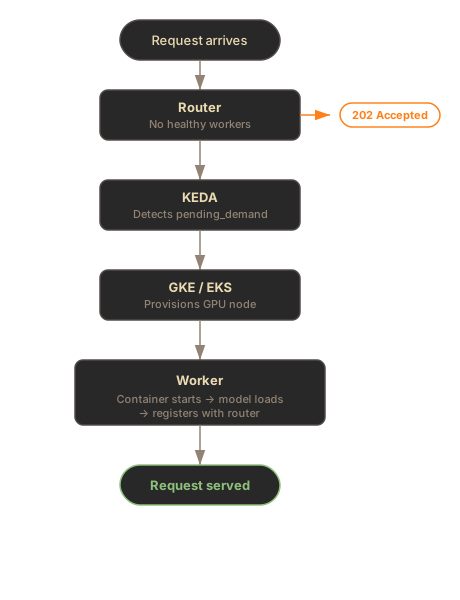
**Key point:** The `X-SIE-MACHINE-PROFILE` header (or SDK `gpu` parameter) selects the worker pool when you need a specific machine profile. If it is omitted, the gateway can still resolve the model’s default route; scale-from-zero still returns `503 Service Unavailable` with the `PROVISIONING` error code when capacity is not yet available.
***
## Cold Start Timeline
[Section titled “Cold Start Timeline”](#cold-start-timeline)
Cold start from zero has three phases:
| Phase | Duration | What Happens |
| ----------------- | -------- | ------------------------------------------------------------------------------------------------------- |
| Node provisioning | 2-5 min | GKE finds a GPU node (spot takes longer if scarce) |
| Container startup | 20-40s | Pull the Python `sie-server` image and `sie-server-sidecar` image, start containers, health checks pass |
| Model loading | 10-120s | Download weights (if not cached) and load to GPU |
**Total cold start: 3-7 minutes** depending on model size and spot availability.
Once a worker pod and model are warm, repeat requests for that model are fast. The SIE server sidecar keeps pulling from JetStream; the `sie-server` adapter either serves from GPU memory or loads a new model from local cache in 10-120s.
***
## The Provisioning (503) Flow
[Section titled “The Provisioning (503) Flow”](#the-provisioning-503-flow)
### HTTP Clients
[Section titled “HTTP Clients”](#http-clients)
When the cluster is scaled to zero, HTTP requests receive a `503 Service Unavailable` response with the `PROVISIONING` error code:
```bash
curl -X POST http://sie.example.com/v1/encode/BAAI/bge-m3 \
-H "Content-Type: application/json" \
-H "X-SIE-MACHINE-PROFILE: l4" \
-d '{"items": [{"text": "Hello world"}]}'
# Response: 503 Service Unavailable
# Headers: Retry-After: 60
# X-SIE-Error-Code: PROVISIONING
# Body: {"error": {"code": "PROVISIONING", "message": "..."}}
```
Your HTTP client should retry after the `Retry-After` interval. Keep retrying for at least 7 minutes on a cold start.
**If the requested machine profile is not configured, you get a 503 with the `GPU_NOT_CONFIGURED` error code instead:**
```bash
# Unknown X-SIE-MACHINE-PROFILE -> 503 GPU_NOT_CONFIGURED
curl -X POST http://sie.example.com/v1/encode/BAAI/bge-m3 \
-H "X-SIE-MACHINE-PROFILE: h100" \
-H "Content-Type: application/json" \
-d '{"items": [{"text": "Hello world"}]}'
# Response: 503 Service Unavailable
# {"detail": {"code": "GPU_NOT_CONFIGURED", "message": "GPU type 'h100' is not configured in this cluster.", "gpu": "h100", "configured_gpu_types": ["l4", "a100-80gb"]}}
```
### SDK Clients (Recommended)
[Section titled “SDK Clients (Recommended)”](#sdk-clients-recommended)
The SDK retries `PROVISIONING` responses automatically with `wait_for_capacity=True`:
* Python
```python
from sie_sdk import SIEClient
from sie_sdk.types import Item
client = SIEClient("http://sie.example.com", api_key="YOUR_KEY")
# Automatically retries PROVISIONING responses with backoff
result = client.encode(
"BAAI/bge-m3",
Item(text="Hello world"),
gpu="l4",
wait_for_capacity=True,
provision_timeout_s=420, # 7 minutes for cold start
)
```
* TypeScript
```typescript
import { SIEClient } from "@superlinked/sie-sdk";
const client = new SIEClient("http://sie.example.com", {
apiKey: "YOUR_KEY",
provisionTimeout: 420000, // 7 minutes for cold start (milliseconds)
});
// Automatically retries PROVISIONING responses with backoff
const result = await client.encode(
"BAAI/bge-m3",
{ text: "Hello world" },
{
gpu: "l4",
waitForCapacity: true,
}
);
```
***
## Per-Bundle Scaling
[Section titled “Per-Bundle Scaling”](#per-bundle-scaling)
Each `(machine_profile, bundle)` combination has its own KEDA ScaledObject and scales independently.
| Bundle | Models Served | Example ScaledObject |
| ------------------ | ------------------------------------------------------------------------------------------------------------------------- | ---------------------------------------------------------- |
| `default` | BGE-M3, E5, Stella, ColBERT, rerankers, GLiNER, GLiREL, GLiClass, Florence-2, Donut, and the rest of the standard catalog | `sie-sie-cluster-worker-l4-default-scaler` |
| `sglang` | Generation models served through SGLang | `sie-sie-cluster-worker-a100-80gb-sglang-scaler` |
| `sglang-embedding` | Large 4B+ parameter LLM embedding models | `sie-sie-cluster-worker-a100-80gb-sglang-embedding-scaler` |
ScaledObject names render as `-worker---scaler` (for release `sie`, `sie-sie-cluster-worker-l4-default-scaler`).
**What this means in practice:** If you have `encode`, `score`, and `extract` working on the `default` bundle worker pod, but then call `encode` with a large SGLang-served embedding model (e.g. `Qwen/Qwen3-Embedding-4B`), a *separate* `sglang-embedding` bundle worker pod needs to scale up. This is a new cold start - expect another 3-7 minutes.
```python
# This uses the default bundle worker pod (already warm)
client.encode("BAAI/bge-m3", Item(text="hello"), gpu="l4")
# This needs the sglang-embedding bundle worker pod (may trigger cold start)
client.encode(
"Qwen/Qwen3-Embedding-4B",
Item(text="Tim Cook leads Apple."),
gpu="a100-80gb",
wait_for_capacity=True,
provision_timeout_s=420,
)
```
***
## KEDA Scaling Metrics
[Section titled “KEDA Scaling Metrics”](#keda-scaling-metrics)
KEDA uses Prometheus metrics to make scaling decisions:
| Metric | Purpose | Used For |
| ------------------------------------- | ----------------------------------------------------------------- | ---------------------------------------------- |
| `sie_gateway_pending_demand` | Requests waiting for a worker type | Scale-from-zero activation |
| `sie_gateway_lane_queue_depth` | Queue depth reported by the SIE server sidecar inside worker pods | Scale-up (add more replicas) |
| `sie_gateway_active_lease_gpus` | GPUs reserved by active resource-pool leases | Keep leased pools provisioned |
| `sie_gateway_rejected_requests_total` | Gateway rejected-request rate | Scale when rejected traffic indicates pressure |
| `sie_gateway_requests_total` | Gateway request rate | Gateway Deployment autoscaling |
### Configuration
[Section titled “Configuration”](#configuration)
```yaml
autoscaling:
enabled: true
pollingInterval: 15 # Check metrics every 15 seconds
cooldownPeriod: 900 # 15 minutes before scaling to zero
scaleDownStabilization: 300 # 5 minute stabilization window
queueDepthThreshold: 10 # Add replicas at 10 queued items per pod
queueDepthActivation: 0 # Warm queue-depth trigger activation threshold
```
Keep `queueDepthActivation` at `0` when any worker lane has `minReplicas: 0`: the chart fails to render with any non-zero value, because the first durable queue item must activate KEDA for scale-from-zero to work.
### Cooldown Behavior
[Section titled “Cooldown Behavior”](#cooldown-behavior)
After no requests arrive for the `cooldownPeriod` (default: 15 minutes), KEDA scales worker pods back to zero. The next request triggers a full cold start again.
* **Consistent traffic**: Lower cooldown (300s) to keep worker pods warm
* **Bursty traffic**: Higher cooldown (900s) to avoid repeated cold starts
* **Cost-sensitive**: Default 900s balances cost and responsiveness
***
## Machine Profiles
[Section titled “Machine Profiles”](#machine-profiles)
The `X-SIE-MACHINE-PROFILE` header (HTTP) or `gpu` parameter (SDK) determines which worker pool receives the request.
| Profile | GPU | Typical Use |
| ----------- | ------------------ | ------------------------------------------ |
| `l4` | NVIDIA L4 (24GB) | Standard inference, best price/performance |
| `l4-spot` | NVIDIA L4 (spot) | 60-70% cheaper, may be preempted |
| `a100-40gb` | NVIDIA A100 (40GB) | Large models, high throughput |
| `a100-80gb` | NVIDIA A100 (80GB) | Very large models (7B+ params) |
Spot instances offer significant cost savings but may take longer to provision if capacity is scarce.
***
## Troubleshooting
[Section titled “Troubleshooting”](#troubleshooting)
### 503 for unconfigured machine profile
[Section titled “503 for unconfigured machine profile”](#503-for-unconfigured-machine-profile)
**Cause:** The request pins a machine profile that is not configured in the cluster.
**Fix:** Use one of the configured machine profiles:
```bash
curl -X POST http://sie.example.com/v1/encode/BAAI/bge-m3 \
-H "X-SIE-MACHINE-PROFILE: l4" \
-H "Content-Type: application/json" \
-d '{"items": [{"text": "Hello world"}]}'
```
Or omit `gpu` and let the gateway resolve the model’s default route:
```python
client.encode("BAAI/bge-m3", Item(text="hello"))
```
### PROVISIONING responses that never resolve
[Section titled “PROVISIONING responses that never resolve”](#provisioning-responses-that-never-resolve)
**Possible causes:**
* **Too short timeout** - Cold starts take 3-7 minutes. Use `provision_timeout_s=420` in the SDK
* **Spot GPU unavailable** - Try a different machine profile (e.g., `l4` instead of `l4-spot`)
* **KEDA not configured** - Check that KEDA is installed and ScaledObjects exist: `kubectl get scaledobjects -n sie`
* **Prometheus down** - KEDA needs Prometheus for gateway and SIE server sidecar metrics. Check: `kubectl get pods -n monitoring`
### Workers scale up then immediately scale down
[Section titled “Workers scale up then immediately scale down”](#workers-scale-up-then-immediately-scale-down)
**Cause:** Requests stopped before the worker became ready. KEDA sees demand drop to 0 and begins cooldown.
**Fix:** Keep sending requests (or use the SDK with `wait_for_capacity=True`) for the full cold start duration. The SDK handles this automatically with retry logic.
### Models from different bundles not available
[Section titled “Models from different bundles not available”](#models-from-different-bundles-not-available)
**Cause:** Each bundle runs in a separate worker pod. Your standard models (`default` bundle) may be warm, but a large LLM embedding model (`sglang-embedding` bundle) needs its own worker pod to scale up.
**Fix:** Send requests with `wait_for_capacity=True` and a sufficient timeout. The target bundle’s worker pod will scale up independently.
***
## What’s Next
[Section titled “What’s Next”](#whats-next)
* [Kubernetes in GCP](/docs/deployment/cloud-gcp/) - full GKE deployment setup
* [Monitoring](/docs/deployment/monitoring/) - metrics for tracking autoscaling behavior
* [Bundles](/docs/engine/bundles/) - understanding dependency isolation
# Kubernetes in AWS
> Deploy SIE on Amazon EKS with GPU autoscaling.
Deploy SIE to Amazon EKS with GPU node pools, KEDA autoscaling, and Terraform automation.
## Prerequisites
[Section titled “Prerequisites”](#prerequisites)
There are two install paths for EKS. Confirm the items under the path you plan to take before running any commands.
### Path A. Terraform and Helm (module provisions the cluster)
[Section titled “Path A. Terraform and Helm (module provisions the cluster)”](#path-a-terraform-and-helm-module-provisions-the-cluster)
1. **AWS account** with billing enabled, and no SCPs that block EKS, IRSA, or the VPC/IAM resources Terraform creates.
2. **IAM permissions** sufficient to create VPC, EKS, IAM, ECR, and S3 resources. `AdministratorAccess` works for the example; for a least-privilege setup combine `AmazonEKSClusterPolicy`, `AmazonEC2FullAccess`, `IAMFullAccess`, `AmazonS3FullAccess`, and `AmazonEC2ContainerRegistryFullAccess` (or scoped equivalents).
3. **EC2 spot quota** for the G/VT family in your target region (default: `eu-central-1`). AWS quotas G/VT by total vCPU, separately for on-demand and spot. The `dev-g6-spot` example uses spot, so check `All G and VT Spot Instance Requests` (quota code `L-3819A6DF`):
```bash
aws service-quotas list-service-quotas --service-code ec2 --region eu-central-1 \
--query 'Quotas[?QuotaCode==`L-3819A6DF`].{Name:QuotaName,Value:Value}' \
--output table
```
`g6.2xlarge` is 8 vCPU per node; the example scales 0-5 nodes, so anything at least 40 is sufficient.
4. **Region with GPU instance availability.** `g6.2xlarge` (L4) is available in most major regions; A100 instance types (`p4d`, `p5`) have narrower availability. Check before changing region.
5. **Local tooling:** Terraform ≥ 1.14, AWS CLI v2 (authenticated via `aws configure` or SSO), `kubectl`, and `helm` ≥ 3.13.
### Path B. Helm into an existing EKS cluster
[Section titled “Path B. Helm into an existing EKS cluster”](#path-b-helm-into-an-existing-eks-cluster)
1. Cluster meets the generic [Kubernetes Cluster Prerequisites](/docs/deployment/#kubernetes-cluster-prerequisites) (k8s version, GPU device plugin, ingress controller, network egress).
2. **GPU node group** with `g6.*` (L4), `p4d.*` (A100 40GB), or `p5.*` (A100 80GB) instances, the right NVIDIA accelerator label, and the `nvidia.com/gpu` taint.
3. **NVIDIA Device Plugin DaemonSet installed.** EKS does not ship it by default; the Terraform module installs it via Helm during cluster bootstrap.
4. **IRSA role created** with an S3 read/write policy scoped to your model-cache bucket, and a trust policy that allows the `sie:sie-server` ServiceAccount to assume it. Annotate the chart’s ServiceAccount with `eks.amazonaws.com/role-arn=` at install time.
5. **ECR decision.** Let the chart pull public images from GHCR (default), or mirror to ECR and set `create_ecr_repositories = false` if the repos are managed by another stack.
6. **`kubectl` authenticated** against the target cluster (`aws eks update-kubeconfig --name --region `).
***
## Architecture
[Section titled “Architecture”](#architecture)
The architecture mirrors the [GCP deployment](/docs/deployment/cloud-gcp/), with gateway, config, worker pods, and KEDA autoscaling:
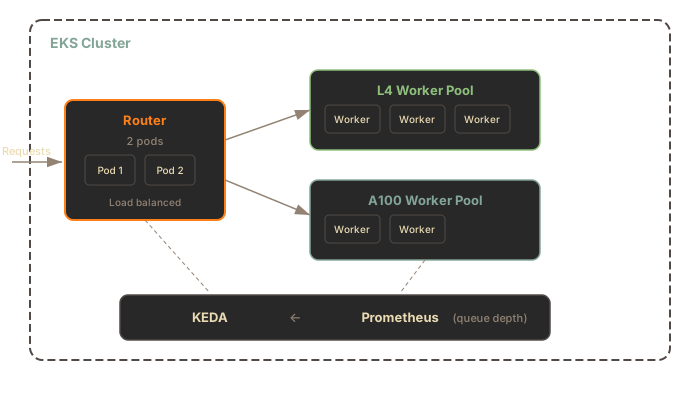
**Components:**
* **EKS Cluster** with managed node groups for GPU instances
* **NVIDIA Device Plugin** for GPU scheduling
* **IRSA** (IAM Roles for Service Accounts) for S3 access
* **NATS Core and JetStream** for queued work, result inboxes, SIE server sidecar health, and config deltas
* **GPU worker pods** that run the SIE server sidecar beside the Python `sie-server` adapter; the sidecar pulls JetStream work and calls the adapter over IPC
* **KEDA and Prometheus** for autoscaling based on gateway and queue metrics
* **Grafana and DCGM Exporter** for dashboards and GPU metrics
***
## Terraform Setup
[Section titled “Terraform Setup”](#terraform-setup)
The `examples/dev-g6-spot` example in [`superlinked/terraform-aws-sie`](https://github.com/superlinked/terraform-aws-sie) consumes the published `superlinked/sie/aws` Terraform registry module, the same module used in production deployments, pinned to a known-good version.
### Prerequisites
[Section titled “Prerequisites”](#prerequisites-1)
See [Path A. Terraform and Helm](#path-a-terraform-and-helm-module-provisions-the-cluster) in the Prerequisites section at the top of this page.
### Deploy
[Section titled “Deploy”](#deploy)
```bash
git clone https://github.com/superlinked/terraform-aws-sie.git
cd terraform-aws-sie/examples/dev-g6-spot
# Initialize and apply (creates an EKS cluster, ~15-20 min)
terraform init
terraform apply
```
The example `main.tf` pins the module version:
```hcl
module "sie_eks" {
source = "superlinked/sie/aws"
version = "0.6.6"
aws_region = var.aws_region
project_name = var.project_name
gpu_instance_type = "g6.2xlarge"
gpu_capacity_type = "SPOT"
gpu_min_size = 0
gpu_max_size = 5
}
```
For multi-GPU production setups, use the `gpu_node_groups` list variable instead of the single-GPU `gpu_*` variables. See the [module variables reference](https://github.com/superlinked/terraform-aws-sie/blob/main/variables.tf).
If your AWS account already manages SIE ECR repos from another stack (e.g. a shared CI account or a previous deployment), set `create_ecr_repositories = false` on the module call to skip ECR resource creation. The module still emits the `ecr_*_repository_url` outputs from caller identity + repo names, so IRSA / Helm wiring is unchanged either way.
### What Gets Created
[Section titled “What Gets Created”](#what-gets-created)
The Terraform module provisions:
| Resource | Purpose |
| -------------------- | --------------------------------------------------------------------------------------- |
| EKS Cluster | Kubernetes control plane |
| GPU Node Group | Auto-scaling `g6.2xlarge` L4 spot instances (0-5 nodes) |
| NVIDIA Device Plugin | GPU scheduling in Kubernetes |
| IRSA Role | Workload identity for SIE pods (no static AWS credentials) |
| ECR Repositories | Created for optional custom images. The chart pulls public images from GHCR by default. |
***
## Helm Installation
[Section titled “Helm Installation”](#helm-installation)
Once the cluster is up, configure `kubectl` and install the `sie-cluster` chart. The chart packages KEDA, kube-prometheus-stack, DCGM Exporter, Loki, and Alloy as optional sub-charts; they default to `install: false`. The smoke test below works with the core services: gateway, config, NATS, and GPU worker pods running the SIE server sidecar beside the Python `sie-server` adapter. To enable KEDA autoscaling and observability, add `--set keda.install=true --set autoscaling.enabled=true --set kube-prometheus-stack.install=true --set dcgm-exporter.install=true` to the install command.
```bash
# Configure kubectl from the terraform output
$(terraform output -raw kubectl_config_command)
# Install SIE (pulls the chart from GHCR, wires up IRSA from the terraform output)
# `workers.pools.l4.enabled=true` is required; the chart's pools default to enabled: false.
IRSA_ARN=$(terraform output -raw sie_irsa_role_arn)
helm upgrade --install sie oci://ghcr.io/superlinked/charts/sie-cluster \
--version 0.6.26 \
-n sie --create-namespace \
--set "serviceAccount.annotations.eks\.amazonaws\.com/role-arn=$IRSA_ARN" \
--set workers.pools.l4.enabled=true \
--set workers.pools.l4.bundles.default.minReplicas=1
# Wait for rollout
kubectl -n sie get pods -w
```
The command above needs no Hugging Face token; the smoke test below (`BAAI/bge-m3`) is ungated. For gated models, create the namespace and Secret first (the namespace does not exist until you create it or Helm does), then add the Secret reference to the install:
```bash
kubectl create namespace sie
kubectl create secret generic hf-token --from-file=token=/path/to/token-file -n sie
# then append to the helm command:
# --set workers.common.hfCache.tokenSecret=hf-token
```
Passing the raw token with `--set hfToken.value=...` also works but exposes it through Helm process arguments and release values.
`workers.pools.l4.bundles.default.minReplicas=1` keeps one L4 worker pod always running, the simplest path to a working smoke test without KEDA. For scale-from-zero, pass `--set keda.install=true --set autoscaling.enabled=true` and set it back to `0`.
### Smoke Test
[Section titled “Smoke Test”](#smoke-test)
```bash
kubectl -n sie port-forward svc/sie-sie-cluster-gateway 8080:8080 &
# Install the Python SDK. Requires Python 3.12; see the SDK README for newer or older Python notes.
pip install sie-sdk
python3 -c "
from sie_sdk import SIEClient
client = SIEClient('http://localhost:8080')
result = client.encode('BAAI/bge-m3', {'text': 'hello world'},
gpu='l4', wait_for_capacity=True, provision_timeout_s=600)
print(result['dense'].shape) # (1024,)
"
```
The first request after scale-from-zero takes \~3-7 minutes (node provisioning + image pull + model loading). See [Scale-from-Zero](/docs/deployment/autoscaling/) for the full flow.
### Cleanup
[Section titled “Cleanup”](#cleanup)
```bash
helm uninstall sie -n sie
terraform destroy
```
***
## Differences from GCP
[Section titled “Differences from GCP”](#differences-from-gcp)
| Feature | GCP (GKE) | AWS (EKS) |
| ------------------- | ------------------- | ------------------------------- |
| GPU scheduling | Native GKE support | NVIDIA Device Plugin required |
| IAM for pods | Workload Identity | IRSA |
| Model cache storage | GCS (`gs://`) | S3 (`s3://`) |
| Node provisioning | GKE Autopilot / NAP | Karpenter or Cluster Autoscaler |
| Spot instances | Spot VMs | Spot Instances |
### S3 for Model Cache
[Section titled “S3 for Model Cache”](#s3-for-model-cache)
Configure the cluster cache to use S3:
```yaml
workers:
common:
clusterCache:
enabled: true
url: s3://my-bucket/models
```
IRSA handles authentication automatically - no access keys needed in the pod.
***
## Security Considerations
[Section titled “Security Considerations”](#security-considerations)
The default Terraform configuration exposes the API endpoint publicly. For production:
* **Restrict ingress** to your VPC CIDR or specific IP ranges
* **Enable authentication** via oauth2-proxy or static tokens
* **Use a private load balancer** for internal-only access. The `aws-load-balancer-internal` annotation applies to a Service, so set it on the gateway Service (under `ingress.annotations` it has no effect and the endpoint stays public):
```yaml
gateway:
service:
type: LoadBalancer
annotations:
service.beta.kubernetes.io/aws-load-balancer-internal: "true"
```
***
## Standalone Docker on AWS
[Section titled “Standalone Docker on AWS”](#standalone-docker-on-aws)
For simpler deployments, run standalone SIE on a GPU EC2 instance:
```bash
# On a g6.xlarge (NVIDIA L4) instance
sudo apt-get install -y nvidia-container-toolkit
sudo systemctl restart docker
docker run --gpus all -p 8080:8080 \
-v ~/.cache/huggingface:/app/.cache/huggingface \
ghcr.io/superlinked/sie-server:latest-cuda12-default
```
This is simpler than EKS and suitable for single-instance production workloads.
***
## What’s Next
[Section titled “What’s Next”](#whats-next)
* [Upgrade Runbook](/docs/deployment/upgrades/) - pre-upgrade checklist, rolling updates, and rollback
* [Scale-from-Zero](/docs/deployment/autoscaling/) - understanding the 503 PROVISIONING flow and cold starts
* [Monitoring](/docs/deployment/monitoring/) - metrics, alerts, and dashboards
* [Kubernetes in GCP](/docs/deployment/cloud-gcp/) - equivalent GKE deployment
* [Kubernetes in Azure](/docs/deployment/cloud-azure/) - equivalent AKS deployment
# Kubernetes in Azure
> Deploy SIE on Azure AKS with GPU autoscaling.
Deploy SIE to Azure Kubernetes Service (AKS) with GPU node pools, KEDA autoscaling, and Terraform automation.
## Prerequisites
[Section titled “Prerequisites”](#prerequisites)
There are two install paths for AKS. Confirm the items under the path you plan to take before running any commands.
### Path A. Terraform and Helm (module provisions the cluster)
[Section titled “Path A. Terraform and Helm (module provisions the cluster)”](#path-a-terraform-and-helm-module-provisions-the-cluster)
1. **Azure subscription** with billing enabled. For CI, use a federated service principal via the GitHub Actions Azure OIDC flow; see the [module README](https://github.com/superlinked/terraform-azure-sie#ci-authentication-github-actions) for the setup.
2. **RBAC roles on the subscription** sufficient to create VNet, AKS, identity, storage, and (optionally) ACR resources. `Contributor` plus `User Access Administrator` works; the latter covers the role assignments the module creates for the model cache and image pulls. For the least-privilege set (Network Contributor, AKS Contributor, AKS RBAC Cluster Admin, AcrPush, Monitoring Contributor, Key Vault Contributor, RBAC Admin), see [scoped role assignments](https://learn.microsoft.com/azure/role-based-access-control/best-practices).
3. **GPU quota in your target region** (default: `westeurope`), requested from the Quotas blade in the Azure portal. Spot pools draw from `Total Regional Spot vCPUs`; on-demand pools draw from the per-family quota (*Standard NCASv3\_T4 Family vCPUs* for T4, *Standard NVADSA10v5 Family vCPUs* for A10, *Standard NCadsH100v5 Family vCPUs* for H100). The `dev-nc4ast4-spot` example uses spot. `Standard_NC4as_T4_v3` is 4 vCPU per node and the example scales 0-5 nodes, so anything at least 20 is sufficient:
```bash
az vm list-usage --location westeurope --output table | grep -iE "NCASv3_T4|Spot"
```
H100 quota approvals are the slowest; file the request before the first apply if you plan to use `gpu_class = "h100"`.
4. **Region with GPU VM availability.** T4 (`NC4as_T4_v3`) and A10 (`NV6ads_A10_v5`) are available in most major regions; A100 (`NC24ads_A100_v4`) and H100 (`NC40ads_H100_v5`) availability is narrower. Check before changing region.
5. **Local tooling:** Terraform ≥ 1.14, Azure CLI (`az`), `kubectl`, [`kubelogin`](https://github.com/Azure/kubelogin), and `helm` ≥ 3.13.
6. **Authenticated:**
```bash
az login
az account set --subscription ""
```
### Path B. Helm into an existing AKS cluster
[Section titled “Path B. Helm into an existing AKS cluster”](#path-b-helm-into-an-existing-aks-cluster)
1. Cluster meets the generic [Kubernetes Cluster Prerequisites](/docs/deployment/#kubernetes-cluster-prerequisites) (k8s version, GPU device plugin, ingress controller, network egress).
2. **GPU node pool** with an N-series VM size (`Standard_NC4as_T4_v3`, `Standard_NV6ads_A10_v5`, `Standard_NC24ads_A100_v4`, or `Standard_NC40ads_H100_v5`) and the `nvidia.com/gpu=present:NoSchedule` taint. Spot pools also carry the AKS-managed `kubernetes.azure.com/scalesetpriority=spot:NoSchedule` taint; the chart’s AKS overlay tolerates both.
3. **NVIDIA Device Plugin DaemonSet installed.** AKS preinstalls the NVIDIA driver on N-series node images but not the device plugin. Verify `kubectl describe node` shows a schedulable `nvidia.com/gpu` resource; without the plugin, GPU nodes never advertise it and worker pods stay `Pending`. The Terraform module installs it via Helm during cluster bootstrap. The exception is the preview [AKS-managed GPU node pools](https://learn.microsoft.com/en-us/azure/aks/aks-managed-gpu-nodes): those install the device plugin for you but do not support the cluster autoscaler during preview, so scale-from-zero cannot work on them. This guide, and the Terraform module, target standard GPU pools.
4. **Workload Identity enabled** on the cluster (OIDC issuer + webhook), with a user-assigned managed identity that has a federated credential for the `sie:sie-server` ServiceAccount and blob-read access to your model-cache container. Pass the identity’s client ID to the chart as the `azure.workload.identity/client-id` ServiceAccount annotation at install time; the AKS values overlay adds the `azure.workload.identity/use: "true"` pod label the webhook keys off.
5. **ACR decision.** Let the chart pull public images from GHCR (default), or mirror to ACR and point `gateway.image.repository`, `workers.common.image.repository`, and `config.image.repository` at it.
6. **`kubectl` authenticated** against the target cluster (`az aks get-credentials --resource-group --name `, then `kubelogin convert-kubeconfig -l azurecli` for AAD-enabled clusters).
***
## Architecture
[Section titled “Architecture”](#architecture)
The architecture mirrors the [GCP](/docs/deployment/cloud-gcp/) and [AWS](/docs/deployment/cloud-aws/) deployments, with gateway, config, worker pods, and KEDA autoscaling:
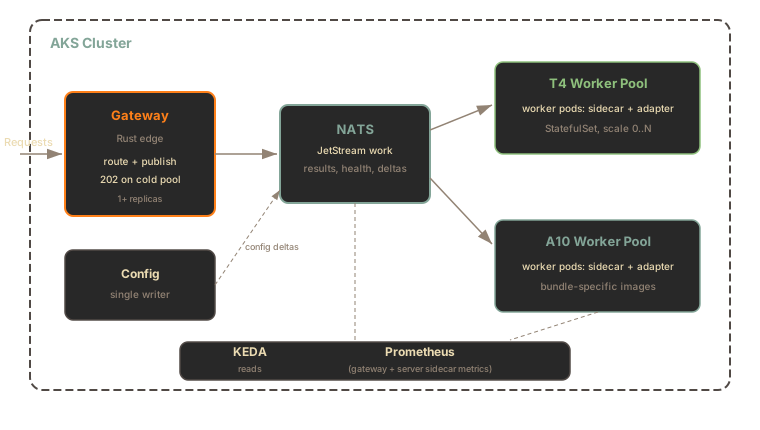
**Components:**
* **AKS Cluster** with AAD-RBAC, a Workload Identity OIDC issuer, and the built-in per-pool cluster autoscaler (no separate autoscaler chart)
* **NVIDIA Device Plugin** for GPU scheduling; the driver itself ships on AKS N-series node images
* **Workload Identity** for Blob Storage access, so no static credentials reach a pod
* **NATS Core and JetStream** for queued work, result inboxes, SIE server sidecar health, and config deltas
* **GPU worker pods** that run the SIE server sidecar beside the Python `sie-server` adapter; the sidecar pulls JetStream work and calls the adapter over IPC
* **KEDA and Prometheus** for autoscaling based on gateway and queue metrics
* **Grafana and DCGM Exporter** for dashboards and GPU metrics
***
## Terraform Setup
[Section titled “Terraform Setup”](#terraform-setup)
The examples in [`superlinked/terraform-azure-sie`](https://github.com/superlinked/terraform-azure-sie) consume the published `superlinked/sie/azure` Terraform registry module, pinned to a known-good version:
| Example | GPU | Approx. spot cost | Best for |
| ---------------------------------------------------------------------------------------------------------------- | --------------------- | ----------------- | -------------------------------------- |
| [`dev-nc4ast4-spot`](https://github.com/superlinked/terraform-azure-sie/tree/main/examples/dev-nc4ast4-spot) | T4 (NC4as\_T4\_v3) | \~$0.15/hr | Minimal-cost development |
| [`dev-nv6adsa10-spot`](https://github.com/superlinked/terraform-azure-sie/tree/main/examples/dev-nv6adsa10-spot) | A10 (NV6ads\_A10\_v5) | \~$0.35/hr | Larger embedding bundles (24 GiB VRAM) |
Costs are approximate West Europe spot list prices; check the [Azure pricing calculator](https://azure.microsoft.com/pricing/calculator/) for your region.
Both examples run GPU nodes on **Spot capacity**: cheap, but evictable at any time and without an SLA. They are development setups; for production, configure a regular-priority (non-Spot) GPU pool through the module variables.
### Prerequisites
[Section titled “Prerequisites”](#prerequisites-1)
See [Path A. Terraform and Helm](#path-a-terraform-and-helm-module-provisions-the-cluster) in the Prerequisites section at the top of this page.
### Deploy
[Section titled “Deploy”](#deploy)
```bash
git clone https://github.com/superlinked/terraform-azure-sie.git
cd terraform-azure-sie/examples/dev-nc4ast4-spot
# Required: populates the CAF `Owner` tag on every resource
export TF_VAR_owner="you@example.com"
# Initialize and apply (VNet, AKS control plane, system + GPU pools,
# workload identity, model-cache storage account)
terraform init
terraform apply
```
The example `main.tf` pins the module version:
```hcl
module "sie_aks" {
source = "superlinked/sie/azure"
version = "0.6.18"
location = var.location
project_name = var.project_name
owner = var.owner
gpu_node_pools = [
{
name = "t4spot"
gpu_class = "t4"
node_count = 0 # scale-to-zero when idle
max_count = 5
spot = true
},
]
}
```
Two module behaviors to know about before the first apply:
* **`storage_use_azuread = true`** is required on your `azurerm` provider block when `create_model_cache = true` (the default). The module disables shared-key auth on the model-cache storage account, so the provider needs AAD tokens to finish the apply. Every shipped example already sets this.
* **`grant_admin_to_creator = true`** gives the identity running Terraform the `AKS RBAC Cluster Admin` role on the new cluster, so `kubectl` works right after apply. Set it unless your identity already holds that role at subscription scope (the cluster is AAD-RBAC; subscription `Owner` alone does not grant Kubernetes data-plane access).
The module does not ship its own state backend or CI-identity bootstrap; those are subscription-wide concerns you own once and reuse across clusters. Each example includes a `backend.hcl.example` for an `azurerm` remote-state backend.
Each `gpu_node_pools` entry picks its GPU via `gpu_class`:
| `gpu_class` | VM size | GPU | VRAM |
| ----------- | -------------------------- | ------- | ----- |
| `t4` | `Standard_NC4as_T4_v3` | 1x T4 | 16 GB |
| `a10` | `Standard_NV6ads_A10_v5` | 1x A10 | 24 GB |
| `a100` | `Standard_NC24ads_A100_v4` | 1x A100 | 80 GB |
| `h100` | `Standard_NC40ads_H100_v5` | 1x H100 | 80 GB |
Adding A100 or H100 once quota is granted is a values-only change: append an entry to `gpu_node_pools`. For multi-GPU worker pods, override `gpu_node_pools[*].vm_size` to a SKU with more GPUs and set the matching `workers.pools..gpu.count` on the Helm side. See the [module variables reference](https://github.com/superlinked/terraform-azure-sie/blob/main/variables.tf).
### Variables
[Section titled “Variables”](#variables)
Key configuration options for the `superlinked/sie/azure` module:
| Variable | Default | Description |
| --------------------------------- | ------------ | ----------------------------------------------------------------------------- |
| `location` | `westeurope` | Azure region |
| `project_name` | `sie` | Name prefix for all resources |
| `owner` | (required) | UPN for the CAF `Owner` tag, e.g. `alice@example.com` |
| `gpu_node_pools` | `[]` | GPU pool definitions (`name`, `gpu_class`, `spot`, `node_count`, `max_count`) |
| `grant_admin_to_creator` | `false` | Grant the applying identity cluster-admin RBAC on the new cluster |
| `create_model_cache` | `true` | Provision the blob container backing the model cache and payload store |
| `create_acr` | `false` | Provision a Premium ACR for custom images (the chart pulls GHCR by default) |
| `enable_private_cluster` | `false` | Private API server endpoint |
| `api_server_authorized_ip_ranges` | `[]` | CIDRs allowed to reach a public API server |
| `deletion_protection` | `true` | `CanNotDelete` lock on the cluster (set `false` for dev) |
The module also fills the four Cloud Adoption Framework taxonomy tags (`Environment`, `Owner`, `CostCenter`, `Workload`) from input variables, so subscriptions with a CAF tag-baseline policy accept the cluster without exceptions.
### What Gets Created
[Section titled “What Gets Created”](#what-gets-created)
| Resource | Purpose |
| -------------------- | ------------------------------------------------------------------------------------- |
| AKS Cluster | Control plane with AAD-RBAC, OIDC issuer, and Workload Identity |
| GPU Node Pool | Auto-scaling `Standard_NC4as_T4_v3` T4 spot nodes (0-5), NVIDIA driver preinstalled |
| System Node Pool | `Standard_B4ms` for system workloads, spread across zones |
| VNet + NAT Gateway | Three subnets (system, GPU, private endpoints) with predictable egress IPs |
| NVIDIA Device Plugin | GPU scheduling in Kubernetes (AKS does not install it) |
| Workload Identity | User-assigned identity + federated credential for the `sie:sie-server` ServiceAccount |
| Storage Account | Blob container holding the model cache (`models/`) and payload store (`payloads/`) |
| ACR | Optional (`create_acr = true`). The chart pulls public images from GHCR by default. |
| Private Endpoints | Optional (`enable_private_endpoints = true`): ACR and Storage on Private Link |
***
## Helm Installation
[Section titled “Helm Installation”](#helm-installation)
Once the cluster is up, configure `kubectl` and install the `sie-cluster` chart with the AKS values overlay. The overlay installs more than the plain GCP and AWS commands do: KEDA, kube-prometheus-stack, log collection, and nginx ingress come on by default, the `t4` and `a10` machine profiles are pre-wired, and worker pods get the GPU and spot tolerations plus the `azure.workload.identity/use` pod label. The overlay URL is pinned to the `v0.6.26` tag to match the chart version; bump both together when upgrading.
```bash
# Configure kubectl from the terraform output, then convert the kubeconfig
# to Azure CLI token auth (the cluster authenticates kubectl through AAD)
$(terraform output -raw kubectl_config_command)
kubelogin convert-kubeconfig -l azurecli
# Install SIE. The -f flag pulls the AKS overlay from the chart's source repo
# at the matching release tag; model_cache_helm_args wires in the blob cache.
helm upgrade --install sie-cluster oci://ghcr.io/superlinked/charts/sie-cluster \
--version 0.6.26 \
-f https://raw.githubusercontent.com/superlinked/sie/v0.6.26/deploy/helm/sie-cluster/values-aks.yaml \
--namespace sie --create-namespace \
--set "serviceAccount.annotations.azure\.workload\.identity/client-id=$(terraform output -raw sie_workload_identity_client_id)" \
$(terraform output -raw model_cache_helm_args)
# Wait for rollout
kubectl -n sie get pods -w
```
For gated Hugging Face models, create the namespace and Secret before the install (Helm has not created the namespace yet at that point): `kubectl create namespace sie`, then `kubectl create secret generic hf-token --from-file=token=/path/to/token-file -n sie`, then add `--set workers.common.hfCache.tokenSecret=hf-token`. (`--set-file hfToken.value=/path/to/token-file` also works but stores the token in Helm release values; `--set hfToken.value="$HF_TOKEN"` additionally exposes it to `ps` and CI traces.) For the smoke test below (`BAAI/bge-m3`) it is optional; in that case omit the flag entirely.
The overlay ships the `t4` pool enabled at `minReplicas: 0`, so the cluster starts with zero GPU nodes and KEDA provisions them on demand. To keep one worker always warm instead, add `--set workers.pools.t4.bundles.default.minReplicas=1`.
### Smoke Test
[Section titled “Smoke Test”](#smoke-test)
```bash
# The AKS overlay sets fullnameOverride=sie, so the service is sie-gateway
kubectl -n sie port-forward svc/sie-gateway 8080:8080 &
# Install the Python SDK. Requires Python 3.12; see the SDK README for newer or older Python notes.
pip install sie-sdk
python3 -c "
from sie_sdk import SIEClient
client = SIEClient('http://localhost:8080')
result = client.encode('BAAI/bge-m3', {'text': 'hello world'},
gpu='t4', wait_for_capacity=True, provision_timeout_s=600)
print(result['dense'].shape) # (1024,)
"
```
The first request after scale-from-zero takes \~3-7 minutes (node provisioning + image pull + model loading). See [Scale-from-Zero](/docs/deployment/autoscaling/) for the full flow.
### Available GPU Types
[Section titled “Available GPU Types”](#available-gpu-types)
The AKS overlay defines two machine profiles out of the box:
| GPU Type | Header Value | VM Size |
| ---------- | ------------ | ------------------------- |
| NVIDIA T4 | `t4` | Standard\_NC4as\_T4\_v3 |
| NVIDIA A10 | `a10` | Standard\_NV6ads\_A10\_v5 |
Azure’s [GPU VM lineup](https://learn.microsoft.com/en-us/azure/virtual-machines/sizes/overview#gpu-accelerated) has no L4 size; the A10 (24 GB VRAM) fills that slot. Only the `t4` worker pool is enabled in the overlay, so `gpu="t4"` (SDK) or `X-SIE-MACHINE-PROFILE: t4` (HTTP) routes out of the box; see [GPU Selection](/docs/deployment/cloud-gcp/#gpu-selection). To route `gpu="a10"`, add a `workers.pools.a10` entry that pairs the `a10` machine profile; without one, the gateway returns `503 GPU_NOT_CONFIGURED`. For A100 or H100 pools, add a `machineProfiles` entry and a `workers.pools` entry in your values file, following the `t4` blocks in [`values-aks.yaml`](https://github.com/superlinked/sie/blob/main/deploy/helm/sie-cluster/values-aks.yaml), alongside the Terraform `gpu_node_pools` entry.
### Cleanup
[Section titled “Cleanup”](#cleanup)
```bash
helm uninstall sie-cluster -n sie
terraform destroy
```
Spot GPU pools can be evicted with no warning; Azure Spot has no EC2-style 2-minute interruption notice, and evicted VMs are deleted. Always destroy dev clusters when not in use.
***
## Model Cache and Payload Store on Blob Storage
[Section titled “Model Cache and Payload Store on Blob Storage”](#model-cache-and-payload-store-on-blob-storage)
Two object-store-backed features share one blob container, created by default (`create_model_cache = true`):
* **Model cache**: pre-staged weights under `models/`, so workers cold-start from Blob Storage instead of re-downloading from Hugging Face on every pod spin-up.
* **Payload store**: work-item payloads over the 1 MiB NATS in-band budget (images, long documents) under `payloads/`. The gateway writes them, the worker reads them once, and a runtime TTL plus a blob lifecycle rule garbage-collects them after a day.
The `model_cache_helm_args` Terraform output composes the Helm flags for you. Written out as values:
```yaml
workers:
common:
clusterCache:
enabled: true
url: abfs://sie-cache@.dfs.core.windows.net/models
```
The chart derives `payloadStore.url` from the cache URL, so one `--set` covers both. Workload Identity handles authentication: the module grants the workload identity `Storage Blob Data Reader` scoped to `models/` and `Storage Blob Data Contributor` scoped to `payloads/`. No storage keys reach a pod; shared-access-key auth is disabled on the account entirely.
One network note: the storage account’s ACL defaults to `Deny`, allowing only the cluster’s subnets. To populate the cache from a laptop or CI runner (for example with `az storage blob upload-batch` into the container’s `models/` prefix), add your egress IP to `storage_allowed_ip_ranges`.
***
## Differences from GCP and AWS
[Section titled “Differences from GCP and AWS”](#differences-from-gcp-and-aws)
| Feature | GCP (GKE) | AWS (EKS) | Azure (AKS) |
| ------------------- | ------------------- | ------------------------------- | ----------------------------------------------------------------------- |
| GPU scheduling | Native GKE support | NVIDIA Device Plugin required | NVIDIA Device Plugin required (module installs it; driver preinstalled) |
| IAM for pods | Workload Identity | IRSA | Workload Identity (managed identity + federated credential) |
| Model cache storage | GCS (`gs://`) | S3 (`s3://`) | Blob Storage (`abfs://`) |
| Node provisioning | GKE Autopilot / NAP | Karpenter or Cluster Autoscaler | Built-in per-pool cluster autoscaler |
| Spot instances | Spot VMs | Spot Instances (2-min notice) | Spot VMSS (no eviction notice, extra `scalesetpriority` taint) |
| Entry-level GPU | L4 | L4 (`g6`) | T4 / A10 (no L4 SKU) |
***
## Security Considerations
[Section titled “Security Considerations”](#security-considerations)
The dev examples expose the AKS API server publicly (`allow_public_api_server = true`). For production:
* **Restrict the API server** with `api_server_authorized_ip_ranges`, or set `enable_private_cluster = true`
* **Enable authentication** via oauth2-proxy or static gateway tokens
* **Use a private load balancer** for internal-only access. The `azure-load-balancer-internal` annotation applies to a Service, so set it on the gateway Service (under `ingress.annotations` it has no effect and the endpoint stays public):
```yaml
gateway:
service:
type: LoadBalancer
annotations:
service.beta.kubernetes.io/azure-load-balancer-internal: "true"
```
* **Put ACR and Storage on Private Link** with `enable_private_endpoints = true`; their public endpoints are disabled entirely
Out of the box the module enforces AAD-RBAC (no local admin accounts in production mode), TLS 1.2 minimum on Storage and ACR, and NAT-gateway egress with predictable IPs.
***
## Standalone Docker on Azure
[Section titled “Standalone Docker on Azure”](#standalone-docker-on-azure)
For simpler deployments, run standalone SIE on a GPU VM:
```bash
# On a Standard_NC4as_T4_v3 (NVIDIA T4) VM with the NVIDIA driver installed
sudo apt-get install -y nvidia-container-toolkit
sudo systemctl restart docker
docker run --gpus all -p 8080:8080 \
-v ~/.cache/huggingface:/app/.cache/huggingface \
ghcr.io/superlinked/sie-server:latest-cuda12-default
```
This is simpler than AKS and suitable for single-instance production workloads.
***
## What’s Next
[Section titled “What’s Next”](#whats-next)
* [Upgrade Runbook](/docs/deployment/upgrades/) - pre-upgrade checklist, rolling updates, and rollback
* [Scale-from-Zero](/docs/deployment/autoscaling/) - understanding the 503 PROVISIONING flow and cold starts
* [Monitoring](/docs/deployment/monitoring/) - metrics, alerts, and dashboards
* [Kubernetes in GCP](/docs/deployment/cloud-gcp/) - equivalent GKE deployment
* [Kubernetes in AWS](/docs/deployment/cloud-aws/) - equivalent EKS deployment
# Kubernetes in GCP
> Deploy SIE on Google Kubernetes Engine with GPU autoscaling.
Deploy SIE to GKE with GPU node pools, KEDA autoscaling, and Terraform automation.
## Prerequisites
[Section titled “Prerequisites”](#prerequisites)
There are two install paths for GKE. Confirm the items under the path you plan to take before running any commands.
### Path A. Terraform and Helm (module provisions the cluster)
[Section titled “Path A. Terraform and Helm (module provisions the cluster)”](#path-a-terraform-and-helm-module-provisions-the-cluster)
1. **GCP project with billing enabled.**
2. **IAM permissions on the project** sufficient to create VPC, GKE, IAM, and Artifact Registry resources. `roles/owner` works; for a least-privilege setup combine `roles/container.admin`, `roles/compute.admin`, `roles/iam.serviceAccountAdmin`, `roles/resourcemanager.projectIamAdmin`, and `roles/artifactregistry.admin`.
3. **Required GCP APIs enabled:**
```bash
gcloud services enable \
container.googleapis.com \
compute.googleapis.com \
artifactregistry.googleapis.com \
iam.googleapis.com
```
4. **GPU quota for `nvidia-l4`** in your region. The `dev-l4-spot` example uses spot, so check `PREEMPTIBLE_NVIDIA_L4_GPUS`. Anything ≥ 4 covers the example’s max of 5 nodes × 1 GPU. This command requires the Compute Engine API enabled in the previous step.
```bash
gcloud compute regions describe REGION \
--format='table(quotas.filter(metric:NVIDIA))'
```
5. **Local tooling:** Terraform ≥ 1.14, `gcloud` CLI, `kubectl`, and `helm` ≥ 3.13.
6. **Authenticated:**
```bash
gcloud auth application-default login
```
### Path B. Helm into an existing GKE cluster
[Section titled “Path B. Helm into an existing GKE cluster”](#path-b-helm-into-an-existing-gke-cluster)
1. Cluster meets the generic [Kubernetes Cluster Prerequisites](/docs/deployment/#kubernetes-cluster-prerequisites) (k8s version, GPU device plugin, ingress controller, network egress).
2. **GPU node pool** with the `nvidia-l4`, `nvidia-tesla-a100`, or `nvidia-a100-80gb` accelerator and the `cloud.google.com/gke-accelerator` node label. The chart’s pool defaults match GKE-managed GPU pool labels.
3. **Workload Identity enabled** on the cluster, with a GCP service account that can read your model-cache GCS bucket. The chart’s Kubernetes ServiceAccount is named `sie-server` and must be annotated with `iam.gke.io/gcp-service-account=`.
4. **Artifact Registry decision.** Let the chart’s images pull from public GHCR (default), or mirror to a private Artifact Registry repo and override `image.repository` per component.
5. **`kubectl` authenticated** against the target cluster (`gcloud container clusters get-credentials ...`).
***
## Architecture
[Section titled “Architecture”](#architecture)
SIE runs as gateway, config, and worker-pod components on Kubernetes:
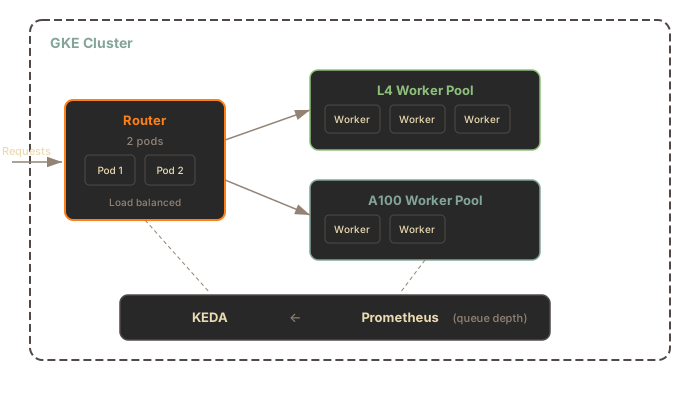
**Components:**
* **Gateway** - Stateless Rust inference edge that publishes work to NATS JetStream
* **Config service** - Single-writer control plane for runtime model configuration
* **NATS Core and JetStream** - Runtime bus for queued work, result inboxes, SIE server sidecar health, and config deltas
* **Worker pods** - StatefulSet pods with the SIE server sidecar beside the Python `sie-server` adapter container
* **KEDA and Prometheus** - Scale worker pools from zero based on gateway and queue metrics
***
## Gateway
[Section titled “Gateway”](#gateway)
The gateway is a stateless Rust service that handles GPU-aware routing:
| Feature | Description |
| ---------------------- | -------------------------------------------------------------------------------------------------------------------- |
| GPU Routing | Routes requests to appropriate GPU pool via `X-SIE-MACHINE-PROFILE` header |
| Pool Routing | Supports tenant isolation via `X-SIE-Pool` header |
| Queue Routing | Publishes work to the selected pool’s NATS JetStream queue, consumed by the SIE server sidecar inside the worker pod |
| Config Reads | Mirrors model and bundle state from `sie-config` |
| Provisioning Responses | Returns `503` with `X-SIE-Error-Code: PROVISIONING` and `Retry-After` when GPU capacity is provisioning |
The gateway runs as a Deployment. The chart default is 1 replica; bump to 2+ for high availability:
```yaml
gateway:
replicas: 2
resources:
requests:
cpu: "500m"
memory: "512Mi"
limits:
cpu: "2"
memory: "2Gi"
```
***
## Worker Pools
[Section titled “Worker Pools”](#worker-pools)
Each GPU type runs as a separate StatefulSet. A worker pod contains the SIE server sidecar and the Python `sie-server` adapter container. Helm renders the sidecar container as `worker-sidecar`. The sidecar pulls work from JetStream, forms batches, calls the adapter over Unix domain socket IPC, publishes results, and sends health heartbeats back through NATS.
| Pool | GPU | VRAM | Use Case |
| ----------- | ----------- | ---- | ------------------------------------------ |
| `l4` | NVIDIA L4 | 24GB | Standard inference, best price/performance |
| `a100-40gb` | NVIDIA A100 | 40GB | Large models, high throughput |
| `a100-80gb` | NVIDIA A100 | 80GB | Very large models (7B+ parameters) |
Worker configuration:
```yaml
workers:
common:
workerSidecar:
enabled: true
pools:
l4:
enabled: true
gpuType: l4
nodeSelector:
cloud.google.com/gke-accelerator: nvidia-l4
gpu:
count: 1
product: NVIDIA-L4
resources:
requests:
cpu: "4"
memory: "16Gi"
bundles:
default:
minReplicas: 0 # Scale to zero when idle
maxReplicas: 10
```
Worker pods use a 300Gi emptyDir volume for model cache. Models load on first request.
***
## GPU Selection
[Section titled “GPU Selection”](#gpu-selection)
Specify the target GPU type using the `X-SIE-MACHINE-PROFILE` header or SDK parameter.
### HTTP Header
[Section titled “HTTP Header”](#http-header)
```bash
curl -X POST http://sie.example.com/v1/encode/BAAI/bge-m3 \
-H "Content-Type: application/json" \
-H "X-SIE-MACHINE-PROFILE: l4" \
-d '{"items": [{"text": "Hello world"}]}'
```
### SDK Parameter
[Section titled “SDK Parameter”](#sdk-parameter)
* Python
```python
from sie_sdk import SIEClient
from sie_sdk.types import Item
client = SIEClient("http://sie.example.com")
# Route to L4 pool
result = client.encode(
"BAAI/bge-m3",
Item(text="Hello world"),
gpu="l4"
)
# Route to A100 pool for large models
result = client.encode(
"intfloat/e5-mistral-7b-instruct",
Item(text="Hello world"),
gpu="a100-40gb"
)
```
* TypeScript
```typescript
import { SIEClient } from "@superlinked/sie-sdk";
const client = new SIEClient("http://sie.example.com");
// Route to L4 pool
let result = await client.encode(
"BAAI/bge-m3",
{ text: "Hello world" },
{ gpu: "l4" },
);
// Route to A100 pool for large models
result = await client.encode(
"intfloat/e5-mistral-7b-instruct",
{ text: "Hello world" },
{ gpu: "a100-40gb" },
);
```
### Available GPU Types
[Section titled “Available GPU Types”](#available-gpu-types)
| GPU Type | Header Value | Machine Type |
| ---------------- | ------------ | -------------- |
| NVIDIA L4 | `l4` | g2-standard-8 |
| NVIDIA A100 40GB | `a100-40gb` | a2-highgpu-1g |
| NVIDIA A100 80GB | `a100-80gb` | a2-ultragpu-1g |
***
## Resource Pools
[Section titled “Resource Pools”](#resource-pools)
Resource pools provide tenant isolation by reserving dedicated worker pods.
### Create a Pool via SDK
[Section titled “Create a Pool via SDK”](#create-a-pool-via-sdk)
Create a pool explicitly (created lazily on first request):
```python
from sie_sdk import SIEClient
from sie_sdk.types import Item
# Client with dedicated pool (2 L4 worker pods reserved)
client = SIEClient("http://sie.example.com")
client.create_pool("tenant-abc", {"l4": 2})
# First request creates the pool, subsequent requests reuse it
result = client.encode(
"BAAI/bge-m3",
Item(text="Hello world"),
gpu="tenant-abc/l4" # pool_name/gpu_type
)
# Check pool status
info = client.get_pool("tenant-abc")
print(f"Pool {info['name']}: {info['status']['state']}")
# Explicit cleanup (optional - pools are GC'd after inactivity)
client.delete_pool("tenant-abc")
```
### Route to Pool via HTTP
[Section titled “Route to Pool via HTTP”](#route-to-pool-via-http)
Use the `X-SIE-Pool` header:
```bash
curl -X POST http://sie.example.com/v1/encode/BAAI/bge-m3 \
-H "Content-Type: application/json" \
-H "X-SIE-MACHINE-PROFILE: l4" \
-H "X-SIE-Pool: tenant-abc" \
-d '{"items": [{"text": "Hello world"}]}'
```
The SDK handles lease renewal automatically. Pools are garbage collected after inactivity.
***
## KEDA Autoscaling
[Section titled “KEDA Autoscaling”](#keda-autoscaling)
KEDA scales worker pools from Prometheus metrics: pending demand for scale-from-zero, queue depth for warm scale-up, active leases for reserved capacity, and rejected-request rate for pressure.
### Scale-from-Zero
[Section titled “Scale-from-Zero”](#scale-from-zero)
When no worker pods are running and a request arrives:
1. Gateway returns `503 Service Unavailable` with `X-SIE-Error-Code: PROVISIONING` and `Retry-After: 60` headers
2. Gateway records pending demand for the target machine profile and bundle
3. KEDA detects pending demand and activates the matching worker pool
4. GKE provisions GPU node (2-5 min)
5. Worker pod starts; the SIE server sidecar pings the `sie-server` adapter over IPC and publishes NATS health
6. Client retries and request succeeds
### Configuration
[Section titled “Configuration”](#configuration)
```yaml
autoscaling:
enabled: true
prometheusAddress: http://prometheus-operated.monitoring.svc:9090
pollingInterval: 15 # Check metrics every 15s
cooldownPeriod: 900 # Wait 15 min before scaling to zero
scaleDownStabilization: 300 # 5 min stabilization window
queueDepthThreshold: 10 # Add replicas at 10 queued items per pod
queueDepthActivation: 0 # Must stay 0 when a lane has minReplicas: 0 (render fails otherwise)
fallbackReplicas: 2 # Replicas if Prometheus is unavailable
```
### Cold Start Expectations
[Section titled “Cold Start Expectations”](#cold-start-expectations)
When scaling from zero, expect these timelines:
| Phase | Duration | What Happens |
| ----------------- | -------- | ----------------------------------------------- |
| Node provisioning | 2-5 min | GKE finds a GPU node (spot may take longer) |
| Container startup | 20-40s | Pull image, start process |
| Model loading | 10-120s | Load weights to GPU (from cache or HuggingFace) |
**Total: 3-7 minutes** from first request to first response. See [Scale-from-Zero](/docs/deployment/autoscaling/) for the full flow and troubleshooting.
### Cost Optimization
[Section titled “Cost Optimization”](#cost-optimization)
GPU nodes scale to zero during idle periods. Configure cooldown based on your traffic patterns:
* **Consistent traffic**: Lower cooldown (300s) for responsive scaling
* **Bursty traffic**: Higher cooldown (900s) to avoid thrashing
* **Dev/test**: Use spot instances for 60-70% cost savings
***
## Terraform Setup
[Section titled “Terraform Setup”](#terraform-setup)
The `examples/dev-l4-spot` example in [`superlinked/terraform-google-sie`](https://github.com/superlinked/terraform-google-sie) provisions a complete GKE cluster with an L4 spot GPU pool via the published `superlinked/sie/google` Terraform registry module.
### Prerequisites
[Section titled “Prerequisites”](#prerequisites-1)
See [Path A. Terraform and Helm](#path-a-terraform-and-helm-module-provisions-the-cluster) in the Prerequisites section at the top of this page.
### Initialize
[Section titled “Initialize”](#initialize)
```bash
git clone https://github.com/superlinked/terraform-google-sie.git
cd terraform-google-sie/examples/dev-l4-spot
# Set project ID
export TF_VAR_project_id="your-project-id"
# Initialize Terraform
terraform init
```
### Plan and Apply
[Section titled “Plan and Apply”](#plan-and-apply)
```bash
# Review changes
terraform plan
# Deploy cluster (15-20 minutes)
terraform apply
```
### Configure kubectl
[Section titled “Configure kubectl”](#configure-kubectl)
```bash
# Get credentials
$(terraform output -raw kubectl_command)
# Verify cluster
kubectl get nodes
```
### Variables
[Section titled “Variables”](#variables)
Key configuration options for the `superlinked/sie/google` module:
| Variable | Default | Description |
| -------------------------- | ------------- | ------------------------------------------------------- |
| `project_id` | (required) | GCP project ID |
| `region` | `us-central1` | GKE cluster region |
| `cluster_name` | `sie-dev` | Name of the GKE cluster |
| `gpu_node_pools` | L4 pool | List of GPU node pool configurations |
| `create_artifact_registry` | `true` | Provision an Artifact Registry for custom images |
| `deployer_service_account` | `""` | Email of the SA running Terraform (optional, for CI/CD) |
### Example: Production Multi-GPU
[Section titled “Example: Production Multi-GPU”](#example-production-multi-gpu)
```hcl
module "sie_gke" {
source = "superlinked/sie/google"
version = "0.6.6"
project_id = "my-project"
region = "us-central1"
cluster_name = "sie-prod"
gpu_node_pools = [
{
name = "l4-pool"
machine_type = "g2-standard-8"
gpu_type = "nvidia-l4"
gpu_count = 1
min_node_count = 1 # Keep 1 warm
max_node_count = 20
spot = false
},
{
name = "a100-pool"
machine_type = "a2-highgpu-1g"
gpu_type = "nvidia-tesla-a100"
gpu_count = 1
min_node_count = 0
max_node_count = 10
spot = true
}
]
}
```
***
## Helm Installation
[Section titled “Helm Installation”](#helm-installation)
Deploy SIE to an existing GKE cluster using Helm. The chart packages KEDA, kube-prometheus-stack, DCGM Exporter, Loki, and Alloy as optional sub-charts; they default to `install: false`. The smoke test below works with the core services: gateway, config, NATS, and GPU worker pods running the SIE server sidecar beside the Python `sie-server` adapter. To enable KEDA autoscaling and the observability stack described elsewhere on this page, add the following to the install command:
```bash
--set keda.install=true \
--set autoscaling.enabled=true \
--set kube-prometheus-stack.install=true \
--set dcgm-exporter.install=true
```
### Prerequisites
[Section titled “Prerequisites”](#prerequisites-2)
See [Path B. Helm into an existing GKE cluster](#path-b-helm-into-an-existing-gke-cluster) at the top of this page. The install below needs no Hugging Face token; the `BAAI/bge-m3` smoke test is ungated. For gated models, create the namespace and Secret first (`kubectl create namespace sie`, then `kubectl create secret generic hf-token --from-file=token=/path/to/token-file -n sie`) and append `--set workers.common.hfCache.tokenSecret=hf-token` to the install command. Passing the raw token with `--set hfToken.value=...` works but exposes it through Helm process arguments and release values, so prefer the Secret reference.
### Install
[Section titled “Install”](#install)
Extract the Workload Identity service-account email from the terraform output and wire it into the chart via `--set`. The example also enables the L4 worker pool explicitly; the chart’s worker pools default to `enabled: false`.
```bash
# The `workload_identity_annotation` output is the full `key=email` pair;
# strip the prefix to get just the SA email for the --set value.
WI_SA=$(terraform output -raw workload_identity_annotation | cut -d= -f2)
helm upgrade --install sie oci://ghcr.io/superlinked/charts/sie-cluster \
--version 0.6.26 \
-n sie --create-namespace \
--set "serviceAccount.annotations.iam\.gke\.io/gcp-service-account=$WI_SA" \
--set workers.pools.l4.enabled=true \
--set workers.pools.l4.bundles.default.minReplicas=1
# Wait for rollout
kubectl -n sie get pods -w
```
`workers.pools.l4.bundles.default.minReplicas=1` keeps one L4 worker pod always running, which is the simplest path to a working smoke test without KEDA installed. For scale-from-zero, pass `--set keda.install=true --set autoscaling.enabled=true` and set it back to `0`.
### Custom Values
[Section titled “Custom Values”](#custom-values)
```yaml
# custom-values.yaml
gateway:
replicas: 3
workers:
common:
cacheStorageSize: 100Gi
clusterCache:
enabled: true
url: gs://my-bucket/models
pools:
l4:
enabled: true
bundles:
default:
minReplicas: 1
maxReplicas: 20
autoscaling:
enabled: true
cooldownPeriod: 300
ingress:
enabled: true
hosts:
- sie.example.com
tlsConfig:
enabled: true
secretName: sie-tls
auth:
enabled: true
oauth2Proxy:
oidcIssuerUrl: https://auth.example.com/realms/sie
serviceMonitor:
enabled: true
```
### Upgrade
[Section titled “Upgrade”](#upgrade)
```bash
helm upgrade sie oci://ghcr.io/superlinked/charts/sie-cluster \
--version 0.6.26 \
-n sie
```
### Verify
[Section titled “Verify”](#verify)
```bash
# Check pods
kubectl get pods -n sie
# Check gateway logs
kubectl logs -n sie -l app.kubernetes.io/component=gateway
# Port-forward the gateway and run a smoke test
kubectl -n sie port-forward svc/sie-sie-cluster-gateway 8080:8080 &
# Install the Python SDK. Requires Python 3.12; see the SDK README for newer or older Python notes.
pip install sie-sdk
python3 -c "
from sie_sdk import SIEClient
client = SIEClient('http://localhost:8080')
result = client.encode('BAAI/bge-m3', {'text': 'hello world'},
gpu='l4', wait_for_capacity=True, provision_timeout_s=600)
print(result['dense'].shape) # (1024,)
"
```
The first request after scale-from-zero takes \~3-7 minutes (node provisioning + image pull + model loading). See [Scale-from-Zero](/docs/deployment/autoscaling/) for the full flow.
### Cleanup
[Section titled “Cleanup”](#cleanup)
```bash
helm uninstall sie -n sie
terraform destroy
```
### Access + Auth
[Section titled “Access + Auth”](#access--auth)
* **Ingress controller**: use ingress-nginx for public or private access.
* **Public vs private**: set ingress-nginx service annotations for internal LBs on GKE.
* **Auth options**:
* OIDC (oauth2-proxy) with external IdP or Dex.
* Static token (gateway-level) for OSS/self-hosted without IdP.
* No auth + private ingress (internal LB).
```bash
# Static token mode for self-hosted clusters
kubectl create secret generic sie-auth-tokens -n sie \
--from-literal=SIE_AUTH_TOKEN="key1,key2,key3"
helm upgrade sie oci://ghcr.io/superlinked/charts/sie-cluster \
--version 0.6.26 \
-n sie \
--set gateway.auth.mode=static \
--set gateway.auth.tokenSecretName=sie-auth-tokens
```
Debug-only access via port-forward is still possible, but production paths should use ingress.
***
## What’s Next
[Section titled “What’s Next”](#whats-next)
* [Upgrade Runbook](/docs/deployment/upgrades/) - pre-upgrade checklist, rolling updates, and rollback
* [Scale-from-Zero](/docs/deployment/autoscaling/) - understanding the 503 PROVISIONING flow and cold starts
* [Kubernetes in AWS](/docs/deployment/cloud-aws/) - equivalent EKS deployment
* [Kubernetes in Azure](/docs/deployment/cloud-azure/) - equivalent AKS deployment
* [Monitoring & Observability](/docs/deployment/monitoring/) - metrics, logging, and dashboards
# Config GitOps Workflow
> Push SIE model configs from a git repo via GitHub Actions, with idempotency keys and config-hash readiness verification.
Commit model YAMLs to a git repo, open a PR, merge it. A GitHub Actions job POSTs each changed YAML to the SIE Config API, then polls the gateway until eligible SIE server sidecar health shows the new config hash. No image rebuild is required when the model’s adapter is already present in a deployed bundle. The workflow is append-only and idempotent: replays of the same commit are safe, and conflicts against existing profile metadata fail fast with a clear error.
## Prerequisites
[Section titled “Prerequisites”](#prerequisites)
* A running SIE deployment with the config service reachable at `$SIE_CONFIG_URL`.
* At least one SIE gateway reachable at `$SIE_GATEWAY_URL`. The gateway exposes per-model readiness.
* `SIE_ADMIN_TOKEN` configured on the config service. The same token is stored as a GitHub Secret.
* Model adapters already present in a deployed bundle. Bundles are a build-time concept; adding a model whose adapter is not yet bundled still requires an image rebuild. See the [HTTP API Reference](/docs/reference/api/) for adapter and bundle semantics.
* Repository layout convention: one YAML per model under `configs/models/`, filename `{sie_id with "/" replaced by "__"}.yaml`. This mirrors the file naming in `packages/sie_server/models/`.
## Repository layout
[Section titled “Repository layout”](#repository-layout)
```plaintext
configs/
models/
BAAI__bge-m3.yaml
intfloat__e5-base-v2.yaml
.github/
workflows/
push-model-configs.yml
```
The `/` to `__` rule mirrors the filename convention used by `packages/sie_server/models/` in the SIE repo itself.
## The workflow, step by step
[Section titled “The workflow, step by step”](#the-workflow-step-by-step)
The full workflow file is [push-model-configs.yml](https://github.com/superlinked/sie/blob/main/examples/github-actions/push-model-configs.yml) in the public SIE repo. Copy it into `.github/workflows/push-model-configs.yml` in your config repo. Key sections:
1. **Trigger.** `push` to `main` filtered on `configs/models/**.yaml`, plus a manual `workflow_dispatch` input `model_path` that lets an operator re-push a single file without a new commit.
2. **Collect changed files.** The first step writes the list of added or modified YAMLs to `changed.txt`. On manual dispatch it contains the single file the operator named; on push it is the `git diff --diff-filter=AM` between `github.event.before` and `github.sha`. Missing diffs (e.g. force push, first commit) degrade to an empty list rather than failing the job.
3. **Per-file POST.** For each file, the workflow builds an idempotency key (see below) and POSTs the raw YAML body to `POST /v1/configs/models` with `Content-Type: application/x-yaml` and `Authorization: Bearer $SIE_ADMIN_TOKEN`. The HTTP status is inspected explicitly: `200` and `201` are both success, `409` and `422` are hard failures with annotated error messages, `401/403` are auth failures, anything else is flagged as unexpected.
4. **Parse `sie_id`.** The workflow reads the model’s `sie_id` out of the YAML via `python3 -c '... yaml.safe_load ...'`. This is the `model_id` used by the gateway readiness endpoint.
5. **Poll gateway readiness.** If `SIE_GATEWAY_URL` is set, the workflow polls `GET $SIE_GATEWAY_URL/v1/configs/models/{model_id}/status` every `READINESS_POLL_INTERVAL_SECONDS` (default 5s) until `all_bundles_acked == true` or `READINESS_TIMEOUT_SECONDS` (default 180s) elapses. If `SIE_GATEWAY_URL` is unset, the poll is skipped with a `::notice::` annotation.
6. **Fail closed.** Timeouts and non-2xx statuses fail the job. The step stops at the first failing file: `push_one()` exits the whole run step on a hard failure, so later files in the same commit are not pushed until you fix the failure and re-run.
## API reference
[Section titled “API reference”](#api-reference)
All config-service endpoints are prefixed with `/v1/configs`. The gateway readiness endpoint lives on the gateway, not on the config service.
| Method | Path | Service | Auth | Success | Notable failures |
| ------ | -------------------------------------- | ------- | -------------------------------------------- | ---------------------------- | ----------------------------------------------------------------------------------------------------------------------------------------------- |
| POST | `/v1/configs/models` | config | write (`SIE_ADMIN_TOKEN`) | 201 created, 200 pure replay | 409 `content_conflict`, 422 `validation_error` / `idempotency_mismatch`, 413 payload too large, 503 `nats_unavailable` / `registry_unavailable` |
| GET | `/v1/configs/models/{model_id}` | config | read (`SIE_ADMIN_TOKEN` or `SIE_AUTH_TOKEN`) | 200 `application/x-yaml` | 404 |
| GET | `/v1/configs/epoch` | config | read | 200 `{"epoch": }` | |
| GET | `/v1/configs/models/{model_id}/status` | gateway | read | 200 snapshot | 404 unknown model |
Required headers on `POST /v1/configs/models`:
* `Authorization: Bearer `
* `Content-Type: application/x-yaml`
* `Idempotency-Key: `
Payload cap: 1 MiB. Larger bodies return 413.
## Request and response shapes
[Section titled “Request and response shapes”](#request-and-response-shapes)
Successful `POST /v1/configs/models` response (abridged; 201 for new profiles, 200 if the body is a pure replay):
```json
{
"model_id": "BAAI/bge-m3",
"created_profiles": ["default"],
"existing_profiles_skipped": [],
"warnings": [],
"routable_bundles_by_profile": {
"default": ["default"]
},
"router_id": "sie-config-0"
}
```
`router_id` is retained in the response for wire-contract compatibility; it identifies the config publisher that emitted the NATS delta, usually the `sie-config` pod.
Gateway readiness snapshot from `GET /v1/configs/models/{model_id}/status` (abridged):
```json
{
"model_id": "BAAI/bge-m3",
"config_epoch": 42,
"all_bundles_acked": true,
"no_bundles": false,
"source": "gateway-registry",
"bundles": [
{
"bundle_id": "default",
"expected_bundle_config_hash": "sha256:...",
"total_eligible_workers": 2,
"acked_workers": ["worker-0", "worker-1"],
"pending_workers": [],
"acked": true
}
]
}
```
`bundles` is a JSON array; each entry carries the per-bundle `bundle_id`, `expected_bundle_config_hash`, `total_eligible_workers`, `acked_workers`, `pending_workers`, and a boolean `acked`. `no_bundles: true` means the model has no bundle binding on this gateway; the workflow treats that as a readiness failure because no worker pod can serve it.
## Idempotency keys
[Section titled “Idempotency keys”](#idempotency-keys)
The example workflow constructs the key as:
```plaintext
gh-${GITHUB_REPOSITORY//\//-}-${GITHUB_SHA::12}-${sha256(file_path)::12}
```
This is stable per `(commit, file)` so GitHub Actions retries, rerun-failed-jobs, and `workflow_dispatch` replays of the same commit all collapse to the same cache entry.
Server-side behaviour (per the config service code):
* The idempotency cache is per-app, LRU, 1000 entries.
* Replay with the same key and same body-hash returns the cached response.
* Replay with the same key and a different body returns 422 `idempotency_mismatch`. If you intentionally changed the body, change the key too (new commit gives you one automatically).
* If a concurrent request waited on an in-flight request with the same `Idempotency-Key` but the cached response was evicted from the in-memory LRU before it could be replayed, the server returns 200 with `error: idempotent_replay_evicted`. The original write was applied exactly once; re-read `GET /v1/configs/models/{id}` to confirm the post-state.
## Readiness verification
[Section titled “Readiness verification”](#readiness-verification)
* Success is `all_bundles_acked == true` in the gateway status response.
* Treat `no_bundles == true` as failure: it means the model has no bundle binding and no worker is eligible to serve it.
* Default timeout is 180 seconds. Increase it if your cluster cold-starts workers or if bundle fan-out is large.
* The readiness endpoint is served by a single gateway replica. `$SIE_GATEWAY_URL` should resolve to a load-balanced service fronting all gateway replicas, so the poll does not latch onto a stale replica.
* For extra safety, cross-check `GET /v1/configs/epoch` on the config service against `config_epoch` in the gateway status snapshot. Divergence points at a gateway that has not yet consumed the NATS notification.
## Troubleshooting
[Section titled “Troubleshooting”](#troubleshooting)
* **409 `content_conflict`.** A profile with this ID already exists and your YAML differs from the stored copy. The API is append-only; pick a new `profile_id` instead of editing the existing one.
* **422 `idempotency_mismatch`.** The key was reused with a different body. Use a new key (e.g. advance the commit) or POST the exact previous body.
* **422 `validation_error`.** Schema validation failed on the YAML. The response body lists the offending fields; fix and re-commit.
* **413 payload too large.** The body exceeded 1 MiB. Split the YAML or remove inlined blobs.
* **503 `nats_unavailable`.** The config service lost its NATS connection. Retry after confirming NATS is healthy.
* **503 `registry_unavailable`.** `ModelRegistry` failed to initialize (typically malformed bundle or model YAML at startup). Check `/readyz` on the config service and the service logs; fix the on-disk state and restart.
* **Readiness timeout.** Either no healthy SIE server sidecars are reporting an eligible bundle, or the gateway has not yet processed the NATS notification. Check the gateway status body in the job log and verify SIE server sidecar health.
* **401 / 403.** `SIE_ADMIN_TOKEN` is missing, wrong, or not accepted as a write token by the config service. If only `SIE_AUTH_TOKEN` is configured server-side, writes are refused.
## Related
[Section titled “Related”](#related)
* [HTTP API Reference](/docs/reference/api/) for the full SIE HTTP surface.
# Docker
> Run SIE in containers with GPU support.
## Quick Start
[Section titled “Quick Start”](#quick-start)
```bash
# CPU only
docker run -p 8080:8080 \
-v sie-hf-cache:/app/.cache/huggingface \
ghcr.io/superlinked/sie-server:latest-cpu-default
# With GPU (recommended for production)
docker run --gpus all -p 8080:8080 \
-v sie-hf-cache:/app/.cache/huggingface \
ghcr.io/superlinked/sie-server:latest-cuda12-default
```
The `sie-hf-cache` named volume persists downloaded model weights across container restarts. For production, pin a versioned tag (for example `v0.6.26-cuda12-default`) instead of the floating `latest` prefix. On macOS, use the CPU image (containers have no GPU access there); on Apple Silicon, add `--platform linux/amd64` to run the amd64 image under emulation if a model dependency has no arm64 build.
Verify the server is running:
```bash
curl http://localhost:8080/healthz
# ok
```
***
## Image Tags
[Section titled “Image Tags”](#image-tags)
Images follow the format `{version}-{platform}-{bundle}`. The floating `latest` prefix points at the most recent release.
### By Platform
[Section titled “By Platform”](#by-platform)
| Tag | Base | Use Case |
| ----------------------- | --------------------------------------- | ---------------------------------- |
| `latest-cuda12-default` | CUDA 12 | Production with modern NVIDIA GPUs |
| `latest-cpu-default` | Debian 12 (`python:3.12-slim-bookworm`) | Development, ARM64, no GPU |
Pinned releases use the version prefix, for example `v0.6.26-cuda12-default`.
### By Bundle
[Section titled “By Bundle”](#by-bundle)
Each platform publishes the bundles below. See [Bundles](/docs/engine/bundles/) for the models each one includes.
| Tag | Purpose |
| ----------------------- | ----------------------------------------------------------------------------------------------------------------------------------------------------------------------------------------------------------------------- |
| `latest-cuda12-default` | All standard models: dense, sparse, ColBERT, vision, extraction, cross-encoders |
| `latest-cuda12-sglang` | SGLang generation bundle: generation models served through SGLang. The `sglang-embedding` bundle (large 4B+ parameter LLM embeddings) can reuse this image via `bundles..imageBundle: sglang` in the helm values. |
CPU and CUDA 12 images follow the same pattern: `latest-cpu-default`, `latest-cpu-sglang`, `latest-cuda12-default`, etc.
***
## GPU Configuration
[Section titled “GPU Configuration”](#gpu-configuration)
### Single GPU
[Section titled “Single GPU”](#single-gpu)
```bash
docker run --gpus all -p 8080:8080 ghcr.io/superlinked/sie-server:latest-cuda12-default
```
### Specific GPU
[Section titled “Specific GPU”](#specific-gpu)
```bash
# Use GPU 0 only
docker run --gpus '"device=0"' -p 8080:8080 ghcr.io/superlinked/sie-server:latest-cuda12-default
# Use GPUs 0 and 1
docker run --gpus '"device=0,1"' -p 8080:8080 ghcr.io/superlinked/sie-server:latest-cuda12-default
```
### NVIDIA Container Toolkit
[Section titled “NVIDIA Container Toolkit”](#nvidia-container-toolkit)
The `--gpus` flag requires NVIDIA Container Toolkit. Install it first:
```bash
# Ubuntu/Debian
distribution=$(. /etc/os-release;echo $ID$VERSION_ID)
curl -s -L https://nvidia.github.io/nvidia-docker/gpgkey | sudo apt-key add -
curl -s -L https://nvidia.github.io/nvidia-docker/$distribution/nvidia-docker.list | \
sudo tee /etc/apt/sources.list.d/nvidia-docker.list
sudo apt-get update && sudo apt-get install -y nvidia-container-toolkit
sudo systemctl restart docker
```
***
## Environment Variables
[Section titled “Environment Variables”](#environment-variables)
Configure the server with environment variables. All variables use the `SIE_` prefix.
### Core Settings
[Section titled “Core Settings”](#core-settings)
| Variable | Default | Description |
| ------------------ | ------------- | ------------------------------------------------------------------- |
| `SIE_DEVICE` | `auto` | Compute device: `auto` (detect GPU), `cpu`, `cuda`, `cuda:0`, `mps` |
| `SIE_MODELS_DIR` | `/app/models` | Path to model configs |
| `SIE_MODEL_FILTER` | (all) | Comma-separated list of models to load |
### Batching
[Section titled “Batching”](#batching)
| Variable | Default | Description |
| ----------------------------- | ------- | ------------------------------- |
| `SIE_MAX_BATCH_REQUESTS` | `64` | Maximum requests per batch |
| `SIE_MAX_BATCH_WAIT_MS` | `15` | Max wait time for batch to fill |
| `SIE_MAX_CONCURRENT_REQUESTS` | `512` | Queue size limit |
### Memory
[Section titled “Memory”](#memory)
| Variable | Default | Description |
| --------------------------------------- | ------- | --------------------------------------- |
| `SIE_MEMORY_PRESSURE_THRESHOLD_PERCENT` | `95` | VRAM percent that triggers LRU eviction |
### Observability
[Section titled “Observability”](#observability)
| Variable | Default | Description |
| --------------------- | ------- | ----------------------------- |
| `SIE_LOG_JSON` | `false` | Use JSON log format |
| `SIE_TRACING_ENABLED` | `false` | Enable OpenTelemetry tracing |
| `SIE_GPU_TYPE` | (auto) | Override GPU type for metrics |
### Example
[Section titled “Example”](#example)
```bash
docker run --gpus all -p 8080:8080 \
-e SIE_DEVICE=cuda \
-e SIE_MAX_BATCH_REQUESTS=128 \
-e SIE_MEMORY_PRESSURE_THRESHOLD_PERCENT=85 \
-e SIE_LOG_JSON=true \
ghcr.io/superlinked/sie-server:latest-cuda12-default
```
***
## Volume Mounts
[Section titled “Volume Mounts”](#volume-mounts)
### HuggingFace Cache
[Section titled “HuggingFace Cache”](#huggingface-cache)
Mount a persistent volume for model weights. This avoids re-downloading on restarts.
```bash
docker run --gpus all -p 8080:8080 \
-v sie-hf-cache:/app/.cache/huggingface \
ghcr.io/superlinked/sie-server:latest-cuda12-default
```
The container uses `HF_HOME=/app/.cache/huggingface` by default.
### Custom Model Configs
[Section titled “Custom Model Configs”](#custom-model-configs)
Add your own model configs by mounting a directory:
```bash
docker run --gpus all -p 8080:8080 \
-v /path/to/my-models:/app/models \
ghcr.io/superlinked/sie-server:latest-cuda12-default
```
### Read-Only Root Filesystem
[Section titled “Read-Only Root Filesystem”](#read-only-root-filesystem)
For security-hardened deployments, use read-only root with explicit writable mounts:
```bash
docker run --gpus all -p 8080:8080 \
--read-only \
-v sie-hf-cache:/app/.cache/huggingface \
--tmpfs /tmp:size=1G \
ghcr.io/superlinked/sie-server:latest-cuda12-default
```
***
## Docker Compose
[Section titled “Docker Compose”](#docker-compose)
### Single Service
[Section titled “Single Service”](#single-service)
```yaml
# docker-compose.yml
services:
sie:
image: ghcr.io/superlinked/sie-server:latest-cuda12-default
ports:
- "8080:8080"
deploy:
resources:
reservations:
devices:
- driver: nvidia
count: all
capabilities: [gpu]
volumes:
- sie-hf-cache:/app/.cache/huggingface
environment:
- SIE_DEVICE=cuda
- SIE_MAX_BATCH_REQUESTS=128
healthcheck:
test: ["CMD", "python", "-c", "import urllib.request; urllib.request.urlopen('http://localhost:8080/healthz')"]
interval: 30s
timeout: 10s
retries: 3
start_period: 60s
volumes:
sie-hf-cache:
```
### Multi-Bundle Setup
[Section titled “Multi-Bundle Setup”](#multi-bundle-setup)
Run multiple bundles side by side when you need the SGLang backend alongside the default models:
```yaml
# docker-compose.yml
services:
sie-default:
image: ghcr.io/superlinked/sie-server:latest-cuda12-default
ports:
- "8080:8080"
deploy:
resources:
reservations:
devices:
- driver: nvidia
device_ids: ["0"]
capabilities: [gpu]
volumes:
- sie-hf-cache:/app/.cache/huggingface
environment:
- SIE_DEVICE=cuda
sie-sglang:
image: ghcr.io/superlinked/sie-server:latest-cuda12-sglang
ports:
- "8081:8080"
deploy:
resources:
reservations:
devices:
- driver: nvidia
device_ids: ["1"]
capabilities: [gpu]
volumes:
- sie-hf-cache:/app/.cache/huggingface
environment:
- SIE_DEVICE=cuda
volumes:
sie-hf-cache:
```
Start with:
```bash
docker compose up -d
```
***
## What’s Next
[Section titled “What’s Next”](#whats-next)
* [Bundles](/docs/engine/bundles/) - dependency isolation for conflicting models
* [Kubernetes in GCP](/docs/deployment/cloud-gcp/) - production deployment with Helm
* [Kubernetes in AWS](/docs/deployment/cloud-aws/) - EKS deployment with Terraform
* [Kubernetes in Azure](/docs/deployment/cloud-azure/) - AKS deployment with Terraform
* [Troubleshooting](/docs/reference/troubleshooting/) - common issues and solutions
# Monitoring & Observability
> Health checks, OpenTelemetry metrics, collector-backed dashboards, and observability for SIE servers.
SIE exposes monitoring across the control plane and worker pods. Inside each Kubernetes worker pod, the SIE server sidecar owns queue health; the Python `sie-server` adapter owns model execution. Use health endpoints for orchestration. Application metrics leave each process once over OTLP, then the bundled OpenTelemetry Collector routes them to Prometheus and Grafana, with optional fan-out to a remote observability backend. WebSocket streams provide interactive status.
Available in SIE 0.6.21
The collector-backed metrics contract ships with SIE 0.6.21.
## Health Endpoints
[Section titled “Health Endpoints”](#health-endpoints)
SIE exposes Kubernetes-compatible health probes for liveness and readiness checks. In Docker, the Python `sie-server` process owns these endpoints. In Kubernetes, the gateway, config service, and both containers inside each worker pod have their own health contract.
| Component | `/healthz` | `/readyz` |
| ----------------------------------------------- | ------------------------------ | --------------------------------------------------------------------------------- |
| `sie-gateway` | Process liveness, returns `ok` | Process readiness. It does not wait for SIE server sidecar health or `sie-config` |
| SIE server sidecar (`worker-sidecar` container) | Process liveness | Fresh IPC `Ping` to the in-pod Python process and no active drain |
| `sie-server` | Python process liveness | Adapter process ready to receive work |
| `sie-config` | Config process liveness | Registry initialized and able to serve config endpoints |
### Liveness
[Section titled “Liveness”](#liveness)
```bash
curl http://localhost:8080/healthz
# Returns: ok
```
Use `/healthz` for Kubernetes liveness probes. A failed check triggers container restart.
### Readiness
[Section titled “Readiness”](#readiness)
```bash
curl http://localhost:8080/readyz
# Returns: ok
```
Use `/readyz` for Kubernetes readiness probes. On the gateway, readiness means the process can accept traffic and return `503 PROVISIONING` for cold-start capacity; worker-pod availability is exposed through `/health`, inference responses, and metrics.
**Kubernetes configuration:**
```yaml
livenessProbe:
httpGet:
path: /healthz
port: 8080
initialDelaySeconds: 10
periodSeconds: 10
readinessProbe:
httpGet:
path: /readyz
port: 8080
initialDelaySeconds: 5
periodSeconds: 5
```
For request-level quantities used in your own billing service, see [Usage and token counting](/docs/deployment/usage/). It explains the difference between measured usage and aggregate performance telemetry.
## OpenTelemetry Metrics
[Section titled “OpenTelemetry Metrics”](#opentelemetry-metrics)
SIE services emit canonical OpenTelemetry metrics once over OTLP. Application containers do not expose a Prometheus `/metrics` endpoint. The bundled OpenTelemetry Collector receives OTLP and exposes Prometheus-compatible metrics on port `9464`. It can also fan out the same observations to a remote OTLP backend.
Canonical OpenTelemetry names use dots. The collector owns the underscore-form Prometheus compatibility names used by PromQL, Grafana, alerts, and KEDA. The checked-in telemetry contract defines the full inventory, attributes, histogram boundaries, and export eligibility.
### Metrics Reference
[Section titled “Metrics Reference”](#metrics-reference)
| Canonical OpenTelemetry name | Prometheus wire name | Type | Description |
| ------------------------------------------- | --------------------------------------------------- | --------- | ----------------------------------------------------------------------------------- |
| `sie.gateway.requests` | `sie_gateway_requests_total` | Counter | Gateway inference responses by operation, outcome, HTTP status, and machine profile |
| `sie.gateway.request.duration` | `sie_gateway_request_duration_seconds` | Histogram | End-to-end gateway request latency |
| `sie.gateway.lane.queue.depth` | `sie_gateway_lane_queue_depth` | Gauge | Exact JetStream pending and delivered-but-unacknowledged work by physical lane |
| `sie.gateway.lane.queue.snapshot.timestamp` | `sie_gateway_lane_queue_snapshot_timestamp_seconds` | Gauge | Freshness companion for exact-lane queue depth |
| `sie.worker.requests` | `sie_worker_requests_total` | Counter | Completed worker items by operation, outcome, backend, lane, model, and profile |
| `sie.worker.request.duration` | `sie_worker_request_duration_seconds` | Histogram | Per-item worker latency |
| `sie.worker.batch.size` | `sie_worker_batch_size` | Histogram | Items in each formed batch |
| `sie.worker.queue.depth` | `sie_worker_queue_depth` | Gauge | Current worker queue depth |
| `sie.worker.model.loaded` | `sie_worker_model_loaded` | Gauge | Current model residency |
| `sie.worker.model.memory` | `sie_worker_model_memory_bytes` | Gauge | Model memory reported by the active backend |
### Enable Prometheus and Grafana
[Section titled “Enable Prometheus and Grafana”](#enable-prometheus-and-grafana)
The bundled `kube-prometheus-stack` installs Prometheus, Grafana, Alertmanager, and the Prometheus Operator. Enabling it also creates the collector, its `ServiceMonitor`, the SIE alert rules, and dashboard ConfigMaps:
```bash
helm upgrade --install sie oci://ghcr.io/superlinked/charts/sie-cluster \
--version 0.6.26 \
--namespace sie \
--create-namespace \
--set kube-prometheus-stack.install=true
```
With an existing Prometheus Operator, set `serviceMonitor.enabled=true` instead. If Prometheus runs outside the SIE namespace, add its namespace to `observability.otel.collector.prometheus.networkPolicy.scrapeNamespaceNames`.
### Manual Prometheus Scrape
[Section titled “Manual Prometheus Scrape”](#manual-prometheus-scrape)
Scrape the collector, not the gateway or workers. For a release named `sie` in namespace `sie`, the static equivalent of the chart-managed `ServiceMonitor` is:
```yaml
# prometheus.yml
scrape_configs:
- job_name: 'sie-otel-collector'
static_configs:
- targets: ['sie-sie-cluster-otel-collector.sie.svc:9464']
metrics_path: /metrics
scrape_interval: 5s
```
## Live Status
[Section titled “Live Status”](#live-status)
For live status without the Grafana stack, SIE has two built-in surfaces:
* **WebSocket stream:** the Python `sie-server` process streams real-time server, GPU, and model status over `/ws/status` (see [WebSocket Status](#websocket-status) below).
* **Gateway health polling:** poll the gateway `/health` endpoint for aggregate cluster status (worker count, GPUs, loaded models).
## WebSocket Status
[Section titled “WebSocket Status”](#websocket-status)
The Python `sie-server` process streams real-time status over WebSocket at `/ws/status`. Updates push every 200ms. In Kubernetes, the gateway also exposes `/ws/cluster-status` for aggregate cluster status, while routing health comes from SIE server sidecar NATS heartbeats.
### Connection
[Section titled “Connection”](#connection)
```python
import asyncio
import websockets
import json
async def monitor():
async with websockets.connect("ws://localhost:8080/ws/status") as ws:
async for message in ws:
status = json.loads(message)
print(f"Loaded models: {status['loaded_models']}")
print(f"GPU type: {status['gpu']}")
```
### Status Message Format
[Section titled “Status Message Format”](#status-message-format)
```json
{
"timestamp": 1703001234.567,
"gpu": "l4",
"loaded_models": ["bge-m3", "e5-base-v2"],
"server": {
"version": "0.1.0",
"uptime_seconds": 3600,
"user": "sie",
"working_dir": "/app",
"pid": 1
},
"gpus": [
{
"device": "cuda:0",
"name": "NVIDIA L4",
"gpu_type": "l4",
"utilization_pct": 45,
"memory_used_bytes": 8589934592,
"memory_total_bytes": 23622320128,
"memory_threshold_pct": 95
}
],
"models": [
{
"name": "bge-m3",
"state": "loaded",
"device": "cuda:0",
"memory_bytes": 2147483648,
"queue_depth": 0,
"queue_pending_items": 0,
"config": {
"hf_id": "BAAI/bge-m3",
"adapter": "bge_m3",
"inputs": ["text"],
"outputs": ["dense", "sparse"]
}
}
],
"counters": {},
"histograms": {}
}
```
### Model States
[Section titled “Model States”](#model-states)
| State | Description |
| ----------- | ---------------------------------------------- |
| `available` | Config loaded, weights not in memory |
| `loading` | Weights currently loading to GPU |
| `loaded` | Ready for inference |
| `unloading` | Weights being evicted from GPU |
| `failed` | Last load attempt failed; config still present |
## Collector-backed Grafana Dashboards
[Section titled “Collector-backed Grafana Dashboards”](#collector-backed-grafana-dashboards)
SIE includes pre-built Grafana dashboards in the Helm chart at [`deploy/helm/sie-cluster/files/dashboards/`](https://github.com/superlinked/sie/tree/v0.6.26/deploy/helm/sie-cluster/files/dashboards). Grafana’s sidecar provisions them automatically. The collector can route the same OTLP observations to a remote backend without changing application instrumentation.
These example PromQL queries use the collector’s compatibility names and pin a release named `sie` in namespace `sie`. Change `namespace` and collector `service` for your release; keep `endpoint="prometheus"`.
### Request Rate
[Section titled “Request Rate”](#request-rate)
```txt
sum by (operation) (
rate(sie_gateway_requests_total{
namespace="sie",
service="sie-sie-cluster-otel-collector",
endpoint="prometheus",
producer_service="sie-gateway",
outcome="success"
}[5m])
)
```
### P99 Latency
[Section titled “P99 Latency”](#p99-latency)
```txt
histogram_quantile(0.99,
sum by (le, operation) (
rate(sie_gateway_request_duration_seconds_bucket{
namespace="sie",
service="sie-sie-cluster-otel-collector",
endpoint="prometheus",
producer_service="sie-gateway"
}[5m])
)
)
```
### GPU Memory Usage
[Section titled “GPU Memory Usage”](#gpu-memory-usage)
```txt
max by (model, profile, backend, lane) (
sie_worker_model_memory_bytes{
namespace="sie",
service="sie-sie-cluster-otel-collector",
endpoint="prometheus",
producer_service="sie-worker"
}
)
```
### Queue Depth
[Section titled “Queue Depth”](#queue-depth)
```txt
max by (pool, machine_profile, bundle) (
sie_gateway_lane_queue_depth{
namespace="sie",
service="sie-sie-cluster-otel-collector",
endpoint="prometheus",
producer_service="sie-gateway"
}
and on (producer_instance, collector_generation, pool, machine_profile, bundle)
(
abs(time() - sie_gateway_lane_queue_snapshot_timestamp_seconds{
namespace="sie",
service="sie-sie-cluster-otel-collector",
endpoint="prometheus",
producer_service="sie-gateway"
}) < 20
)
)
```
### Batch Efficiency
[Section titled “Batch Efficiency”](#batch-efficiency)
```txt
avg by (model, profile) (
sie_worker_batch_fill_ratio{
namespace="sie",
service="sie-sie-cluster-otel-collector",
endpoint="prometheus",
producer_service=~"sie-worker|sie-worker-sidecar"
}
)
```
## Alert Rules
[Section titled “Alert Rules”](#alert-rules)
The `sie-cluster` chart can render pre-configured Prometheus alert rules:
| Alert | Severity | Condition | Description |
| ------------------------------- | -------- | ------------------------------------------------- | ------------------------------------------------------- |
| `SIEWorkerDown` | critical | SIE server sidecar container not ready for 2 min | A worker pod is unavailable |
| `SIENoHealthyWorkers` | critical | No ready SIE server sidecar containers for 1 min | All worker pods are unavailable |
| `SIEWorkerHighQueueDepth` | warning | Fresh lane queue depth > 50 for 5 min | The physical lane may need more capacity |
| `SIEGPUMemoryHigh` | warning | GPU memory > 90% for 5 min | Risk of OOM, LRU eviction may be insufficient |
| `SIEGPUTemperatureHigh` | warning | GPU temp > 80°C for 5 min | GPU throttling likely, check cooling |
| `SIEGPUECCErrors` | critical | Double-bit ECC errors increase over 1h | Hardware issue likely |
| `SIEGatewayDown` | critical | No ready gateway containers for 1 min | Traffic cannot be routed |
| `SIEHighErrorRate` | warning | Gateway 5xx rate > 5% for 5 min | Server or model errors spiking |
| `SIEHighLatency` | warning | p95 latency > 5s for 5 min | Request latency is above target |
| `SIEGenerationServerErrorSpike` | warning | Generation 5xx rate > 0.02 req/s for 5 min | Generation failures are increasing on a machine profile |
| `SIEModelLoadingRetrySpike` | info | Model-load errors or timeouts > 0.05/s for 10 min | Workers are repeatedly failing to load a model |
| `SIEResourceExhaustedSpike` | info | Terminal OOM recovery > 0.1/s for 10 min | Worker capacity is constrained |
| `SIEConfigDown` | critical | Config container not ready for 2 min | Config writes are blocked; gateways serve cached state |
| `SIEProvisioningStuck` | warning | Pod Pending for 10 min | Check scheduling events and GPU capacity |
| `SIEScaleUpFailed` | warning | FailedScheduling event in 10 min | Likely insufficient GPU capacity |
### Installing Alert Rules
[Section titled “Installing Alert Rules”](#installing-alert-rules)
The bundled `kube-prometheus-stack` command above installs the alert rules automatically. With an existing Prometheus Operator, enable them explicitly:
```bash
helm upgrade --install sie oci://ghcr.io/superlinked/charts/sie-cluster \
--version 0.6.26 \
--namespace sie \
-f helm-values.yaml \
--set alertRules.enabled=true
```
### Custom Alerts
[Section titled “Custom Alerts”](#custom-alerts)
Add custom alerts to your Prometheus configuration:
```yaml
# Alert when P99 latency exceeds 5 seconds
- alert: SIEHighLatencyP99
expr: |
histogram_quantile(0.99,
sum by (le, operation) (
rate(sie_gateway_request_duration_seconds_bucket{
namespace="sie",
service="sie-sie-cluster-otel-collector",
endpoint="prometheus",
producer_service="sie-gateway"
}[5m])
)
) > 5
for: 5m
labels:
severity: warning
annotations:
summary: "High P99 latency for {{ $labels.operation }}"
```
***
## Logging
[Section titled “Logging”](#logging)
SIE supports both human-readable and structured JSON logging.
### Log Levels
[Section titled “Log Levels”](#log-levels)
Enable verbose logging with `--verbose` or `-v`:
```bash
sie-server serve --verbose
```
### JSON Logging
[Section titled “JSON Logging”](#json-logging)
Enable JSON format for Loki and log aggregation systems:
```bash
sie-server serve --json-logs
```
Or via environment variable:
```bash
export SIE_LOG_JSON=true
sie-server serve
```
### JSON Log Format
[Section titled “JSON Log Format”](#json-log-format)
```json
{
"timestamp": "2025-12-18T10:30:00.123Z",
"level": "INFO",
"logger": "sie_server.api.encode",
"message": "Inference completed",
"model": "bge-m3",
"request_id": "abc123",
"trace_id": "def456",
"latency_ms": 45.2,
"batch_size": 16,
"gpu_type": "l4"
}
```
### Structured Fields
[Section titled “Structured Fields”](#structured-fields)
JSON logs include optional fields when available:
| Field | Description |
| ------------ | ------------------------------- |
| `model` | Model name for the request |
| `request_id` | Unique request identifier |
| `trace_id` | OpenTelemetry trace ID |
| `latency_ms` | Request latency in milliseconds |
| `batch_size` | Number of items in the batch |
| `gpu_type` | Detected GPU type |
## What’s Next
[Section titled “What’s Next”](#whats-next)
* [Scale-from-Zero](/docs/deployment/autoscaling/) - autoscaling lifecycle and troubleshooting
* [Troubleshooting](/docs/reference/troubleshooting/) - common issues and solutions
* [CLI Reference](/docs/reference/cli/) for all server options
* [API Reference](/docs/reference/api/) for endpoint documentation
# Offline / Air-Gapped Deployment
> Run SIE in clusters with no public internet access. Mirror weights and images to private storage.
Bring SIE up in a cluster with no public internet access. The worker pods normally pull model weights from HuggingFace and container images from GHCR; both of those need to come from inside your network instead.
This guide covers a typical air-gapped flow:
1. Snapshot model weights on a workstation that has internet access.
2. Mirror the snapshot to private S3-compatible storage reachable from the cluster.
3. Configure the chart to read weights from that store and skip HuggingFace.
4. Mirror the SIE container images to a private registry.
5. Verify first inference with no egress.
The same pattern works for “restricted egress” clusters that allow private object storage but block public HuggingFace.
## 1. Snapshot model weights
[Section titled “1. Snapshot model weights”](#1-snapshot-model-weights)
Use the `hf` CLI from the `huggingface_hub` package (`huggingface-cli` is the deprecated alias of the same tool and now prints a deprecation warning):
```bash
export HF_HUB_CACHE=./offline-weights
# One model
hf download BAAI/bge-m3 --cache-dir ./offline-weights
# A bundle's worth of models, repeated for each model in the bundle
hf download intfloat/e5-base-v2 --cache-dir ./offline-weights
hf download mixedbread-ai/mxbai-rerank-large-v2 --cache-dir ./offline-weights
```
The result is a directory in HuggingFace cache layout (`./offline-weights/models--BAAI--bge-m3/snapshots//...`) that the chart can mount as `HF_HUB_CACHE`. The cache layout stores both blob files and snapshot symlinks, so the on-disk and mirrored sizes will be roughly 2x the model’s raw byte count. Expected, not duplication.
Set `HF_TOKEN` before running for any gated models.
## 2. Mirror to private storage
[Section titled “2. Mirror to private storage”](#2-mirror-to-private-storage)
Push the snapshot to object storage that the cluster can reach. AWS S3, GCS, Azure Blob, MinIO, and Ceph all work; the chart treats them the same.
```bash
# AWS S3
aws s3 sync ./offline-weights s3://sie-models-private/weights/
# MinIO (in-cluster or on-prem)
mc mirror ./offline-weights minio/sie-models-private/weights/
# GCS
gsutil -m rsync -r ./offline-weights gs://sie-models-private/weights/
# Azure Blob - azcopy does not reuse az login; authenticate it separately.
# Needs Storage Blob Data Contributor on the container (or use a SAS URL).
azcopy login
azcopy sync ./offline-weights "https://.blob.core.windows.net/sie-models-private/weights/" --recursive
```
Whatever you choose, the URL handed to the chart in the next step must be reachable from worker pods.
## 3. Configure the cluster cache
[Section titled “3. Configure the cluster cache”](#3-configure-the-cluster-cache)
Point the chart’s `workers.common.clusterCache` at the mirrored bucket. The Python `sie-server` adapter containers in worker pods read weights from there instead of HuggingFace.
```yaml
# values-offline.yaml
workers:
common:
extraEnv:
- name: SIE_HF_FALLBACK
value: "false"
clusterCache:
enabled: true
url: s3://sie-models-private/weights/ # or gs:// (GCS), abfs:// (Azure Blob)
hfCache:
home: /models/huggingface
tokenSecret: ""
# Skip HF token wiring entirely in air-gapped clusters
hfToken:
create: false
```
For S3, worker pods authenticate via IRSA (EKS) or static credentials supplied through `extraEnv`. For GCS, they use Workload Identity (GKE); for Azure Blob (`abfs://`), Workload Identity (AKS). For MinIO or other S3-compatibles, mount credentials via a secret and pass them through `workers.common.extraEnv`.
## 4. Mirror container images
[Section titled “4. Mirror container images”](#4-mirror-container-images)
The chart pulls these public SIE images from GHCR by default:
| Image | Where it’s set | Tag form |
| ---------------------------------------- | ----------------------------------------------- | ------------------------------------------------------------ |
| `ghcr.io/superlinked/sie-server` | `workers.common.image.repository` | `vX.Y.Z-{platform}-{bundle}` (e.g. `v0.6.26-cuda12-default`) |
| `ghcr.io/superlinked/sie-server-sidecar` | `workers.common.workerSidecar.image.repository` | plain `vX.Y.Z` |
| `ghcr.io/superlinked/sie-gateway` | `gateway.image.repository` | plain `vX.Y.Z` |
| `ghcr.io/superlinked/sie-config` | `config.image.repository` | plain `vX.Y.Z` |
`sie-server` is only published with `-{platform}-{bundle}` suffixes. `ghcr.io/superlinked/sie-server:v0.6.26` (plain) does **not** exist, and the chart’s worker template assembles the full tag from `workers.common.image.tag` + `-${platform}-${bundle}` at install time.
The `ghcr.io/superlinked/sie-server-sidecar` image backs the SIE server sidecar in Kubernetes. Helm renders that sidecar as the `worker-sidecar` container for release compatibility.
The chart also pulls NATS images (server, config reloader, nats-box) from docker.io via the bundled `nats` sub-chart when `nats.install=true`, which is the default. For a truly air-gapped cluster, one where the cluster host has no public egress across the whole cluster, these must be mirrored too. The sub-chart resolves the exact image tags at render time, so extract them with the `helm template` command below.
If you enable optional sub-charts (`keda.install=true`, `kube-prometheus-stack.install=true`, `dcgm-exporter.install=true`, `observability.logs.loki.install=true`, `observability.logs.alloy.install=true`), each pulls additional images. Run `helm template oci://ghcr.io/superlinked/charts/sie-cluster --version 0.6.26 -f values-offline.yaml | grep -oE 'image:.*' | sort -u` to extract the full set for your config.
Mirror the SIE images once:
```bash
TAG=v0.6.26
PLATFORM=cuda12 # or `cpu` for a CPU-only worker pool
BUNDLE=default
# sie-server: platform/bundle suffix is required. There is no plain `:$TAG` tag.
docker pull ghcr.io/superlinked/sie-server:${TAG}-${PLATFORM}-${BUNDLE}
docker tag ghcr.io/superlinked/sie-server:${TAG}-${PLATFORM}-${BUNDLE} \
private-registry.example.com/sie/sie-server:${TAG}-${PLATFORM}-${BUNDLE}
docker push private-registry.example.com/sie/sie-server:${TAG}-${PLATFORM}-${BUNDLE}
# sie-gateway, sie-config, and sie-server-sidecar: plain version tag
for img in sie-gateway sie-config sie-server-sidecar; do
docker pull ghcr.io/superlinked/$img:$TAG
docker tag ghcr.io/superlinked/$img:$TAG private-registry.example.com/sie/$img:$TAG
docker push private-registry.example.com/sie/$img:$TAG
done
```
> **Note on architecture mismatch:** `docker pull` on a host whose architecture differs from the cluster nodes’ (e.g. an arm64 Mac mirroring images for an amd64 EKS cluster) will silently pull the wrong platform unless you pass `--platform`, and the subsequent `docker push` will publish a multi-arch index with only the pulled platforms. Worker pods on a mismatched node arch will then fail with `no match for platform in manifest`. For arch-safe mirroring use [`crane`](https://github.com/google/go-containerregistry/blob/main/cmd/crane/README.md) (`brew install crane`); it copies all platforms without going through the host’s container runtime:
>
> ```bash
> crane copy ghcr.io/superlinked/sie-server:${TAG}-${PLATFORM}-${BUNDLE} \
> private-registry.example.com/sie/sie-server:${TAG}-${PLATFORM}-${BUNDLE}
> ```
Then point the chart at your registry. Note `workers.common.image.tag` stays as the plain version; the chart appends `-{platform}-{bundle}` automatically:
```yaml
# values-offline.yaml (continued)
gateway:
image:
repository: private-registry.example.com/sie/sie-gateway
tag: v0.6.26
config:
image:
repository: private-registry.example.com/sie/sie-config
tag: v0.6.26
workers:
common:
image:
repository: private-registry.example.com/sie/sie-server
tag: v0.6.26 # chart appends -${platform}-${bundle} at install time
platform: cuda12 # or "cpu"
workerSidecar:
image:
repository: private-registry.example.com/sie/sie-server-sidecar
tag: v0.6.26
pools:
l4:
enabled: true
bundles:
default: {} # bundles are configured per pool, not under common
global:
imagePullSecrets:
- name: regcred
```
If your registry needs auth, create the `regcred` Docker secret in the `sie` namespace before installing the chart:
```bash
kubectl create secret docker-registry regcred \
--docker-server=private-registry.example.com \
--docker-username=... \
--docker-password=... \
-n sie
```
## 5. Install and verify
[Section titled “5. Install and verify”](#5-install-and-verify)
Install the chart with the offline values, no internet egress required:
```bash
helm upgrade --install sie oci://ghcr.io/superlinked/charts/sie-cluster \
--version 0.6.26 \
-f values-offline.yaml \
-n sie --create-namespace
```
If you also mirrored the chart itself (recommended for fully air-gapped), pull it once with `helm pull oci://ghcr.io/superlinked/charts/sie-cluster --version 0.6.26` and install from the local `.tgz`:
```bash
helm pull oci://ghcr.io/superlinked/charts/sie-cluster --version 0.6.26
# Move sie-cluster-0.6.26.tgz onto the air-gapped workstation, then:
helm upgrade --install sie ./sie-cluster-0.6.26.tgz \
-f values-offline.yaml \
-n sie --create-namespace
```
Verify first inference. Install the SDK and run the GPU or CPU smoke test depending on your worker pool:
```bash
kubectl -n sie port-forward svc/sie-sie-cluster-gateway 8080:8080 &
# Install the Python SDK. Requires Python 3.12; see the SDK README for newer or older Python notes.
pip install sie-sdk
```
For a GPU worker pool (`workers.common.platform: cuda12`, `workers.pools.l4.enabled: true`):
```bash
python3 -c "
from sie_sdk import SIEClient
client = SIEClient('http://localhost:8080')
result = client.encode('BAAI/bge-m3', {'text': 'hello world'},
gpu='l4', wait_for_capacity=True, provision_timeout_s=600)
print(result['dense'].shape) # (1024,)
"
```
For a CPU worker pool (`workers.common.platform: cpu`, `workers.pools.cpu.enabled: true`, useful for local clusters or small offline deployments without a GPU):
```bash
python3 -c "
from sie_sdk import SIEClient
client = SIEClient('http://localhost:8080')
result = client.encode('BAAI/bge-m3', {'text': 'hello world'},
gpu='cpu', wait_for_capacity=True, provision_timeout_s=600)
print(result['dense'].shape) # (1024,)
"
```
The first request still pays the cold-start cost, but the weight load now comes from your private store rather than HuggingFace. CPU inference will be substantially slower than GPU for the same model.
## Troubleshooting
[Section titled “Troubleshooting”](#troubleshooting)
| Symptom | Likely cause |
| ---------------------------------------------------------------- | --------------------------------------------------------------------------------------------------------------------------------------------------- |
| Worker pod stuck in `Init` with `403 Forbidden` from S3/GCS/Blob | IRSA/Workload Identity missing the bucket-read permission |
| `ImagePullBackOff` on a worker pod | Registry credentials missing, or `imagePullSecrets` not wired |
| Worker logs show `OSError: Couldn't reach huggingface.co` | `clusterCache` URL typo or bucket missing the requested model |
| Chart install hangs on dependency download | Sub-charts (KEDA, kube-prometheus-stack, DCGM) trying to fetch from public Artifact Hub. Use `helm pull` with `--untar` and install the local copy. |
## What’s Next
[Section titled “What’s Next”](#whats-next)
* [Kubernetes in GCP](/docs/deployment/cloud-gcp/) for the online quickstart this builds on
* [Kubernetes in AWS](/docs/deployment/cloud-aws/) for the EKS counterpart
* [Kubernetes in Azure](/docs/deployment/cloud-azure/) for the AKS counterpart
* [Config GitOps Workflow](/docs/deployment/config-gitops/) for managing model configs without redeploying the chart
* [Upgrade Runbook](/docs/deployment/upgrades/) for rolling updates and rollback
# Hardware & Capacity
> GPU selection, memory planning, and capacity estimation for SIE deployments.
Choosing the right hardware impacts cost, latency, and throughput. This guide covers GPU selection, memory planning, and capacity estimation.
## GPU Selection Guide
[Section titled “GPU Selection Guide”](#gpu-selection-guide)
SIE supports NVIDIA GPUs via CUDA. Choose based on your model size and throughput requirements.
### Recommended GPUs
[Section titled “Recommended GPUs”](#recommended-gpus)
| GPU | VRAM | Best For | GCP Machine Type |
| ---------------- | ----- | ----------------------------------------------- | ------------------------------------------- |
| NVIDIA L4 | 24 GB | Most embedding models, cost-effective inference | `g2-standard-8` (1x), `g2-standard-24` (2x) |
| NVIDIA A100 40GB | 40 GB | Large models, high throughput | `a2-highgpu-1g` |
| NVIDIA A100 80GB | 80 GB | Very large models (7B+), multi-model serving | `a2-ultragpu-1g` |
| NVIDIA H100 | 80 GB | Highest throughput, latest generation | `a3-highgpu-1g` |
### Budget Options
[Section titled “Budget Options”](#budget-options)
| GPU | VRAM | Best For | GCP Machine Type |
| --------- | ----- | ---------------------------------- | -------------------- |
| NVIDIA T4 | 16 GB | Small models, development, testing | `n1-standard-8` + T4 |
**L4 is recommended for most production workloads.** It offers the best price-performance ratio for embedding models under 4B parameters.
## Memory Planning
[Section titled “Memory Planning”](#memory-planning)
GPU memory usage depends on model size, batch size, and sequence length.
### Model Size Categories
[Section titled “Model Size Categories”](#model-size-categories)
| Category | Parameters | Approximate VRAM | Example Models |
| -------- | ---------- | ---------------- | ------------------------------------------------------- |
| Small | < 100M | 0.5-1 GB | all-MiniLM-L6-v2 |
| Medium | 100M-500M | 1-3 GB | bge-m3, e5-large-v2, multilingual-e5-large |
| Large | 500M-2B | 3-8 GB | gte-Qwen2-1.5B-instruct, stella\_en\_1.5B\_v5 |
| XLarge | 2B-8B | 8-20 GB | Qwen3-Embedding-4B, e5-mistral-7b-instruct, NV-Embed-v2 |
### Batch Memory Overhead
[Section titled “Batch Memory Overhead”](#batch-memory-overhead)
Beyond model weights, inference requires memory for:
* **Activations**: Proportional to batch size and sequence length
* **KV cache**: For transformer attention (significant for long sequences)
* **CUDA context**: \~500MB-1GB fixed overhead per GPU
**Rule of thumb**: Reserve 2-3x the model weight size for safe operation with batching.
### Multi-Model Serving
[Section titled “Multi-Model Serving”](#multi-model-serving)
SIE loads models on-demand and uses LRU eviction when memory pressure exceeds 95%:
```python
# From memory.py - default eviction threshold
pressure_threshold: float = 0.95 # Evict LRU model above 95%
```
For multi-model deployments, provision VRAM for:
* Your largest model (always loaded)
* 1-2 additional frequently-used models
* Headroom for batch processing
**Example**: Serving bge-m3 (\~2GB) and e5-mistral-7b (\~15GB) together requires at least 24GB VRAM.
## Capacity Planning
[Section titled “Capacity Planning”](#capacity-planning)
Throughput varies by model architecture, sequence length, and hardware. Use these estimates as starting points.
### Throughput by Model Type (L4 GPU)
[Section titled “Throughput by Model Type (L4 GPU)”](#throughput-by-model-type-l4-gpu)
The numbers below are rough planning estimates, not measured guarantees. Validate with your own workload before capacity planning:
| Model Type | Example | Corpus Throughput | Query Throughput |
| ---------------- | ------------------ | ------------------- | ------------------ |
| Small encoder | all-MiniLM-L6-v2 | \~50,000 tokens/sec | \~5,000 tokens/sec |
| Medium encoder | bge-m3 | \~30,000 tokens/sec | \~3,000 tokens/sec |
| Large LLM-based | Qwen3-Embedding-4B | \~5,000 tokens/sec | \~700 tokens/sec |
| XLarge LLM-based | e5-mistral-7b | \~3,000 tokens/sec | \~400 tokens/sec |
**Corpus vs Query**: Corpus encoding uses longer sequences (documents). Query encoding uses shorter sequences (search queries).
### Scaling Estimates
[Section titled “Scaling Estimates”](#scaling-estimates)
For horizontal scaling, estimate required replicas:
```plaintext
replicas = (target_throughput / single_gpu_throughput) * safety_factor
```
Use a safety factor of 1.3-1.5 to account for traffic spikes and variance.
**Example**: To achieve 100,000 tokens/sec with bge-m3:
* Single L4 throughput: \~30,000 tokens/sec
* Replicas needed: (100,000 / 30,000) \* 1.4 = 4-5 replicas
## Cost Optimization
[Section titled “Cost Optimization”](#cost-optimization)
### Spot/Preemptible Instances
[Section titled “Spot/Preemptible Instances”](#spotpreemptible-instances)
The Helm chart’s machine profiles support spot instances for GPU worker pools:
```yaml
# From deploy/helm/sie-cluster/values.yaml - machineProfiles
l4-spot:
gpuType: nvidia-l4
machineType: g2-standard-8
spot: true
```
**Recommended for**:
* Batch processing workloads
* Non-latency-critical embedding jobs
* Development and testing
**Not recommended for**:
* Low-latency serving with strict SLAs
* Single-replica deployments
### Scale-to-Zero
[Section titled “Scale-to-Zero”](#scale-to-zero)
For variable traffic, enable KEDA autoscaling with `autoscaling.enabled=true`; the chart creates a KEDA ScaledObject per worker lane with `minReplicas: 0`. Stock Kubernetes HPA cannot scale to zero. Combine with:
* GKE Autopilot for automatic node provisioning
* Preemptible node pools for cost savings during scale-up
**Cold start latency**: Model loading adds 10-120 seconds depending on model size, and up to several minutes for large models. Consider keeping at least one warm replica for latency-sensitive workloads.
### Right-Sizing Checklist
[Section titled “Right-Sizing Checklist”](#right-sizing-checklist)
1. **Start with L4** - Upgrade to A100 only if models exceed 24GB VRAM
2. **Use spot instances** - Enable for batch workloads and non-critical paths
3. **Measure actual throughput** - Run performance evals before capacity planning
4. **Monitor memory pressure** - High eviction rates indicate undersized VRAM
## GCP GPU Quotas
[Section titled “GCP GPU Quotas”](#gcp-gpu-quotas)
Before deploying, request sufficient GPU quota in your target region.
### Checking Quotas
[Section titled “Checking Quotas”](#checking-quotas)
```bash
# List GPU quotas in a region
gcloud compute regions describe us-central1 \
--format="table(quotas.filter(metric ~ GPU))"
```
### Common Quota Types
[Section titled “Common Quota Types”](#common-quota-types)
| Quota Name | GPU Type | Notes |
| ----------------------- | --------- | ---------------------------- |
| `NVIDIA_L4_GPUS` | L4 | Most available, recommended |
| `NVIDIA_A100_GPUS` | A100 40GB | Limited availability |
| `NVIDIA_A100_80GB_GPUS` | A100 80GB | Very limited |
| `NVIDIA_H100_GPUS` | H100 | Newest, limited availability |
| `NVIDIA_T4_GPUS` | T4 | Widely available |
### Requesting Quota Increases
[Section titled “Requesting Quota Increases”](#requesting-quota-increases)
1. Go to [IAM & Admin > Quotas](https://console.cloud.google.com/iam-admin/quotas)
2. Filter by service “Compute Engine API” and metric containing “GPU”
3. Select the quota and click “Edit Quotas”
4. Provide justification and submit
**Tip**: Request quota in multiple regions. GPU availability varies significantly by zone.
### Zone Availability
[Section titled “Zone Availability”](#zone-availability)
GPU availability varies by zone. Check before provisioning:
```bash
# List zones with L4 GPUs
gcloud compute accelerator-types list --filter="name=nvidia-l4"
```
## What’s Next
[Section titled “What’s Next”](#whats-next)
* [Request Lifecycle](/docs/engine/) - How SIE processes requests through batching and inference
* [CLI Reference](/docs/reference/cli/) - Server configuration options including device selection
# Performance Tuning
> Optimize SIE for your workload with batching, memory, and inference settings.
SIE provides several tuning parameters that affect throughput, latency, and resource usage. This guide covers the main configuration options.
## Batching Parameters
[Section titled “Batching Parameters”](#batching-parameters)
Batching groups requests to maximize GPU utilization. The tuning surface depends on deployment mode:
| Mode | Runtime that forms batches | Primary knobs |
| ----------------------- | ---------------------------------------- | ------------------------------------------------------------------------------- |
| Standalone `sie-server` | Python `sie-server` | `SIE_MAX_BATCH_WAIT_MS`, `SIE_MAX_BATCH_REQUESTS`, per-model `max_batch_tokens` |
| Kubernetes queue mode | SIE server sidecar inside the worker pod | `workers.common.workerSidecar.batcher.*`, `pipelineDepth`, `adaptive.*` |
### max\_batch\_cost
[Section titled “max\_batch\_cost”](#max_batch_cost)
Maximum total cost per batch. For text, cost equals token count. Default: 16384 tokens.
Batch cost is an internal default in `BatchConfig` and is configured per-model, not via environment variable.
### max\_batch\_wait\_ms
[Section titled “max\_batch\_wait\_ms”](#max_batch_wait_ms)
Maximum time to wait for more requests before processing a batch. Default: 10ms.
```bash
# Environment variable
export SIE_MAX_BATCH_WAIT_MS=20
```
Lower values reduce latency for sparse traffic. Higher values improve batching efficiency under load.
### max\_batch\_requests
[Section titled “max\_batch\_requests”](#max_batch_requests)
Maximum number of requests per batch. Default: 64.
```bash
# Environment variable
export SIE_MAX_BATCH_REQUESTS=128
```
This is a secondary limit. Cost-based batching typically triggers first for text workloads.
### Queue-mode Sidecar Defaults
[Section titled “Queue-mode Sidecar Defaults”](#queue-mode-sidecar-defaults)
In Kubernetes, the SIE server sidecar pulls from JetStream and sends fully formed `RunBatch` IPC calls to the `sie-server` adapter. The production defaults are intentionally conservative:
| Helm value | Default | Purpose |
| ------------------------------------------------------- | ------- | ------------------------------------------------ |
| `workers.common.workerSidecar.pipelineDepth` | `2` | One Python batch active and one queued behind it |
| `workers.common.workerSidecar.batcher.coalesceMs` | `5` | Server-sidecar batch coalesce window |
| `workers.common.workerSidecar.batcher.maxBatchRequests` | `12` | Hard item cap per SIE server sidecar batch |
| `workers.common.workerSidecar.adaptive.minQuantumMs` | `2` | Pull-loop coalesce floor |
| `workers.common.workerSidecar.adaptive.maxQuantumMs` | `15` | Pull-loop coalesce ceiling |
| `workers.common.workerSidecar.adaptive.targetP50Ms` | `50` | Pull-loop latency target |
Treat these as a group. Raising `maxBatchRequests` without checking `pipelineDepth` and adaptive wait can improve throughput while hurting p50 and p95 latency.
### Tuning Strategy
[Section titled “Tuning Strategy”](#tuning-strategy)
For low-latency Docker workloads, reduce `SIE_MAX_BATCH_WAIT_MS` to 5ms or less. For high-throughput Docker workloads, increase `SIE_MAX_BATCH_WAIT_MS` and `SIE_MAX_BATCH_REQUESTS`.
For Kubernetes queue-mode workloads, start with the Helm SIE server sidecar defaults. Increase `batcher.maxBatchRequests` only after `sie_worker_batch_size`, `sie_worker_request_duration_seconds`, and `sie_gateway_request_duration_seconds` show that the GPU is underfed and latency has room.
## Memory Thresholds
[Section titled “Memory Thresholds”](#memory-thresholds)
SIE uses reactive LRU eviction to manage GPU memory. No static VRAM budget is required.
### Pressure Threshold
[Section titled “Pressure Threshold”](#pressure-threshold)
When memory usage exceeds this percentage, the least-recently-used model is evicted. Default: 95%.
```bash
# Environment variable
export SIE_MEMORY_PRESSURE_THRESHOLD_PERCENT=95
```
Lower values keep more headroom for inference spikes. Higher values allow more models to stay loaded.
### How Eviction Works
[Section titled “How Eviction Works”](#how-eviction-works)
The memory manager checks pressure at two points:
1. **Before loading**: If above threshold, evict LRU model first
2. **After each batch**: Background check for gradual memory growth
Models are tracked by last-use time. The oldest model is evicted first.
```python
# From memory.py - LRU tracking
def touch(self, model_name: str) -> None:
if model_name in self._models:
self._models[model_name].touch()
self._models.move_to_end(model_name)
```
### Device-Specific Behavior
[Section titled “Device-Specific Behavior”](#device-specific-behavior)
Memory tracking adapts to your hardware:
| Device | Memory Source |
| ------ | ------------------------ |
| CUDA | NVML device memory query |
| MPS | PyTorch allocated memory |
| CPU | System RAM via psutil |
## Attention Backend
[Section titled “Attention Backend”](#attention-backend)
The attention implementation affects inference speed significantly.
### Available Backends
[Section titled “Available Backends”](#available-backends)
| Backend | Requirements | Speedup |
| ------------------- | ------------------------------- | -------- |
| `flash_attention_2` | Ampere+ GPU, flash-attn package | 2-4x |
| `sdpa` | PyTorch 2.0+ | 1.5-2x |
| `eager` | Any | Baseline |
### Configuration
[Section titled “Configuration”](#configuration)
```bash
# Auto-select best available (default)
export SIE_ATTENTION_BACKEND=auto
# Force specific backend
export SIE_ATTENTION_BACKEND=flash_attention_2
export SIE_ATTENTION_BACKEND=sdpa
```
Auto mode selects Flash Attention 2 if available, then SDPA, then eager.
### Flash Attention Requirements
[Section titled “Flash Attention Requirements”](#flash-attention-requirements)
Flash Attention 2 requires:
* CUDA compute capability 8.0+ (Ampere: A100, RTX 30xx, RTX 40xx)
* The `flash-attn` package installed
* FP16 or BF16 compute precision (not FP32)
If requirements are not met, the server uses SDPA automatically.
## Compute Precision
[Section titled “Compute Precision”](#compute-precision)
Control the precision used for model inference:
```bash
# Options: float16, bfloat16, float32
export SIE_DEFAULT_COMPUTE_PRECISION=float16
```
| Precision | Memory | Speed | Compatibility |
| ---------- | ------ | ----- | ----------------- |
| `float16` | Low | Fast | All CUDA GPUs |
| `bfloat16` | Low | Fast | Ampere+, MPS, CPU |
| `float32` | High | Slow | All devices |
BF16 offers better numerical stability than FP16 for some models. FP32 is mainly for debugging.
## Preprocessing Workers
[Section titled “Preprocessing Workers”](#preprocessing-workers)
Tokenization and image processing run in a CPU thread pool. The pool size defaults to 4 preprocessing worker threads and is configurable via `SIE_PREPROCESSOR_WORKERS`. The `min(CPU count, 8)` default in `preprocessor_registry.py` is only a library-level fallback that the server path does not take.
The thread pool is shared across all models. Both tokenization and image preprocessing use the same pool.
## Environment Variables
[Section titled “Environment Variables”](#environment-variables)
The most commonly used tuning parameters can be set via environment variables with the `SIE_` prefix:
| Variable | Default | Description |
| --------------------------------------- | ------- | --------------------------------------------------- |
| `SIE_MAX_BATCH_REQUESTS` | 64 | Max requests per batch |
| `SIE_MAX_BATCH_WAIT_MS` | 15 | Max wait time (ms) |
| `SIE_MAX_CONCURRENT_REQUESTS` | 512 | Request queue size |
| `SIE_PREPROCESSOR_WORKERS` | 4 | Number of preprocessing worker threads |
| `SIE_RUST_PIPELINE_DEPTH` | 2 | Queue-mode SIE server sidecar IPC pipeline depth |
| `SIE_BATCHER_COALESCE_MS` | 5 | Queue-mode SIE server sidecar batch coalesce window |
| `SIE_BATCHER_MAX_BATCH_REQUESTS` | 12 | Queue-mode SIE server sidecar max items per batch |
| `SIE_ADAPTIVE_MIN_QUANTUM_MS` | 2 | Queue-mode pull-loop wait floor |
| `SIE_ADAPTIVE_MAX_QUANTUM_MS` | 15 | Queue-mode pull-loop wait ceiling |
| `SIE_ADAPTIVE_TARGET_P50_MS` | 50 | Queue-mode pull-loop latency target |
| `SIE_MEMORY_PRESSURE_THRESHOLD_PERCENT` | 95 | Eviction trigger (%) |
| `SIE_ATTENTION_BACKEND` | auto | Attention implementation |
| `SIE_DEFAULT_COMPUTE_PRECISION` | float16 | Model precision |
## Benchmarking Changes
[Section titled “Benchmarking Changes”](#benchmarking-changes)
Use the eval runner to measure the impact of tuning changes. The perf eval reports throughput (items/sec), latency percentiles, and GPU utilization.
See the [Evals documentation](/docs/evals/) for the full benchmarking workflow and the commands to run.
## What’s Next
[Section titled “What’s Next”](#whats-next)
* [Request Lifecycle](/docs/engine/) - how batching and memory work together
* [Evals](/docs/evals/) - benchmark your configuration changes
# Upgrade Runbook
> Step-by-step guide for upgrading SIE clusters with pre-checks, rolling updates, and rollback procedures.
Procedure for upgrading an SIE cluster to a new release version. Covers Helm-managed deployments on GKE, EKS, and AKS.
**Components upgraded:**
* **Gateway** (Deployment) - stateless inference edge, fast restart
* **Config service** (Deployment) - single-replica config control plane
* **Worker pools** (StatefulSets) - GPU worker pods with the SIE server sidecar plus the Python `sie-server` adapter, model cache in emptyDir
**Version management:** SIE uses release-please for unified versioning. A single version (e.g., `0.6.26`) is applied to the Helm chart (`Chart.yaml` `appVersion`), Python packages, Rust gateway and SIE server sidecar crates, and TypeScript packages. The CHANGELOG.md at the repo root documents all changes per release.
***
## 1. Pre-Upgrade Checklist
[Section titled “1. Pre-Upgrade Checklist”](#1-pre-upgrade-checklist)
Complete all items before starting the upgrade.
### 1.1 Review the CHANGELOG
[Section titled “1.1 Review the CHANGELOG”](#11-review-the-changelog)
Read `CHANGELOG.md` for the target version. Pay attention to:
* **Breaking changes** in the gateway, config API, or server API
* **Helm values changes** (new required values, renamed keys, removed options)
* **Model config changes** (new or removed models, adapter changes)
```bash
# View changelog for the target version
git log v..v --oneline
```
### 1.2 Record Current State
[Section titled “1.2 Record Current State”](#12-record-current-state)
```bash
# Note current Helm release version
helm list -n sie
# Note current chart values (save for rollback reference)
helm get values sie -n sie -o yaml > /tmp/sie-values-backup.yaml
# Back up pool state (ConfigMaps + Leases in the sie namespace)
kubectl get configmap,lease -n sie -o yaml > /tmp/sie-pool-state-backup.yaml
# Record current image tags for every container, including the SIE server sidecar
kubectl get deployment -n sie -o jsonpath='{range .items[*]}{.metadata.name}: {range .spec.template.spec.containers[*]}{.name}={.image}{" "}{end}{"\n"}{end}'
kubectl get statefulset -n sie -o jsonpath='{range .items[*]}{.metadata.name}: {range .spec.template.spec.containers[*]}{.name}={.image}{" "}{end}{"\n"}{end}'
# Record Helm revision number
helm history sie -n sie --max 5
```
### 1.3 Verify Cluster Health
[Section titled “1.3 Verify Cluster Health”](#13-verify-cluster-health)
```bash
# All gateway pods should be Running and Ready
kubectl get pods -n sie -l app.kubernetes.io/component=gateway
# The config service should be Running and Ready
kubectl get pods -n sie -l app.kubernetes.io/component=config
# All worker pods should be Running and Ready if not scaled to zero.
# Active worker pods usually show 2/2 containers ready.
kubectl get pods -n sie -l app.kubernetes.io/component=worker
# Gateway readiness (returns ok)
kubectl exec -n sie deploy/sie-sie-cluster-gateway -- wget -qO- http://localhost:8080/readyz
# Gateway detailed health (returns worker count, GPU count, loaded models)
kubectl exec -n sie deploy/sie-sie-cluster-gateway -- wget -qO- http://localhost:8080/health
# Config service health
kubectl exec -n sie deploy/sie-sie-cluster-config -- wget -qO- http://localhost:8080/healthz
# KEDA ScaledObjects should not be in Fallback mode
kubectl get scaledobject -n sie
kubectl describe scaledobject -n sie | grep -A2 "Type.*Fallback"
# Check for recent errors in gateway and config logs
kubectl logs -n sie -l app.kubernetes.io/component=gateway --tail=50 | grep -i error
kubectl logs -n sie -l app.kubernetes.io/component=config --tail=50 | grep -i error
# Check for recent errors in worker logs
kubectl logs -n sie -l app.kubernetes.io/component=worker --tail=50 | grep -i error
```
### 1.4 Verify Observability Stack
[Section titled “1.4 Verify Observability Stack”](#14-verify-observability-stack)
```bash
# Prometheus is serving queries
kubectl exec -n monitoring svc/prometheus-operated -- wget -qO- \
'http://localhost:9090/api/v1/query?query=up' 2>/dev/null | head -c 200
# Grafana is accessible
kubectl port-forward -n monitoring svc/prometheus-grafana 3000:80 &
# Open http://localhost:3000 and verify SIE dashboards show data
```
### 1.5 Drain Active Workloads (Optional)
[Section titled “1.5 Drain Active Workloads (Optional)”](#15-drain-active-workloads-optional)
Caution
Only drain traffic if your upgrade includes breaking changes. Standard rolling updates maintain availability without draining.
If running during active traffic, consider:
```bash
# Pause KEDA autoscaling to prevent scale events during upgrade.
# Each ScaledObject targets a specific StatefulSet, so freeze each one
# at its own replica count (pools may differ).
for so in $(kubectl get scaledobject -n sie -o jsonpath='{.items[*].metadata.name}'); do
# Read the actual scale target from the ScaledObject spec
sts=$(kubectl get scaledobject "$so" -n sie -o jsonpath='{.spec.scaleTargetRef.name}')
replicas=$(kubectl get statefulset "$sts" -n sie -o jsonpath='{.spec.replicas}' 2>/dev/null)
if [ -n "$replicas" ]; then
kubectl annotate scaledobject "$so" -n sie \
autoscaling.keda.sh/paused-replicas="$replicas" --overwrite
fi
done
```
***
## 2. Upgrade Procedure
[Section titled “2. Upgrade Procedure”](#2-upgrade-procedure)
### 2.1 Prepare New Images
[Section titled “2.1 Prepare New Images”](#21-prepare-new-images)
For clusters using custom image registries (not the default `ghcr.io/superlinked`), push the new images first:
```bash
# Build and push new images (adjust registry as needed)
REGISTRY="your-registry.example.com"
TAG="0.6.26" # Target version
# Build and push the CUDA worker image for the default bundle (run from the repo root)
docker buildx build -f packages/sie_server/Dockerfile.cuda12 \
-t "$REGISTRY/sie-server:v$TAG-cuda12-default" \
--push .
```
This covers the worker image only. The chart also pulls `sie-gateway`, `sie-config`, and `sie-server-sidecar` images (Dockerfiles under `packages/sie_gateway/`, `packages/sie_config/`, and `packages/sie_server_sidecar/`), which need the same build-and-push treatment.
### 2.2 Helm Upgrade
[Section titled “2.2 Helm Upgrade”](#22-helm-upgrade)
#### Option A: Upgrade from Local Chart
[Section titled “Option A: Upgrade from Local Chart”](#option-a-upgrade-from-local-chart)
```bash
# Dry-run first to preview changes
helm diff upgrade sie deploy/helm/sie-cluster/ \
-n sie \
-f /tmp/sie-values-backup.yaml \
--set workers.common.image.tag="" \
--set workers.common.workerSidecar.image.tag="" \
--set gateway.image.tag="" \
--set config.image.tag=""
# Apply the upgrade (--wait blocks until pods are ready; --timeout guards against hangs)
helm upgrade sie deploy/helm/sie-cluster/ \
-n sie \
-f /tmp/sie-values-backup.yaml \
--set workers.common.image.tag="" \
--set workers.common.workerSidecar.image.tag="" \
--set gateway.image.tag="" \
--set config.image.tag="" \
--wait --timeout 10m
```
#### Option B: Upgrade from OCI Registry
[Section titled “Option B: Upgrade from OCI Registry”](#option-b-upgrade-from-oci-registry)
```bash
# Dry-run
helm diff upgrade sie oci://ghcr.io/superlinked/charts/sie-cluster \
-n sie \
--version \
-f /tmp/sie-values-backup.yaml \
--set workers.common.image.tag="" \
--set workers.common.workerSidecar.image.tag="" \
--set gateway.image.tag="" \
--set config.image.tag=""
# Apply
helm upgrade sie oci://ghcr.io/superlinked/charts/sie-cluster \
-n sie \
--version \
-f /tmp/sie-values-backup.yaml \
--set workers.common.image.tag="" \
--set workers.common.workerSidecar.image.tag="" \
--set gateway.image.tag="" \
--set config.image.tag="" \
--wait --timeout 10m
```
#### Option C: Terraform-Managed Clusters
[Section titled “Option C: Terraform-Managed Clusters”](#option-c-terraform-managed-clusters)
Terraform modules live in separate repositories ([terraform-google-sie](https://github.com/superlinked/terraform-google-sie), [terraform-aws-sie](https://github.com/superlinked/terraform-aws-sie), [terraform-azure-sie](https://github.com/superlinked/terraform-azure-sie)) with their own upgrade flow; see each module’s documentation.
### 2.3 Expected Behavior During Rolling Update
[Section titled “2.3 Expected Behavior During Rolling Update”](#23-expected-behavior-during-rolling-update)
**Gateway (Deployment):**
* Kubernetes rolls out new gateway pods one at a time (default `RollingUpdate` strategy).
* Startup probe gates the other probes: `GET /healthz`, `periodSeconds: 5`, `failureThreshold: 12` (up to 60 s for boot).
* Once startup passes, liveness polls `GET /healthz` every 10 s and readiness polls `GET /readyz` every 5 s. `/readyz` returns 200 even with zero fresh SIE server sidecar health records; the gateway accepts traffic and emits `503` with error code `PROVISIONING` for cold-start cases.
* The gateway is stateless on the request path; new pods come up in seconds.
* Brief 503s are possible during the switchover window if all old pods are terminated before new ones pass readiness.
**Config service (Deployment):**
* `sie-config` is intentionally single-replica because it owns serialized config writes and epoch bumps.
* If the config-store PVC is enabled, the chart uses a `Recreate` strategy to avoid ReadWriteOnce mount conflicts.
* The gateway keeps serving from its in-memory registry during a short config-service restart, but config writes and bootstrap/drift recovery depend on `sie-config`.
**Workers (StatefulSets):**
* The default `RollingUpdate` strategy updates pods one at a time in reverse ordinal order. (`podManagementPolicy: Parallel` only affects pod ordering during scaling, not rolling updates.)
* Worker `terminationGracePeriodSeconds: 65`.
* `preStop` hook: `sleep 10` - gives the K8s endpoints controller 10 seconds to remove the pod from the service before SIGTERM.
* On SIGTERM, the SIE server sidecar starts draining, stops accepting new queue work, and lets in-flight IPC calls finish before exit.
* The Python `sie-server` adapter enters graceful shutdown: rejects new local server API requests with `503` and `Retry-After: 5`, drains in-flight requests, then exits.
* Readiness stops passing once shutdown begins. With queue-mode SIE server sidecar routing, the gateway removes that sidecar health record when its NATS heartbeat goes stale.
* New worker pods must download model weights if the emptyDir cache is empty (cache does not persist across pod restarts). Cold model loading can take 10-120 seconds depending on model size and cache state.
* PodDisruptionBudget: `maxUnavailable: 1` per worker pool - protects against external disruptions (e.g., `kubectl drain`, node autoscaler) but is **not** enforced by the StatefulSet controller during rolling updates.
**Client Impact:**
* SDK clients with automatic retry handle 503s transparently.
* Requests in flight during graceful shutdown complete normally (up to 25-second drain timeout).
* If all worker pods in a pool are restarting simultaneously, the gateway returns `503` with error code `PROVISIONING`, and the SDK retries with backoff.
### 2.4 Monitor the Rollout
[Section titled “2.4 Monitor the Rollout”](#24-monitor-the-rollout)
```bash
# Watch gateway and config rollouts
kubectl rollout status deployment/sie-sie-cluster-gateway -n sie --timeout=120s
kubectl rollout status deployment/sie-sie-cluster-config -n sie --timeout=120s
# Watch worker rollouts (one per pool)
kubectl get statefulsets -n sie -w
# Watch all pods
kubectl get pods -n sie -w
# Check KEDA ScaledObjects are still healthy (not Fallback)
kubectl get scaledobject -n sie -o custom-columns=NAME:.metadata.name,READY:.status.conditions[0].status,MIN:.spec.minReplicaCount,MAX:.spec.maxReplicaCount,REPLICAS:.status.currentReplicas
# Watch gateway logs for errors during transition
kubectl logs -n sie -l app.kubernetes.io/component=gateway -f --tail=20
```
***
## 3. Post-Upgrade Verification
[Section titled “3. Post-Upgrade Verification”](#3-post-upgrade-verification)
### 3.1 All Pods Healthy
[Section titled “3.1 All Pods Healthy”](#31-all-pods-healthy)
```bash
# All pods Running and Ready
kubectl get pods -n sie
# Expected: gateway/config pods 1/1 Ready, active worker pods 2/2 Ready
# Verify new image tags are deployed
kubectl get pods -n sie -o jsonpath='{range .items[*]}{.metadata.name}: {range .spec.containers[*]}{.name}={.image}{" "}{end}{"\n"}{end}'
```
### 3.2 Gateway and Config Health
[Section titled “3.2 Gateway and Config Health”](#32-gateway-and-config-health)
```bash
# Readiness check
kubectl exec -n sie deploy/sie-sie-cluster-gateway -- wget -qO- http://localhost:8080/readyz
# Expected: ok
# Detailed health (worker count, models, GPU types)
kubectl exec -n sie deploy/sie-sie-cluster-gateway -- wget -qO- http://localhost:8080/health
# Expected: "status": "healthy", worker_count > 0 (if pools not scaled to zero)
# Config service is healthy
kubectl exec -n sie deploy/sie-sie-cluster-config -- wget -qO- http://localhost:8080/healthz
# Model catalog is available
kubectl exec -n sie deploy/sie-sie-cluster-gateway -- wget -qO- http://localhost:8080/v1/models | head -c 500
```
### 3.3 Encode Request Smoke Test
[Section titled “3.3 Encode Request Smoke Test”](#33-encode-request-smoke-test)
```bash
# Port-forward to gateway
kubectl port-forward -n sie svc/sie-sie-cluster-gateway 8080:8080 &
# Test encode request (requires a running worker with GPU)
python3 -c "
from sie_sdk import SIEClient
client = SIEClient('http://localhost:8080')
result = client.encode('BAAI/bge-m3', {'text': 'upgrade verification test'})
print(f'Dense embedding dim: {len(result[\"dense\"])}')
print('SUCCESS: Encode request returned 200')
"
# Or with curl (JSON output):
curl -s -X POST http://localhost:8080/v1/encode/BAAI%2Fbge-m3 \
-H "Content-Type: application/json" \
-d '{"items": [{"text": "upgrade verification test"}]}' | python3 -m json.tool | head -5
```
### 3.4 KEDA and Autoscaling
[Section titled “3.4 KEDA and Autoscaling”](#34-keda-and-autoscaling)
```bash
# Unpause KEDA if paused in step 1.5
kubectl annotate scaledobject -n sie --all autoscaling.keda.sh/paused-replicas- --overwrite
# Verify ScaledObjects are Ready (not Fallback)
kubectl get scaledobject -n sie
kubectl describe scaledobject -n sie | grep -A3 "Conditions:"
# Expected: Ready=True, Active depends on load, Fallback=False
```
### 3.5 Metrics Flowing
[Section titled “3.5 Metrics Flowing”](#35-metrics-flowing)
```bash
# Verify Prometheus is scraping the new pods
kubectl exec -n monitoring svc/prometheus-operated -- wget -qO- \
'http://localhost:9090/api/v1/query?query=sie_worker_requests_total' 2>/dev/null | python3 -m json.tool | head -20
# Verify gateway metrics
kubectl exec -n monitoring svc/prometheus-operated -- wget -qO- \
'http://localhost:9090/api/v1/query?query=sie_gateway_requests_total' 2>/dev/null | python3 -m json.tool | head -20
# Check Grafana dashboards show data for new pods
# Port-forward: kubectl port-forward -n monitoring svc/prometheus-grafana 3000:80
# Navigate to the SIE Cluster Overview dashboard
```
### 3.6 Version Verification
[Section titled “3.6 Version Verification”](#36-version-verification)
```bash
# Check Helm release version
helm list -n sie
# Expected: Chart version and App version match target
# Check the server version header on a response
curl -s -I http://localhost:8080/healthz | grep -i x-sie
# Expected: X-SIE-Server-Version:
```
***
## 4. Rollback Procedure
[Section titled “4. Rollback Procedure”](#4-rollback-procedure)
### 4.1 Identify Rollback Target
[Section titled “4.1 Identify Rollback Target”](#41-identify-rollback-target)
```bash
# List Helm release history
helm history sie -n sie --max 10
# Note the REVISION number of the last known-good release
```
### 4.2 Execute Rollback
[Section titled “4.2 Execute Rollback”](#42-execute-rollback)
```bash
# Rollback to previous revision
helm rollback sie -n sie
# Or rollback to immediately previous version
helm rollback sie -n sie
```
For Terraform-managed clusters, follow the rollback flow documented in the external Terraform module you use (terraform-google-sie, terraform-aws-sie, or terraform-azure-sie).
### 4.3 Monitor Rollback
[Section titled “4.3 Monitor Rollback”](#43-monitor-rollback)
```bash
# Watch the rollback proceed
kubectl rollout status deployment/sie-sie-cluster-gateway -n sie --timeout=120s
kubectl get pods -n sie -w
# Verify old image is restored
kubectl get pods -n sie -o jsonpath='{range .items[*]}{.metadata.name}: {range .spec.containers[*]}{.name}={.image}{" "}{end}{"\n"}{end}'
```
### 4.4 Verify Rollback Succeeded
[Section titled “4.4 Verify Rollback Succeeded”](#44-verify-rollback-succeeded)
Run the same [post-upgrade verification](#3-post-upgrade-verification) steps:
```bash
# Gateway health
kubectl exec -n sie deploy/sie-sie-cluster-gateway -- wget -qO- http://localhost:8080/readyz
# Encode smoke test
kubectl port-forward -n sie svc/sie-sie-cluster-gateway 8080:8080 &
python3 -c "
from sie_sdk import SIEClient
client = SIEClient('http://localhost:8080')
result = client.encode('BAAI/bge-m3', {'text': 'rollback verification'})
print(f'Dense dim: {len(result[\"dense\"])} - SUCCESS')
"
# KEDA health
kubectl get scaledobject -n sie
```
### 4.5 Known Caveats
[Section titled “4.5 Known Caveats”](#45-known-caveats)
* **No database migrations:** Workers use emptyDir for model cache, and the gateway stores pool state in ConfigMaps with Leases for TTL. `sie-config` persists model config YAML and an epoch counter only when its config store is enabled.
* **Model cache invalidation:** Worker pods use emptyDir volumes for the HuggingFace model cache. Rolling back means new pods start with an empty cache and must re-download model weights on first request. If cluster cache (S3/GCS) is configured, downloads come from there instead of HuggingFace Hub.
* **Pool state:** Resource pools are stored as ConfigMaps in the `sie` namespace. Pool leases survive upgrades and rollbacks. Active pools will continue to work, but if the pool API changed between versions, clients may need to recreate pools.
* **KEDA ScaledObjects:** Helm rollback re-applies the previous ScaledObject definitions. If KEDA version requirements changed between SIE versions, verify ScaledObjects are not in Fallback mode after rollback.
* **Config drift:** If the upgrade included changes to embedded model or bundle configs (baked into the Helm chart `files/` directory), rollback restores the previous configs. Ensure the previous configs are compatible with the previous server version.
* **SDK version compatibility:** The gateway returns `X-SIE-Server-Version` headers. If clients upgraded their SDK alongside the server, a server rollback may trigger version mismatch warnings in the SDK logs. The SDK remains functional but logs warnings for major.minor mismatches.
***
## Appendix: Key Resources
[Section titled “Appendix: Key Resources”](#appendix-key-resources)
| Resource | Namespace | Type | Purpose |
| ----------------------------------------------- | --------- | ------------------- | ----------------------------------------------------------- |
| `sie-sie-cluster-gateway` | `sie` | Deployment | Stateless request gateway (1 replica by default; 2+ for HA) |
| `sie-sie-cluster-config` | `sie` | Deployment | Single-writer config control plane |
| `sie-sie-cluster-worker--` | `sie` | StatefulSet | GPU worker pool (one per pool/bundle lane) |
| `sie-sie-cluster-worker` | `sie` | Service (headless) | Worker DNS discovery |
| `sie-sie-cluster-gateway` | `sie` | Service (ClusterIP) | Gateway endpoint |
| `sie-sie-cluster-config` | `sie` | Service (ClusterIP) | Internal config API |
| `sie-sie-cluster-worker---scaler` | `sie` | ScaledObject | KEDA autoscaler per pool/bundle lane |
| `sie-sie-cluster-worker--` | `sie` | PodDisruptionBudget | maxUnavailable: 1 per pool/bundle lane |
| `sie-sie-cluster-gpu-config` | `sie` | ConfigMap | Available GPU types / machine profiles |
| `sie-sie-cluster-bundles` | `sie` | ConfigMap | Embedded bundle configs |
| `sie-sie-cluster-models` | `sie` | ConfigMap | Embedded model configs |
| `sie-sie-cluster-models-index` | `sie` | ConfigMap | Index of model config files for volume mounts |
### Health Endpoints
[Section titled “Health Endpoints”](#health-endpoints)
| Endpoint | Component | Returns |
| -------------- | ----------------------------------------------- | ------------------------------------------------------------------------------------------------------- |
| `GET /healthz` | Gateway | `ok` - process liveness |
| `GET /readyz` | Gateway | `ok` - process readiness, independent of SIE server sidecar health |
| `GET /health` | Gateway | Detailed cluster status (worker count, GPUs, models) |
| `GET /healthz` | Config service | `{"status": "ok"}` - liveness probe |
| `GET /readyz` | Config service | `{"status": "ready"}` or 503 - registry readiness |
| `GET /healthz` | Python `sie-server` adapter | `ok` - liveness probe |
| `GET /readyz` | Python `sie-server` adapter | `ok` or 503 - readiness probe |
| `GET /healthz` | SIE server sidecar (`worker-sidecar` container) | `ok` - process liveness |
| `GET /readyz` | SIE server sidecar (`worker-sidecar` container) | `ok` or 503 - fresh IPC ping and no active drain |
| `GET /metrics` | OTel Collector service (port 9464) | Prometheus exposition of OTLP metrics; application containers do not expose a local `/metrics` endpoint |
### Grafana Dashboards
[Section titled “Grafana Dashboards”](#grafana-dashboards)
| Dashboard | Purpose |
| --------------------- | ------------------------------------------------ |
| SIE Cluster Overview | QPS, latency (p50/p95/p99), GPU utilization |
| SIE Model Performance | Per-model latency, throughput, batch sizes |
| SIE Worker Health | Per-worker-pod CPU/memory, GPU temp, queue depth |
| SIE Generation | Generation request rates, errors, and latency |
| SIE Perf Tuning (L4) | Batching and GPU utilization tuning on L4 pools |
| SIE Queue Routing | Lane queue depth and routing behavior |
| SIE Tracing | Trace-derived request breakdowns |
***
## What’s Next
[Section titled “What’s Next”](#whats-next)
* [Monitoring](/docs/deployment/monitoring/) - metrics, alerts, and dashboards
* [Scale-from-Zero](/docs/deployment/autoscaling/) - KEDA autoscaling and cold start handling
* [Kubernetes in GCP](/docs/deployment/cloud-gcp/) - GKE deployment setup
* [Kubernetes in AWS](/docs/deployment/cloud-aws/) - EKS deployment setup
* [Kubernetes in Azure](/docs/deployment/cloud-azure/) - AKS deployment setup
# Usage and token counting
> Read usage from a standalone SIE server for encode, score, extract, and generate, then understand the differences when deploying a cluster.
SIE measures the work an inference request performs. Your self-hosted application can use those measurements to apply its own prices and produce invoices. You own the customer ledger, payment integration, and billing policy; running the open-source engine does not require Superlinked Cloud or Metronome.
**A token count is a quantity. It becomes a charge only when your billing service applies a price.** Keep the measured quantities so a price change does not erase the evidence behind an earlier invoice.
Start with the standalone server below. If you deploy a cluster, also read [Cluster and gateway differences](#cluster-and-gateway-differences): the gateway does not expose every field that a standalone server does. For latency, capacity, and dashboards, see [Monitoring and observability](/docs/deployment/monitoring/).
## Standalone server usage
[Section titled “Standalone server usage”](#standalone-server-usage)
A standalone `sie-server` accepts the request, prepares the model’s input, and builds the HTTP response from the inference result. The sections below describe each native operation’s usage and SDK access separately.
```text
Your application sends an encode, score, extract, or generate request
→ sie-server prepares inputs and runs the selected model
→ The HTTP response includes the available usage fields
→ Your application records those quantities and applies its prices
```
The [public model catalog](https://github.com/superlinked/sie/tree/main/packages/sie_server/models) covers text, image, video, audio, and document inputs. Choose the relevant operation and deployed profile; a model name alone does not establish measurement coverage. The `sie-fake` catalog fixture produces synthetic results and is not evidence for a real model.
The numerical examples on this page are illustrative, not benchmark results or claims about how a particular sentence tokenizes. **Missing usage means no measurement is available to the caller.** Never replace an absent field with zero or label a character estimate as a measured token count.
### Encode
[Section titled “Encode”](#encode)
Native encode can return `usage.input_tokens`, summed across the input items. It adds `usage.images` when complete image counts are also available. If token counts are unavailable or incomplete, this usage block is omitted; a measured token count of zero is preserved.
Text counts come from the preprocessor or adapter, with a supported adapter-tokenizer fallback. They follow the applicable truncation limit, include model-specific special tokens, and exclude batch padding. Instructions and tokenizer choice can change the count for the same text.
| Model family | Measurement | Counting rule |
| ------------------------------------------------------------------------------------------------------------------ | -------------------------------------------- | ----------------------------------------------------------------------------------------------------------------------------------------------------------------------------------------------------- |
| Dense, sparse, and hybrid text embeddings, such as E5, SPLADE, and BGE-M3 | `input_tokens` when available | Count processed input tokens with applicable prefixes, special tokens, and length limits. Vector dimensions, sparse nonzero entries, and the number of output formats are not additional token counts |
| Text multi-vector embeddings, such as ColBERT | `input_tokens` when available | Use the adapter’s token count. Query and document preprocessing can differ; the number of returned vectors is not a universal substitute |
| Image/text and visual-document embeddings, such as CLIP, SigLIP, ColPali, ColQwen, ColSmol, ColEmbed, and V-SPLADE | `images`, plus `input_tokens` where supplied | Keep processed images and text tokens separate. A page supplied as an image follows the image encoder’s contract; it does not automatically become a Docling page unit |
| Video-aware embeddings, such as Qwen3-VL-Embedding | `images`, plus available `input_tokens` | Sampled frames count as processed images. Count the frames the adapter used, rather than one unit for the uploaded video or every frame in its source file |
**Example: two text inputs.** If the processed inputs measure 3 and 11 tokens, the native HTTP response contains this usage excerpt:
```json
{
"usage": {
"input_tokens": 14
}
}
```
Requesting both dense and sparse vectors does not change that total to 28. Output dimensions and vector formats are not additional input tokens. For a video-aware encoder, eight sampled frames can produce an image count of eight; the source file count is one, and only available fields reach the response.
**SDK access:** encode convenience calls return item results, not the complete native response envelope. Do not assume `client.encode(...)` provides a top-level usage summary. Your billing integration needs an export that retains the available native usage fields. See the [Python SDK reference](/docs/reference/sdk/) and [TypeScript SDK reference](/docs/reference/typescript-sdk/) for item result shapes.
**OpenAI-compatible embeddings:** standalone `/v1/embeddings` can substitute a character estimate for missing usage, without an annotation identifying that fallback. Use native encode’s measured usage for token-based accounting on this topology. A scheduling estimate such as `len(text) / 4` is not a model-tokenizer count.
### Score
[Section titled “Score”](#score)
Native score can return `usage.input_tokens` across all evaluated query/document pairs, plus `usage.images` when supplied. It reads these counts from the adapter output. Missing token counts omit the usage block; a measured zero is preserved.
| Model family | Measurement | Counting rule |
| ----------------------------------------------------------- | --------------------------------------------- | ------------------------------------------------------------------------------------------------------------------------------------------------------------------------------------------------------------------------------------------------------- |
| Text cross-encoder rerankers, including BGE, Jina, and Qwen | `usage.input_tokens` when supplied | Each query/document pair is tokenized with model-specific separators and instruction handling. The query contributes to each evaluated pair. If the adapter supplies no token count, the standalone response omits usage |
| Late-interaction rerankers, such as ColBERT and BGE-M3 | `usage.input_tokens` when available | Use adapter-specific query and document tokenization. Their limits can differ. Client-side MaxSim over previously encoded vectors does not send another inference request to SIE |
| Vision-language reranking, such as Qwen3-VL-Reranker | `usage.input_tokens`, optional `usage.images` | Count the processor’s input IDs after document truncation and before padding. Its count includes the multimodal prompt representation. Count query and document images consumed by each pair; a reused query image contributes again for each candidate |
| Stablebridge reranking | No token usage | Its current score adapter supplies no token counts, and its inherited counting hook returns `None`. A relevance score does not establish token usage |
**Example: one query and two documents.** If the complete pairs measure 18 and 26 tokens, request usage is `input_tokens = 44`. Both counts already include the query. Do not add its tokens a third time or charge the same request-level total for every returned score.
For vision-language reranking, one query image compared with two document images consumes four images across the two pairs: the query image is used twice. Processor token counts remain a separate quantity.
#### Score SDK example
[Section titled “Score SDK example”](#score-sdk-example)
The `score` SDK result preserves an optional usage summary. This example uses `BAAI/bge-m3` with its default profile, whose adapter supplies query-plus-document token counts directly through the [BGE-M3 scoring implementation](https://github.com/superlinked/sie/blob/main/packages/sie_server/src/sie_server/adapters/bge_m3_score_mixin.py). Enable that model in your deployment before running it.
The example rejects unavailable usage and accepts a measured zero. It reads usage once for the whole request. Other rerankers can differ: the default `BAAI/bge-reranker-v2-m3` adapter supplies no token counts to the standalone score response.
* Python
```python
from sie_sdk import SIEClient
with SIEClient("http://localhost:8080") as client:
result = client.score(
"BAAI/bge-m3",
{"text": "How do I count tokens?"},
[
{"text": "Use the model tokenizer's measured counts."},
{"text": "An embedding is a vector representation."},
],
)
usage = result.get("usage")
if usage is None:
raise RuntimeError("Usage was unavailable; reconcile this attempt")
print("Input tokens across all pairs:", usage["input_tokens"])
```
* TypeScript
```typescript
import { SIEClient } from "@superlinked/sie-sdk";
const client = new SIEClient("http://localhost:8080");
try {
const result = await client.score(
"BAAI/bge-m3",
{ text: "How do I count tokens?" },
[
{ text: "Use the model tokenizer's measured counts." },
{ text: "An embedding is a vector representation." },
],
);
if (result.usage === undefined) {
throw new Error("Usage was unavailable; reconcile this attempt");
}
console.log("Input tokens across all pairs:", result.usage.inputTokens);
} finally {
await client.close();
}
```
### Extract
[Section titled “Extract”](#extract)
Native standalone extract can return `usage.input_tokens` when the adapter supplies valid per-item token counts. It does not put image counts, page counts, or audio duration into this public usage block. A model can return useful entities, OCR text, or a transcript without exposing a usage quantity to the caller.
| Model family | Standalone response | Counting rule or current gap |
| -------------------------------------------------------------------------------------------------------------------------------------------- | ----------------------------------- | --------------------------------------------------------------------------------------------------------------------------------------------------------------------------------------------------------------------------------------------------------------------------- |
| Classic GLiNER entity extraction | `usage.input_tokens` | Retained document subwords after the processor’s truncation. Label-prompt words and padding are excluded; tokenizer special tokens remain counted |
| GLiNER2 entities, relations, structured extraction, and classification, including GLiGuard; GLiClass classification | `usage.input_tokens` when available | Count document-only tokenizer IDs with normal special tokens and the configured length cap. The label/schema prompt is excluded from this meter; the number of returned labels or entities is not the usage quantity |
| GLiNER-bi entities, GLiREL relations, NLI classification, and Stablebridge extraction/pruning/highlighting | No token usage | Useful results can arrive without a token measurement. GLiNER-bi does not inherit classic GLiNER’s measured-count behavior. Pruned/kept spans and classification scores do not establish processed-token usage |
| Captioning, detection, visual QA, and image-based OCR, including Florence-2, OWLv2, Grounding DINO, Donut, GLM-OCR, PaddleOCR-VL, and MinerU | No image usage field | Use one image per item; see the [image-count limitation](#image-count-limitation). Output boxes, captions, and OCR characters are results, not token measurements. An adapter that internally generates text does not necessarily expose generation usage through `extract` |
| LightOnOCR, including its SGLang profile with `meter_pages: true` | No page usage field | One processed image represents one page per extraction item. This explicit page meter takes precedence over a generic image count |
| Docling document parsing and OCR | No page usage field | Uses the processed-page list, with document metadata as a fallback for older result shapes. Docling returns `0` if page metadata cannot be read, so zero alone cannot distinguish no processed pages from missing evidence |
| Whisper audio transcription through shared audio preparation | No audio-duration usage field | Source sample count divided by source sample rate, rounded up to whole milliseconds. This measures accepted audio duration, not inference runtime or transcript tokens |
**Example: GLiNER2 classification.** A document measured at 120 tokens and classified against five labels produces this native HTTP usage excerpt:
```json
{
"usage": {
"input_tokens": 120
}
}
```
The document-only meter does not multiply 120 by the number of labels. By comparison, if GLiREL returns two relations without token counts, usage remains unavailable. Two relations establish neither two processed tokens nor zero processed tokens.
**SDK access:** extract convenience calls return item results, not the complete native response envelope. They are not a universal export of `usage.input_tokens`. Preserve the native usage through an explicit measurement export if your billing integration needs it. Page, image, and audio billing also require such an export; their [cluster worker units](#additional-worker-units) do not automatically become public HTTP fields.
### Generate
[Section titled “Generate”](#generate)
Native generation reports `usage.prompt_tokens`, `usage.completion_tokens`, and `usage.total_tokens`. These quantities come from the generation backend. They are distinct from the encode, score, and extract field named `input_tokens`.
| Model family | Measurement | Counting rule |
| ------------------------------------------------------------------------- | ----------------------------------------------------- | --------------------------------------------------------------------------------------------------------------------------------------------------------------------------- |
| Text generation, chat, structured JSON, and generative guardrails | `prompt_tokens`, `completion_tokens` | Use generation-backend counts. Chat templates, instructions, and tokenization affect prompt usage; JSON fields and classification labels do not replace output-token counts |
| Vision-language generation, such as image-capable Qwen and Gemma profiles | Backend-reported `prompt_tokens`, `completion_tokens` | Use the engine’s multimodal usage report. There is no universal image-to-token multiplier, and the generation usage envelope does not provide a separate `images` total |
| Translation with MADLAD/CTranslate2 | `prompt_tokens`, `completion_tokens` | Input comes from the translation tokenizer; output is counted from generated token sequences. The target-language prefix can affect the input count |
#### Generation example and streaming
[Section titled “Generation example and streaming”](#generation-example-and-streaming)
The SGLang adapter reads `prompt_tokens` and `completion_tokens` from the engine’s terminal usage metadata. Use those counts rather than re-tokenizing the displayed answer: formatting, chat templates, and model-specific token handling can differ from what is visible in the response text.
Native generation reports:
```json
{
"usage": {
"prompt_tokens": 2000,
"completion_tokens": 300,
"total_tokens": 2300
}
}
```
This is an illustrative response excerpt. `total_tokens` is the sum of the other two fields. If your prices distinguish input and output, price those fields separately; adding the total again would double-count the request. `max_new_tokens` is an output limit, not the amount generated.
For streaming, native `generate` puts usage on the terminal chunk. OpenAI-compatible chat/completions streams require `stream_options.include_usage: true` for their usage chunk. A stream chunk can contain part of a token or several tokens, so counting chunks does not measure tokens. An interrupted stream may never deliver final usage to the client; record an incomplete attempt rather than inferring a zero charge.
OpenAI-compatible chat/completions use the same prompt/completion/total names. The Responses API uses `input_tokens`, `output_tokens`, and `total_tokens` for its generation summary.
A failed standalone stream can contain zero defaults when final counts never arrived. Record its failure status and reconcile the attempt before deciding a charge.
#### Generate SDK example
[Section titled “Generate SDK example”](#generate-sdk-example)
Generation SDK parsing can lose the distinction between missing and zero. Python omits `usage` when the entire block is missing, but converts missing token fields inside a supplied block to zero. TypeScript returns zero counts even when the entire block is missing. For auditable billing, your measurement export must preserve whether counts were actually supplied; a typed SDK result alone cannot prove this. See the [Python parser](https://github.com/superlinked/sie/blob/main/packages/sie_sdk/src/sie_sdk/client/sync.py) and [TypeScript parser](https://github.com/superlinked/sie/blob/main/packages/sie_ts_sdk/src/internal/parsing.ts).
Use a generation model enabled in your deployment whose usage reporting you have verified. These examples read the SDK fields; the completion check does not establish that the backend supplied measured counts.
* Python
```python
from sie_sdk import SIEClient
with SIEClient("http://localhost:8080") as client:
result = client.generate(
"Qwen/Qwen3.5-4B",
"Explain vector search in one sentence.",
max_new_tokens=64,
)
if result.get("finish_reason") not in {"stop", "length"}:
raise RuntimeError("Record this attempt for failure reconciliation")
usage = result.get("usage")
if usage is None:
raise RuntimeError("Usage was unavailable; reconcile this attempt")
print("Input tokens:", usage["prompt_tokens"])
print("Output tokens:", usage["completion_tokens"])
```
* TypeScript
```typescript
import { SIEClient } from "@superlinked/sie-sdk";
const client = new SIEClient("http://localhost:8080");
try {
const result = await client.generate(
"Qwen/Qwen3.5-4B",
"Explain vector search in one sentence.",
{ maxNewTokens: 64 },
);
if (!["stop", "length"].includes(result.finishReason)) {
throw new Error("Record this attempt for failure reconciliation");
}
console.log("Input tokens:", result.usage.promptTokens);
console.log("Output tokens:", result.usage.completionTokens);
} finally {
await client.close();
}
```
## Cluster and gateway differences
[Section titled “Cluster and gateway differences”](#cluster-and-gateway-differences)
In a queue-mode cluster, the [request pipeline](/docs/engine/) adds a gateway and worker result transport. The adapter’s measurement rules still apply, but the gateway builds the public response from worker results. Do not assume the standalone response contract carries through unchanged.
```text
Your application → gateway → queued work → worker
→ worker result and per-work-item units → sidecar → gateway
→ public response with the usage fields supported for that operation
```
### Public response differences
[Section titled “Public response differences”](#public-response-differences)
| Operation | Cluster behavior |
| ---------- | ----------------------------------------------------------------------------------------------------------------------------------------------------------------------------------------------------------------------------------------------------------------------------------- |
| `encode` | The gateway sums `input_tokens` only when every included successful result supplies a token count. It includes `images` only when every included result also supplies that field. A missing required count prevents an incomplete aggregate from being reported |
| `score` | The same aggregate rules apply. Before reporting results, the worker can recover missing pair token counts with the adapter’s tokenizer. This is why the default `BAAI/bge-reranker-v2-m3` can supply token usage on the queue path even though its standalone response omits usage |
| `extract` | The current gateway response builder does not add aggregate `usage`, even when the worker measured tokens, pages, images, or audio duration. A standalone extract token-usage integration therefore needs a separate export when moved to this path |
| `generate` | The gateway uses the generation result’s prompt/completion/total usage. Native and compatible streaming still require final usage to arrive; SDK parsing can still lose missing-versus-zero information |
**Zero in queue encode:** the worker emits a zero token count only when that item also reports a positive image count. It drops a zero without that image evidence, which can leave the gateway without enough counts to produce aggregate usage. This differs from standalone encode’s preservation of measured zeros.
**Gateway `/v1/embeddings`:** the compatibility response adds `sie_token_source` alongside `prompt_tokens` and `total_tokens`. `"worker"` identifies a measured count; `"character_estimate"` identifies a fallback estimate. Preserve that source in your records. The standalone compatibility endpoint does not supply this annotation.
### Additional worker units
[Section titled “Additional worker units”](#additional-worker-units)
Workers can report `pairs`, `pages`, `images`, and `audio_ms` internally. These are not all exposed uniformly in public responses. If your invoices need one of them, add an explicit measurement export to your integration before relying on it.
| Operation and example | Internal quantity | Interpretation |
| ---------------------------------------------------------------------------------------------- | ------------------------------------------------------------------ | ---------------------------------------------------------------------------------------------------------------------------- |
| Score: a query is evaluated against two candidates | `pairs = 2` | This counts evaluated pairs; it does not replace their token measurements |
| Extract: Docling confirms three processed pages; another attempt has unavailable page metadata | `pages = 3`; the other attempt’s fallback `0` needs reconciliation | Preserve conversion evidence so missing page metadata is not silently billed as zero work |
| Extract: audio has 1,601 source samples at 16,000 Hz | `audio_ms = 101` | `ceil(1601 / 16000 × 1000) = 101`. Wall-clock transcription time does not enter this calculation |
| Extract: LightOnOCR processes one image as one page | `pages = 1` | Its page meter takes precedence over a generic image count, including the SGLang profile configured with `meter_pages: true` |
#### Image-count limitation
[Section titled “Image-count limitation”](#image-count-limitation)
The dedicated Florence-2, OWLv2, Grounding DINO, Donut, GLM-OCR, PaddleOCR-VL, and MinerU adapters process the first image of each item, while their inherited image-count hook counts all supplied images. With two images in one item, that hook can report two although only one was processed. Send one image per item on these profiles. The SGLang vision-extraction adapter overrides the hook to count the first image; its page-metered LightOnOCR profile uses `pages` instead. See the [default image hook](https://github.com/superlinked/sie/blob/main/packages/sie_server/src/sie_server/adapters/base.py), [Florence-2 extraction](https://github.com/superlinked/sie/blob/main/packages/sie_server/src/sie_server/adapters/florence2/__init__.py), and [SGLang override](https://github.com/superlinked/sie/blob/main/packages/sie_server/src/sie_server/adapters/sglang_vision_extract/adapter.py).
**SDK request metadata:** optional `request` metadata describes an entire request and may be repeated on its items. Count that request once when your deployment supplies it. Moving to a cluster does not make encode/extract SDK convenience results a universal export of worker units.
## Timing and resource cost
[Section titled “Timing and resource cost”](#timing-and-resource-cost)
Timing fields explain latency. Depending on the path, these include `queue_ms`, `tokenization_ms`, `inference_ms`, `postprocessing_ms`, and `total_ms`. Generation can report `ttft_ms` and `tpot_ms`.
An inference duration is not a count of billable tokens or a GPU invoice. Concurrent requests can share a batch; loading, idle capacity, CPU work, and provider rounding have different cost implications. A 300-token answer can take different amounts of time on different hardware while retaining the same token quantity. Similarly, `audio_ms` measures input audio duration, even if transcription finishes faster than real time.
Use [monitoring and observability](/docs/deployment/monitoring/) for capacity and performance analysis. Aggregated telemetry does not provide a durable, customer-attributed transaction ledger by itself.
## Connect usage to your billing service
[Section titled “Connect usage to your billing service”](#connect-usage-to-your-billing-service)
Your application chooses the billable dimensions and owns their prices. Fields such as `credits_charged` or `rate_book_version`, when supplied by a managed integration, are additional billing annotations and are not required outputs of a self-hosted engine. A token-priced generation service might calculate:
```text
amount = prompt_tokens × input_price_per_token
+ completion_tokens × output_price_per_token
```
Keep that calculation separate from measurement collection:
1. **Identify the work.** Assign your own customer and operation identifiers before dispatch. Retain the resolved model, profile, deployed SIE version, and attempt correlation where available.
2. **Record the outcome and quantities.** Preserve the reported units, their source, timestamps, and completion status. Keep unknown measurements distinguishable from measured zeros.
3. **Apply a versioned pricing policy.** Store which prices and rounding rule produced the amount. Decide explicitly how partial results, cancellations, and failed attempts are handled.
4. **Deliver billing events durably.** Deduplicate your records and retry delivery to your invoice system. Persisting an event once does not make a repeated inference request the same execution. A connection loss can leave the caller uncertain whether work finished; preserve that uncertainty for reconciliation.
Check your selected models and API paths with known inputs before enabling invoices. Include a long input that truncates, a multi-item request, a measured zero, an unavailable count, and an interrupted stream. An adapter returning a useful result does not guarantee every billing dimension is available on that route.
## Implementation references
[Section titled “Implementation references”](#implementation-references)
These links point to the public `superlinked/sie` repository. Follow the corresponding tag or commit for your deployed version.
* [Token-count hooks](https://github.com/superlinked/sie/blob/main/packages/sie_server/src/sie_server/adapters/_base_adapter.py) and [metering tests](https://github.com/superlinked/sie/blob/main/packages/sie_server/tests/test_metering_units.py)
* [GLiNER document-token counting](https://github.com/superlinked/sie/blob/main/packages/sie_server/src/sie_server/adapters/gliner/__init__.py) and [Docling page counting](https://github.com/superlinked/sie/blob/main/packages/sie_server/src/sie_server/adapters/docling/adapter.py)
* [Audio duration calculation](https://github.com/superlinked/sie/blob/main/packages/sie_audio_prep/src/lib.rs) and [worker result units](https://github.com/superlinked/sie/blob/main/packages/sie_server/src/sie_server/queue_executor.py)
* [Standalone usage tests](https://github.com/superlinked/sie/blob/main/packages/sie_server/tests/api/test_usage_reporting.py), [gateway response construction](https://github.com/superlinked/sie/blob/main/packages/sie_gateway/src/handlers/proxy.rs), and [SDK result types](https://github.com/superlinked/sie/blob/main/packages/sie_sdk/src/sie_sdk/types.py)
# Multi-modal
> Encode images and documents alongside text.
Multimodal models encode images and text into a shared vector space. Search images with text queries, or find similar images directly. SIE supports CLIP, SigLIP, and document models like ColPali.
## Quick Example
[Section titled “Quick Example”](#quick-example)
* Python
```python
from sie_sdk import SIEClient
from sie_sdk.types import Item
client = SIEClient("http://localhost:8080")
# Encode an image
with open("photo.jpg", "rb") as f:
image_bytes = f.read()
result = client.encode(
"openai/clip-vit-base-patch32",
Item(images=[{"data": image_bytes, "format": "jpeg"}])
)
print(f"Dense vector: {len(result['dense'])} dims") # 512
```
* TypeScript
```typescript
import { SIEClient } from "@superlinked/sie-sdk";
import { readFileSync } from "fs";
const client = new SIEClient("http://localhost:8080");
// Encode an image
const imageBytes = readFileSync("photo.jpg");
const result = await client.encode(
"openai/clip-vit-base-patch32",
{ images: [imageBytes] }
);
console.log(`Dense vector: ${result.dense?.length} dims`); // 512
await client.close();
```
## Image Input Formats
[Section titled “Image Input Formats”](#image-input-formats)
The SDK accepts images in multiple formats:
* Python
```python
# From bytes with format hint
result = client.encode(
"openai/clip-vit-base-patch32",
Item(images=[{"data": image_bytes, "format": "jpeg"}])
)
# From file (read bytes)
with open("image.png", "rb") as f:
result = client.encode(
"openai/clip-vit-base-patch32",
Item(images=[{"data": f.read(), "format": "png"}])
)
# Multiple images (averaged)
result = client.encode(
"openai/clip-vit-base-patch32",
Item(images=[
{"data": img1_bytes, "format": "jpeg"},
{"data": img2_bytes, "format": "jpeg"},
])
)
```
* TypeScript
```typescript
import { readFileSync } from "fs";
// From file (read bytes)
const imageBytes = readFileSync("photo.jpg");
const result = await client.encode(
"openai/clip-vit-base-patch32",
{ images: [imageBytes] }
);
// Multiple images (averaged)
const img1 = readFileSync("image1.jpg");
const img2 = readFileSync("image2.jpg");
const multiResult = await client.encode(
"openai/clip-vit-base-patch32",
{ images: [img1, img2] }
);
```
Supported formats: JPEG, PNG, WebP, BMP, TIFF, GIF (first frame).
## Text-to-Image Search
[Section titled “Text-to-Image Search”](#text-to-image-search)
CLIP and SigLIP encode text and images into the same vector space:
* Python
```python
# Index images
image_embeddings = []
for image_path in image_paths:
with open(image_path, "rb") as f:
result = client.encode(
"openai/clip-vit-base-patch32",
Item(images=[{"data": f.read(), "format": "jpeg"}])
)
image_embeddings.append(result["dense"])
# Store in vector database
for i, embedding in enumerate(image_embeddings):
vector_db.insert(id=f"img-{i}", vector=embedding)
# Search with text query
query_result = client.encode(
"openai/clip-vit-base-patch32",
Item(text="a cat sitting on a couch")
)
# Find similar images
results = vector_db.search(query_result["dense"], top_k=10)
```
* TypeScript
```typescript
import { readFileSync } from "fs";
// Index images
const imageEmbeddings: Float32Array[] = [];
for (const imagePath of imagePaths) {
const imageBytes = readFileSync(imagePath);
const result = await client.encode(
"openai/clip-vit-base-patch32",
{ images: [imageBytes] }
);
if (result.dense) {
imageEmbeddings.push(result.dense);
}
}
// Store in vector database
for (let i = 0; i < imageEmbeddings.length; i++) {
await vectorDb.insert({ id: `img-${i}`, vector: imageEmbeddings[i] });
}
// Search with text query
const queryResult = await client.encode(
"openai/clip-vit-base-patch32",
{ text: "a cat sitting on a couch" }
);
// Find similar images
const results = await vectorDb.search(queryResult.dense!, 10);
```
## Image-to-Image Search
[Section titled “Image-to-Image Search”](#image-to-image-search)
Search for visually similar images:
* Python
```python
# Encode reference image
with open("reference.jpg", "rb") as f:
ref_result = client.encode(
"openai/clip-vit-base-patch32",
Item(images=[{"data": f.read(), "format": "jpeg"}])
)
# Find similar images in your database
similar = vector_db.search(ref_result["dense"], top_k=10)
```
* TypeScript
```typescript
import { readFileSync } from "fs";
// Encode reference image
const refImage = readFileSync("reference.jpg");
const refResult = await client.encode(
"openai/clip-vit-base-patch32",
{ images: [refImage] }
);
// Find similar images in your database
const similar = await vectorDb.search(refResult.dense!, 10);
```
## SigLIP Models
[Section titled “SigLIP Models”](#siglip-models)
SigLIP often outperforms CLIP on image-text matching:
* Python
```python
result = client.encode(
"google/siglip-so400m-patch14-384",
Item(images=[{"data": image_bytes, "format": "jpeg"}])
)
print(f"Dense vector: {len(result['dense'])} dims") # 1152
```
* TypeScript
```typescript
const result = await client.encode(
"google/siglip-so400m-patch14-384",
{ images: [imageBytes] }
);
console.log(`Dense vector: ${result.dense?.length} dims`); // 1152
```
SigLIP uses sigmoid loss (vs contrastive), which can improve fine-grained matching.
## Document Search with ColPali
[Section titled “Document Search with ColPali”](#document-search-with-colpali)
ColPali encodes document page images directly. No OCR needed. The model “sees” layout, tables, and figures:
* Python
```python
# Encode a PDF page as image
result = client.encode(
"vidore/colpali-v1.3-hf",
Item(images=[{"data": page_image_bytes, "format": "png"}]),
output_types=["multivector"]
)
# ColPali returns multi-vector (per-patch) embeddings
print(f"Patches: {result['multivector'].shape[0]}")
```
* TypeScript
```typescript
// Encode a PDF page as image
const result = await client.encode(
"vidore/colpali-v1.3-hf",
{ images: [pageImageBytes] },
{ outputTypes: ["multivector"] }
);
// ColPali returns multi-vector (per-patch) embeddings
console.log(`Patches: ${result.multivector?.length}`);
```
ColPali is ColBERT-style: multi-vector output, MaxSim scoring.
## Vision Models
[Section titled “Vision Models”](#vision-models)
| Model | Dimensions | Resolution | Notes |
| --------------------------------------- | ----------- | ---------- | ------------------- |
| `openai/clip-vit-base-patch32` | 512 | 224 | Fast, general |
| `openai/clip-vit-large-patch14` | 768 | 224 | Higher quality |
| `google/siglip-so400m-patch14-384` | 1152 | 384 | Best quality |
| `laion/CLIP-ViT-H-14-laion2B-s32B-b79K` | 1024 | 224 | Large-scale trained |
| `vidore/colpali-v1.3-hf` | 128 (multi) | 448 | Document pages |
## HTTP API
[Section titled “HTTP API”](#http-api)
Images are base64-encoded in HTTP requests. The server defaults to msgpack. For JSON:
```bash
curl -X POST http://localhost:8080/v1/encode/openai/clip-vit-base-patch32 \
-H "Content-Type: application/json" \
-H "Accept: application/json" \
-d '{"items": [{"images": [{"data": "'$(base64 -w0 photo.jpg)'", "format": "jpeg"}]}]}'
```
## What’s Next
[Section titled “What’s Next”](#whats-next)
* [Multi-vector embeddings](/docs/encode/multivector/) - ColPali uses multivector output
* [Dense embeddings](/docs/encode/) - text-only encoding
# Multi-vector & ColBERT
> Per-token embeddings for late interaction retrieval.
Multi-vector embeddings assign a vector to each token instead of pooling into a single vector. This enables “late interaction” scoring where query and document tokens interact during search.
## Quick Example
[Section titled “Quick Example”](#quick-example)
* Python
```python
from sie_sdk import SIEClient
from sie_sdk.types import Item
client = SIEClient("http://localhost:8080")
result = client.encode(
"jinaai/jina-colbert-v2",
Item(text="What is machine learning?"),
output_types=["multivector"],
is_query=True,
)
# Per-token embeddings: [num_tokens, dim]
mv = result["multivector"]
print(f"Tokens: {mv.shape[0]}, Dim: {mv.shape[1]}")
# Tokens: 32, Dim: 128
```
* TypeScript
```typescript
import { SIEClient } from "@superlinked/sie-sdk";
const client = new SIEClient("http://localhost:8080");
const result = await client.encode(
"jinaai/jina-colbert-v2",
{ text: "What is machine learning?" },
{ outputTypes: ["multivector"], isQuery: true }
);
// Per-token embeddings: Float32Array[] (one per token)
const mv = result.multivector;
console.log(`Tokens: ${mv?.length}, Dim: ${mv?.[0]?.length}`);
// Tokens: 32, Dim: 128
await client.close();
```
## When to Use Multi-Vector
[Section titled “When to Use Multi-Vector”](#when-to-use-multi-vector)
**Use multi-vector when:**
* Retrieval quality is critical (RAG, legal/medical search)
* You can afford \~12x storage vs dense (see [Storage Considerations](#storage-considerations))
* Sub-100ms latency is acceptable
**Stick to dense when:**
* Storage is constrained
* You need sub-millisecond latency
* Quality difference does not justify the storage cost
## How Late Interaction Works
[Section titled “How Late Interaction Works”](#how-late-interaction-works)
ColBERT-style models use MaxSim scoring:
1. Encode query → N query token vectors
2. Encode document → M document token vectors
3. For each query token, find max similarity with any document token
4. Sum max similarities = final score
```plaintext
Query: [q1, q2, q3, q4] # 4 tokens
Document: [d1, d2, d3, d4, d5] # 5 tokens
MaxSim = max(sim(q1,d*)) + max(sim(q2,d*)) + max(sim(q3,d*)) + max(sim(q4,d*))
```
This captures fine-grained term matching that dense embeddings miss.
## MaxSim Scoring
[Section titled “MaxSim Scoring”](#maxsim-scoring)
The SDK provides client-side MaxSim scoring:
* Python
```python
from sie_sdk import SIEClient
from sie_sdk.types import Item
from sie_sdk.scoring import maxsim
client = SIEClient("http://localhost:8080")
# Encode query (is_query=True enables query expansion with MASK tokens)
query_result = client.encode(
"jinaai/jina-colbert-v2",
Item(text="What is ColBERT?"),
output_types=["multivector"],
is_query=True,
)
# Encode documents (no is_query - documents are not expanded)
documents = [
Item(text="ColBERT is a late interaction retrieval model."),
Item(text="The weather is sunny today."),
]
doc_results = client.encode(
"jinaai/jina-colbert-v2",
documents,
output_types=["multivector"],
)
# Compute MaxSim scores
query_mv = query_result["multivector"]
doc_mvs = [r["multivector"] for r in doc_results]
scores = maxsim(query_mv, doc_mvs)
for i, score in enumerate(scores):
print(f"Doc {i}: {score:.3f}")
```
* TypeScript
```typescript
import { SIEClient, maxsim } from "@superlinked/sie-sdk";
const client = new SIEClient("http://localhost:8080");
// Encode query (isQuery=true enables query expansion with MASK tokens)
const queryResult = await client.encode(
"jinaai/jina-colbert-v2",
{ text: "What is ColBERT?" },
{ outputTypes: ["multivector"], isQuery: true }
);
// Encode documents (no isQuery - documents are not expanded)
const documents = [
{ text: "ColBERT is a late interaction retrieval model." },
{ text: "The weather is sunny today." },
];
const docResults = await client.encode(
"jinaai/jina-colbert-v2",
documents,
{ outputTypes: ["multivector"] }
);
// Compute MaxSim scores using SDK helper
const queryMv = queryResult.multivector!;
const scores = docResults.map((r) => maxsim(queryMv, r.multivector!));
scores.forEach((score, i) => {
console.log(`Doc ${i}: ${score.toFixed(3)}`);
});
await client.close();
```
## Query Expansion
[Section titled “Query Expansion”](#query-expansion)
ColBERT models pad queries with \[MASK] tokens that become “virtual” query terms:
* Python
```python
# Short query gets expanded with MASK tokens
result = client.encode(
"jinaai/jina-colbert-v2",
Item(text="python"),
output_types=["multivector"],
is_query=True,
)
# Produces 32 tokens (1 real + 31 MASK) instead of just 1
print(f"Tokens: {result['multivector'].shape[0]}")
```
* TypeScript
```typescript
// Short query gets expanded with MASK tokens
const result = await client.encode(
"jinaai/jina-colbert-v2",
{ text: "python" },
{ outputTypes: ["multivector"], isQuery: true }
);
// Produces 32 tokens (1 real + 31 MASK) instead of just 1
console.log(`Tokens: ${result.multivector?.length}`);
```
Documents are NOT expanded, only queries are.
## MUVERA: Multi-Vector to Fixed-Dimension Embeddings
[Section titled “MUVERA: Multi-Vector to Fixed-Dimension Embeddings”](#muvera-multi-vector-to-fixed-dimension-embeddings)
MUVERA (Multi-Vector Retrieval Algorithm) converts variable-length multi-vector embeddings to fixed-dimension dense vectors. This enables ColBERT-quality retrieval using standard HNSW vector search instead of specialized multi-vector indexes:
* Python
```python
result = client.encode(
"jinaai/jina-colbert-v2:muvera",
Item(text="document text"),
output_types=["dense"],
)
# Result is fixed-dimension dense vector (20480 dims)
print(f"FDE dimensions: {len(result['dense'])}")
```
* TypeScript
```typescript
const result = await client.encode(
"jinaai/jina-colbert-v2:muvera",
{ text: "document text" },
{ outputTypes: ["dense"] }
);
// Result is fixed-dimension dense vector (20480 dims)
console.log(`FDE dimensions: ${result.dense?.length}`);
```
**Trade-off:** MUVERA trades some ranking quality for standard single-vector indexing, but enables use of standard vector databases (Qdrant, Pinecone, pgvector) without multi-vector support.
## Storage Considerations
[Section titled “Storage Considerations”](#storage-considerations)
Multi-vector embeddings are significantly larger than dense embeddings because they store one vector per token rather than a single pooled vector:
| Representation | Dimensions | Storage per 1M docs (float32) |
| ---------------------------------------- | ---------------------- | ----------------------------- |
| Dense (bge-m3) | 1024 | \~4 GB |
| Multi-vector (ColBERT 128-dim) | \~100 tokens x 128 dim | \~51 GB |
| Multi-vector (ColBERT 96-dim) | \~100 tokens x 96 dim | \~38 GB |
| MUVERA FDE (ColPali/paper configuration) | 10240 | \~41 GB |
The multi-vector storage calculation: 1M docs x 100 tokens x 128 dims x 4 bytes = \~51 GB. Actual token counts vary by document length (max 512 for most models, 8192 for long-context models). MUVERA FDE dimensions depend on the model’s MUVERA configuration; `jinaai/jina-colbert-v2` produces 20480-dim FDEs.
## Multi-Vector Models
[Section titled “Multi-Vector Models”](#multi-vector-models)
| Model | Token Dim | Max Length | Notes |
| --------------------------------------- | --------- | ---------- | ------------------------------- |
| `jinaai/jina-colbert-v2` | 128 | 8192 | Long context, rotary embeddings |
| `answerdotai/answerai-colbert-small-v1` | 96 | 512 | Smallest, fastest |
| `colbert-ir/colbertv2.0` | 128 | 512 | Original ColBERT |
| `mixedbread-ai/mxbai-colbert-large-v1` | 128 | 512 | Large model, standard dim |
| `lightonai/GTE-ModernColBERT-v1` | 128 | 8192 | ModernBERT architecture |
## HTTP API
[Section titled “HTTP API”](#http-api)
The server defaults to msgpack. For JSON, set the Accept header:
```bash
curl -X POST http://localhost:8080/v1/encode/jinaai/jina-colbert-v2 \
-H "Content-Type: application/json" \
-H "Accept: application/json" \
-d '{"items": [{"text": "ColBERT query"}], "params": {"output_types": ["multivector"]}}'
```
## What’s Next
[Section titled “What’s Next”](#whats-next)
* [Dense embeddings](/docs/encode/) - simpler, smaller storage
* [Reranking](/docs/score/) - alternative quality improvement via cross-encoders
# Quantization
> Reduce vector storage with int8, uint8, and binary quantization.
Quantization reduces vector storage and bandwidth. A 1024-dim float32 vector (4KB) becomes 1KB with int8 or 128 bytes with binary. Quality loss is small for int8 and larger for binary; measure on your own data.
## Quick Example
[Section titled “Quick Example”](#quick-example)
* Python
```python
from sie_sdk import SIEClient
from sie_sdk.types import Item
client = SIEClient("http://localhost:8080")
# Int8 quantization
result = client.encode(
"BAAI/bge-m3",
Item(text="text to encode"),
output_dtype="int8"
)
# Result is int8 array, 4x smaller than float32
print(f"Dtype: {result['dense'].dtype}") # int8
print(f"Range: [{result['dense'].min()}, {result['dense'].max()}]") # [-127, 127]
```
* TypeScript
```typescript
import { SIEClient } from "@superlinked/sie-sdk";
const client = new SIEClient("http://localhost:8080");
// Int8 quantization
const result = await client.encode(
"BAAI/bge-m3",
{ text: "text to encode" },
{ outputDtype: "int8" }
);
// Result is still Float32Array but contains quantized values
// Server handles quantization, client receives appropriate format
console.log(`Dimensions: ${result.dense?.length}`);
await client.close();
```
## Quantization Types
[Section titled “Quantization Types”](#quantization-types)
| Type | Size Reduction | Quality Loss | Best For |
| --------- | -------------- | ------------ | -------------------- |
| `float32` | 1x (baseline) | None | Quality-critical |
| `float16` | 2x | Negligible | Balance |
| `int8` | 4x | Low | General storage |
| `uint8` | 4x | Low | Qdrant compatibility |
| `binary` | 32x | Larger | Massive scale |
## Int8 Quantization
[Section titled “Int8 Quantization”](#int8-quantization)
Symmetric per-vector quantization mapping values to \[-127, 127]:
* Python
```python
result = client.encode(
"BAAI/bge-m3",
Item(text="hello world"),
output_dtype="int8"
)
# Each vector is independently scaled
# value_int8 = round(value_float32 / max_abs * 127)
```
* TypeScript
```typescript
const result = await client.encode(
"BAAI/bge-m3",
{ text: "hello world" },
{ outputDtype: "int8" }
);
// Each vector is independently scaled
// value_int8 = round(value_float32 / max_abs * 127)
```
Use with vector databases that support int8:
* Qdrant (scalar quantization)
* Milvus (int8 index)
* Pinecone (using product quantization)
## Uint8 Quantization
[Section titled “Uint8 Quantization”](#uint8-quantization)
Linear mapping to \[0, 255] range:
* Python
```python
result = client.encode(
"BAAI/bge-m3",
Item(text="hello world"),
output_dtype="uint8"
)
# Maps [min, max] → [0, 255] per vector
```
* TypeScript
```typescript
const result = await client.encode(
"BAAI/bge-m3",
{ text: "hello world" },
{ outputDtype: "uint8" }
);
// Maps [min, max] → [0, 255] per vector
```
Qdrant’s scalar quantization uses uint8 format.
## Binary Quantization
[Section titled “Binary Quantization”](#binary-quantization)
Bit-packed to 32x smaller:
* Python
```python
result = client.encode(
"BAAI/bge-m3",
Item(text="hello world"),
output_dtype="binary"
)
# 1024-dim float32 (4KB) → 128 bytes
# Each dimension becomes 1 bit: positive → 1, negative → 0
print(f"Shape: {result['dense'].shape}") # (128,) uint8
```
* TypeScript
```typescript
const result = await client.encode(
"BAAI/bge-m3",
{ text: "hello world" },
{ outputDtype: "binary" }
);
// 1024-dim float32 (4KB) → 128 bytes
// Each dimension becomes 1 bit: positive → 1, negative → 0
console.log(`Shape: ${result.dense?.length}`); // 128
```
Binary uses Hamming distance instead of cosine:
```python
# Hamming distance = XOR + popcount
hamming = np.sum(np.bitwise_xor(a_binary, b_binary).astype(np.uint8))
```
Binary is useful for:
* First-stage candidate filtering
* Memory-constrained environments
* Re-ranking with full-precision vectors
## Float16 Precision
[Section titled “Float16 Precision”](#float16-precision)
Half precision with minimal quality loss:
* Python
```python
result = client.encode(
"BAAI/bge-m3",
Item(text="hello world"),
output_dtype="float16"
)
print(f"Dtype: {result['dense'].dtype}") # float16
```
* TypeScript
```typescript
const result = await client.encode(
"BAAI/bge-m3",
{ text: "hello world" },
{ outputDtype: "float16" }
);
// Note: JavaScript doesn't have native float16, so values may be returned as float32
console.log(`Dimensions: ${result.dense?.length}`);
```
Float16 is effectively lossless for vector search in practice. Use it when your database supports it.
## Quality Impact
[Section titled “Quality Impact”](#quality-impact)
How much retrieval quality each dtype retains, best to worst:
| Quantization | Quality Retention |
| ------------ | ----------------- |
| float32 | Full (baseline) |
| float16 | Near-lossless |
| int8 | High |
| uint8 | High |
| binary | Lower |
Actual impact varies by model and task. Run evals on your data.
## Two-Stage Pattern
[Section titled “Two-Stage Pattern”](#two-stage-pattern)
Use binary for fast candidate retrieval, full precision for reranking:
* Python
```python
# Stage 1: Binary search over millions
binary_result = client.encode(model, query, output_dtype="binary")
candidates = binary_index.search(binary_result["dense"], top_k=1000)
# Stage 2: Full precision rerank of top candidates
full_result = client.encode(model, query) # float32
reranked = rerank_with_full_precision(full_result["dense"], candidates)
```
* TypeScript
```typescript
// Stage 1: Binary search over millions
const binaryResult = await client.encode(model, query, { outputDtype: "binary" });
const candidates = await binaryIndex.search(binaryResult.dense!, 1000);
// Stage 2: Full precision rerank of top candidates
const fullResult = await client.encode(model, query); // float32
const reranked = rerankWithFullPrecision(fullResult.dense!, candidates);
```
## Sparse Vector Quantization
[Section titled “Sparse Vector Quantization”](#sparse-vector-quantization)
Sparse values are only ever cast to float16 (when `output_dtype="float16"`). The int8, uint8, and binary dtypes apply to dense and multivector outputs only; sparse values stay float32:
* Python
```python
result = client.encode(
"BAAI/bge-m3",
Item(text="hello"),
output_types=["dense", "sparse"],
output_dtype="int8"
)
# Dense is int8
print(result["dense"].dtype) # int8
# Sparse stays float32 (indices + values don't benefit from quantization)
print(result["sparse"]["values"].dtype) # float32
```
* TypeScript
```typescript
const result = await client.encode(
"BAAI/bge-m3",
{ text: "hello" },
{ outputTypes: ["dense", "sparse"], outputDtype: "int8" }
);
// Dense is quantized
console.log(`Dense length: ${result.dense?.length}`);
// Sparse stays float32 (indices + values don't benefit from quantization)
console.log(`Sparse values: Float32Array`);
```
## HTTP API
[Section titled “HTTP API”](#http-api)
The server defaults to msgpack for efficient binary transport. For JSON responses:
```bash
curl -X POST http://localhost:8080/v1/encode/BAAI/bge-m3 \
-H "Content-Type: application/json" \
-H "Accept: application/json" \
-d '{
"items": [{"text": "quantized text"}],
"params": {"output_dtype": "int8"}
}'
```
Response includes int8 values:
```json
{
"model": "BAAI/bge-m3",
"items": [
{
"dense": {"dims": 1024, "dtype": "int8", "values": [23, -89, 12, ...]}
}
]
}
```
Note: JSON represents int8 as integers. For msgpack, values are packed as int8.
## What’s Next
[Section titled “What’s Next”](#whats-next)
* [Model Catalog](/models#task=encode) - all supported models
# Sparse & Hybrid Search
> Use sparse embeddings for lexical matching and hybrid search.
Sparse vectors capture lexical (keyword) signals. Unlike dense embeddings that compress meaning into fixed-size vectors (384 to 4096+ dimensions depending on the model), sparse vectors assign weights directly to vocabulary tokens. This enables exact term matching alongside semantic search.
## Quick Example
[Section titled “Quick Example”](#quick-example)
* Python
```python
from sie_sdk import SIEClient
from sie_sdk.types import Item
client = SIEClient("http://localhost:8080")
result = client.encode(
"BAAI/bge-m3",
Item(text="machine learning algorithms"),
output_types=["sparse"]
)
# Sparse vector: token IDs -> weights
sparse = result["sparse"]
print(f"Non-zero tokens: {len(sparse['indices'])}")
```
* TypeScript
```typescript
import { SIEClient } from "@superlinked/sie-sdk";
const client = new SIEClient("http://localhost:8080");
const result = await client.encode(
"BAAI/bge-m3",
{ text: "machine learning algorithms" },
{ outputTypes: ["sparse"] }
);
// Sparse vector: token IDs -> weights
const sparse = result.sparse;
console.log(`Non-zero tokens: ${sparse?.indices.length}`);
await client.close();
```
## When to Use Sparse Embeddings
[Section titled “When to Use Sparse Embeddings”](#when-to-use-sparse-embeddings)
**Use sparse when:**
* Exact term matching matters (product names, proper nouns, acronyms)
* You want hybrid search (combining dense + sparse)
* Your domain has specialized vocabulary
**Stick to dense when:**
* Pure semantic search is sufficient
* Storage is constrained (sparse vectors are larger)
* You’re not using a vector database that supports sparse
## Sparse Vector Format
[Section titled “Sparse Vector Format”](#sparse-vector-format)
Sparse vectors contain:
* `indices`: Token IDs from the model’s vocabulary
* `values`: Weights for each token (higher = more important)
- Python
```python
result = client.encode("BAAI/bge-m3", Item(text="hello world"), output_types=["sparse"])
sparse = result["sparse"]
# {"indices": array([101, 2023, ...]), "values": array([0.45, 0.32, ...])}
# Reconstruct as dict
sparse_dict = dict(zip(sparse["indices"], sparse["values"]))
```
- TypeScript
```typescript
const result = await client.encode(
"BAAI/bge-m3",
{ text: "hello world" },
{ outputTypes: ["sparse"] }
);
const sparse = result.sparse;
// { indices: Int32Array([101, 2023, ...]), values: Float32Array([0.45, 0.32, ...]) }
// Reconstruct as Map
const sparseMap = new Map();
if (sparse) {
for (let i = 0; i < sparse.indices.length; i++) {
sparseMap.set(sparse.indices[i], sparse.values[i]);
}
}
```
## BGE-M3: Dense + Sparse in One Call
[Section titled “BGE-M3: Dense + Sparse in One Call”](#bge-m3-dense--sparse-in-one-call)
BGE-M3 produces dense, sparse, and multi-vector outputs simultaneously:
* Python
```python
result = client.encode(
"BAAI/bge-m3",
Item(text="What is machine learning?"),
output_types=["dense", "sparse"]
)
# Dense: 1024-dimensional semantic embedding
print(f"Dense: {len(result['dense'])} dims")
# Sparse: lexical signal
print(f"Sparse: {len(result['sparse']['indices'])} non-zero terms")
```
* TypeScript
```typescript
const result = await client.encode(
"BAAI/bge-m3",
{ text: "What is machine learning?" },
{ outputTypes: ["dense", "sparse"] }
);
// Dense: 1024-dimensional semantic embedding
console.log(`Dense: ${result.dense?.length} dims`);
// Sparse: lexical signal
console.log(`Sparse: ${result.sparse?.indices.length} non-zero terms`);
```
This is more efficient than calling separate dense and sparse models.
## Hybrid Search Pattern
[Section titled “Hybrid Search Pattern”](#hybrid-search-pattern)
Combine dense and sparse scores for retrieval:
* Python
```python
from sie_sdk import SIEClient
from sie_sdk.types import Item
client = SIEClient("http://localhost:8080")
query = Item(text="Python programming tutorial")
# Get both embeddings
result = client.encode(
"BAAI/bge-m3",
query,
output_types=["dense", "sparse"],
is_query=True,
)
# Store both in your vector database
# Most databases support hybrid search with weighted combination:
# final_score = alpha * dense_score + (1 - alpha) * sparse_score
```
* TypeScript
```typescript
import { SIEClient } from "@superlinked/sie-sdk";
const client = new SIEClient("http://localhost:8080");
const query = { text: "Python programming tutorial" };
// Get both embeddings
const result = await client.encode(
"BAAI/bge-m3",
query,
{
outputTypes: ["dense", "sparse"],
isQuery: true,
}
);
// Store both in your vector database
// Most databases support hybrid search with weighted combination:
// final_score = alpha * dense_score + (1 - alpha) * sparse_score
await client.close();
```
## SPLADE Models
[Section titled “SPLADE Models”](#splade-models)
SPLADE models are purpose-built for sparse retrieval:
* Python
```python
# SPLADE-v3
result = client.encode(
"naver/splade-v3",
Item(text="neural information retrieval"),
output_types=["sparse"]
)
# OpenSearch neural sparse
result = client.encode(
"opensearch-project/opensearch-neural-sparse-encoding-v2-distill",
Item(text="search query"),
output_types=["sparse"]
)
```
* TypeScript
```typescript
// SPLADE-v3
const result = await client.encode(
"naver/splade-v3",
{ text: "neural information retrieval" },
{ outputTypes: ["sparse"] }
);
// OpenSearch neural sparse
const osResult = await client.encode(
"opensearch-project/opensearch-neural-sparse-encoding-v2-distill",
{ text: "search query" },
{ outputTypes: ["sparse"] }
);
```
SPLADE uses MLM (masked language model) head to predict term importance.
## Sparse Models
[Section titled “Sparse Models”](#sparse-models)
| Model | Vocabulary | Notes |
| ----------------------------------------------- | ---------- | --------------------------------- |
| `BAAI/bge-m3` | 250,002 | Also supports dense + multivector |
| `naver/splade-v3` | 30,522 | Sparse-focused, BERT vocabulary |
| `naver/splade-cocondenser-selfdistil` | 30,522 | Balanced |
| `opensearch-project/opensearch-neural-sparse-*` | 30,522 | OpenSearch integration |
## Vector Database Support
[Section titled “Vector Database Support”](#vector-database-support)
Sparse vectors require database support. Compatible options:
| Database | Sparse Support |
| ------------- | -------------------- |
| Elasticsearch | Yes (native) |
| OpenSearch | Yes (neural sparse) |
| Qdrant | Yes (sparse vectors) |
| Weaviate | Yes (hybrid) |
| Milvus | Yes (sparse index) |
| Pinecone | Yes (hybrid) |
## HTTP API
[Section titled “HTTP API”](#http-api)
The server defaults to msgpack. For JSON, set the Accept header:
```bash
curl -X POST http://localhost:8080/v1/encode/BAAI/bge-m3 \
-H "Content-Type: application/json" \
-H "Accept: application/json" \
-d '{"items": [{"text": "sparse query"}], "params": {"output_types": ["sparse"]}}'
```
## What’s Next
[Section titled “What’s Next”](#whats-next)
* [Dense embeddings](/docs/encode/) - when sparse isn’t needed
* [Multi-vector embeddings](/docs/encode/multivector/) - ColBERT for maximum quality
# Model Adapters
> Thin wrappers that connect model families to the inference engine.
Adapters connect model families to the inference engine. An adapter is the runtime implementation of a model family’s forward pass: it loads the weights onto a device, prepares and batches inputs, runs the model on a specific compute backend (Flash Attention, SGLang, or PyTorch SDPA), and shapes the raw outputs into the engine’s output types (dense, sparse, multivector, score, or JSON). Every adapter implements the same lifecycle protocol, which lets SIE serve 100+ models with consistent behavior.
Deployments can configure and extend adapters, so the set below varies per installation. For the current set, browse [`packages/sie_server/src/sie_server/adapters/`](https://github.com/superlinked/sie/tree/main/packages/sie_server/src/sie_server/adapters) in the repo.
## What Are Adapters
[Section titled “What Are Adapters”](#what-are-adapters)
An adapter wraps a specific model architecture or library. It handles:
* **Loading** model weights onto a device (CPU, CUDA, MPS)
* **Inference** via encode(), score(), or extract() methods
* **Unloading** with proper memory cleanup
One adapter can serve many models. For example, `SentenceTransformerDenseAdapter` works with all-MiniLM, E5, BGE, and hundreds of other compatible models.
## Adapter Protocol
[Section titled “Adapter Protocol”](#adapter-protocol)
Every adapter exposes the same core lifecycle:
* **Capabilities** to declare input/output support
* **Dimensions** for output shapes
* **Load/Unload** for device placement and cleanup
* **Encode/Score/Extract** for inference
### Capabilities
[Section titled “Capabilities”](#capabilities)
Each adapter declares its capabilities:
| Field | Type | Description |
| --------- | ----------- | ------------------------------------------------------------------------- |
| `inputs` | `list[str]` | Supported input modalities: “text”, “image”, “audio”, “video”, “document” |
| `outputs` | `list[str]` | Output types: “dense”, “sparse”, “multivector”, “score”, “json”, “tokens” |
Capabilities are static metadata in the model config and adapter implementation. Task support (encode, score, extract) is declared in the model YAML `tasks` block, not through capability flags.
### Dimensions
[Section titled “Dimensions”](#dimensions)
Adapters report output dimensions for validation and client usage:
| Field | Description |
| ------------- | ---------------------------------------- |
| `dense` | Dense vector dimensionality (e.g., 1024) |
| `sparse` | Vocabulary size for sparse vectors |
| `multivector` | Per-token embedding dimension |
## Compute Engines
[Section titled “Compute Engines”](#compute-engines)
Adapters use different compute backends depending on model architecture:
### Flash Attention 2
[Section titled “Flash Attention 2”](#flash-attention-2)
Flash Attention with variable-length sequences eliminates padding waste. Uses `flash_attn_varlen_func` to pack sequences and process without padding tokens.
**Benefits:**
* Higher throughput (no wasted compute on padding)
* Lower memory usage (no padded tensors)
### SGLang
[Section titled “SGLang”](#sglang)
SGLang provides memory-efficient inference for large LLM embedding models (4B+). Pre-allocates KV cache to prevent OOM under concurrent load.
**Benefits:**
* Stable memory usage with concurrent requests
* Handles 4B-8B parameter models reliably
* LoRA adapter support via HTTP API
### PyTorch with SDPA
[Section titled “PyTorch with SDPA”](#pytorch-with-sdpa)
Standard PyTorch with Scaled Dot-Product Attention. Uses native transformers libraries like sentence-transformers.
**Benefits:**
* Broadest compatibility
* Works on CPU, CUDA, and MPS
* Simple debugging
## Adapter Catalog
[Section titled “Adapter Catalog”](#adapter-catalog)
Two sources track the full set of adapters and the models each one serves, and both stay current as models change:
* **Adapters and their implementations**: [`packages/sie_server/src/sie_server/adapters/`](https://github.com/superlinked/sie/tree/main/packages/sie_server/src/sie_server/adapters) in the repo, grouped by family (dense, sparse, ColBERT, reranker, vision, extraction).
* **Supported models**, filterable by task and modality: [Model Catalog](/models).
## Memory Management
[Section titled “Memory Management”](#memory-management)
Adapters must fully release GPU memory in `unload()` so LRU eviction is safe.
```python
if self._model is not None:
del self._model
self._model = None
self._device = None
# Release GPU memory
import gc
gc.collect()
if device and device.startswith("cuda"):
torch.cuda.empty_cache()
elif device == "mps":
torch.mps.empty_cache()
```
The registry tracks memory usage via `memory_footprint()` for LRU eviction.
## LoRA Support
[Section titled “LoRA Support”](#lora-support)
Some adapters support dynamic LoRA adapter loading:
```python
def supports_lora(self) -> bool:
"""Return True if this adapter supports LoRA."""
...
def load_lora(self, lora_path: str, revision: str | None = None) -> int:
"""Load a LoRA adapter, return memory usage."""
...
def set_active_lora(self, lora_name: str | None) -> None:
"""Switch active LoRA before inference."""
...
```
SGLang adapters use the HTTP API for LoRA switching. PEFT-based adapters use the `PEFTLoRAMixin` for in-process loading.
## Writing Custom Adapters
[Section titled “Writing Custom Adapters”](#writing-custom-adapters)
For adding support for new model architectures, see [Adding Models](/docs/engine/adding-models/).
The typical workflow:
1. Identify the model architecture (BERT, Qwen2, custom)
2. Choose a compute backend (SDPA, Flash, SGLang)
3. Implement the adapter protocol
4. Create a model config in `packages/sie_server/models/`
## What’s Next
[Section titled “What’s Next”](#whats-next)
* [Adding Models](/docs/engine/adding-models/) - configure new models
* [Model Catalog](/models) - all supported models
# Adding Models
> Configure custom models for the SIE inference engine.
Add any HuggingFace model by creating a config file. No code changes required.
***
## Directory Layout
[Section titled “Directory Layout”](#directory-layout)
Model configs are flat YAML files in the models directory, named `{Org}__{name}.yaml`: the org and model name from the model’s `sie_id` joined by a double underscore, with original casing preserved. An org-less `sie_id` (e.g. `docling`) yields a bare `{name}.yaml`.
```plaintext
models/
BAAI__bge-m3.yaml
my-org__my-custom-model.yaml
```
For Docker deployments, mount your custom models directory:
```bash
docker run --gpus all -p 8080:8080 \
-v /path/to/custom-models:/app/models:ro \
ghcr.io/superlinked/sie-server:latest-cuda12-default
```
***
## Config File Structure
[Section titled “Config File Structure”](#config-file-structure)
Each model needs a config YAML file. Here is a minimal example:
```yaml
sie_id: my-org/my-model
hf_id: my-org/my-model
inputs:
text: true
tasks:
encode:
dense:
dim: 768
max_sequence_length: 512
profiles:
default:
max_batch_tokens: 16384
adapter_path: sie_server.adapters.pytorch_embedding:PyTorchEmbeddingAdapter
```
***
## Required Fields
[Section titled “Required Fields”](#required-fields)
| Field | Type | Description |
| ---------- | ------ | ----------------------------------------------------------------------------------------------------------------- |
| `sie_id` | string | Model ID used in API requests |
| `tasks` | object | Tasks the model serves (`encode`, `score`, `extract`, `generate`) with output dims, e.g. `tasks.encode.dense.dim` |
| `profiles` | object | Named profiles; at least one. The profile named `default` is the default |
Each profile must set `adapter_path` and `max_batch_tokens`, either directly or by inheriting them with `extends`.
### Weight Source
[Section titled “Weight Source”](#weight-source)
At least one of `hf_id`, `weights_path`, or `package_backed: true` is required:
| Field | Description |
| ---------------- | ---------------------------------------------------------------------------------------------------------------------------------------- |
| `hf_id` | HuggingFace model ID (e.g., `BAAI/bge-m3`) |
| `weights_path` | Local path to weights (takes precedence over `hf_id`) |
| `package_backed` | Set `true` for models whose weights ship with the installed package; must not be combined with `hf_id`, `weights_path`, or `hf_revision` |
***
## Optional Fields
[Section titled “Optional Fields”](#optional-fields)
Top-level:
| Field | Type | Default | Description |
| --------------------- | ------ | ------------ | ------------------------------------------------------------------- |
| `inputs` | object | `text: true` | Input modality flags: `text`, `image`, `audio`, `video`, `document` |
| `hf_revision` | string | null | Pin weights to an immutable 40-char commit SHA |
| `max_sequence_length` | int | null | Maximum input tokens |
Per profile:
| Field | Type | Default | Description |
| ------------------- | ------ | ------- | ------------------------------------------------------- |
| `adapter_path` | string | - | Adapter path `module:Class` (required unless `extends`) |
| `max_batch_tokens` | int | - | Maximum tokens per batch (required unless `extends`) |
| `extends` | string | null | Inherit settings from another profile |
| `compute_precision` | string | null | Override precision: `float16`, `bfloat16`, `float32` |
| `adapter_options` | object | `{}` | Nested `loadtime` and `runtime` option maps |
Adapter behavior such as `pooling` (`cls`, `mean`, `last_token`, `splade`, `none`) and `normalize` is configured under `adapter_options.runtime`.
***
## Profiles
[Section titled “Profiles”](#profiles)
Profiles define named combinations of adapter and runtime options. The profile named `default` is the default; other profiles typically use `extends: default` and override `adapter_options`.
```yaml
profiles:
default:
max_batch_tokens: 16384
compute_precision: bfloat16
adapter_path: sie_server.adapters.bge_m3_flash:BGEM3FlashAdapter
adapter_options:
runtime:
pooling: cls
normalize: true
sparse:
extends: default
adapter_options:
runtime:
pooling: cls
normalize: true
output_types:
- sparse
banking:
extends: default
adapter_options:
runtime:
pooling: cls
normalize: true
lora_id: saivamshiatukuri/bge-m3-banking77-lora
instruction: Classify banking intent
```
A child profile’s non-empty `adapter_options.runtime` block fully replaces the parent’s, so repeat inherited keys like `pooling` and `normalize`.
### Adapter Options
[Section titled “Adapter Options”](#adapter-options)
Options split into `loadtime` (require reload) and `runtime` (per-request override), nested under `adapter_options` in each profile:
```yaml
profiles:
default:
max_batch_tokens: 16384
compute_precision: bfloat16
adapter_path: sie_server.adapters.sglang.embedding:SGLangEmbeddingAdapter
adapter_options:
loadtime:
mem_fraction_static: 0.85
runtime:
pooling: last_token
normalize: true
query_template: |-
Instruct: {instruction}
Query: {text}
default_instruction: Given a query, retrieve relevant passages that answer the query
```
***
## Available Adapters
[Section titled “Available Adapters”](#available-adapters)
Each adapter lives in its own module under [`packages/sie_server/src/sie_server/adapters/`](https://github.com/superlinked/sie/tree/main/packages/sie_server/src/sie_server/adapters). The `adapter:` path is `module:Class`, for example `sie_server.adapters.pytorch_embedding:PyTorchEmbeddingAdapter`. Browse the directory for the adapter that matches your model’s architecture, then copy its `module:Class` into the config.
***
## Complete Example
[Section titled “Complete Example”](#complete-example)
A full config with inputs, tasks, profiles, and runtime options:
```yaml
sie_id: sentence-transformers/all-MiniLM-L6-v2
hf_id: sentence-transformers/all-MiniLM-L6-v2
inputs:
text: true
image: false
audio: false
video: false
tasks:
encode:
dense:
dim: 384
sparse: null
multivector: null
score: null
extract: null
max_sequence_length: 256
profiles:
default:
max_batch_tokens: 16384
compute_precision: null
adapter_path: sie_server.adapters.sentence_transformer:SentenceTransformerDenseAdapter
adapter_options:
loadtime:
trust_remote_code: false
runtime:
pooling: mean
normalize: true
```
***
## Testing Your Model
[Section titled “Testing Your Model”](#testing-your-model)
After creating the config, verify the model loads and produces correct outputs.
### 1. Start the server
[Section titled “1. Start the server”](#1-start-the-server)
```bash
docker run --gpus all -p 8080:8080 \
-v /path/to/custom-models:/app/models:ro \
ghcr.io/superlinked/sie-server:latest-cuda12-default
```
### 2. Check model is listed
[Section titled “2. Check model is listed”](#2-check-model-is-listed)
```bash
curl http://localhost:8080/v1/models | jq '.models[].name'
```
### 3. Generate embeddings
[Section titled “3. Generate embeddings”](#3-generate-embeddings)
* Python
```python
from sie_sdk import SIEClient
from sie_sdk.types import Item
client = SIEClient("http://localhost:8080")
result = client.encode("my-org/my-model", Item(text="test input"))
print(result["dense"].shape) # Should match tasks.encode.dense.dim
```
* TypeScript
```typescript
import { SIEClient } from "@superlinked/sie-sdk";
const client = new SIEClient("http://localhost:8080");
const result = await client.encode("my-org/my-model", { text: "test input" });
console.log(result.dense?.length); // Should match tasks.encode.dense.dim
```
### 4. Run quality eval
[Section titled “4. Run quality eval”](#4-run-quality-eval)
Evaluate retrieval quality against MTEB tasks to confirm the config produces embeddings that match the reference implementation. See [Benchmarking](/docs/evals/).
***
## Hot Reload
[Section titled “Hot Reload”](#hot-reload)
The server monitors the models directory for changes. Add new configs without restarting:
1. Create a new `models/{Org}__{name}.yaml` file
2. The server detects the new config automatically
3. Model weights load on first request
For Docker, the mounted volume updates are detected. Changes to existing configs are hot reloaded too: the watcher drains in-flight requests to the affected model, unloads it, and reloads it with the new config.
For adding models to a running cluster without filesystem changes, use the [Config API](/docs/engine/config-api/).
***
## What’s Next
[Section titled “What’s Next”](#whats-next)
* [Config API](/docs/engine/config-api/) - add models at runtime via REST
* [Model Catalog](/models) - browse 100+ supported models
* [Benchmarking](/docs/evals/) - evaluate model quality and performance
# Architecture
> High-level architecture of SIE from client SDK to GPU inference.
SIE has two runtime shapes. A single Docker `sie-server` exposes the server API in one process. A Kubernetes cluster splits the path across a Rust gateway, NATS, GPU worker pods, and a dedicated config service. Each worker pod runs the SIE server sidecar beside the Python `sie-server` adapter process.
## System Overview
[Section titled “System Overview”](#system-overview)
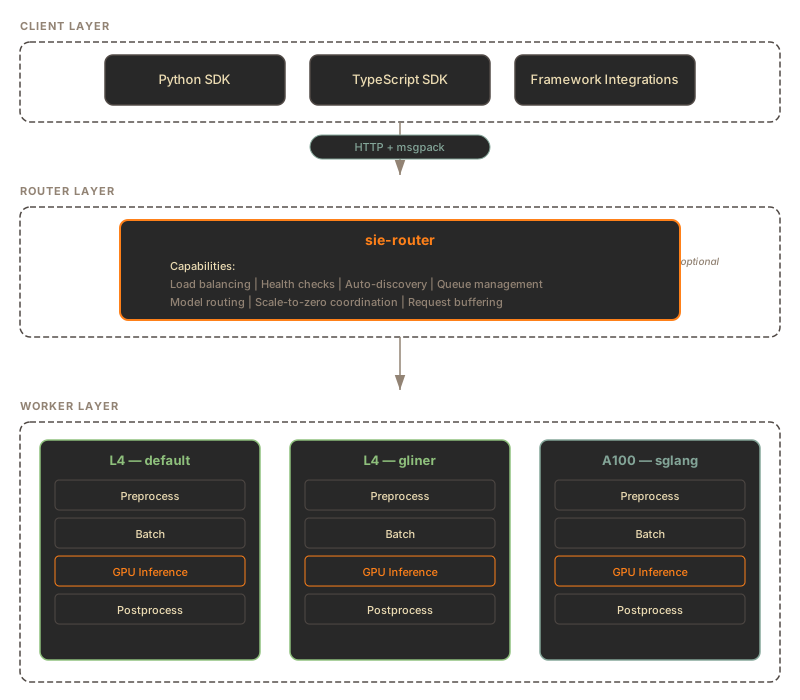
In production Kubernetes deployments, the hot path is intentionally separate from the config control plane:
```text
Client SDK
-> sie-gateway (Rust, stateless inference edge)
-> NATS JetStream queue
-> SIE server sidecar inside the worker pod
-> UDS IPC
-> sie-server adapter process
-> NATS Core result inbox
-> sie-gateway response
Admin tooling
-> sie-config (Python, single-writer config control plane)
-> config store + NATS config deltas
-> gateways and worker pods converge asynchronously
```
***
## Components
[Section titled “Components”](#components)
### Client SDK
[Section titled “Client SDK”](#client-sdk)
The SDK provides `encode()`, `score()`, and `extract()` methods. It handles:
* **msgpack serialization**: Binary wire format, faster and smaller than JSON
* **Automatic 503 PROVISIONING retry**: Waits for scale-from-zero with `wait_for_capacity=True`
* **Pool management**: Background lease renewal for resource pools
* **Numpy integration**: Returns native numpy arrays for embeddings
Framework integrations (LangChain, LlamaIndex, etc.) wrap the SDK with framework-specific interfaces.
### Gateway
[Section titled “Gateway”](#gateway)
The gateway is a stateless Rust service that sits between clients and Kubernetes worker pods. It is optional for single-server setups but required for elastic Kubernetes clusters.
**Responsibilities:**
* Resolves model, bundle, machine profile, and pool from its in-memory registry
* Publishes inference work to NATS JetStream
* Returns `503` with error code `PROVISIONING` and a `Retry-After` header when the target worker pool is scaled to zero
* Serves read-side config endpoints from its local registry mirror
* Manages resource pools for capacity isolation
* Tracks worker-pod health and bundle config hashes from SIE server sidecar NATS heartbeats
The gateway does not own config writes. `POST /v1/configs/models`, `GET /v1/configs/export`, and `GET /v1/configs/epoch` belong to `sie-config`.
### Config Service
[Section titled “Config Service”](#config-service)
`sie-config` is the authoritative config control plane. It runs as a single writer, persists API-added model configs, and publishes runtime config deltas:
* `POST /v1/configs/models` appends new models or profiles.
* `GET /v1/configs/export` gives gateways a full snapshot for bootstrap and drift recovery.
* `GET /v1/configs/epoch` exposes the authoritative model-write epoch and bundle-set hash.
* `GET /v1/configs/bundles{,/{id}}` lets gateways fetch the bundle set baked into the `sie-config` image.
Gateways bootstrap from `sie-config`, subscribe to `sie.config.models._all` for live deltas, and poll `/v1/configs/epoch` to recover any missed NATS messages.
### SIE Server Sidecar
[Section titled “SIE Server Sidecar”](#sie-server-sidecar)
Every queue-mode worker pod includes the SIE server sidecar. The Helm chart enables it by default and renders the container as `worker-sidecar`. The image repository is `ghcr.io/superlinked/sie-server-sidecar`. It owns the queue half of the worker pod’s cluster hot path:
* Pulls work from the pool’s NATS JetStream stream
* Validates subjects and reply inboxes before processing payloads
* Forms batches by model, operation, and LoRA key
* Calls the Python `sie-server` adapter process over Unix domain socket IPC
* Frames results, publishes them to the gateway inbox, and ACKs or NAKs JetStream messages
* Publishes `sie.health.` heartbeats with queue depth, loaded model state, and the current `bundle_config_hash`
* Applies bundle-scoped config deltas to the `sie-server` adapter through IPC and reconciles missed deltas from `sie-config`
The SIE server sidecar does not load model weights and does not link GPU libraries. It keeps queue, batching, payload, and framing work in Rust while the `sie-server` adapter remains responsible for model execution.
### Worker Adapter (sie-server)
[Section titled “Worker Adapter (sie-server)”](#worker-adapter-sie-server)
`sie-server` remains the Python model-execution process. In standalone Docker it exposes the server API. In Kubernetes queue mode, it runs beside the SIE server sidecar inside each worker pod and exposes an IPC server to execute prepared batches.
It owns:
* Model registry and GPU lifecycle
* Adapter-specific preprocessing and model-path selection
* Model loading, LoRA loading, and memory pressure eviction
* GPU inference through PyTorch, Flash Attention, SGLang, and other adapter backends
* The single-process API used by Docker deployments
Queue-mode batches from the SIE server sidecar arrive as fully formed GPU work. The `sie-server` adapter can still retokenize an item when that is the safe execution path.
***
## Wire Protocol
[Section titled “Wire Protocol”](#wire-protocol)
SIE uses **msgpack** as the default wire format instead of JSON:
| Format | Encode speed | Decode speed | Size | Numpy support |
| ------- | ------------ | ------------ | ------------- | ------------------------ |
| msgpack | Fast | Fast | \~50% of JSON | Native via msgpack-numpy |
| JSON | Slower | Slower | Baseline | Requires list conversion |
The SDK sends and receives msgpack automatically. The OpenAI-compatible `/v1/embeddings` endpoint uses JSON for compatibility.
Inside a Kubernetes cluster, gateway-to-sidecar work items, IPC frames between the SIE server sidecar and the `sie-server` adapter, and sidecar-to-gateway results are msgpack as well. JSON is reserved for low-frequency control-plane APIs and client requests that explicitly negotiate JSON.
***
## Model Cache Hierarchy
[Section titled “Model Cache Hierarchy”](#model-cache-hierarchy)
Model weights are resolved through a 3-tier cache:
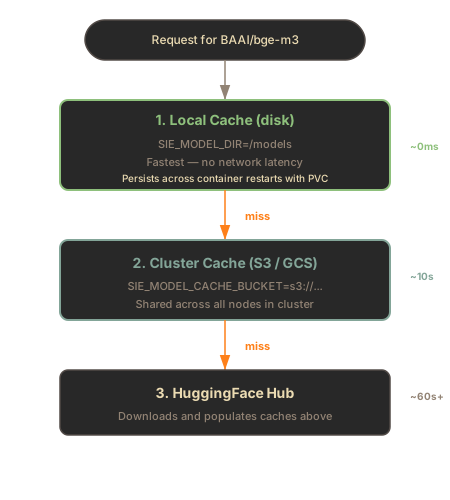
**Local disk cache** uses LRU eviction when disk usage exceeds `SIE_DISK_PRESSURE_THRESHOLD_PERCENT` (default: 85%).
**Cluster cache** is useful for Kubernetes deployments where multiple worker pods share the same S3/GCS bucket, avoiding redundant downloads from HuggingFace.
***
## Deployment Modes
[Section titled “Deployment Modes”](#deployment-modes)
### Standalone Docker
[Section titled “Standalone Docker”](#standalone-docker)
```plaintext
Client → sie-server (single GPU)
```
Simplest setup. The SDK points at one `sie-server` process. Good for development and small production.
### Multi-Bundle (Docker Compose)
[Section titled “Multi-Bundle (Docker Compose)”](#multi-bundle-docker-compose)
```plaintext
Client → sie-server:8080 (default bundle)
Client → sie-server:8081 (sglang bundle)
```
Multiple containers, each with a different bundle. Client routes to the correct port.
### Cluster (Kubernetes)
[Section titled “Cluster (Kubernetes)”](#cluster-kubernetes)
```plaintext
Client → sie-gateway → NATS JetStream → SIE server sidecar → UDS IPC → sie-server adapter
Admin → sie-config → config store + NATS config deltas → gateway + worker pod
```
Full production setup with GPU routing, autoscaling, and observability. See [Kubernetes in GCP](/docs/deployment/cloud-gcp/) or [AWS](/docs/deployment/cloud-aws/).
***
## What’s Next
[Section titled “What’s Next”](#whats-next)
* [Request Pipeline](/docs/engine/) - detailed preprocessing, batching, and GPU inference flow
* [Gateway](/docs/engine/router/) - routing, queueing, load balancing, and resource pools
* [Config API](/docs/engine/config-api/) - runtime model config writes and readiness polling
* [Adapters](/docs/engine/adapters/) - compute engine abstraction layer
# Bundles
> Dependency isolation for models with conflicting requirements.
## Why Bundles
[Section titled “Why Bundles”](#why-bundles)
Python ML libraries often have conflicting dependency requirements. Models using `trust_remote_code=True` or specialized backends can pin incompatible versions of `transformers`, `torch`, or `sglang`. SIE solves this with bundles: each bundle is a self-contained environment with compatible dependencies, built into its own Docker image.
Each bundle is a YAML file under `packages/sie_server/bundles/` that lists the adapters it enables and the pinned dependency versions needed by those adapters. At build time, the Dockerfile selects one bundle via the `BUNDLE` build arg and installs only that bundle’s deps.
***
## Published Bundles
[Section titled “Published Bundles”](#published-bundles)
Three bundles are published to GHCR today: `default`, `sglang`, and `transformers5`. The `default` bundle covers every model unless it needs the SGLang runtime or `transformers>=5`.
| Bundle | Purpose | Key Models |
| --------------- | ----------------------------------------------------------------- | ------------------------------------------------------------------------------------------------------------------------------------------------------------------------------------------------------------------ |
| `default` | Everything that runs on standard `transformers` + Flash Attention | BGE-M3, E5, Stella, Qwen3, GritLM, NV-Embed, gte-Qwen2-7B, llama-embed-nemotron-8b, ColBERT, ColPali, ColQwen2, GLiNER, GLiREL, GLiClass, Florence-2, Donut, CLIP, SigLIP, Grounding DINO, OwlV2, SPLADE, and more |
| `sglang` | Text generation served through the SGLang runtime | Qwen3.x generation family, granite-guardian-3.0-2b, sqlcoder-7b-2 |
| `transformers5` | Adapters that require `transformers>=5` | LightOnOCR, GLM-OCR, GLiNER2 classification, sparse vision documents |
> The previous `gliner` and `florence2` bundles no longer exist; their adapters and dependencies were folded into `default` once the underlying version conflicts were resolved.
The repo’s `bundles/` directory holds eight bundle YAML files in total. Of the rest, `sglang-embedding` (large LLM embeddings) and `sglang-vision-extract` run on the published `sglang` image via a `bundles..imageBundle` override in the Helm chart, while `candle` and `gemma` are separate local builds. This page covers the published subset.
***
## Bundle Contents
[Section titled “Bundle Contents”](#bundle-contents)
### default
[Section titled “default”](#default)
The default bundle is the broad, general-purpose image. It bundles the standard `transformers`, `sentence-transformers`, Flash Attention, and the NER/vision adapters.
**Included adapter families:**
* Dense encoders: BERT (flash), ModernBERT (flash), BGE-M3, Qwen2, XLM-RoBERTa, Nomic, GTE, Stella, sentence-transformers, PyTorch embedding
* Cross-encoders / rerankers: BERT, ModernBERT, Qwen2, Jina (flash), NLI classification
* Multi-vector / late-interaction: ColBERT, ColBERT + ModernBERT, ColBERT + rotary, ColPali, ColQwen2, NeMo ColEmbed
* Sparse: SPLADE (flash), GTE sparse (flash)
* Vision and vision-language: CLIP, SigLIP, Grounding DINO, OwlV2, Florence-2, Donut
* Zero-shot NER / extraction: GLiNER, GLiREL, GLiClass
### sglang
[Section titled “sglang”](#sglang)
The SGLang generation bundle. It enables the SGLang generation adapter with pinned SGLang, grammar-backend, and kernel dependencies for serving text-generation models.
### sglang-embedding
[Section titled “sglang-embedding”](#sglang-embedding)
A companion bundle wired to the SGLang embedding adapter for large LLM embeddings (4B+ params). It shares the `sglang` dependency stack; the split exists for worker pool isolation.
**Included models:**
* `Qwen/Qwen3-Embedding-4B`
* `intfloat/e5-mistral-7b-instruct`
* `Linq-AI-Research/Linq-Embed-Mistral`
* `Salesforce/SFR-Embedding-Mistral`, `Salesforce/SFR-Embedding-2_R`
### transformers5
[Section titled “transformers5”](#transformers5)
Published to GHCR for adapters that require `transformers>=5`. It covers LightOnOCR and GLM-OCR document parsing, GLiNER2 classification, and the sparse vision (multimodal SparseEncoder) adapter.
***
## Docker Images
[Section titled “Docker Images”](#docker-images)
All three published bundles (`default`, `sglang`, `transformers5`) ship for both `cpu` and `cuda12` platforms. The image tag format is `{version}-{platform}-{bundle}`, with a floating `latest-{platform}-{bundle}` tag that tracks the most recent release.
```bash
# Default bundle (CPU)
docker run -p 8080:8080 ghcr.io/superlinked/sie-server:latest-cpu-default
# Default bundle (CUDA 12, recommended for GPU)
docker run --gpus all -p 8080:8080 ghcr.io/superlinked/sie-server:latest-cuda12-default
# SGLang bundle (CUDA 12)
docker run --gpus all -p 8080:8080 ghcr.io/superlinked/sie-server:latest-cuda12-sglang
# Transformers 5 bundle (CUDA 12)
docker run --gpus all -p 8080:8080 ghcr.io/superlinked/sie-server:latest-cuda12-transformers5
# Pin to a specific release
docker run --gpus all -p 8080:8080 ghcr.io/superlinked/sie-server:v0.2.0-cuda12-default
```
***
## Bundle Selection
[Section titled “Bundle Selection”](#bundle-selection)
Choose a bundle based on the models you need:
1. **Start with `default`.** It covers dense, sparse, multi-vector, cross-encoder, vision, and extraction models, which is the overwhelming majority of use cases.
2. **Use `sglang`** when you need text generation through the SGLang runtime. Run it as a second container alongside `default` and route requests by model name.
3. **Use `transformers5`** for models that need `transformers>=5`: LightOnOCR, GLM-OCR, GLiNER2 classification, and sparse vision documents.
Models are loaded on first request. The bundle only determines which models are available inside a given image.
***
## What’s Next
[Section titled “What’s Next”](#whats-next)
* [Model Catalog](/models) - complete list of supported models
* [Docker Deployment](/docs/deployment/docker/) - tags, GPU configuration, and Docker Compose
* [Deployment Overview](/docs/deployment/) - from single container to Kubernetes
# Config API
> Add models at runtime without rebuilding Docker images.
Add models to a running SIE cluster with a single API call. If the model’s adapter is already in a deployed bundle, no adapter image rebuild is needed. The change is written to `sie-config`, distributed over NATS, and mirrored by every gateway replica.
The Config API is split across two services:
| Service | Role |
| ------------- | ------------------------------------------------------------------------------------------------------------------------------------- |
| `sie-config` | Authoritative control plane. Owns writes, persistence, bundle metadata, snapshots, epoch, and NATS publishing. |
| `sie-gateway` | Read-side cache. Serves config reads, resolve, and per-replica SIE server sidecar readiness status. It does not handle config writes. |
The config services evolve per deployment. For the current implementation, browse [`packages/sie_config/src/sie_config/`](https://github.com/superlinked/sie/tree/main/packages/sie_config/src/sie_config) in the repo.
***
## Quick Example
[Section titled “Quick Example”](#quick-example)
```bash
# Add a model at runtime through sie-config
curl -X POST http://sie-config:8080/v1/configs/models \
-H "Content-Type: application/x-yaml" \
-H "Authorization: Bearer $SIE_ADMIN_TOKEN" \
-H "Idempotency-Key: add-e5-base-001" \
-d '
sie_id: intfloat/multilingual-e5-base
hf_id: intfloat/multilingual-e5-base
inputs:
text: true
tasks:
encode:
dense:
dim: 768
profiles:
default:
adapter_path: sie_server.adapters.sentence_transformer:SentenceTransformerDenseAdapter
max_batch_tokens: 8192
adapter_options:
loadtime: {}
runtime:
pooling: mean
normalize: true
'
```
Response:
```json
{
"model_id": "intfloat/multilingual-e5-base",
"created_profiles": ["default"],
"existing_profiles_skipped": [],
"warnings": [],
"routable_bundles_by_profile": {"default": ["default"]},
"router_id": "sie-config"
}
```
This response means the config was accepted, persisted, and applied to `sie-config`’s registry. NATS publish failures are surfaced in `warnings`; a fully unavailable publisher returns `503`. The response does **not** mean every eligible SIE server sidecar has reported readiness for the model. To check serving readiness, poll a gateway replica:
```bash
curl http://sie-gateway:8080/v1/configs/models/intfloat/multilingual-e5-base/status \
-H "Authorization: Bearer $SIE_AUTH_TOKEN"
```
```json
{
"model_id": "intfloat/multilingual-e5-base",
"config_epoch": 42,
"all_bundles_acked": true,
"no_bundles": false,
"bundles": [
{
"bundle_id": "default",
"expected_bundle_config_hash": "sha256...",
"total_eligible_workers": 3,
"acked_workers": ["worker-a", "worker-b", "worker-c"],
"pending_workers": [],
"acked": true
}
],
"source": "gateway-registry"
}
```
***
## How It Works
[Section titled “How It Works”](#how-it-works)
```plaintext
Admin client
-> POST /v1/configs/models on sie-config
-> persist model YAML to ConfigStore
-> mutate sie-config ModelRegistry
-> increment config epoch
-> publish NATS deltas:
sie.config.models.{bundle_id} -> SIE server sidecars inside worker pods
sie.config.models._all -> gateways
Gateways
-> apply _all deltas to their ModelRegistry
-> poll /v1/configs/epoch for missed deltas or bundle drift
-> expose /v1/configs/models/{id}/status for readiness
```
1. Admin tooling sends `POST /v1/configs/models` to `sie-config`.
2. `sie-config` validates that every new profile’s `adapter_path` is routable by at least one known bundle.
3. A single-process asyncio write lock serializes persist, registry mutation, epoch increment, and NATS publish.
4. SIE server sidecars subscribed to `sie.config.models.{bundle_id}` receive bundle-scoped config notifications and forward accepted YAML to the `sie-server` adapter over IPC.
5. Gateways subscribed to `sie.config.models._all` update their in-memory registries.
6. SIE server sidecars publish the updated `bundle_config_hash` in `sie.health.` after the `sie-server` adapter accepts the config, or after export reconciliation catches up.
7. Gateway `/status` endpoints expose whether this replica has eligible SIE server sidecar health records with the expected hash.
***
## When to Use
[Section titled “When to Use”](#when-to-use)
| Scenario | Use Config API? | Alternative |
| -------------------------------------- | --------------- | ----------------------------------------- |
| Add a model with an existing adapter | Yes | - |
| Add a new profile to an existing model | Yes | - |
| Add a model that needs a new adapter | No | Create adapter, rebuild bundle image |
| Add a new bundle | No | Define in repo, rebuild images |
| Change a model’s adapter\_path | No | Append-only; create a new profile instead |
The Config API is **append-only**. You can add models and profiles, but not modify or delete existing ones.
***
## Endpoints
[Section titled “Endpoints”](#endpoints)
### Endpoint Placement
[Section titled “Endpoint Placement”](#endpoint-placement)
| Endpoint | `sie-config` | `sie-gateway` |
| ------------------------------------ | ------------ | -------------------------------------- |
| `POST /v1/configs/models` | Yes | No, returns `405 Method Not Allowed` |
| `GET /v1/configs/models` | Yes | Yes, from gateway registry |
| `GET /v1/configs/models/{id}` | Yes | Yes, from gateway registry |
| `GET /v1/configs/models/{id}/status` | No | Yes, per-replica config-hash readiness |
| `GET /v1/configs/bundles` | Yes | Yes |
| `GET /v1/configs/bundles/{id}` | Yes | Yes |
| `POST /v1/configs/resolve` | Yes | Yes |
| `GET /v1/configs/export` | Yes | No, consumed by gateways |
| `GET /v1/configs/epoch` | Yes | No, consumed by gateways |
### List Models
[Section titled “List Models”](#list-models)
```bash
curl http://sie-gateway:8080/v1/configs/models
```
```json
{
"models": [
{
"model_id": "BAAI/bge-m3",
"profiles": ["default", "sparse"],
"source": "gateway-registry"
},
{
"model_id": "intfloat/multilingual-e5-base",
"profiles": ["default"],
"source": "gateway-registry"
}
]
}
```
On the gateway, `source: "gateway-registry"` means the response comes from that replica’s in-memory config mirror. Call `sie-config` directly if you need to distinguish persisted API-added models from filesystem seed models.
### Get Model
[Section titled “Get Model”](#get-model)
```bash
curl http://sie-gateway:8080/v1/configs/models/BAAI/bge-m3
```
On the gateway, this returns a minimal YAML registry view with `sie_id`, `source: gateway-registry`, and compatible `bundles`. Call `sie-config` directly for the full stored model YAML with profile definitions.
### Add Model
[Section titled “Add Model”](#add-model)
```bash
curl -X POST http://sie-config:8080/v1/configs/models \
-H "Content-Type: application/x-yaml" \
-H "Authorization: Bearer $SIE_ADMIN_TOKEN" \
-d @model-config.yaml
```
| Status | Meaning |
| ------ | ---------------------------------------------------------------------- |
| `201` | Model or profiles created |
| `200` | All profiles already existed (idempotent) |
| `400` | Invalid YAML |
| `401` | `SIE_ADMIN_TOKEN` is configured but the request is missing bearer auth |
| `403` | Write attempted with only the inference token configured |
| `409` | Profile exists with different content (content-equality check) |
| `422` | Validation failed (unroutable adapter, missing fields) |
| `503` | NATS unavailable or config store unavailable |
The gateway does not register this route. If you send the same POST to `sie-gateway`, the response is `405 Method Not Allowed`.
### List Bundles
[Section titled “List Bundles”](#list-bundles)
```bash
curl http://sie-gateway:8080/v1/configs/bundles
```
```json
{
"bundles": [
{
"bundle_id": "default",
"priority": 10,
"adapter_count": 18,
"source": "gateway-registry",
"connected_workers": 3
}
]
}
```
### Get Bundle
[Section titled “Get Bundle”](#get-bundle)
```bash
curl http://sie-gateway:8080/v1/configs/bundles/default
```
Returns bundle metadata as YAML including the adapter list.
### Resolve Routing
[Section titled “Resolve Routing”](#resolve-routing)
```bash
curl -X POST http://sie-gateway:8080/v1/configs/resolve \
-H "Content-Type: application/json" \
-d '{"model": "BAAI/bge-m3", "bundle": "default"}'
```
Returns the bundle that would be selected for a request without executing inference. Omit `bundle` to use the registry’s default bundle priority, or use the `default:/BAAI/bge-m3` model-spec form for an explicit bundle override.
***
## Config YAML Format
[Section titled “Config YAML Format”](#config-yaml-format)
The model config format is the same as [static model configs](/docs/engine/adding-models/). For runtime writes, `sie-config` validates the YAML schema and requires new profiles to be routable by existing bundle adapters, but its checks are looser than the worker’s: when a worker applies the delta it parses the config with the strict `ModelConfig` schema, which requires `tasks` and one of `hf_id`, `weights_path`, or `package_backed`. A payload missing those can be accepted with `201` and then sit unusable because every worker rejects it. Always send the full worker-valid schema.
### Minimal Config
[Section titled “Minimal Config”](#minimal-config)
The smallest config every worker will accept:
```yaml
sie_id: intfloat/multilingual-e5-base
hf_id: intfloat/multilingual-e5-base
tasks:
encode:
dense:
dim: 768
profiles:
default:
adapter_path: sie_server.adapters.sentence_transformer:SentenceTransformerDenseAdapter
max_batch_tokens: 8192
```
### Full Config
[Section titled “Full Config”](#full-config)
```yaml
sie_id: intfloat/multilingual-e5-base
hf_id: intfloat/multilingual-e5-base
inputs:
text: true
tasks:
encode:
dense:
dim: 768
profiles:
default:
adapter_path: sie_server.adapters.sentence_transformer:SentenceTransformerDenseAdapter
max_batch_tokens: 8192
adapter_options:
loadtime: {}
runtime:
pooling: mean
normalize: true
financial:
extends: default
adapter_options:
runtime:
pooling: mean
normalize: true
instruction: "Retrieve financial documents"
```
### Profile Append
[Section titled “Profile Append”](#profile-append)
POST the same `sie_id` with additional profiles. Existing profiles are skipped; new ones are created.
```yaml
sie_id: intfloat/multilingual-e5-base
profiles:
default:
adapter_path: sie_server.adapters.sentence_transformer:SentenceTransformerDenseAdapter
max_batch_tokens: 8192
medical:
extends: default
adapter_options:
runtime:
instruction: "Retrieve medical literature"
```
Response: `201` with `created_profiles: ["medical"]` and `existing_profiles_skipped: ["default"]`.
***
## Serving Readiness
[Section titled “Serving Readiness”](#serving-readiness)
`POST /v1/configs/models` does not wait for SIE server sidecar convergence. `sie-config` has no sidecar-health registry, so readiness is a read-side concern on each gateway replica. SIE server sidecars advertise the local `bundle_config_hash` after the `sie-server` adapter applies a config delta or replays a missed entry from `GET /v1/configs/export`.
| Field | Description |
| --------------------------------------- | ------------------------------------------------------------------------------------------------------------------ |
| `config_epoch` | Highest control-plane epoch applied on this gateway |
| `all_bundles_acked` | `true` when every eligible bundle has at least one healthy SIE server sidecar health record with the expected hash |
| `no_bundles` | `true` when the model resolves to zero bundles on this gateway |
| `bundles[].expected_bundle_config_hash` | Hash SIE server sidecars must report for the bundle |
| `bundles[].acked_workers` | Healthy worker IDs whose reported hash matches |
| `bundles[].pending_workers` | Healthy eligible worker IDs that have not reported the expected hash |
`all_bundles_acked: false` does not mean the write failed. The model can already be in the catalog while SIE server sidecar health is still catching up or the worker pod is scaling from zero. Admin tooling that needs a fleet-wide view should poll every gateway replica.
***
## Persistence
[Section titled “Persistence”](#persistence)
API-added models are persisted by `sie-config`, not by the gateway. On `sie-config` startup, `SIE_CONFIG_RESTORE=true` restores model configs from the configured store. Gateways do not read the store directly; they fetch snapshots from `sie-config`.
### Storage Backends
[Section titled “Storage Backends”](#storage-backends)
| Backend | Config | Use Case |
| ---------------- | ----------------------------------------- | ----------------------------- |
| Local filesystem | `SIE_CONFIG_STORE_DIR=/data/config` | Development or Kubernetes PVC |
| S3 | `SIE_CONFIG_STORE_DIR=s3://bucket/prefix` | AWS production persistence |
| GCS | `SIE_CONFIG_STORE_DIR=gs://bucket/prefix` | GCP production persistence |
`sie-config` runs as a single writer. The local backend writes atomically with a temp file, `fsync`, and replace; cloud backends use object-store PUT semantics.
### Environment Variables
[Section titled “Environment Variables”](#environment-variables)
| Variable | Default | Description |
| ---------------------- | -------------------- | -------------------------------------------------------------------------------- |
| `SIE_CONFIG_STORE_DIR` | Local pod filesystem | Config store path used by `sie-config` |
| `SIE_CONFIG_RESTORE` | `false` | Set to `true` to restore API-added models from the store on `sie-config` startup |
| `SIE_NATS_URL` | None | NATS server URL for config distribution |
| `SIE_BUNDLES_DIR` | `/app/bundles` | Bundle YAML directory baked into the `sie-config` image |
| `SIE_MODELS_DIR` | `/app/models` | Baseline model YAML directory baked into the `sie-config` image |
***
## NATS Distribution
[Section titled “NATS Distribution”](#nats-distribution)
Config changes are distributed to SIE server sidecars and gateways via NATS Core pub/sub. NATS is transport for config deltas, not the durable source of truth.
| Subject | Subscribers | Purpose |
| ------------------------------- | ---------------------------------- | ------------------------------- |
| `sie.config.models.{bundle_id}` | SIE server sidecars in that bundle | Per-bundle config notifications |
| `sie.config.models._all` | All gateways | Gateway registry sync |
### Gateway Recovery
[Section titled “Gateway Recovery”](#gateway-recovery)
Gateways recover missed messages by polling `sie-config`:
* `GET /v1/configs/epoch` returns the authoritative epoch plus a `bundles_hash`.
* If the epoch or bundle hash drifts, the gateway re-runs bootstrap.
* Bootstrap fetches bundles from `GET /v1/configs/bundles{,/{id}}` and models from `GET /v1/configs/export`.
### NATS Unavailable
[Section titled “NATS Unavailable”](#nats-unavailable)
If NATS is configured but temporarily unavailable:
* Config writes return `503` with `{"detail": {"error": "nats_unavailable", "message": "..."}}` rather than persisting a change that cannot be distributed.
* Existing inference depends on the separate JetStream work queue and continues only if that queue path is healthy.
* Once config pub/sub recovers, gateways close any missed-delta gap through the epoch poller.
If only some bundle publishes fail, the write can still return `201` with a `warnings` entry such as `nats_publish_partial`. The config is durable, and gateways recover through the epoch/export path; SIE server sidecars on the affected bundle may lag until their live subscriber or export reconciler catches up.
***
## Authentication
[Section titled “Authentication”](#authentication)
Config API uses the same auth tokens as the rest of the SIE API:
| Operation | Token Required |
| ----------------------------------------- | ----------------------------------------------------------------------- |
| `GET /v1/configs/*` | `SIE_AUTH_TOKEN` or `SIE_ADMIN_TOKEN` depending on deployment auth mode |
| `POST /v1/configs/models` on `sie-config` | `SIE_ADMIN_TOKEN` |
| `GET /v1/configs/export` on `sie-config` | `SIE_ADMIN_TOKEN` |
If neither token is configured, all endpoints are open (development mode). If `SIE_AUTH_TOKEN` is set but `SIE_ADMIN_TOKEN` is not, writes are rejected with `403`; the inference token never grants config-write access.
***
## Helm Configuration
[Section titled “Helm Configuration”](#helm-configuration)
Kubernetes deployments run `sie-config` and `sie-gateway` as separate deployments. Enable NATS-based config distribution and persistent config storage in Helm values:
```yaml
nats:
enabled: true
config:
enabled: true
configStore:
enabled: true
size: 10Gi
gateway:
replicas: 2
```
The chart’s built-in persistence path is the `config.configStore` PVC. The `sie-config` service also supports `SIE_CONFIG_STORE_DIR=s3://...` or `gs://...`, but wiring that environment variable requires a chart overlay or custom deployment because the stock values file does not expose an `extraEnv` knob for the config service.
***
## Limitations
[Section titled “Limitations”](#limitations)
* **Append-only**: Models and profiles cannot be modified or deleted after creation.
* **Adapter must be bundled**: The model’s `adapter_path` must exist in at least one known bundle. Adding models that require new adapters still requires an image rebuild.
* **Bundles are build-time only**: Bundles cannot be created or modified via API. Rebuild and redeploy `sie-config` plus worker-pod images for bundle changes; gateways pick up the new bundle set from `sie-config`.
* **`sie-config` is single-writer**: Run one replica. Multi-replica writes require shared idempotency state, which is intentionally not part of the current topology.
* **Readiness is per gateway replica**: `GET /v1/configs/models/{id}/status` reports the SIE server sidecar health records visible to that gateway. Poll all replicas for a fleet-wide view.
* **Gateway cold start depends on `sie-config`**: A fresh gateway that cannot reach `sie-config` starts with whatever optional filesystem seed was mounted. In the default deployment, typed requests may return `404` until bootstrap succeeds.
***
# LoRA Adapters
> Fine-tune embeddings with Low-Rank Adaptation without retraining base models.
LoRA (Low-Rank Adaptation) lets you customize embedding models for specific domains. Instead of fine-tuning all model weights, LoRA trains small adapter layers. This reduces training cost and enables swapping adapters at inference time.
## What is LoRA
[Section titled “What is LoRA”](#what-is-lora)
LoRA freezes the base model and injects trainable low-rank matrices into attention layers. A typical LoRA adapter is 1-5% of the base model size. Multiple LoRA adapters can share the same base model, switching between domains without reloading weights.
**Benefits:**
* Train domain-specific embeddings with minimal data
* Share base model across multiple adapters
* Hot-swap adapters per request
* Reduce GPU memory vs separate fine-tuned models
## Quick Example
[Section titled “Quick Example”](#quick-example)
* Python
```python
from sie_sdk import SIEClient
from sie_sdk.types import Item
client = SIEClient("http://localhost:8080")
# Use a LoRA adapter for domain-specific embeddings
result = client.encode(
"BAAI/bge-m3",
Item(text="breach of fiduciary duty"),
options={"lora_id": "org/bge-m3-legal-lora"}
)
```
* TypeScript
```typescript
import { SIEClient } from "@superlinked/sie-sdk";
const client = new SIEClient("http://localhost:8080");
// Use a LoRA adapter for domain-specific embeddings.
// `options` passthrough is supported on the wire; cast until the TS
// SDK types add the field (see reference/typescript-sdk).
const result = await client.encode(
"BAAI/bge-m3",
{ text: "breach of fiduciary duty" },
{ options: { lora_id: "org/bge-m3-legal-lora" } } as never,
);
```
## PEFT LoRA (Dynamic Loading)
[Section titled “PEFT LoRA (Dynamic Loading)”](#peft-lora-dynamic-loading)
Most SIE adapters use PEFT (Parameter-Efficient Fine-Tuning) for LoRA support. PEFT provides dynamic loading and hot reload capabilities.
**How it works:**
1. First request with a LoRA triggers async loading
2. PEFT wraps the base model with adapter layers
3. Subsequent requests use the loaded adapter instantly
4. Multiple LoRAs can be loaded simultaneously
* Python
```python
# First request: triggers LoRA load (may take a few seconds)
result = client.encode("BAAI/bge-m3", Item(text="legal query"), options={"lora_id": "org/legal-lora"})
# Subsequent requests: instant (adapter already loaded)
result = client.encode("BAAI/bge-m3", Item(text="another query"), options={"lora_id": "org/legal-lora"})
# Switch to different LoRA
result = client.encode("BAAI/bge-m3", Item(text="medical query"), options={"lora_id": "org/medical-lora"})
```
* TypeScript
```typescript
// First request: triggers LoRA load (may take a few seconds)
let result = await client.encode("BAAI/bge-m3", { text: "legal query" }, { options: { lora_id: "org/legal-lora" } } as never);
// Subsequent requests: instant (adapter already loaded)
result = await client.encode("BAAI/bge-m3", { text: "another query" }, { options: { lora_id: "org/legal-lora" } } as never);
// Switch to different LoRA
result = await client.encode("BAAI/bge-m3", { text: "medical query" }, { options: { lora_id: "org/medical-lora" } } as never);
```
**PEFT adapters support hot reload.** Loading a new LoRA does not block ongoing inference requests.
## SGLang LoRA (Pre-loaded)
[Section titled “SGLang LoRA (Pre-loaded)”](#sglang-lora-pre-loaded)
For LLM-based embedding models (4B+ parameters), SIE uses SGLang. SGLang requires LoRA adapters to be pre-loaded at server startup.
**Configure in model config YAML:**
```yaml
sie_id: Qwen/Qwen3-Embedding-4B
hf_id: Qwen/Qwen3-Embedding-4B
profiles:
default:
max_batch_tokens: 16384
adapter_path: sie_server.adapters.sglang.embedding:SGLangEmbeddingAdapter
adapter_options:
loadtime:
lora_paths:
legal: org/qwen3-legal-lora
medical: /path/to/medical-adapter
max_loras_per_batch: 8
```
**Use at request time:**
* Python
```python
# Select pre-loaded LoRA by name
result = client.encode(
"Qwen/Qwen3-Embedding-4B",
Item(text="legal document"),
options={"lora_id": "legal"}
)
```
* TypeScript
```typescript
// Select pre-loaded LoRA by name
const result = await client.encode(
"Qwen/Qwen3-Embedding-4B",
{ text: "legal document" },
{ options: { lora_id: "legal" } } as never,
);
```
SGLang handles mixed-LoRA batching internally via S-LoRA. Requests with different LoRAs can batch together.
## Configuring LoRA
[Section titled “Configuring LoRA”](#configuring-lora)
### Via Request Options
[Section titled “Via Request Options”](#via-request-options)
Pass `lora_id` in the options parameter:
* Python
```python
result = client.encode(
"BAAI/bge-m3",
Item(text="query"),
options={"lora_id": "org/my-lora-adapter"}
)
```
* TypeScript
```typescript
const result = await client.encode(
"BAAI/bge-m3",
{ text: "query" },
{ options: { lora_id: "org/my-lora-adapter" } } as never,
);
```
### Via Profiles
[Section titled “Via Profiles”](#via-profiles)
Define LoRA adapters as profiles in your model config. This simplifies client code and enables named presets. `lora_id` and `instruction` are adapter runtime options under `adapter_options.runtime`:
```yaml
sie_id: BAAI/bge-m3
profiles:
legal:
extends: default
adapter_options:
runtime:
lora_id: org/bge-m3-legal-lora
instruction: Given a legal query, retrieve relevant case law
medical:
extends: default
adapter_options:
runtime:
lora_id: org/bge-m3-medical-lora
instruction: Retrieve medical research for this query
```
Use the profile by name:
* Python
```python
result = client.encode(
"BAAI/bge-m3",
Item(text="breach of contract"),
options={"profile": "legal"},
)
```
* TypeScript
```typescript
const result = await client.encode(
"BAAI/bge-m3",
{ text: "breach of contract" },
{ options: { profile: "legal" } } as never,
);
```
### HTTP API
[Section titled “HTTP API”](#http-api)
```bash
curl -X POST http://localhost:8080/v1/encode/BAAI/bge-m3 \
-H "Content-Type: application/json" \
-H "Accept: application/json" \
-d '{"items": [{"text": "legal query"}], "params": {"options": {"lora_id": "org/legal-lora"}}}'
```
## LoRA Eviction
[Section titled “LoRA Eviction”](#lora-eviction)
SIE limits the number of loaded LoRA adapters per model to manage GPU memory. When this limit is reached, the least recently used (LRU) adapter is evicted.
**Configuration:**
```yaml
# engine.yaml
max_loras_per_model: 10 # Default: 10 adapters per model
```
Or via environment variable:
```bash
SIE_MAX_LORAS_PER_MODEL=20
```
**Eviction behavior:**
* New LoRA request triggers eviction if limit reached
* Oldest unused adapter is unloaded first
* Evicted adapters reload automatically on next request
* Base model remains loaded (only adapter weights evicted)
Each LoRA adds approximately 1-5% of base model memory. Monitor GPU memory if loading many adapters.
## Supported Adapters
[Section titled “Supported Adapters”](#supported-adapters)
| Adapter Type | LoRA Support | Hot Reload | Notes |
| ------------------------------------------------ | ------------ | ---------- | --------------------- |
| PEFT-based (sentence-transformers, BGE-M3, etc.) | Yes | Yes | Dynamic loading |
| SGLang (LLM embeddings) | Yes | No | Pre-loaded at startup |
| ColBERT | No | - | Not yet supported |
| CLIP/SigLIP | No | - | Not yet supported |
## What’s Next
[Section titled “What’s Next”](#whats-next)
* [Model Catalog](/models) - see which models support LoRA
* [Profiles](/docs/engine/profiles/) - bundle LoRA with other options
# Model Profiles
> Named option bundles for runtime configuration presets.
Profiles are named bundles of runtime options. Instead of passing the same options repeatedly, define a profile once and reference it by name.
## Quick Example
[Section titled “Quick Example”](#quick-example)
* Python
```python
from sie_sdk import SIEClient
from sie_sdk.types import Item
client = SIEClient("http://localhost:8080")
# Use the "sparse" profile
result = client.encode(
"BAAI/bge-m3",
Item(text="machine learning"),
options={"profile": "sparse"}
)
# Returns sparse embeddings only
sparse = result["sparse"]
print(f"Non-zero tokens: {len(sparse['indices'])}")
```
* TypeScript
```typescript
import { SIEClient } from "@superlinked/sie-sdk";
const client = new SIEClient("http://localhost:8080");
// Use the "sparse" profile
const result = await client.encode(
"BAAI/bge-m3",
{ text: "machine learning" },
{ options: { profile: "sparse" } } as never,
);
// Returns sparse embeddings only
const sparse = result.sparse;
console.log(`Non-zero tokens: ${sparse?.indices.length}`);
```
## Built-in Profiles
[Section titled “Built-in Profiles”](#built-in-profiles)
Models can define multiple profiles. Common patterns include:
| Profile | Purpose | Typical Settings |
| --------- | ----------------- | ------------------------------------- |
| `default` | Standard behavior | Model’s default output types |
| `sparse` | Lexical search | `output_types: [sparse]` |
| `muvera` | ColBERT via dense | `muvera: {}`, `output_types: [dense]` |
BGE-M3 includes `sparse`, `banking`, and `medical-vn` profiles. ColBERT models include `muvera` profiles for MUVERA-based retrieval.
## Using Profiles
[Section titled “Using Profiles”](#using-profiles)
Pass the profile name in the `options` parameter:
* Python
```python
from sie_sdk import SIEClient
from sie_sdk.types import Item
client = SIEClient("http://localhost:8080")
# Sparse-only embedding
result = client.encode(
"BAAI/bge-m3",
Item(text="search query"),
options={"profile": "sparse"}
)
# Domain-specific LoRA with custom instruction
result = client.encode(
"BAAI/bge-m3",
Item(text="transfer funds"),
is_query=True,
options={"profile": "banking"},
)
```
* TypeScript
```typescript
import { SIEClient } from "@superlinked/sie-sdk";
const client = new SIEClient("http://localhost:8080");
// Sparse-only embedding
let result = await client.encode(
"BAAI/bge-m3",
{ text: "search query" },
{ options: { profile: "sparse" } } as never,
);
// Domain-specific LoRA with custom instruction
result = await client.encode(
"BAAI/bge-m3",
{ text: "transfer funds" },
{ isQuery: true, options: { profile: "banking" } } as never,
);
```
The HTTP API uses the same `options` field:
```bash
curl -X POST http://localhost:8080/v1/encode/BAAI/bge-m3 \
-H "Content-Type: application/json" \
-H "Accept: application/json" \
-d '{"items": [{"text": "search query"}], "params": {"options": {"profile": "sparse"}}}'
```
## Profile Fields
[Section titled “Profile Fields”](#profile-fields)
Profiles support these fields:
| Field | Type | Description |
| ------------------- | ------ | ----------------------------------------------------- |
| `extends` | string | Inherit settings from another profile |
| `adapter_path` | string | Adapter class path (required unless `extends`) |
| `max_batch_tokens` | int | Maximum tokens per batch (required unless `extends`) |
| `compute_precision` | string | Precision override (`float16`, `bfloat16`, `float32`) |
| `adapter_options` | object | Nested `loadtime` and `runtime` option maps |
## Adapter Runtime Options
[Section titled “Adapter Runtime Options”](#adapter-runtime-options)
Behavior like output selection, instructions, and LoRA lives in `adapter_options.runtime`, not in top-level profile fields:
| Option | Type | Description |
| ------------------- | ------ | --------------------------------------------------- |
| `output_types` | list | Output types to return (dense, sparse, multivector) |
| `output_similarity` | dict | Similarity function per output type (cosine, dot) |
| `instruction` | string | Instruction prefix for queries |
| `lora_id` | string | LoRA adapter path (HuggingFace ID or local path) |
Profiles can also include any other adapter-specific runtime options. For example, the `muvera` profile on ColBERT models includes `muvera: {}` to enable the postprocessor:
```yaml
muvera:
extends: default
adapter_options:
runtime:
muvera: {}
output_types:
- dense
output_similarity:
dense: cosine
```
## Defining Custom Profiles
[Section titled “Defining Custom Profiles”](#defining-custom-profiles)
Define profiles in the model’s config YAML file:
```yaml
sie_id: BAAI/bge-m3
hf_id: BAAI/bge-m3
profiles:
default:
max_batch_tokens: 16384
adapter_path: sie_server.adapters.bge_m3_flash:BGEM3FlashAdapter
adapter_options:
runtime:
pooling: cls
normalize: true
sparse:
extends: default
adapter_options:
runtime:
pooling: cls
normalize: true
output_types:
- sparse
banking:
extends: default
adapter_options:
runtime:
pooling: cls
normalize: true
lora_id: saivamshiatukuri/bge-m3-banking77-lora
instruction: Classify banking intent
```
The profile named `default` is the default. A child profile’s non-empty `adapter_options.runtime` block fully replaces the parent’s, so repeat inherited keys like `pooling` and `normalize`.
## Profile Resolution
[Section titled “Profile Resolution”](#profile-resolution)
Runtime options are resolved in two steps (later overrides earlier):
1. **Profile** - the selected profile’s resolved `adapter_options.runtime`: its own block if non-empty, otherwise the block from its `extends` parent. A profile without `extends` inherits nothing
2. **Request** - options passed in the request, merged on top key by key
```python
# Request-level options override profile settings
result = client.encode(
"BAAI/bge-m3",
Item(text="query"),
options={
"profile": "sparse",
"is_query": True # Overrides any profile setting
}
)
```
If no profile is specified, the default profile is used. If a profile name is invalid, the server returns an error listing available profiles.
## Listing Available Profiles
[Section titled “Listing Available Profiles”](#listing-available-profiles)
Query the models endpoint to see available profiles:
```bash
curl http://localhost:8080/v1/models
```
The response includes profile information for each model.
## What’s Next
[Section titled “What’s Next”](#whats-next)
* [Sparse embeddings](/docs/encode/sparse/) - when to use sparse output
* [Multi-vector embeddings](/docs/encode/multivector/) - MUVERA profile for ColBERT models
# Gateway
> Stateless Rust inference edge for multi-pod GPU clusters.
The SIE gateway is a stateless Rust service that sits between clients and GPU worker pods. It handles routing, queue submission, resource pools, SIE server sidecar health, read-side config, and scale-from-zero orchestration. In Kubernetes, each worker pod runs the SIE server sidecar beside the Python `sie-server` adapter process; the sidecar pulls queued work and calls the adapter over IPC.
The page keeps the `/docs/engine/router/` URL for compatibility, but the deployed component is `sie-gateway`.
## When to Use the Gateway
[Section titled “When to Use the Gateway”](#when-to-use-the-gateway)
Not every deployment needs a gateway. The deciding factor is whether you are running an elastic worker fleet:
* **Single server** (local dev or Docker): point the SDK at a standalone `sie-server`.
* **Kubernetes clusters**: use the gateway. It provides a stable client endpoint, worker discovery, queue-based inference, scale-from-zero, resource pools, and config read endpoints.
* **Horizontal gateway replicas**: supported. Each replica keeps its own in-memory registry and converges through bootstrap, NATS config deltas, and epoch polling.
| Setup | Use Gateway? | Why |
| ----------------------- | ------------ | --------------------------------------------------------------------------------- |
| Single Docker container | No | One `sie-server` process handles the request path |
| Kubernetes | Yes | Required for worker discovery, queue routing, scale-from-zero, and pool isolation |
***
## Architecture
[Section titled “Architecture”](#architecture)
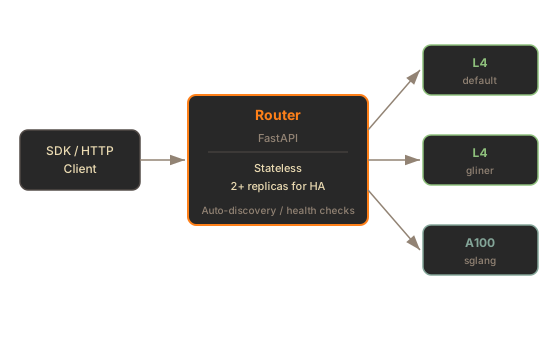
The gateway is stateless with respect to durable data. It owns in-memory routing state, but it does not persist config and it does not execute inference.
```text
Client request
-> sie-gateway resolves model, bundle, machine profile, and pool
-> gateway publishes msgpack work items to NATS JetStream
-> matching worker pod's SIE server sidecar pulls, batches, and calls the sie-server adapter over UDS IPC
-> SIE server sidecar publishes msgpack results to the gateway's NATS Core inbox
-> gateway assembles and returns the HTTP response
```
Config writes are outside this hot path. Admin tooling writes to `sie-config`, and gateways mirror that state through `/v1/configs/export`, NATS deltas, and `/v1/configs/epoch` polling.
***
## Request Routing
[Section titled “Request Routing”](#request-routing)
The gateway resolves every inference request to:
1. **Model and profile**: the model path and optional `:profile` suffix.
2. **Bundle**: selected by adapter compatibility, with the lowest numeric bundle priority winning by default.
3. **Machine profile**: `X-SIE-MACHINE-PROFILE` header or SDK `gpu` parameter.
4. **Pool**: default pool or explicit `X-SIE-Pool` / SDK `pool/profile` target.
5. **Queue subject**: `sie.work.{pool}.{machine_profile}.{bundle}.{model}` on the pool’s JetStream stream, consumed by the SIE server sidecar inside matching worker pods.
The Rust gateway is **queue-only** for inference. If the queue transport is unavailable, the gateway returns `503`.
### GPU Routing
[Section titled “GPU Routing”](#gpu-routing)
Requests can specify a target machine profile:
```bash
# HTTP
curl -X POST http://gateway:8080/v1/encode/BAAI/bge-m3 \
-H "X-SIE-MACHINE-PROFILE: l4" \
-H "Content-Type: application/json" \
-d '{"items": [{"text": "Hello world"}]}'
```
* Python
```python
# SDK
result = client.encode("BAAI/bge-m3", Item(text="hello"), gpu="l4")
```
* TypeScript
```typescript
// SDK
const result = await client.encode("BAAI/bge-m3", { text: "hello" }, { gpu: "l4" });
```
If the caller omits a machine profile, the gateway can use the default configured route. Scale-from-zero returns `503` with error code `PROVISIONING` when the selected `(bundle, machine_profile)` has no fresh SIE server sidecar health and the caller did not pin an explicit pool.
### 503 PROVISIONING Scale-from-Zero
[Section titled “503 PROVISIONING Scale-from-Zero”](#503-provisioning-scale-from-zero)
When no healthy SIE server sidecar has recently published health for the selected `(bundle, machine_profile)` tuple and the caller did not pin a specific pool, the gateway returns:
```plaintext
HTTP/1.1 503 Service Unavailable
Retry-After: 60
Content-Type: application/json
{
"error": {
"code": "PROVISIONING",
"message": "No worker available for GPU type 'l4'. Provisioning in progress."
}
}
```
The SDK handles this automatically with `wait_for_capacity=True`. See [Scale-from-Zero](/docs/deployment/autoscaling/) for details.
`503` with error code `PROVISIONING` is the provisioning signal. Unknown models fail fast with `404` once the gateway registry has bootstrapped. Incompatible explicit bundle choices fail with `409`.
***
## Sidecar Health And Discovery
[Section titled “Sidecar Health And Discovery”](#sidecar-health-and-discovery)
The production Helm path runs the SIE server sidecar inside each worker pod and uses NATS health. The sidecar publishes `sie.health.` heartbeats with the worker pod’s bundle, machine profile, queue depth, loaded models, and `bundle_config_hash`; the gateway builds its routing registry from those heartbeats.
| Mode | Used for | Health source |
| -------- | ------------------------------------------ | --------------------------------------------------------------- |
| `nats` | Default chart path with SIE server sidecar | `sie.health.` heartbeats from the SIE server sidecar |
| `ws` | Local status diagnostics | Python `sie-server` `/ws/status` stream |
| `static` | Explicit local diagnostics | Operator-provided worker URLs |
The gateway still owns pool state through Kubernetes `ConfigMap`s and `Lease`s. Kubernetes is not on the inference request path; queued work moves through NATS JetStream.
### Local Diagnostics
[Section titled “Local Diagnostics”](#local-diagnostics)
For hand-run gateway processes that inspect a standalone `sie-server` `/ws/status`, list worker URLs explicitly:
```bash
sie-gateway serve \
-w http://worker-1:8080 \
-w http://worker-2:8080 \
-w http://worker-3:8080
```
With queue-mode SIE server sidecar routing, the chart leaves `gateway.healthMode` empty and renders the routing-safe default, `nats`.
***
## Resource Pools
[Section titled “Resource Pools”](#resource-pools)
Resource pools reserve dedicated worker pods for tenant isolation. Pool worker pods only serve requests for that pool.
### Create a Pool
[Section titled “Create a Pool”](#create-a-pool)
```python
client = SIEClient("http://gateway:8080")
# Reserve 2 L4 workers for this tenant
client.create_pool("tenant-abc", {"l4": 2})
# Route requests to the pool
result = client.encode(
"BAAI/bge-m3",
Item(text="hello"),
gpu="tenant-abc/l4" # pool_name/gpu_type
)
# Check pool status
info = client.get_pool("tenant-abc")
# Cleanup
client.delete_pool("tenant-abc")
```
### Pool Lifecycle
[Section titled “Pool Lifecycle”](#pool-lifecycle)
* Pools are represented in Kubernetes `ConfigMap`s and `Lease`s.
* The SDK renews pool leases automatically in a background thread.
* Pools expire after their TTL unless renewed.
* The `default` pool is protected and cannot be deleted.
***
## Config Read Surface
[Section titled “Config Read Surface”](#config-read-surface)
The gateway serves read-side config endpoints from its in-memory registry:
| Endpoint | Purpose |
| ------------------------------------ | --------------------------------------------------------------- |
| `GET /v1/configs/models` | List models known to this gateway |
| `GET /v1/configs/models/{id}` | Return model YAML from the gateway registry |
| `GET /v1/configs/models/{id}/status` | Report per-replica config-hash readiness |
| `GET /v1/configs/bundles` | List known bundles and visible SIE server sidecar health counts |
| `GET /v1/configs/bundles/{id}` | Return bundle YAML |
| `POST /v1/configs/resolve` | Dry-run model or explicit bundle override to bundle routing |
The gateway is not a config write authority. `POST /v1/configs/models` is not registered on the gateway and returns `405 Method Not Allowed`; send writes to `sie-config`.
### Bootstrap and Recovery
[Section titled “Bootstrap and Recovery”](#bootstrap-and-recovery)
On startup, the gateway:
1. Optionally loads filesystem seeds from `SIE_BUNDLES_DIR` and `SIE_MODELS_DIR` if an escape-hatch config map is mounted.
2. Reads `GET /v1/configs/epoch` to capture the authoritative epoch and bundle-set hash.
3. Fetches bundles from `sie-config` with `GET /v1/configs/bundles{,/{id}}`.
4. Fetches model state with `GET /v1/configs/export`.
5. Subscribes to `sie.config.models._all` for live deltas.
6. Polls `GET /v1/configs/epoch` every 30 seconds to catch missed deltas or bundle-set drift.
`/readyz` does not wait for `sie-config`. A fresh gateway can be ready before the first config bootstrap succeeds; during that window, typed requests may return `404` until the registry is populated.
***
## Health & Status
[Section titled “Health & Status”](#health--status)
The gateway aggregates SIE server sidecar health records:
| Endpoint | Description |
| ----------------------- | ------------------------------------------------------------------------- |
| `GET /healthz` | Gateway liveness |
| `GET /readyz` | Gateway readiness; intentionally independent of `sie-config` reachability |
| `GET /health` | Cluster summary: worker count, GPU count, models loaded |
| `GET /v1/models` | Model list from the gateway registry |
| `WS /ws/cluster-status` | Real-time cluster metrics stream |
### Cluster Health Example
[Section titled “Cluster Health Example”](#cluster-health-example)
```bash
curl http://gateway:8080/health
```
```json
{
"status": "healthy",
"type": "gateway",
"configured_gpu_types": ["l4", "a100-80gb"],
"live_gpu_types": ["l4"],
"cluster": {
"worker_count": 3,
"gpu_count": 3,
"models_loaded": 12,
"total_qps": 0.0
}
}
```
***
## Metrics
[Section titled “Metrics”](#metrics)
Important gateway metrics include:
| Metric | Purpose |
| --------------------------------------- | ---------------------------------------------------------- |
| `sie_gateway_requests` | HTTP requests by endpoint, status, and machine profile |
| `sie_gateway_request_duration` | Gateway request latency |
| `sie_gateway_pending_demand` | KEDA scale-from-zero trigger by machine profile and bundle |
| `sie_gateway_lane_queue_depth` | Per-worker queue depth |
| `sie_gateway_config_applied_epoch` | Highest config epoch applied on this gateway |
| `sie_gateway_config_bootstrap_degraded` | Whether bootstrap has been failing long enough to alert |
| `sie_gateway_config_operations` | NATS config-delta processing outcomes |
| `sie_gateway_messaging_client_ready` | Gateway NATS connection state |
***
## What’s Next
[Section titled “What’s Next”](#whats-next)
* [Scale-from-Zero](/docs/deployment/autoscaling/) - the 503 PROVISIONING flow and cold start handling
* [Config API](/docs/engine/config-api/) - runtime config writes and gateway readiness polling
* [Kubernetes in GCP](/docs/deployment/cloud-gcp/) - full deployment with the gateway
* [Monitoring](/docs/deployment/monitoring/) - metrics and dashboards
# Custom Evals
> Evaluate models on your own labeled data: encode and rerank with the SDK, then score the rankings with NDCG and recall.
A few hundred labeled queries from your own domain settle model choice faster than any leaderboard. The pattern below is the same one the shipped [retrieval-ablation benchmark](/docs/examples/benchmark/) runs at larger scale: encode, rank, optionally rerank, score.
## Structure the Labeled Set
[Section titled “Structure the Labeled Set”](#structure-the-labeled-set)
Three pieces: a corpus, queries, and relevance judgments (qrels).
```python
corpus = [
{"id": "doc1", "text": "Machine learning uses algorithms to learn from data."},
{"id": "doc2", "text": "The weather forecast predicts rain tomorrow."},
]
queries = [
{"id": "q1", "text": "What is machine learning?"},
]
qrels = {
"q1": {"doc1": 2}, # higher grade = more relevant
}
```
Any graded scale works; the retrieval-ablation dataset uses 1 for relevant and 2 for highly relevant. Pull queries from real logs where you can, and have someone who knows the domain judge relevance. Unjudged documents count as not relevant.
## Encode and Rank
[Section titled “Encode and Rank”](#encode-and-rank)
* Python
```python
import numpy as np
from sie_sdk import SIEClient
client = SIEClient("http://your-sie-endpoint:8080")
MODEL = "BAAI/bge-m3"
CANDIDATES = 50 # rerank pool size; keep this larger than the final cutoff
doc_vecs = np.stack([r["dense"] for r in client.encode(MODEL, corpus)])
doc_vecs /= np.linalg.norm(doc_vecs, axis=1, keepdims=True)
rankings = {}
for query in queries:
q = client.encode(MODEL, {"text": query["text"]}, is_query=True)
q_vec = q["dense"] / np.linalg.norm(q["dense"])
order = np.argsort(-(doc_vecs @ q_vec))
rankings[query["id"]] = [corpus[i]["id"] for i in order[:CANDIDATES]]
```
* TypeScript
```typescript
import { SIEClient } from "@superlinked/sie-sdk";
const corpus = [
{ id: "doc1", text: "Machine learning uses algorithms to learn from data." },
{ id: "doc2", text: "The weather forecast predicts rain tomorrow." },
];
const queries = [{ id: "q1", text: "What is machine learning?" }];
const client = new SIEClient("http://your-sie-endpoint:8080");
const MODEL = "BAAI/bge-m3";
const CANDIDATES = 50; // rerank pool size; larger than the final cutoff
function normalize(v: Float32Array): Float32Array {
let n = 0;
for (const x of v) n += x * x;
n = Math.sqrt(n);
return v.map((x) => x / n);
}
function dot(a: Float32Array, b: Float32Array): number {
let s = 0;
for (let i = 0; i < a.length; i++) s += a[i] * b[i];
return s;
}
const docResults = await client.encode(MODEL, corpus);
const docVecs = docResults.map((r) => normalize(r.dense!));
const rankings: Record = {};
for (const query of queries) {
const q = await client.encode(MODEL, { text: query.text }, { isQuery: true });
const qVec = normalize(q.dense!);
rankings[query.id] = docVecs
.map((v, i) => ({ id: corpus[i].id, sim: dot(v, qVec) }))
.sort((a, b) => b.sim - a.sim)
.slice(0, CANDIDATES)
.map((e) => e.id);
}
```
`encode` accepts a list and returns results in the same order; chunk large corpora into batches. Query-side encoding (`is_query=True` in Python, `isQuery: true` in TypeScript) matters for models with asymmetric encoding such as BGE and E5.
## Rerank the Top Candidates
[Section titled “Rerank the Top Candidates”](#rerank-the-top-candidates)
Cross-encoder reranking won every condition in the shipped benchmark, and reranker size was the single biggest quality lever (+14.5% NDCG\@10 for the large reranker over the base). Pool recall was the bottleneck: the same reranker scored 0.600 NDCG\@10 on an 89-candidate pool and 0.621 on a 151-candidate pool (per its [RESULTS.md](https://github.com/superlinked/sie/blob/main/examples/retrieval-ablation/RESULTS.md)). So retrieve more candidates than you intend to keep, then let the reranker order them:
* Python
```python
K = 10 # final cutoff for the metrics below
by_id = {c["id"]: c for c in corpus}
for query in queries:
pool = [by_id[doc_id] for doc_id in rankings[query["id"]]]
result = client.score(
"mixedbread-ai/mxbai-rerank-large-v2",
query={"text": query["text"]},
items=pool,
)
rankings[query["id"]] = [s["item_id"] for s in result["scores"]][:K]
```
* TypeScript
```typescript
const K = 10; // final cutoff for the metrics below
const byId = new Map(corpus.map((c) => [c.id, c]));
for (const query of queries) {
const pool = rankings[query.id].map((docId) => byId.get(docId)!);
const result = await client.score(
"mixedbread-ai/mxbai-rerank-large-v2",
{ text: query.text },
pool,
);
rankings[query.id] = result.scores.map((s) => s.itemId).slice(0, K);
}
```
Scores come back sorted by relevance, most relevant first, with each item’s id echoed.
## Score the Ranking
[Section titled “Score the Ranking”](#score-the-ranking)
NDCG and recall are a few lines of plain Python. These match the metric functions the retrieval-ablation benchmark ships:
```python
import math
def ndcg_at_k(ranked_ids, rels, k=10):
dcg = sum(rels.get(d, 0) / math.log2(i + 2) for i, d in enumerate(ranked_ids[:k]))
ideal = sorted(rels.values(), reverse=True)[:k]
idcg = sum(r / math.log2(i + 2) for i, r in enumerate(ideal))
return dcg / idcg if idcg > 0 else 0.0
def recall_at_k(ranked_ids, rels, k=10):
relevant = {d for d, r in rels.items() if r > 0}
return len(relevant & set(ranked_ids[:k])) / len(relevant) if relevant else 0.0
ndcg = sum(ndcg_at_k(rankings[qid], qrels[qid]) for qid in qrels) / len(qrels)
```
To compare models, swap `MODEL` and rerun. Keep the corpus, queries, and qrels frozen while you iterate; a moving eval set cannot tell you whether the model improved.
For a full multi-strategy comparison template (BM25, dense, hybrid fusion, multi-vector, cross-encoder rerank), start from [examples/retrieval-ablation](https://github.com/superlinked/sie/tree/main/examples/retrieval-ablation) and swap in your own dataset.
## What’s Next
[Section titled “What’s Next”](#whats-next)
* [Quality Evaluation](/docs/evals/quality/) - the shipped benchmark and MTEB-style workflows
* [Performance Evaluation](/docs/evals/performance/) - latency and throughput measurement
* [SDK Reference](/docs/reference/sdk/) - full `encode` and `score` signatures
# Performance Evaluation
> Measure latency and throughput against an SIE endpoint with response timing metadata, isolated resource pools, and the Grafana dashboards shipped in the Helm chart.
SIE gives you two vantage points on performance: per-request timing that arrives with every encode response, and cluster-wide dashboards fed by OpenTelemetry. Between them you can tell whether time went to queueing, tokenization, or the GPU, and whether the cluster keeps up as load grows.
## Request Timing Metadata
[Section titled “Request Timing Metadata”](#request-timing-metadata)
Encode responses carry a server-side timing breakdown when the server tracked one, and the SDK attaches it to each result:
* Python
```python
from sie_sdk import SIEClient
client = SIEClient("http://your-sie-endpoint:8080")
result = client.encode("BAAI/bge-m3", {"text": "Hello world"})
print(result["timing"])
```
* TypeScript
```typescript
import { SIEClient } from "@superlinked/sie-sdk";
const client = new SIEClient("http://your-sie-endpoint:8080");
const result = await client.encode("BAAI/bge-m3", { text: "Hello world" });
console.log(result.timing);
```
| Field | Meaning |
| ------------------- | ----------------------------- |
| `total_ms` | Total end-to-end time |
| `queue_ms` | Time waiting in queue |
| `tokenization_ms` | Time tokenizing input |
| `inference_ms` | GPU forward pass time |
| `postprocessing_ms` | Postprocessor transforms time |
The table shows the wire field names. The Python SDK’s typed `TimingInfo` covers `total_ms`, `queue_ms`, `tokenization_ms`, and `inference_ms`; `postprocessing_ms` is omitted from the wire when it is 0 and has no typed field in the SDK. The TypeScript SDK exposes a four-field camelCase subset: `totalMs`, `queueMs`, `tokenizationMs`, `inferenceMs`.
Score responses return scores and token usage without a timing block, so time reranking calls client-side.
## Server Time vs Wall Time
[Section titled “Server Time vs Wall Time”](#server-time-vs-wall-time)
Client-side wall time adds network transfer and any SDK retries on top of `total_ms`. The SDK retries transparently while capacity provisions or a model cold-loads, so a single slow call is often a scale-up event rather than slow inference. In the Python SDK, check `client.last_retry_count` after a call to see how many retries it performed, and keep cold-start runs out of your steady-state numbers.
## Isolating a Benchmark With Pools
[Section titled “Isolating a Benchmark With Pools”](#isolating-a-benchmark-with-pools)
Latency measured while production traffic shares the GPUs is a measurement of contention, not of the model. Resource pools reserve exclusive capacity for the duration of a benchmark:
* Python
```python
client.create_pool("eval", {"l4": 2})
result = client.encode("BAAI/bge-m3", {"text": "Hello"}, gpu="eval/l4")
client.delete_pool("eval")
```
* TypeScript
```typescript
await client.createPool("eval", { l4: 2 });
const result = await client.encode("BAAI/bge-m3", { text: "Hello" }, { gpu: "eval/l4" });
await client.deletePool("eval");
```
## Load Patterns
[Section titled “Load Patterns”](#load-patterns)
The public repo does not ship a load-testing harness. Drive load with an asyncio script against the SDK, or any HTTP load generator you already use. Two patterns cover most questions:
* **Constant rate.** Hold a fixed request rate for several minutes and record latency percentiles. This is your steady-state number for capacity planning.
* **Ramp.** Increase the rate stepwise until p99 degrades. The point where `queue_ms` starts climbing while `inference_ms` stays flat is saturation; the fix at that point is more replicas, not a faster model.
Run each measurement long enough to outlast autoscaling, and separate results taken during scale-up from results at stable worker counts.
## Cluster Dashboards
[Section titled “Cluster Dashboards”](#cluster-dashboards)
The Helm chart ships seven Grafana dashboards in [`deploy/helm/sie-cluster/files/dashboards/`](https://github.com/superlinked/sie/tree/main/deploy/helm/sie-cluster/files/dashboards), provisioned automatically when the bundled monitoring stack is enabled:
* SIE Cluster Overview
* SIE Model Performance
* SIE Perf Tuning (L4)
* SIE Queue Routing
* SIE Worker Health
* SIE Tracing
* SIE Generation
For benchmark runs, SIE Model Performance is the one to watch: per-model QPS, p95 latency, average batch size, and a latency breakdown by operation. Setup and example PromQL queries are in [Monitoring](/docs/deployment/monitoring/).
## What’s Next
[Section titled “What’s Next”](#whats-next)
* [Quality Evaluation](/docs/evals/quality/) - measure retrieval accuracy with NDCG\@10
* [Monitoring & Observability](/docs/deployment/monitoring/) - the full metrics and dashboard stack
* [SDK Reference](/docs/reference/sdk/) - client options for timeouts and GPU routing
# Quality Evaluation
> Measure retrieval quality against an SIE endpoint with NDCG@10, using the shipped retrieval-ablation benchmark as the template.
Quality evaluation answers one question: given your queries, does the model surface the right documents? You need a corpus, queries, and relevance judgments. Rank metrics such as NDCG\@10 do the rest. The SIE repository ships a complete example of exactly this workflow.
## The Shipped Benchmark
[Section titled “The Shipped Benchmark”](#the-shipped-benchmark)
[examples/retrieval-ablation](https://github.com/superlinked/sie/tree/main/examples/retrieval-ablation) benchmarks page-level document search on six bank 10-K filings from SEC EDGAR. The script does four things:
1. Encodes 2,942 pages with dense and multi-vector models through `sie.encode`.
2. Encodes 1,854 real queries the same way.
3. Runs six ablation conditions: BM25, dense vector search, RRF fusion, cross-encoder reranking, multi-vector reranking, and multi-vector direct search.
4. Scores every ranked list with NDCG\@10, MRR\@10, and Recall\@10 against 8,766 relevance judgments.
Eight models across the sweep (a dense encoder, three cross-encoder rerankers, and five multi-vector models, with `BAAI/bge-m3` pulling double duty as encoder and multi-vector model), one SIE endpoint, no model serving to manage. The [docs write-up](/docs/examples/benchmark/) covers the methodology and results in full.
## Run It Against Your Endpoint
[Section titled “Run It Against Your Endpoint”](#run-it-against-your-endpoint)
Create a `.env` in the example directory first. The example also uses Turbopuffer for its BM25 and vector index:
```plaintext
# Use https for any remote endpoint; reserve http:// for local,
# unauthenticated development, since SIE_API_KEY travels as a bearer token.
SIE_BASE_URL=https://your-sie-endpoint
# Optional: only needed for managed/auth-enabled SIE clusters.
SIE_API_KEY=
TURBOPUFFER_API_KEY=tpuf_...
```
Then:
```bash
uv sync
# Validate config (no GPU needed)
uv run python benchmark_ablation.py --dry-run
# Full run: every condition and model sweep, all 1,854 queries
uv run python benchmark_ablation.py --gpu l4-spot
# Skip the baselines (BM25, dense, RRF); still sweeps every reranker
# and multi-vector model in conditions 4-6
uv run python benchmark_ablation.py --gpu l4-spot --skip-conditions 1,2,3
```
Encoding and search results cache to `cache/ablation/`, so re-runs skip completed steps. Cross-encoder reranking checkpoints every 100 queries.
## What It Found
[Section titled “What It Found”](#what-it-found)
All figures below come from the example’s [RESULTS.md](https://github.com/superlinked/sie/blob/main/examples/retrieval-ablation/RESULTS.md):
| Strategy | NDCG\@10 | Recall\@10 |
| ---------------------------------------------------- | --------- | ---------- |
| Dual multi-vector pool, then `mxbai-rerank-large-v2` | **0.621** | **0.665** |
| Cross-encoder rerank over a hybrid BM25+vector pool | 0.600 | 0.640 |
| `bge-m3` multi-vector direct | 0.435 | 0.482 |
| `bge-m3` dense vector | 0.396 | 0.438 |
| BM25 | 0.185 | 0.239 |
Reranking dominated. RRF fusion actually scored below plain vector search on this dataset (0.358 vs 0.396): BM25 diluted a strong vector signal. That is the point of running evals on your own data; the result was not obvious in advance.
## Running Your Own MTEB-Style Eval
[Section titled “Running Your Own MTEB-Style Eval”](#running-your-own-mteb-style-eval)
Any MTEB or BEIR retrieval task decomposes into the same three parts: a corpus, queries, and qrels. The loop is short:
1. Encode the corpus with `client.encode` (batch the calls).
2. Encode queries with `is_query=True`.
3. Rank by similarity, and optionally rerank the top candidates with `client.score`.
4. Compute NDCG\@10 against the qrels. The shipped benchmark implements `ndcg_at_k`, `mrr_at_k`, and `recall_at_k` in plain Python; nothing heavier is required.
[Custom Evals](/docs/evals/custom/) walks through this pattern with runnable code.
## What’s Next
[Section titled “What’s Next”](#whats-next)
* [Custom Evals](/docs/evals/custom/) - the worked pattern on your own labeled data
* [Performance Evaluation](/docs/evals/performance/) - latency and throughput measurement
* [Reranking models](/docs/score/models/) - choosing a cross-encoder to test
# Find the best retrieval strategy for your RAG
> Evals-driven retrieval study on 1,854 SEC 10-K queries: how the winning pipeline was chosen and what every alternative scored
[View on GitHub ](https://github.com/superlinked/sie/tree/main/examples/retrieval-ablation)examples/retrieval-ablation
## Why this exists
[Section titled “Why this exists”](#why-this-exists)
RAG quality lives or dies by the retrieval step. Most teams pick a retrieval pipeline by feel, by averaged leaderboard scores, or by what is already in the stack. None of those tell you how each strategy performs on your data, so the surprises show up in production.
The cure is straightforward to describe and historically painful to run: define a representative benchmark, evaluate every reasonable retrieval strategy on it, and pick by a single metric. The painful part has always been infrastructure. Most teams give up after wiring two or three different model serving stacks.
This example shows what that workflow looks like when one inference cluster can serve every retrieval, reranking, and multi-vector model the experiment needs. The result is the recipe below, the methodology that produced it, and the numbers that ruled out every alternative.
## What we tested
[Section titled “What we tested”](#what-we-tested)
Six bank 10-K filings from SEC EDGAR, 1,854 real questions, 2,942 pages, eight retrieval strategies, ranked by NDCG\@10.
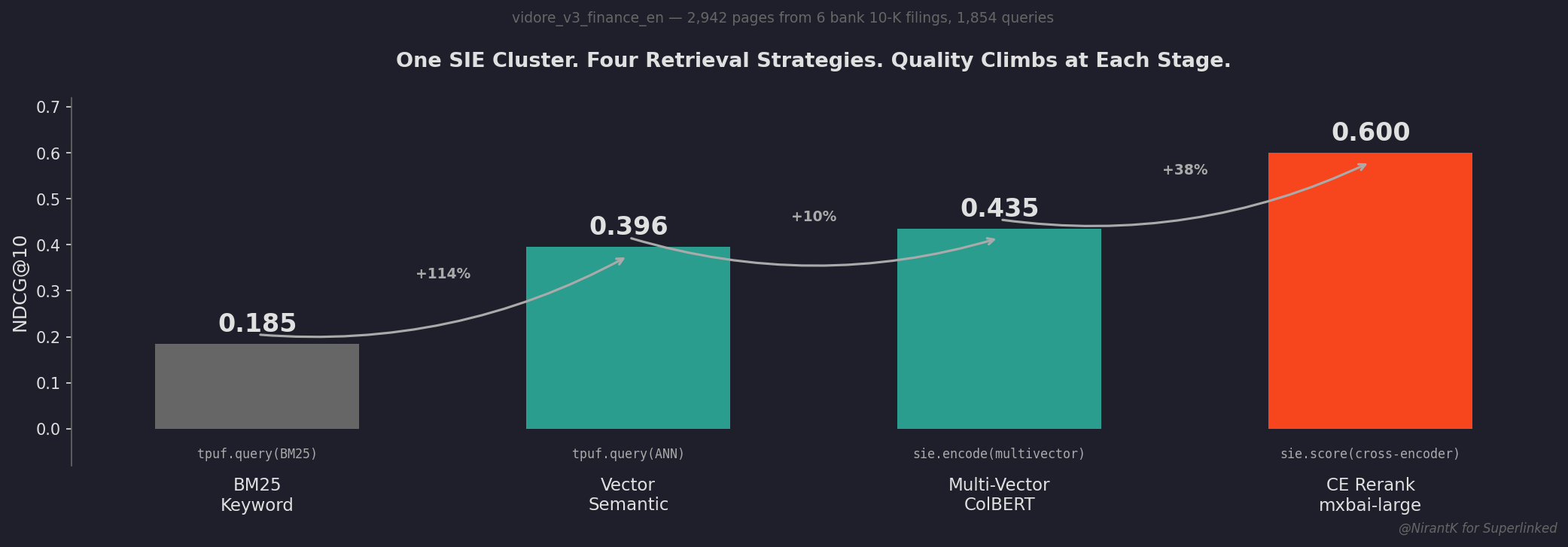 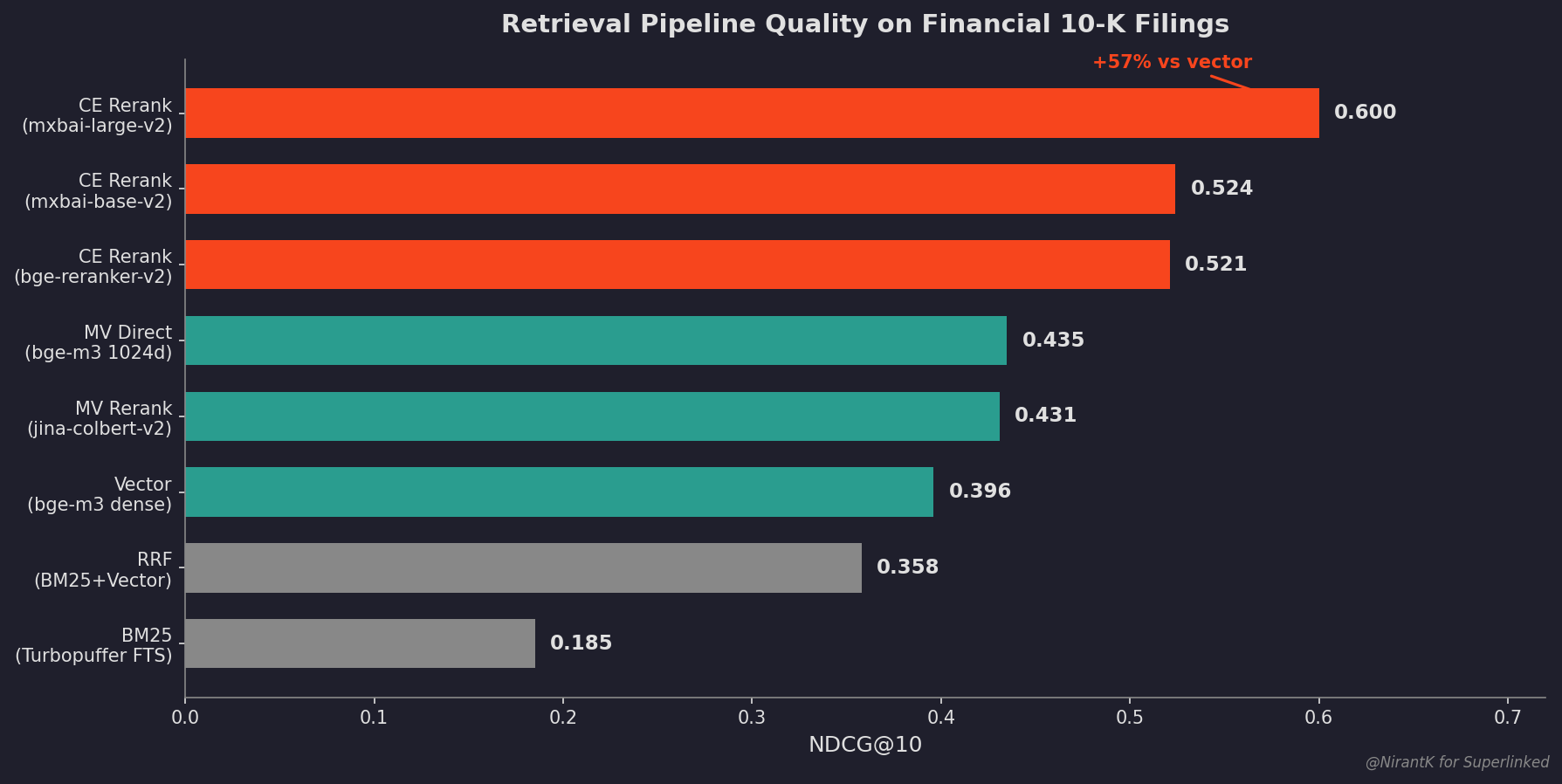
## The winner
[Section titled “The winner”](#the-winner)
**Dual multi-vector retrieval, then cross-encoder rerank.**
1. Encode queries and pages with two complementary multi-vector models, `BAAI/bge-m3` (1024d) and `jinaai/jina-colbert-v2` (128d).
2. Rerank the union of both candidate pools with `mixedbread-ai/mxbai-rerank-large-v2`.
On the same 1,854 queries this pipeline reaches **NDCG\@10 = 0.621 and Recall\@10 = 0.665**, 57% better than a single dense model and 3x better than BM25 alone.
> *Built by [@NirantK](https://twitter.com/NirantK) for [Superlinked](https://superlinked.com).*
## Pipeline in code
[Section titled “Pipeline in code”](#pipeline-in-code)
```python
from sie_sdk import SIEAsyncClient
async with SIEAsyncClient("http://your-sie-endpoint:8080", api_key="SL-...") as sie:
# Multi-vector encode with two complementary models
mv_bge = await sie.encode("BAAI/bge-m3", [{"text": "quarterly revenue"}],
output_types=["multivector"])
mv_jina = await sie.encode("jinaai/jina-colbert-v2", [{"text": "quarterly revenue"}],
output_types=["multivector"])
# Union the two pools, rerank with a cross-encoder
result = await sie.score("mixedbread-ai/mxbai-rerank-large-v2",
query={"text": "quarterly revenue"},
items=[{"text": "Revenue was $50B..."},
{"text": "The board met on Tuesday..."}])
```
Three model families, one endpoint, no container orchestration.
## Run the full pipeline
[Section titled “Run the full pipeline”](#run-the-full-pipeline)
```bash
uv sync
# Validate config (no GPU needed)
uv run python benchmark_ablation.py --dry-run
# Full benchmark across all 7 models and all 1,854 queries
uv run python benchmark_ablation.py --gpu l4-spot
```
All expensive operations (encoding, search) cache to `cache/ablation/`. Re-runs skip completed steps. Cross-encoder reranking checkpoints every 100 queries for crash recovery.
## How the experiment was set up
[Section titled “How the experiment was set up”](#how-the-experiment-was-set-up)
### Dataset
[Section titled “Dataset”](#dataset)
`vidore_v3_finance_en`: six bank 10-K filings from SEC EDGAR.
| Property | Value |
| --------------------------- | ------------------------------------- |
| Pages | 2,942 |
| Queries | 1,854 |
| Relevance judgments | 8,766 (1=relevant, 2=highly relevant) |
| Avg relevant docs per query | 4.7 |
| Median page text | 3,809 chars (\~950 tokens) |
### Conditions
[Section titled “Conditions”](#conditions)
Six conditions isolate the contribution of each pipeline stage. Conditions 4 and 5 rerank the same hybrid pool, only the reranker changes. bge-m3 plays three different roles to isolate representation type from retrieval strategy.
| # | Condition | Retriever | Reranker | What it isolates |
| - | ----------- | ------------------ | -------------------------- | -------------------------- |
| 1 | BM25-only | Turbopuffer FTS | none | Keyword baseline |
| 2 | Vector-only | bge-m3 dense ANN | none | Semantic baseline |
| 3 | RRF | Fused (k=60) | none | Does hybrid beat vector? |
| 4 | CE rerank | Hybrid pool | mxbai-rerank, bge-reranker | Cross-encoder value |
| 5 | MV rerank | Hybrid pool | 5 ColBERT models | MV vs cross-encoder |
| 6 | MV direct | Brute-force MaxSim | 5 ColBERT models | MV as standalone retriever |
Metrics: NDCG\@10, MRR\@10, Recall\@10. All computed against the official qrels.
## Headline results
[Section titled “Headline results”](#headline-results)
Ranked by NDCG\@10. Larger candidate pools (TOP\_K=50) consistently improved CE reranking.
| Strategy | Models | NDCG\@10 | Recall\@10 |
| -------------------------------- | --------------------------------------- | --------- | ---------- |
| **Dual-MV pool, then CE rerank** | bge-m3 + jina-colbert, then mxbai-large | **0.621** | **0.665** |
| MV-bge200 pool, then CE rerank | bge-m3 MV pool, then mxbai-large | 0.613 | 0.656 |
| CE rerank | mxbai-rerank-large alone | 0.600 | 0.640 |
| MV direct | bge-m3 (1024d) | 0.435 | 0.482 |
| MV rerank | jina-colbert-v2 (128d) | 0.431 | 0.494 |
| Vector | bge-m3 dense | 0.396 | 0.438 |
| RRF (BM25 + Vector) | n/a | 0.358 | 0.434 |
| BM25 | Turbopuffer FTS | 0.185 | 0.239 |
The full 15-row primary ablation, the reranker sweep, and the pool-composition experiments live in [RESULTS.md](https://github.com/superlinked/sie/blob/main/examples/retrieval-ablation/RESULTS.md).
## What the numbers say
[Section titled “What the numbers say”](#what-the-numbers-say)
1. **Cross-encoder reranking wins**: mxbai-large with the dual-MV pool (0.621) beats every retriever-only setup. The CE step is a bigger lever than picking a different retriever.
2. **Pool recall is the real bottleneck**: CE scores 0.69 within-pool. The dual-MV pool reaches 0.92 recall and tops the table; a hybrid-50 pool gets 0.77 recall and trails.
3. **Two MV models beat one**: combining bge-m3 and jina-colbert-v2 pools beats either alone. Model diversity adds recall.
4. **jina-colbert-v2 is the cost / quality sweet spot**: 96% of bge-m3 MV quality at 12.5% storage (128d vs 1024d).
5. **RRF hurts on this dataset**: BM25 dilutes the strong vector signal. The hybrid-fusion baseline scores worse than vector alone.
## Recipes by constraint
[Section titled “Recipes by constraint”](#recipes-by-constraint)
* **Best quality**: dual MV pool, then mxbai-rerank-large CE rerank (NDCG=0.621).
* **No GPU at inference**: MV direct with bge-m3 (NDCG=0.435). Pre-encode offline, score with MaxSim on CPU.
* **Best cost / quality**: jina-colbert-v2 multi-vector (NDCG=0.431). 8x less storage than bge-m3 MV at near-identical quality.
## API keys required
[Section titled “API keys required”](#api-keys-required)
| Service | What for | Get one at |
| --------------- | ---------------------------------------------------------- | ------------------------------------------------------------------------------------ |
| **SIE** | Encoding, scoring, multi-vector | Self-hosted ([deploy guide](https://github.com/superlinked/sie)) or contact the team |
| **Turbopuffer** | BM25 + vector search index (free tier covers this dataset) | [turbopuffer.com](https://turbopuffer.com) |
| **HuggingFace** | Dataset download (free, cached) | [huggingface.co/settings/tokens](https://huggingface.co/settings/tokens) |
Tip
`SIE_API_KEY` is optional. Leave it unset for a local or otherwise unauthenticated SIE deployment; set it only when your managed or auth-enabled cluster requires one.
Create `.env` in this directory:
```plaintext
SIE_BASE_URL=http://your-sie-endpoint:8080
# Optional: only needed for managed/auth-enabled SIE clusters.
SIE_API_KEY=
TURBOPUFFER_API_KEY=tpuf_...
```
By Nirant Kasliwal.
# Swap an OCR model with one identifier change
> A multi-model OCR pipeline where the recognition VLM, the end-to-end document model, and the zero-shot NER are all the same SIE extract call. Only the model ID changes.
[Try it on Hugging Face Spaces ](https://huggingface.co/spaces/superlinked/document-ocr)superlinked/document-ocr · zero install, click any sample
[View on GitHub ](https://github.com/superlinked/sie/tree/main/examples/document-ocr)examples/document-ocr
## What this is
[Section titled “What this is”](#what-this-is)
OCR is rarely a single-model problem. A real pipeline has three concerns:
1. **Recognition** (image to text). VLM-OCRs like LightOnOCR or PaddleOCR-VL take a whole document and emit Markdown.
2. **Structured extraction** (image to JSON). End-to-end document models like Donut on CORD skip the text intermediate entirely and emit nested JSON directly.
3. **Zero-shot NER on the recognized text** (text to typed fields). When you want to declare entity labels at query time instead of fine-tuning a new model.
This demo wires all three behind one SIE server. Pick a sample document on the left, swap any of the three models in the dropdowns, watch SIE hot-swap the underlying architecture with a single identifier change.
```python
# Recognition: VLM-OCR, returns Markdown
client.extract("lightonai/LightOnOCR-2-1B", Item(images=[image_bytes]))
# Structured: end-to-end Donut, returns JSON tree
client.extract("naver-clova-ix/donut-base-finetuned-cord-v2", Item(images=[image_bytes]))
# NER: zero-shot, returns typed entities
client.extract(
"urchade/gliner_multi-v2.1",
Item(text=recognized_markdown),
labels=["merchant", "total", "date"],
)
```
Each panel in the UI has a “See the SIE call” disclosure that shows the exact line of code that just ran. Swap a dropdown, the snippet updates with the one parameter that changed.
## Why SIE specifically for OCR
[Section titled “Why SIE specifically for OCR”](#why-sie-specifically-for-ocr)
You could build this with three SaaS APIs (one OCR provider, one document AI provider, one NER provider). It would work. It would also be three auth flows, three rate-limit budgets, three SDKs, and three deployment stories.
SIE collapses that into one process:
* **One server, three of the four primitives.** `encode`, `score`, `extract`. This demo uses `extract` for all three model classes.
* **One SDK call.** `client.extract(model_id, item)` works for VLM-OCR, end-to-end document AI, and zero-shot NER. Swap the model ID alone.
* **Open source, runs in your VPC.** Customer documents never leave the host running the compose. Compliance teams stop blocking you.
* **Same code laptop to Kubernetes.** SIE ships a Helm chart, KEDA autoscaling, and Terraform modules. The code in this demo runs unchanged against a production cluster; only the URL changes.
## Try it now
[Section titled “Try it now”](#try-it-now)
The fastest path is the [hosted Hugging Face Space](https://huggingface.co/spaces/superlinked/document-ocr). It runs the same code as the local Docker version.
For local Docker (no API key, runs entirely on your machine), first start takes about 5 to 8 minutes on a typical connection while the model weights download; each sample click takes about 20 to 30 s on Linux x86\_64 (about 60 to 90 s on Apple Silicon):
```bash
git clone https://github.com/superlinked/sie
cd sie/examples/document-ocr
npm install
npm start
```
`npm start` runs `docker compose up -d` (boots `ghcr.io/superlinked/sie-server:latest-cpu-transformers5`, preloads three small models), then starts a Node UI server and opens `http://localhost:3032`.
First start downloads \~5 GB of model weights
LightOnOCR-2-1B is \~4 GB on its own. Weights cache in a named Docker volume (`sie-cache`) so `docker compose down` followed by `docker compose up` skips the download.
## What runs in this demo
[Section titled “What runs in this demo”](#what-runs-in-this-demo)
* **Recognition** (default `lightonai/LightOnOCR-2-1B`): Pixtral encoder + Qwen3 decoder, 2.1B. Produces Markdown directly. Alternates include PaddleOCR-VL-1.5 and GLM-OCR (both GPU-only; the UI auto-disables them on the CPU image).
* **Structured extraction** (default `naver-clova-ix/donut-base-finetuned-cord-v2`): fine-tuned for the CORD receipt schema. Alternates include Donut on DocVQA and Donut on RVL-CDIP (16-class document classifier).
* **Zero-shot NER** (default `urchade/gliner_multi-v2.1`): 280M, multilingual, declare labels at query time. Alternates include GLiNER large, GLiNER PII, and NuMind’s NuNER Zero (different architecture, same SDK call).
## What you can do
[Section titled “What you can do”](#what-you-can-do)
* Click any sample (`receipt`, `invoice`, `business-card`, `event-poster`, `slide`, `letter`) and watch all three model classes run in one pipeline. The footer prints per-stage timings.
* Swap the recognition dropdown. The “See the SIE call” disclosure updates with the new model ID, nothing else changes.
* Swap the structured dropdown from `donut-cord-v2` to `donut-rvlcdip`. Same architecture, different fine-tune. Output shape changes from a CORD-shaped JSON tree to a 16-class document classification.
* Swap NER from `gliner_multi-v2.1` to `NuNER_Zero`. Different model family entirely (NuMind vs urchade), same SDK call, same labels.
* Compare two samples back to back: click `receipt.png` (Donut on CORD dominates because that’s its fine-tuning distribution), then click `letter.png` (the opposite: Donut produces garbage shaped like CORD; recognition + GLiNER carry the pipeline).
## SIE features used
[Section titled “SIE features used”](#sie-features-used)
* `extract` for all three model classes
## Source
[Section titled “Source”](#source)
The example lives in [examples/document-ocr](https://github.com/superlinked/sie/tree/main/examples/document-ocr) in the main SIE repo. The hosted Hugging Face Space is built from the same source.
# Self-hosted product search in 5 min
> Amazon-style search powered by three SDK calls: extract attributes, encode descriptions, score rerank candidates.
[View on GitHub ](https://github.com/superlinked/sie/tree/main/examples/ecommerce-product-search)examples/ecommerce-product-search
## What this is
[Section titled “What this is”](#what-this-is)
A complete product search demo you can clone and run on a laptop in five minutes. Type `wireless bluetooth headphones` and get ranked Amazon products back with extracted brand, color, and material filters. The whole pipeline (zero-shot attribute extraction, dense embeddings, cross-encoder reranking) runs through one local SIE server with three SDK calls. No vector DB to provision, no separate reranker service, no hand-rolled regex for attributes.
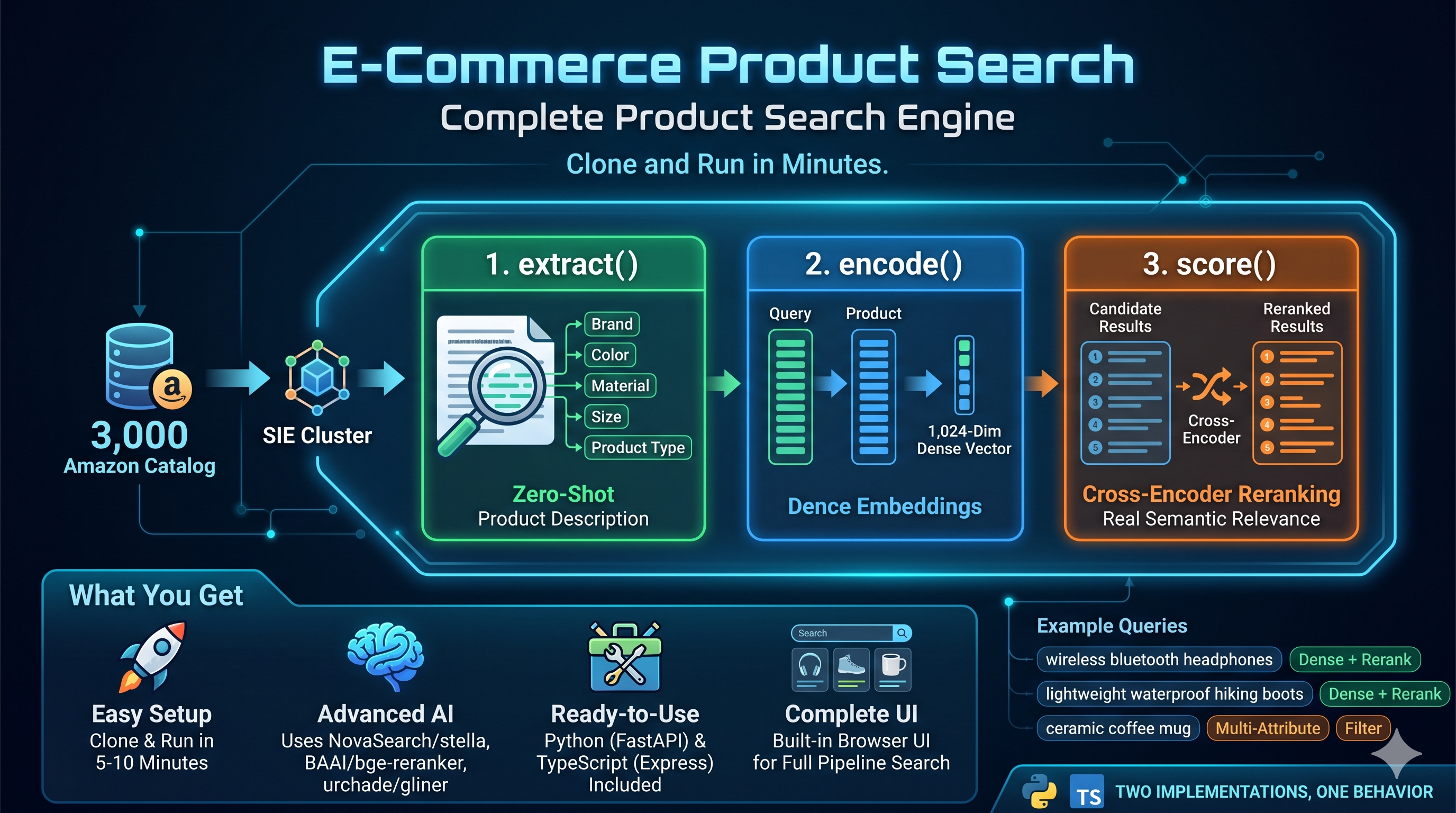
*Built by [Vipul Maheshwari](https://github.com/viplismism).*
## Try these queries
[Section titled “Try these queries”](#try-these-queries)
Once the server is running at `http://localhost:8888`, open it in your browser and try:
| Query | Filter | What it exercises |
| ------------------------------------- | ----------------- | --------------------------------------------------- |
| `wireless bluetooth headphones` | `All Electronics` | Dense retrieval plus cross-encoder rerank |
| `lightweight waterproof hiking boots` | none | Multi-attribute semantic match |
| `gold jewelry for women` | none | Style and material phrasing, rerank matters |
| `ceramic coffee mug` | `Amazon Home` | Category filter applied to extracted attributes |
| `power drill cordless` | `brand=DEWALT` | Filter on an attribute that was extracted zero-shot |
Each query flows through the full pipeline: `encode()` the query, vector search against the saved matrix, filter by extracted attributes, `score()` rerank with a cross-encoder, return the top 10.
## Run it locally (5 minutes)
[Section titled “Run it locally (5 minutes)”](#run-it-locally-5-minutes)
You need Docker, Python 3.12, and roughly 3 GB of disk for the model weights. No API keys, no signup, no cluster.
```bash
# 1. Start a local SIE server on CPU.
docker run -p 8080:8080 ghcr.io/superlinked/sie-server:latest-cpu-default
# With an NVIDIA GPU:
# docker run --gpus all -p 8080:8080 ghcr.io/superlinked/sie-server:latest-cuda12-default
# 2. In another terminal: clone, install, fetch data.
git clone https://github.com/superlinked/sie
cd sie/examples/ecommerce-product-search
pip install -r python/requirements.txt
python data/fetch_dataset.py
# 3. Build the index and start the search server.
python python/ingest.py
uvicorn --app-dir python server:app --port 8888
```
Open `http://localhost:8888` and start searching.
What to expect on the first run
`ingest.py` triggers a one-time pull of three model weights (GLiNER for extraction, Stella for embeddings, BGE-reranker for scoring, roughly 3 GB in total). On CPU this takes 5 to 10 minutes. On GPU it is closer to 2 minutes. Subsequent runs are instant because the models stay loaded.
**Want faster feedback?** Edit `config.yaml` and change `dataset.sample_size` from `3000` to `300`. Ingest finishes in about a minute, and the demo still showcases the full pipeline.
### Prefer TypeScript?
[Section titled “Prefer TypeScript?”](#prefer-typescript)
Same flow, Node 22+ and `pnpm` required. See the [TypeScript README](https://github.com/superlinked/sie/blob/main/examples/ecommerce-product-search/typescript/README.md) for the Express version.
## How it works
[Section titled “How it works”](#how-it-works)
Ingest builds a searchable index once:
1. **`extract()`** pulls structured attributes (`brand`, `color`, `material`, `size`, `product_type`) from raw product descriptions with `urchade/gliner_multi-v2.1`. Zero-shot, no training data, no custom schema work.
2. **`encode()`** embeds every product’s title and description into 1,024-dim dense vectors with `NovaSearch/stella_en_400M_v5`.
The index is just two files on disk (`data/embeddings.npy` and `data/metadata.json`).
Search runs this on every incoming query:
1. **`encode()`** the query with a query-side prefix (Stella is asymmetric).
2. Cosine similarity against the in-memory matrix gives the top 100 candidates.
3. Filter by extracted attributes if the request specifies any.
4. **`score()`** reranks the candidates with the `BAAI/bge-reranker-v2-m3` cross-encoder and returns the top 10.
Three model families, three roles, one endpoint. No per-model container to ship, no GPU scheduling to babysit, no separate reranker service.
## API reference
[Section titled “API reference”](#api-reference)
Both backends expose the same three endpoints.
### `GET /api/search`
[Section titled “GET /api/search”](#get-apisearch)
| Parameter | Required | Description |
| ---------- | -------- | -------------------------------------------------------------- |
| `q` | yes | Search query |
| `category` | no | Category filter (matches against the product category) |
| `brand` | no | Brand filter (matches against the extracted `brand` attribute) |
```bash
curl "http://localhost:8888/api/search?q=waterproof+boots&brand=Columbia"
```
Response:
```json
{
"query": "waterproof boots",
"filters": { "brand": "Columbia" },
"results": [
{
"id": "",
"title": "",
"description": "",
"category": "AMAZON FASHION",
"price": "",
"rating": "",
"image": "",
"features": ["", ""],
"attributes": {
"brand": "Columbia",
"color": ""
},
"scores": {
"vector": "",
"rerank": ""
}
}
]
}
```
### `GET /api/categories`
[Section titled “GET /api/categories”](#get-apicategories)
Returns category counts as `[name, count]` tuples (feeds the dropdown in the UI).
### `GET /api/stats`
[Section titled “GET /api/stats”](#get-apistats)
Returns index size, embedding dims, and the three model names.
## Troubleshooting
[Section titled “Troubleshooting”](#troubleshooting)
| Symptom | Fix |
| --------------------------------- | ----------------------------------------------------------------------------------------- |
| `Connection refused` on port 8080 | `docker run` is not running or crashed. Check `docker ps`. |
| Ingest seems stuck | First run is downloading \~3 GB of model weights. Check `docker logs` for progress. |
| Port 8888 already in use | Pick another: `uvicorn --app-dir python server:app --port 9000` |
| Filter returns 0 matches | Server logs a warning and falls back to unfiltered top-k so the UI still shows something. |
| On CPU, ingest is too slow | Edit `config.yaml`, set `dataset.sample_size: 300`. |
## Customize
[Section titled “Customize”](#customize)
Both implementations read the same `config.yaml`. The defaults work out of the box for local Docker. Tune only when you need to.
```yaml
cluster:
url: "http://localhost:8080"
api_key: ""
gpu: "" # set to "l4-spot" or similar when targeting a managed multi-GPU cluster
provision_timeout_s: 600
models:
embedding: "NovaSearch/stella_en_400M_v5"
reranker: "BAAI/bge-reranker-v2-m3"
extractor: "urchade/gliner_multi-v2.1"
extract_labels:
- brand
- color
- material
- size
- product_type
search:
top_k_candidates: 100
top_k_results: 10
ingest:
batch_size_extraction: 8
batch_size_encoding: 32
confidence_threshold: 0.5
junk_text_max_len: 15
dataset:
name: "milistu/AMAZON-Products-2023"
sample_size: 3000
min_description_length: 100
```
Swap any of the three models for another one in the SIE catalog and the pipeline keeps working. That is the point.
## Project layout
[Section titled “Project layout”](#project-layout)
```text
examples/ecommerce-product-search/
├── config.yaml
├── data/
│ ├── fetch_dataset.py
│ └── products.json # generated by fetch_dataset.py
├── python/
│ ├── ingest.py
│ ├── search.py
│ ├── server.py
│ └── requirements.txt
├── static/
│ └── index.html # shared browser UI
└── typescript/
├── package.json
└── src/
├── ingest.ts
├── search.ts
└── server.ts
```
By Vipul Maheshwari.
# Private fine-tuned compliance RAG
> A regulatory RAG pipeline that hot-loads a domain LoRA at request time and reranks plus prunes context in one forward pass.
[View on GitHub ](https://github.com/superlinked/sie/tree/main/examples/regulatory-rag)examples/regulatory-rag
## What this is
[Section titled “What this is”](#what-this-is)
A regulatory-intelligence RAG stack that does two things stock embedding servers can’t.
**Hot-loaded LoRA encoder.** The base `answerdotai/ModernBERT-base` model lives on the GPU once. A named profile (`us-regulatory`) flips on the `sugiv/modernbert-us-stablecoin-encoder` LoRA adapter (8.77 MB, r=16, α=32) at request time and produces a domain-adapted 768-dim embedding. No separate deployment, no separate container, no model swap. Add another domain by adding another profile block to a YAML.
**Custom cross-encoder that reranks and prunes in one pass.** A `PruningHead` MLP (525K params) sits on top of a frozen `BAAI/bge-reranker-v2-m3`. The classifier output is the rerank score for `sie.score()`; the per-token hidden states become keep / drop probabilities exposed through `sie.extract()`. So one forward pass does both, and the surviving spans become the LLM context. Average compression: 74% character-count reduction on the reranked passages.
Everything needed to host this lives in [`server-plugin/`](https://github.com/superlinked/sie/tree/main/examples/regulatory-rag/server-plugin) as a thin Docker-baked extension on top of the public `sie-server` image.
## The pipeline
[Section titled “The pipeline”](#the-pipeline)
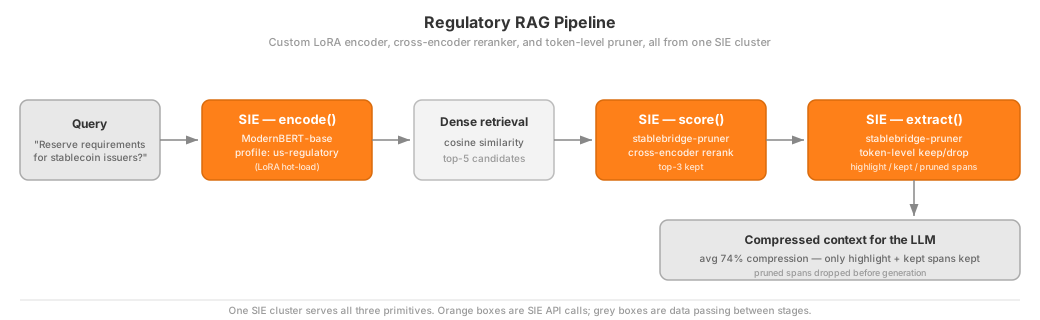
Detail per stage:
* **Encode**: `ModernBERT-base` with the `us-regulatory` profile, which hot-loads the `sugiv/modernbert-us-stablecoin-encoder` LoRA weights at request time. Produces a 768-dim domain-adapted embedding.
* **Dense retrieval**: in-memory cosine similarity over the corpus, top-5 kept.
* **Score / Rerank**: `sugiv/stablebridge-pruner-highlighter` cross-encoder, keeps top-3.
* **Extract / Prune**: same Stablebridge model, second primitive. Returns token-level keep/drop probabilities aggregated into `highlight` / `kept` / `pruned` spans.
* **LLM context**: the surviving `highlight` and `kept` spans become the compressed context passed downstream. Averages 74% compression vs. the raw reranked passages.
## Why this example exists
[Section titled “Why this example exists”](#why-this-example-exists)
Most OSS inference servers assume you are running off-the-shelf models. Real teams don’t. They fine-tune encoders on their domain, they train pruner heads to cut LLM context costs, they mix and match. This example shows the full path (**extend the server, register new models, hit them from the SDK**) using a regulatory-intelligence use case built on public-good data.
Two model additions drive the pipeline:
| Model | Base | Task | What it adds |
| --------------------------------------------------------------------------------------------------------- | ----------------------------- | -------------- | ----------------------------------------------------------------------------------------------------------------------------------------------------------------- |
| [`sugiv/modernbert-us-stablecoin-encoder`](https://huggingface.co/sugiv/modernbert-us-stablecoin-encoder) | `answerdotai/ModernBERT-base` | encode | LoRA adapter (r=16, α=32, 8.77 MB) fine-tuned on US stablecoin regulations. Hot-loaded via the `us-regulatory` profile on the base model, no separate deployment. |
| [`sugiv/stablebridge-pruner-highlighter`](https://huggingface.co/sugiv/stablebridge-pruner-highlighter) | `BAAI/bge-reranker-v2-m3` | score, extract | `PruningHead` MLP (525K params) on top of the frozen reranker. Produces rerank scores *and* token-level keep/drop probabilities in one forward pass. |
## SIE features demonstrated
[Section titled “SIE features demonstrated”](#sie-features-demonstrated)
| Feature | How it’s used here |
| ----------------------- | ------------------------------------------------------------------------------------------------------------------- |
| **encode** | Domain-adapted dense embeddings (ModernBERT + LoRA) |
| **score** | Cross-encoder reranking of retrieved candidates |
| **extract** | Token-level pruning + sentence-level highlight spans |
| **profiles** | `us-regulatory` profile activates LoRA weights at request time |
| **custom adapter** | `StablebridgePrunerAdapter` extends `sie_server.adapters.ModelAdapter` to add pruning under the `extract` primitive |
| **cost-based batching** | SIE batches by token count, handling variable-length regulatory docs |
| **model sharing** | Encoder + pruner share one GPU via SIE’s LRU memory management |
## Quick start
[Section titled “Quick start”](#quick-start)
### 1. Build a custom sie-server image
[Section titled “1. Build a custom sie-server image”](#1-build-a-custom-sie-server-image)
Everything the pipeline needs on the server side is packaged in [`server-plugin/`](https://github.com/superlinked/sie/tree/main/examples/regulatory-rag/server-plugin): the patch, the adapter, the YAMLs.
```bash
# From this directory
docker build -t sie-regulatory --build-arg SIE_TAG=latest-cuda12-default ./server-plugin
docker run --gpus all -p 8080:8080 sie-regulatory
# CPU-only also works for the tiny sample corpus:
# docker build -t sie-regulatory --build-arg SIE_TAG=latest-cpu-default ./server-plugin
# docker run -p 8080:8080 sie-regulatory
```
See the [server-plugin README](https://github.com/superlinked/sie/blob/main/examples/regulatory-rag/server-plugin/README.md) for what is in the image and how to extend it further.
### 2. Run the pipeline
[Section titled “2. Run the pipeline”](#2-run-the-pipeline)
```bash
# No dependencies to install; the client uses stdlib urllib.
python rag_pipeline.py
```
Options:
```plaintext
--url URL SIE server URL (default: http://localhost:8080)
--query TEXT Custom query (default: runs all sample regulatory queries)
--top-k N Candidates from dense retrieval (default: 5)
--output PATH Save results as JSON
--quiet Minimal output
```
## Benchmark results (RTX PRO 6000 Blackwell, 98GB VRAM)
[Section titled “Benchmark results (RTX PRO 6000 Blackwell, 98GB VRAM)”](#benchmark-results-rtx-pro-6000-blackwell-98gb-vram)
| Operation | Mean Latency | p95 Latency | Notes |
| --------------------- | ------------ | ----------- | -------------------------------------- |
| Encode (base) | 20 ms | 25 ms | 768-dim dense embedding |
| Encode (LoRA) | 23 ms | 27 ms | +3 ms for LoRA adapter switch |
| Score (2 candidates) | 15 ms | 17 ms | Cross-encoder reranking |
| Score (10 candidates) | 19 ms | 21 ms | Sub-linear scaling |
| Extract (single doc) | 17 ms | 19 ms | Pruning + highlighting |
| **E2E Pipeline** | **61 ms** | **66 ms** | Encode, then Score(5), then Extract(1) |
100% correct ranking on relevant vs. irrelevant passages. Average 74% character-count compression on the final context vs. the raw reranked passages. On smaller GPUs (A10G, L4) expect 3 to 4 times these numbers.
## Files
[Section titled “Files”](#files)
```plaintext
regulatory-rag/
├── rag_pipeline.py # 3-stage RAG pipeline (stdlib only)
├── sample_corpus.json # 12 US regulatory passages
├── README.md
└── server-plugin/
├── README.md # What the plugin does, how to extend it
├── Dockerfile # Builds sie-server with the extensions baked in
├── encode_lora_routing.patch
├── adapters/
│ └── stablebridge_pruner/
│ └── __init__.py # Custom ModelAdapter, 659 lines
└── models/
├── answerdotai__ModernBERT-base.yaml
└── sugiv__stablebridge-pruner-highlighter.yaml
```
## Architecture notes
[Section titled “Architecture notes”](#architecture-notes)
**LoRA as a profile.** SIE serves LoRA adapters by loading the base model once and activating LoRA weights via named profiles. When the pipeline calls `encode("answerdotai/ModernBERT-base", profile="us-regulatory")`, SIE applies the `sugiv/modernbert-us-stablecoin-encoder` weights to the shared base, with no separate deployment or rebuild. Swap in another LoRA by adding another profile block to the model YAML.
**The pruner as an adapter.** `StablebridgePrunerAdapter` wraps a frozen `BAAI/bge-reranker-v2-m3` with a trained `PruningHead` MLP (1024 to 512 to 1). It exposes both `score()` and `extract()` from the same forward pass. The classifier output becomes the rerank score, the per-token hidden states become keep/drop probabilities. That is a new kind of primitive that would not exist in a stock embedding server.
**Entities are just SIE entities.** The pruner returns semantic labels you can filter on downstream:
* **`highlight`** (score ≥ 0.9): directly answers the query
* **`kept`** (score ≥ 0.6): supporting context worth preserving
* **`pruned`** (score < 0.6): can be safely removed
* **`summary`**: compression statistics
## Credits
[Section titled “Credits”](#credits)
Built by [@sugix](https://github.com/sugix) as part of the SIE alpha tester program. LoRA training used `answerdotai/ModernBERT-base` on a curated corpus of US stablecoin regulation; pruner head trained on BEIR-style relevance judgments.
## License
[Section titled “License”](#license)
Apache 2.0, same as SIE.
By Sugi Venugeethan.
# Find SOTA embedding models by MTEB task
> Semantic search across ~14K HF embedding models, ranked by task-specific MTEB scores.
[View on GitHub ](https://github.com/superlinked/sie/tree/main/examples/sie-hugging-face-mteb-semantic-search)examples/sie-hugging-face-mteb-semantic-search
## What this is
[Section titled “What this is”](#what-this-is)
SIE ships with 100+ specialized models (BGE, Qwen3, Stella, ColBERT, ColPali, GLiNER, Florence-2, and many more) and the broader HF embedding catalog has thousands more. Picking the right one for *your* task is hard: the MTEB leaderboard shows averaged scores that hide per-task strengths, and HF search is keyword-only.
This example is a small app that solves that. Describe what you are building in plain language (“multilingual long-document retrieval”, “zero-shot entity extraction from invoices”, “reranking for financial search”) and get back the SIE-ready model id you can paste straight into `client.encode()`, `client.score()`, or `client.extract()`. Under the hood it indexes \~14K model cards into ChromaDB through SIE, ranks by task-specific MTEB scores, and uses an LLM-generated description as the search target.
**Two modes.** *Zero-setup mode* runs a local text ranker against a bundled demo catalog: no SIE, no API keys, good for kicking the tires. *Full mode* uses your SIE endpoint for embeddings and OpenRouter for LLM-generated descriptions, the production path. Copy `backend/.env.example` to `backend/.env` and fill in only the keys for the mode you want. The sections below walk through both.
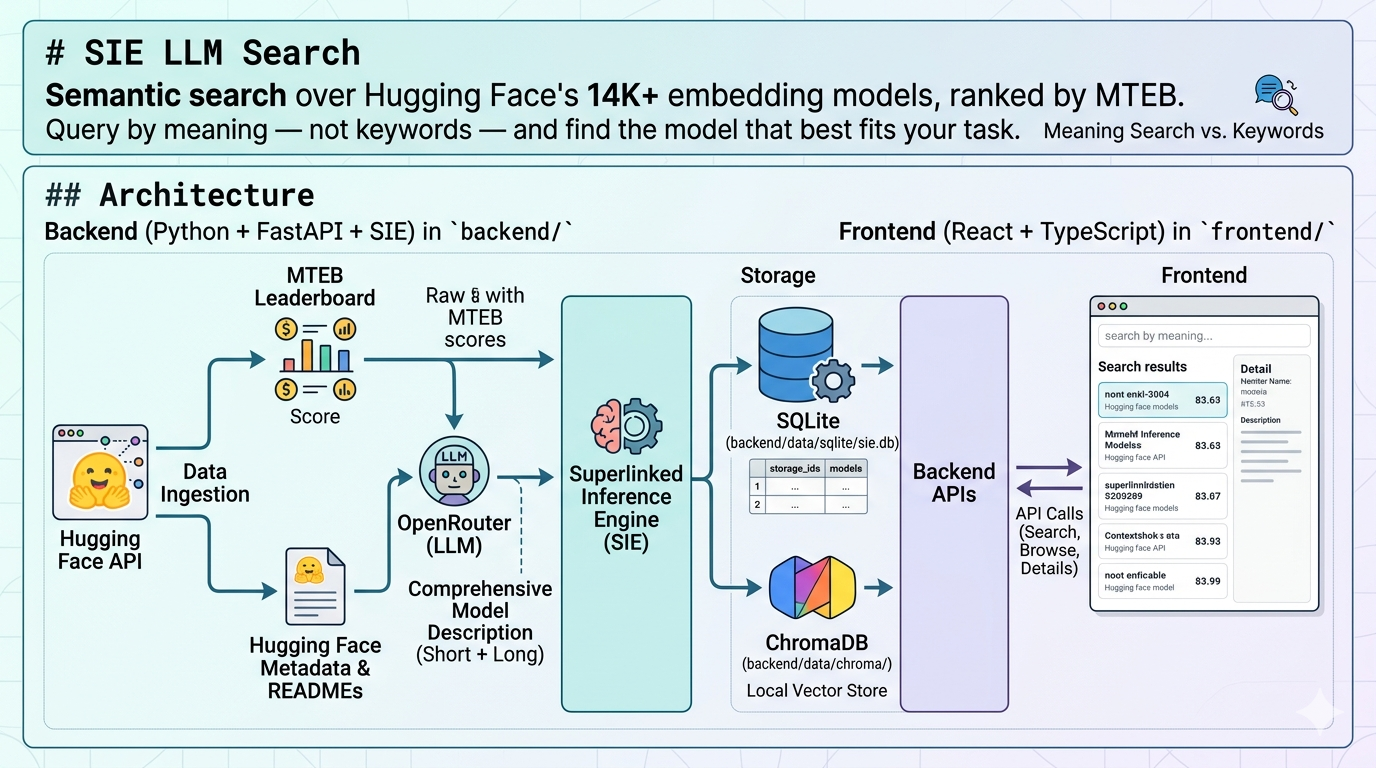
## Architecture
[Section titled “Architecture”](#architecture)
* **Backend**: Python service in `backend/` (FastAPI + SIE):
* SQLite in `backend/data/sqlite/sie.db` with tables `storage_ids` and `models`.
* ChromaDB in `backend/data/chroma/` as the local vector store.
* Superlinked Inference Engine (SIE) produces embeddings for short and long descriptions.
* OpenRouter generates descriptions from HF metadata + README + MTEB scores.
* **Frontend**: TypeScript + React app in `frontend/` that calls the backend APIs for search, browse, and model details.
```mermaid
flowchart LR
UI[Frontend React + Vite]
API[FastAPI backend/app]
SQL[(SQLite models, storage_ids)]
Chroma[(ChromaDB short + long vectors)]
SIE[SIE embeddings]
OR[OpenRouter description LLM]
HF[HuggingFace metadata + README]
MTEB[MTEB cache benchmark scores]
UI -->|/api/...| API
API --> SQL
API --> Chroma
Chroma --> SIE
API --> OR
API --> HF
API --> MTEB
```
## Try it locally first
[Section titled “Try it locally first”](#try-it-locally-first)
You can run the project without a SIE endpoint, OpenRouter key, or Hugging Face token. The repo includes a small bundled demo catalog plus a local text-ranking fallback.
```bash
cd backend
pip install -r requirements.txt
python cli_seed_demo.py
python -m uvicorn app.main:app --reload --port 8000
cd ../frontend
npm install
npm run dev
```
Then open `http://localhost:5173` and use storage id `demo`.
What works in local demo mode:
* browse the bundled model cards
* open model details and bundled READMEs
* run simple search and reranked search through the local fallback ranker
What still needs live services:
* downloading fresh Hugging Face model metadata
* generating descriptions through OpenRouter
* vector search and Chroma reindexing through a real SIE endpoint
## Why SIE is useful here
[Section titled “Why SIE is useful here”](#why-sie-is-useful-here)
This project is not just a model browser. It shows how SIE helps turn a large model catalog into a searchable product experience.
With SIE, the same application can start in a lightweight local demo mode and then move to live semantic search with real embeddings when you connect a running SIE endpoint. That makes it easier to prototype, evaluate, and operationalize search workflows without rebuilding the app around a different serving stack.
In practice, this example shows three concrete benefits:
* a single API surface for semantic search workflows
* a clear path from local exploration to live inference-backed search
* less custom infrastructure to wire together when testing retrieval ideas on real model metadata
## Project layout
[Section titled “Project layout”](#project-layout)
```plaintext
sie-hugging-face-mteb-semantic-search/
├── backend/
│ ├── app/
│ │ ├── api/routes/ # FastAPI routers: models, generate, search, chroma
│ │ ├── db/ # SQLAlchemy models, session, migrations
│ │ ├── services/ # chroma, fallback search, llm, openrouter, sie_chroma
│ │ ├── prompts/ # description prompt templates (.md)
│ │ ├── config.py # pydantic-settings, reads backend/.env
│ │ └── main.py # FastAPI app factory
│ ├── cli_download.py # download HF metadata + MTEB scores
│ ├── cli_generate.py # generate short/long descriptions + index
│ ├── cli_reindex.py # rebuild Chroma from existing descriptions
│ ├── cli_seed_demo.py # seed bundled demo catalog for local use
│ ├── cli_sie_status.py # inspect SIE server health + loaded models
│ ├── demo_models.json # bundled demo data for public quickstart
│ ├── data/ # sqlite/, chroma/, hf-cache/ (gitignored)
│ └── requirements.txt
├── frontend/
│ ├── src/App.tsx # single-file React app, four tabs
│ └── package.json
├── assets/
└── README.md
```
## Prerequisites
[Section titled “Prerequisites”](#prerequisites)
* **Python 3.12** and `pip`.
* **Node.js 18+** and `npm`.
* An **OpenRouter** API key if you want to generate new descriptions.
* A running **SIE** endpoint if you want live vector indexing and embedding search. `SIE_API_KEY` is optional and only needed for managed or auth-enabled clusters.
* Optional: a **Hugging Face** token, useful for higher rate limits.
## Installation
[Section titled “Installation”](#installation)
Backend:
```bash
cd backend
pip install -r requirements.txt
```
Frontend:
```bash
cd frontend
npm install
```
## Configuration
[Section titled “Configuration”](#configuration)
All backend settings come from environment variables or `backend/.env`. See `backend/app/config.py` for the full list; the important keys are:
| Variable | Default | Purpose |
| ---------------------- | ---------------------------------- | ----------------------------------------------------------- |
| `HF_TOKEN` | *(empty)* | Optional, raises HuggingFace rate limits |
| `OPENROUTER_API_KEY` | *(empty, required for generation)* | Auth for OpenRouter description calls |
| `OPENROUTER_MODEL` | `google/gemini-3.1-pro-preview` | Default LLM used by CLI + UI |
| `LLM_MAX_PARALLEL` | `20` | Max in-flight OpenRouter calls |
| `SIE_API_ENDPOINT` | *(empty, required for embeddings)* | URL of the SIE server |
| `SIE_API_KEY` | *(empty)* | Optional bearer token for managed/auth-enabled SIE clusters |
| `SIE_EMBED_MODEL` | `NovaSearch/stella_en_400M_v5` | Embedding model registered on SIE |
| `SIE_EMBED_BATCH_SIZE` | `32` | Texts per SIE encode call |
| `SQLITE_PATH` | `data/sqlite/sie.db` | Local SQLite database path |
| `CHROMA_PATH` | `data/chroma` | Local ChromaDB directory |
Minimal `backend/.env` for live services:
```env
OPENROUTER_API_KEY=sk-or-...
SIE_API_ENDPOINT=https://your-sie-host
# Optional: only needed for managed/auth-enabled SIE clusters.
SIE_API_KEY=
HF_TOKEN=hf_... # optional
```
## How to use
[Section titled “How to use”](#how-to-use)
### 0. Seed the bundled demo catalog
[Section titled “0. Seed the bundled demo catalog”](#0-seed-the-bundled-demo-catalog)
If you want the no-credentials path, seed the bundled local catalog first:
```bash
cd backend
python cli_seed_demo.py
```
Then use storage id `demo` in the UI.
### 1. Run the backend
[Section titled “1. Run the backend”](#1-run-the-backend)
```bash
cd backend
pip install -r requirements.txt
python -m uvicorn app.main:app --reload --port 8000
```
Verify: `http://localhost:8000/health` returns `{"status":"ok"}`.
### 2. Run the frontend
[Section titled “2. Run the frontend”](#2-run-the-frontend)
```bash
cd frontend
npm install
npm run dev
```
Then open `http://localhost:5173`. For the local demo flow, start with storage id `demo`.
### 3. Check the SIE server with `cli_sie_status.py`
[Section titled “3. Check the SIE server with cli\_sie\_status.py”](#3-check-the-sie-server-with-cli_sie_statuspy)
Inspects liveness, readiness, loaded embedding models, and worker pools.
```bash
cd backend
python cli_sie_status.py # full status report
python cli_sie_status.py --health # /health only
python cli_sie_status.py --models # list loaded models
python cli_sie_status.py --pools # list worker pools
```
### 4. Download model metadata with `cli_download.py`
[Section titled “4. Download model metadata with cli\_download.py”](#4-download-model-metadata-with-cli_downloadpy)
Selects the top MTEB-benchmarked models (ranked by number of benchmark tasks), fetches their Hugging Face metadata in parallel, and stores everything under a logical `storage_id` in SQLite.
```bash
cd backend
# Top 30 models, append to storage (default)
python cli_download.py test01
# Top 100 models, 20-way parallel HF fetch
python cli_download.py test01 --limit 100 --parallel 20
# Wipe the storage first (same as the web UI "Download" button)
python cli_download.py test01 --overwrite
# Show which models would be fetched without actually downloading
python cli_download.py test01 --dry-run
```
Demo READMEs are bundled locally. Live Hugging Face READMEs are fetched on demand for downloaded models (see Operations notes below).
### 5. Generate descriptions and index with `cli_generate.py`
[Section titled “5. Generate descriptions and index with cli\_generate.py”](#5-generate-descriptions-and-index-with-cli_generatepy)
Runs the same pipeline as the web UI *Generate Descriptions* buttons:
1. Prepare 6K prompt (HF metadata + live README + MTEB summary).
2. Generate 6K detailed description via OpenRouter.
3. Generate 2K long description from the 6K output.
4. Generate 200-char short description from the 6K output.
5. Save short + long to SQLite.
6. Upsert both embeddings into ChromaDB via SIE.
```bash
cd backend
# All models in the storage, default parallelism (LLM_MAX_PARALLEL)
python cli_generate.py test01
# Single model only
python cli_generate.py test01 BAAI/bge-large-en-v1.5
# Skip models that already have short + long descriptions
python cli_generate.py test01 --skip-existing --parallel 50
# Override the default OPENROUTER_MODEL
python cli_generate.py test01 --model google/gemini-2.5-flash
# Rebuild Chroma from existing SQLite descriptions, skip LLM calls
python cli_generate.py test01 --reindex-only
# Prepare prompts but don't call the LLM or save
python cli_generate.py test01 --dry-run
```
### 6. Rebuild the vector index only with `cli_reindex.py`
[Section titled “6. Rebuild the vector index only with cli\_reindex.py”](#6-rebuild-the-vector-index-only-with-cli_reindexpy)
Drops and rebuilds the `models_{storage_id}` Chroma collection from the current SQLite descriptions. Useful if the vector DB is out of sync, or after switching `SIE_EMBED_MODEL`.
```bash
cd backend
python cli_reindex.py test01
python cli_reindex.py test01 --batch-size 16
```
## Frontend
[Section titled “Frontend”](#frontend)
Single-page React app (`frontend/src/App.tsx`) with four tabs, in this order:
1. **Search with Reranking**: the recommended entry point. Runs a short-description kNN, then reranks the candidates by long-description similarity. Calls `POST /api/search/semantic-rerank`.
2. **Simple search**: single-stage semantic search on short descriptions. Calls `POST /api/search/semantic`.
3. **Download LLM Cards**: triggers `POST /api/models/download` to (re)populate a storage with the top MTEB-benchmarked HF models.
4. **Browse LLM Cards**: filters stored models by `storage_id` and optional `hf_id` substring; each row opens a full detail view with MTEB scores, the live HF README, and a *Generate descriptions* modal.
The Search with Reranking tab is the default when the app loads.
A full walk-through of the UI fields and modals lives in [`frontend/frontend.md`](https://github.com/superlinked/sie/blob/main/examples/sie-hugging-face-mteb-semantic-search/frontend/frontend.md).
## Data model
[Section titled “Data model”](#data-model)
### Table `storage_ids`
[Section titled “Table storage\_ids”](#table-storage_ids)
| Column | Type | Notes |
| ------------- | -------- | ------------------------------- |
| `id` | int PK | |
| `storage_id` | string | Unique, indexed (e.g. `test01`) |
| `description` | string? | Free-text |
| `created_at` | datetime | Server default |
### Table `models`
[Section titled “Table models”](#table-models)
| Column | Type | Notes |
| ----------------------------------------------------------------------------- | ------------- | ----------------------------------------------------------- |
| `id` | int PK | |
| `storage_id` | int FK | Cascades to `storage_ids.id` |
| `hf_id` | string | HuggingFace model id, indexed |
| `created_at` | datetime | When this row was stored locally |
| `created_at_hf` | datetime? | HF model creation time |
| `last_modified` | datetime? | HF last modified |
| `author`, `sha` | string? | |
| `private`, `disabled` | bool? | |
| `downloads`, `downloads_all_time`, `downloads_30d`, `likes`, `trending_score` | numeric? | HF metrics |
| `tags` | JSON | HF tag array |
| `pipeline_tag`, `library_name`, `mask_token` | string? | |
| `config`, `card_data` | JSON | Small structured HF metadata |
| `mteb_scores` | JSON | Compact `[{task_name, main_score}, ...]`, averaged per task |
| `short_description` | varchar(200) | At most 200 characters |
| `long_description` | varchar(2048) | At most 2048 characters |
**Not stored locally:** `readme`, `siblings`, `safetensors`, `spaces`, and the raw nested MTEB per-subset/per-split JSON. These would blow SQLite past several GB across the full catalog.
### Chroma collection `models_{storage_id}`
[Section titled “Chroma collection models\_{storage\_id}”](#chroma-collection-models_storage_id)
Holds **two entries per model**:
* id `"{hf_id}::short"` with `kind="short"`: embedding of `short_description`.
* id `"{hf_id}::long"` with `kind="long"`: embedding of `long_description`.
Both are produced by the same `SIEEmbeddingFunction`. The `kind` metadata lets each search endpoint filter to the right set.
## Search APIs
[Section titled “Search APIs”](#search-apis)
Semantic search lets users describe a task in plain language and find the embedding models whose descriptions are closest in meaning. Two endpoints are available, a single-stage short-description search and a two-stage rerank search.
Both share the same request shape:
```json
{
"storage_id": "test01",
"query": "evaluate medical pictures",
"n_results": 20
}
```
### `POST /api/search/semantic`: single stage
[Section titled “POST /api/search/semantic: single stage”](#post-apisearchsemantic-single-stage)
Embeds the query, kNN-searches the `kind="short"` entries, returns up to `n_results` models sorted by cosine distance.
Response:
```json
{
"storage_id": "test01",
"query": "evaluate medical pictures",
"results": [
{ "hf_id": "BAAI/bge-large-en-v1.5", "distance": 0.123, "short_description": "..." }
]
}
```
### `POST /api/search/semantic-rerank`: two stage
[Section titled “POST /api/search/semantic-rerank: two stage”](#post-apisearchsemantic-rerank-two-stage)
1. **Stage 1, short kNN:** `collection.query(query_texts=[query], n_results=N, where={"kind": "short"})` returns candidate models with their short-distance scores.
2. **Stage 2, long rerank:** `collection.query(query_texts=[query], n_results=len(candidates), where={"$and": [{"kind": "long"}, {"hf_id": {"$in": candidates}}]})` makes Chroma recompute cosine distance against only those candidates’ long vectors.
3. Results are merged by `hf_id`, sorted by `rerank_distance` ascending; any candidate without a long embedding falls back to `short_distance` and is appended at the end.
Response:
```json
{
"storage_id": "test01",
"query": "evaluate medical pictures",
"results": [
{
"hf_id": "BAAI/bge-large-en-v1.5",
"rerank_distance": 0.087,
"short_distance": 0.123,
"short_description": "..."
}
]
}
```
`rerank_distance` is `null` for any fallback item.
### Index population
[Section titled “Index population”](#index-population)
* **Auto:** `POST /api/generate/save` calls `upsert_embedding(storage_id, hf_id, short, long)` after every save, keeping both Chroma entries in sync. Clearing a description deletes that `kind`’s entry.
* **Bulk (re)build:** `python cli_reindex.py `.
## Operations notes
[Section titled “Operations notes”](#operations-notes)
### Why README is not stored locally
[Section titled “Why README is not stored locally”](#why-readme-is-not-stored-locally)
At 14,000 models, storing HF READMEs in SQLite blows the database past several GB. Instead, only small fields live in SQLite (metadata, tags, compact MTEB scores, the two generated descriptions). The full README is fetched **live from HuggingFace** via `GET /api/models/readme/{hf_id}` whenever the user opens a detail view, and for description generation (`ModelCard.load(hf_id).text` truncated to 4000 chars). A small in-memory LRU avoids hammering HF.
### Migrating from older schemas
[Section titled “Migrating from older schemas”](#migrating-from-older-schemas)
Earlier versions also stored `readme`, `siblings`, `safetensors`, `spaces`, and the raw nested `mteb_results`. If you are migrating an existing DB:
```bash
cd backend
python cli_download.py --overwrite
sqlite3 data/sqlite/sie.db "VACUUM;"
```
SQLite does not shrink on its own after row deletes. The `VACUUM;` step is what actually reclaims disk.
### Description generation pipeline
[Section titled “Description generation pipeline”](#description-generation-pipeline)
The CLI and UI both follow the same six-step pipeline:
1. Render the **6K detailed** prompt from model JSON, live README (4K chars max), and MTEB summary.
2. Call OpenRouter, returns **6K detailed description** (not persisted).
3. Call OpenRouter with the 6K text, returns **2K long description**.
4. Call OpenRouter with the 6K text, returns **200-char short description**.
5. Save short + long into the `models` table.
6. Upsert short + long embeddings into ChromaDB via SIE.
Prompt templates live in `backend/app/prompts/*.md` and can be edited without touching Python code.
By Zolt Balai.
# A Stripe Link checkout with an SIE fraud-risk gate
> Three SIE primitives (extract, encode, score) score every order against a corpus of past fraud patterns before the Stripe PaymentIntent is created. The risk band annotates the Stripe Link payment button in the same UI, in the same request.
[View on GitHub ](https://github.com/superlinked/sie/tree/main/examples/stripe-link-fraud)examples/stripe-link-fraud
## What this demo actually shows
[Section titled “What this demo actually shows”](#what-this-demo-actually-shows)
Imagine you run a small e-commerce shop. You added Stripe Link to your checkout because the one-click experience for returning shoppers really does lift conversion. Three months in, the chargebacks start. Not from the returning Link customers (those are golden); from the brand-new signups: a brand-new email opens an account, adds a gift card, pays with Link, the card is stolen, and twenty days later the issuer claws the money back. You eat the loss and the fee.
The natural reaction is to bolt on a fraud-scoring SaaS. That works. It also adds a third auth flow, a fourth SDK, a fifth vendor that needs to see your customer’s email and shipping address, and a compliance review that takes two months.
This demo shows the other path: **the fraud scoring runs against the same SIE server your search and embeddings already run against**. Three SIE primitives, three lines of code:
```ts
// 1. Extract typed signals from the order context
const entities = await client.extract(
"urchade/gliner_multi-v2.1",
{ text: orderSummary },
{ labels: ["product", "shipping_address", "email_domain", "amount"] },
);
// 2. Encode the context into a dense vector
const { dense } = await client.encode(
"sentence-transformers/all-MiniLM-L6-v2",
{ text: orderSummary },
);
// 3. Rerank top-K fraud patterns (cosine retrieval picked the candidates)
const { scores } = await client.score(
"BAAI/bge-reranker-base",
{ text: orderSummary },
topKFraudPatterns,
);
```
The output is a low / medium / high band. The Stripe Link PaymentElement reflects that band: the button stays “Pay with Link” for low risk, flips to “Hold for review” for high risk. The actual authorization still goes through Stripe; the risk band just tells the UI (and your downstream operations team) how much trust to give this one transaction.
## How this relates to Stripe Link specifically
[Section titled “How this relates to Stripe Link specifically”](#how-this-relates-to-stripe-link-specifically)
Stripe Link is the saved-payment-method wallet that powers one-click checkout across Stripe-using merchants. Conversion-wise it’s a huge win: a returning shopper sees their card pre-filled and a “Pay” button, done. But that same low-friction surface is exactly where account takeover and synthetic-identity fraud likes to hide. The customer looks like a returning Link shopper because their *email* matches a Link account; meanwhile their *behavior* (new device, new shipping address, velocity spike) does not match.
This demo’s pipeline runs at the moment a `PaymentIntent` is being created with Link enabled (`automatic_payment_methods: { enabled: true }`). The order context, the customer’s Link status, their geography, and the cart shape are all fed into the SIE pipeline. The risk band is written onto the PaymentIntent as `metadata.sie_risk_band`; what you do with that downstream (Stripe Radar rules, your own ops queue, a webhook into a fraud tool) is up to you. Downstream in this demo:
* a **low** band lets the Stripe Link Element mount normally and the customer pays with one click;
* a **medium** band still authorizes but tags the intent for review inside Stripe Dashboard (or your own ops tool) via `metadata.sie_risk_band`;
* a **high** band keeps the PaymentElement disabled with a “Hold for review” CTA, so a human checks the order before the charge goes through.
The Link flow is not bypassed and not duplicated. The risk gate is purely advisory and informational. The same SIE server that runs this fraud-scoring also runs the merchant’s search, product embeddings, and any other ML in the stack, so there is no second inference vendor to onboard.
## Run it locally
[Section titled “Run it locally”](#run-it-locally)
Start with SIE
This demo talks to a running SIE server via `docker compose`. No API key needed for SIE; everything runs on your machine.
```bash
git clone https://github.com/superlinked/sie
cd sie/examples/stripe-link-fraud
cp .env.example .env
npm install
npm start
```
`npm start` runs `docker compose up -d` (boots `ghcr.io/superlinked/sie-server:latest-cpu-default`, preloads the three small models, \~440 MB total) and starts a Node UI server at `http://localhost:3033`.
* **First start**: \~3-5 minutes (one-time image + model download).
* **Subsequent restarts**: \~30-60 seconds. Weights cache in the `sie-cache` Docker volume.
* **Per-click runtime**: \~1 second once the models are hot.
### Plugging in your Stripe Link keys
[Section titled “Plugging in your Stripe Link keys”](#plugging-in-your-stripe-link-keys)
The demo runs **without** Stripe keys: the SIE risk panel is fully functional, and the right-hand checkout panel shows a mock “Pay with Link” button. To switch on the real Stripe.js + Link flow, drop your test-mode keys in `.env`:
```bash
STRIPE_PUBLISHABLE_KEY=pk_test_...
STRIPE_SECRET_KEY=sk_test_...
```
Grab them at [dashboard.stripe.com/test/apikeys](https://dashboard.stripe.com/test/apikeys). With keys set, the backend calls `stripe.paymentIntents.create({ automatic_payment_methods: { enabled: true } })`, which is the same call you make in production: Stripe decides whether to expose Link, card, Apple Pay, etc. based on your account and the customer.
Test card numbers live at [docs.stripe.com/testing#cards](https://docs.stripe.com/testing#cards). `4242 4242 4242 4242` always succeeds; `4000 0025 0000 3155` triggers 3D Secure.
## Specific things to try in the UI
[Section titled “Specific things to try in the UI”](#specific-things-to-try-in-the-ui)
The left panel ships five sample orders that exercise the pipeline:
| Order | Customer profile | Expected band |
| ----------------------------------------------- | -------------------------------------------------------- | --------------------------------------------------------------- |
| Normal subscription renewal | Returning Link customer, 12 months of history | **low** |
| Returning customer, apparel reorder | Repeat shopper, normal cart size | **low** |
| Brand-new email, gift cards only | New account, mailinator email, IP=RU | **medium** (matches `gift_card_resale`) |
| First order, high value, overnight to reshipper | New account, $489 single SKU, freight forwarder shipping | **high** (matches `high_value_first_purchase_express_shipping`) |
| Established account, sudden velocity spike | Long-standing customer, 4 orders in 30 min | low (subtle; cosine misses) |
Click each in turn and watch the right panel react. The “velocity spike” case intentionally misses because cosine + cross-encoder over a small corpus catches obvious fraud-pattern matches but does not replace velocity feature engineering. A production stack would combine SIE’s similarity signal with traditional rules.
## What the numbers in the UI mean
[Section titled “What the numbers in the UI mean”](#what-the-numbers-in-the-ui-mean)
The risk panel shows three numeric scores. Here is what each one is:
1. **GLiNER confidence (next to each extracted entity).** The model’s confidence (0 to 1) that the highlighted span really is an instance of the labeled entity type (`product`, `shipping_address`, etc.). GLiNER is doing zero-shot NER, so this is genuine confidence and not a softmax over a fixed label set.
2. **Cosine top score (in the risk band).** Cosine similarity between the order-context embedding and the nearest fraud-pattern embedding in the corpus. Range 0 to 1, where 1 would mean the order’s vector is identical to a fraud pattern. This is the value the band thresholds are applied to.
3. **Reranker score (right of each candidate).** Cross-encoder relevance score from `BAAI/bge-reranker-base` for *this* order paired with *this* candidate fraud pattern. The model returns a 0 to 1 score. The top-3 candidates from cosine retrieval are reranked and reordered by this value, which is sharper than cosine for close-call cases.
Bands are derived from the cosine top score, not the reranker score, because cosine has a wider usable spread for this kind of semantic similarity. The reranker is used to order the displayed candidates, not to threshold the band. Both thresholds live in `src/config.ts`:
```ts
risk: {
blockThreshold: 0.47,
reviewThreshold: 0.52,
topKRerank: 3,
}
```
When you swap in real fraud data, expect to re-tune both thresholds by sampling the cosine distribution on a held-out set.
## Model lineup
[Section titled “Model lineup”](#model-lineup)
| Stage | Model | Size | Role |
| ------- | ---------------------------------------- | ------ | ---------------------------------------------- |
| Extract | `urchade/gliner_multi-v2.1` | 280 MB | zero-shot NER on the order summary |
| Encode | `sentence-transformers/all-MiniLM-L6-v2` | 80 MB | 384-dim dense encoder for cosine retrieval |
| Score | `BAAI/bge-reranker-base` | 280 MB | cross-encoder reranker on the top-K candidates |
All three live in SIE’s `default` bundle and ship with the `latest-cpu-default` Docker image. To swap any of them, edit `src/config.ts` (the model IDs) and the preload list in `compose.yml`.
## SIE features used
[Section titled “SIE features used”](#sie-features-used)
* `extract` for zero-shot NER on the order context
* `encode` for dense retrieval against the fraud-pattern corpus
* `score` for cross-encoder reranking of the top-K candidates
## Why SIE specifically for this
[Section titled “Why SIE specifically for this”](#why-sie-specifically-for-this)
You could build this gate with three SaaS services: a hosted NER API, a hosted embeddings API, a hosted reranking API. That works. It also adds:
* **Three vendors that see your order data.** Email addresses, billing details, cart contents. Each one a separate data-processing agreement for your legal team to negotiate.
* **Three auth flows, three rate-limit budgets, three SDKs.** Each with its own retry semantics and outage stories.
* **A second inference stack** alongside whatever you already run for product search and recommendations.
SIE collapses all of that into one process:
* **One server, three of the four primitives.** `extract`, `encode`, `score`. The same server can power your product search and your fraud gate from the same process; you don’t pay double.
* **One SDK call shape.** `client.(model_id, item)` is the whole API. Swap a model ID in `src/config.ts` to try a different encoder or reranker without touching any application code.
* **Open source, runs in your VPC.** Customer order data never leaves the host running this compose. Compliance teams stop blocking you.
* **Same code laptop to Kubernetes.** SIE ships a Helm chart, KEDA autoscaling, and [Terraform modules for GKE/EKS/AKS](/docs/deployment/). This demo’s code runs unchanged against a production cluster; only the URL changes.
## What’s in the box
[Section titled “What’s in the box”](#whats-in-the-box)
```plaintext
src/
config.ts SIE + Stripe config, model IDs, risk thresholds
events.ts typed SSE events streamed to the browser
risk.ts extract → encode → score pipeline
index-build.ts one-time corpus encoder
types.ts order, customer, fraud-pattern, index types
data/
fraud_patterns.json 12 synthetic historical fraud patterns
sample_orders.json 5 sample carts + customer profiles
web/
server.ts Node http server, /api/run SSE, /api/payment-intent
public/ index.html, style.css, app.js, architecture.svg
compose.yml local docker compose up
.env.example Stripe test keys + SIE URL
docs/architecture.svg diagram for the README
docs/screenshot.png UI screenshot
```
About 1,400 lines total. No bundler, no React, no build step. The UI is vanilla HTML + CSS + JavaScript driven by `EventSource` for the SSE stream from the Node server.
## Extend it
[Section titled “Extend it”](#extend-it)
* **Swap the corpus.** Replace `data/fraud_patterns.json` with your own historical chargebacks, then `npm run index` to re-encode. Threshold values in `src/config.ts` will need re-tuning on a held-out set.
* **Try a different encoder.** All three model IDs live in `src/config.ts`. Drop in `intfloat/e5-small-v2` for encoder, or `mixedbread-ai/mxbai-rerank-large-v2` for a stronger cross-encoder. No code change.
* **Push the band into Stripe Radar.** The demo writes the band as `metadata.sie_risk_band` on the PaymentIntent; a Radar rule like `:metadata['sie_risk_band']: == 'high'` can `block` or `review` inside Stripe’s existing pipeline.
* **Add a second signal.** Combine the cosine band with traditional velocity / device-fingerprint rules. The SIE primitives compose; an agentic harness sitting in front can call `score` for the similarity gate and `extract` again for IP geolocation parsing in the same round-trip.
## Honest scope and known limits
[Section titled “Honest scope and known limits”](#honest-scope-and-known-limits)
* **The fraud-pattern corpus is synthetic and tiny** (\~12 patterns). Real systems use thousands and tag patterns by industry and merchant vertical. SIE supports re-indexing live; the demo just doesn’t show it.
* **Subtle patterns are missed.** Velocity, device fingerprinting, and behavioral anomalies need feature engineering beyond text similarity. The demo intentionally lets one “velocity spike” sample miss to make this honest.
* **Stripe test mode only.** Don’t point this at live keys; the risk band is informational and does not currently gate `PaymentIntent.create`. Production wiring would either block the intent above a threshold or push the band into Stripe Radar via metadata.
* **Apple Silicon performance is poor** because the SIE Docker image is `linux/amd64` only and runs through Rosetta. On Linux x86\_64, the whole `extract+encode+score` chain completes in \~200 ms.
## Built with
[Section titled “Built with”](#built-with)
* [SIE](https://github.com/superlinked/sie) (Apache 2.0): the inference engine that hosts all three model classes
* [Stripe Link](https://stripe.com/payments/link) via [Stripe.js + Elements](https://docs.stripe.com/payments/elements) (test mode by default)
* [GLiNER](https://huggingface.co/urchade/gliner_multi-v2.1) (Apache 2.0): zero-shot NER
* [sentence-transformers/all-MiniLM-L6-v2](https://huggingface.co/sentence-transformers/all-MiniLM-L6-v2) (Apache 2.0): 22M-param dense encoder
* [BAAI/bge-reranker-base](https://huggingface.co/BAAI/bge-reranker-base) (MIT): general-purpose cross-encoder
# Build a multi-modal product classifier with embeddings
> A structured evaluation of NLI, text retrieval, image retrieval, and cross-encoder reranking on Shopify's product taxonomy.
[View on GitHub ](https://github.com/superlinked/sie/tree/main/examples/taxonomy-classification)examples/taxonomy-classification
## What this is
[Section titled “What this is”](#what-this-is)
Real product taxonomies are large, hierarchical, and ambiguous: 10,000+ categories, up to 8 levels deep, often with multiple valid labels per product. Picking the right model for taxonomy classification means trying very different approaches: zero-shot NLI, text embeddings, image embeddings, multi-modal retrieval, and cross-encoder rerankers. Most stacks force you to pick one approach upfront, because each model family needs its own serving setup.
This example walks through a single evaluation that compares four families on the same dataset, with all the model swaps happening as one parameter change in `sie.extract()`, `sie.encode()`, or `sie.score()`. The point is the workflow: when one inference layer can serve every model family, exploring them is cheap.
## Problem
[Section titled “Problem”](#problem)
Taxonomy classification assigns a category path (e.g. `Electronics > Computers > Laptops`) to a product given its description or image. Real-world taxonomies are large (10K+ categories), hierarchical (up to 8 levels deep), and ambiguous (multiple categories can be valid for the same product).
Google’s [Custom Taxonomy Classifier](https://github.com/google-marketing-solutions/custom-taxonomy-classifier) demonstrates a minimal version of this: embed flat category names with a single Vertex AI model, retrieve the nearest neighbor. This project goes further: we systematically evaluate multiple approaches across text, vision, with and without reranking on a hierarchical taxonomy.
## Why SIE
[Section titled “Why SIE”](#why-sie)
Taxonomy classification is not a single-model problem. Finding the best approach requires experimenting with fundamentally different model types:
| SIE capability | Model type | Role |
| -------------- | ---------------------------- | ------------------------------------------- |
| `extract` | NLI / zero-shot classifiers | Score query-category entailment |
| `encode` | Text embedding models | Embed products and categories for retrieval |
| `encode` | Vision models (CLIP, SigLIP) | Embed product images for retrieval |
| `score` | Cross-encoder rerankers | Rerank retrieval candidates |
SIE serves all of these behind a single API. Switching from text embeddings to NLI to image retrieval to cross-encoder reranking requires one code line change, not rebuilding infrastructure. This makes it practical to run a structured evaluation across approaches that would otherwise each need their own serving stack.
## SIE setup
[Section titled “SIE setup”](#sie-setup)
Start an SIE server first
All scripts in this example talk to a running SIE server. See the [SIE quickstart](/docs/quickstart) for how to run it locally or point at a cluster.
Once SIE is reachable, create a `.env` in this directory with the URL of your SIE server or cluster:
```bash
cp .env.example .env
# then edit SIE_BASE_URL (default: http://localhost:8080)
```
`SIE_API_KEY` is optional and only needed for managed or auth-enabled SIE clusters.
## Dataset and metrics
[Section titled “Dataset and metrics”](#dataset-and-metrics)
We use [Shopify/product-catalogue](https://huggingface.co/datasets/Shopify/product-catalogue), based on the [Shopify Product Taxonomy](https://github.com/Shopify/product-taxonomy). Each row gives us a product title, product description, product image, one ground-truth category path, and `potential_product_categories` for plausible alternatives.
For this example we keep the working set intentionally small: only the first train shard, which becomes 2,309 products after cleaning and trimming. The goal here is not to build the best possible classifier, but to show how SIE makes it easy to iterate quickly across very different ML approaches.
To prepare the exact dataset used in this project:
```bash
uv sync
uv run download-shopify-dataset
uv run download-shopify-taxonomy
uv run clean-shopify-dataset
uv run trim-shopify-dataset-to-l3
```
These scripts generate the following files under `data/`:
* `train-00000-of-00015.parquet`: the raw Shopify train shard downloaded from Hugging Face
* `shopify-taxonomy-categories.txt`: the raw taxonomy categories file from Shopify
* `shopify-products-clean-full-depth.parquet`: cleaned dataset with required fields and valid taxonomy labels
* `shopify-taxonomy-l3.parquet`: taxonomy trimmed to 3 levels
* `shopify-products-experiment-l3.parquet`: final L3 dataset used by the evaluation scripts
To keep evaluation simple, we trim the taxonomy to 3 levels:
* `26` L1 labels
* `213` L2 nodes
* `1,790` total nodes
We report hierarchical F1 (`hF1`) in two settings:
* **strict**: only the single `ground_truth_category` counts as correct
* **lenient**: any label in `potential_product_categories` counts as correct
## Approaches
[Section titled “Approaches”](#approaches)
### Zero-Shot NLI
[Section titled “Zero-Shot NLI”](#zero-shot-nli)
This approach scores only the top-level Shopify category from `product_description` via `sie.extract()`. This is the simplest baseline: no index, no retrieval step, just direct scoring against all 26 L1 labels.

The actual eval uses all 26 Shopify L1 labels; the shorter example below uses three for readability:
```python
result = client.extract(
"knowledgator/gliclass-large-v3.0",
Item(text="Handwoven straw Panama hat with a cotton ribbon."),
labels=[
"Apparel & Accessories",
"Home & Garden",
"Sporting Goods",
],
)
for classification in result["classifications"]:
print(f"{classification['label']}: {classification['score']:.2f}")
# Apparel & Accessories: 1.00
```
CLI scripts for running full evaluation and one-off predictions:
```bash
# eval
uv run eval-nli \
--model knowledgator/gliclass-large-v3.0 \
--output eval/nli/knowledgator-gliclass-large-v3.0.json
# predict
uv run predict-nli \
--model knowledgator/gliclass-large-v3.0 \
--description "Handwoven straw Panama hat with a cotton ribbon." \
--top-k 5
```
We evaluated two NLI models:
* `knowledgator/gliclass-large-v3.0` (`0.5B`)
* `cross-encoder/nli-deberta-v3-base` (`200M`)
Since this approach predicts only L1, we report L1 macro F1 rather than hierarchical F1:
| Approach | Model | Model size | L1 F1 (strict) | L1 F1 (lenient) |
| -------- | ----------------------------------- | ---------: | -------------: | --------------: |
| nli | `knowledgator/gliclass-large-v3.0` | `0.5B` | `0.302` | `0.384` |
| nli | `cross-encoder/nli-deberta-v3-base` | `200M` | `0.204` | `0.285` |
This gives us a clean top-level baseline, but it is not a good fit for the full hierarchy. The label space grows from 26 L1 labels to 213 L2 nodes and 1,790 total nodes in the trimmed L3 taxonomy, so the next approaches switch to retrieval-based models more suitable for larger candidate sets.
### Text Retrieval
[Section titled “Text Retrieval”](#text-retrieval)
This is the first approach that works on the full hierarchy. We encode each `product_description` as a query vector, encode each taxonomy path as a category vector, store the category embeddings in Chroma, and return the nearest path. `full-path` uses strings like `Apparel & Accessories > Clothing Accessories > Hats`; `leaf` uses only the last node, like `Hats`.
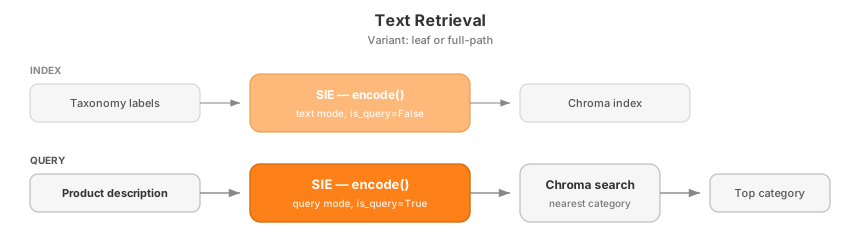
The raw `encode()` calls look like this. Here we compare one product against three candidate paths by hand; in the full pipeline, all category vectors live in Chroma.
```python
query = client.encode(
"NovaSearch/stella_en_1.5B_v5",
Item(text="Handwoven straw Panama hat with a cotton ribbon."),
is_query=True,
)
categories = client.encode(
"NovaSearch/stella_en_1.5B_v5",
[
Item(text="Apparel & Accessories > Clothing Accessories > Hats"),
Item(text="Home & Garden > Decor > Coat & Hat Racks"),
Item(text="Sporting Goods > Outdoor Recreation > Camping & Hiking"),
],
is_query=False,
)
# After cosine similarity on the returned vectors:
# Apparel & Accessories > Clothing Accessories > Hats: 0.46
# Home & Garden > Decor > Coat & Hat Racks: 0.34
# Sporting Goods > Outdoor Recreation > Camping & Hiking: 0.21
```
CLI scripts for running full evaluation and one-off predictions:
```bash
# eval
uv run eval-text-retrieval \
--model NovaSearch/stella_en_1.5B_v5 \
--variant full-path \
--index-dir .cache/chroma \
--output eval/text-retrieval/NovaSearch-stella_en_1.5B_v5-full-path.json
# predict
uv run predict-text-retrieval \
--model NovaSearch/stella_en_1.5B_v5 \
--variant full-path \
--index-dir .cache/chroma \
--description "Handwoven straw Panama hat with a cotton ribbon." \
--top-k 5
```
We evaluated three text embedding models in both indexing variants:
| Approach | Model | Model size | hF1 (strict) | hF1 (lenient) | Variant |
| -------------- | ---------------------------------------- | ---------: | -----------: | ------------: | ----------- |
| text-retrieval | `NovaSearch/stella_en_1.5B_v5` | `1.5B` | `0.425` | `0.553` | `full-path` |
| text-retrieval | `NovaSearch/stella_en_1.5B_v5` | `1.5B` | `0.334` | `0.450` | `leaf` |
| text-retrieval | `intfloat/multilingual-e5-large` | `0.6B` | `0.301` | `0.356` | `full-path` |
| text-retrieval | `intfloat/multilingual-e5-large` | `0.6B` | `0.295` | `0.385` | `leaf` |
| text-retrieval | `sentence-transformers/all-MiniLM-L6-v2` | `23M` | `0.253` | `0.344` | `leaf` |
| text-retrieval | `sentence-transformers/all-MiniLM-L6-v2` | `23M` | `0.239` | `0.312` | `full-path` |
Text retrieval ends up being the strongest family in this project. `NovaSearch/stella_en_1.5B_v5` with `full-path` indexing is the best overall result (`0.425` strict, `0.553` lenient). `full-path` clearly helps Stella, while the tiny `all-MiniLM-L6-v2` does slightly better with `leaf` labels.
The dataset also includes product images, so the next step is to keep the same retrieval setup and swap the text query for an image query.
### Image Retrieval
[Section titled “Image Retrieval”](#image-retrieval)
Image retrieval keeps the same idea, but the query is now a product image instead of text. The category side is still text, so we need a multimodal model that maps images and taxonomy paths into the same vector space.
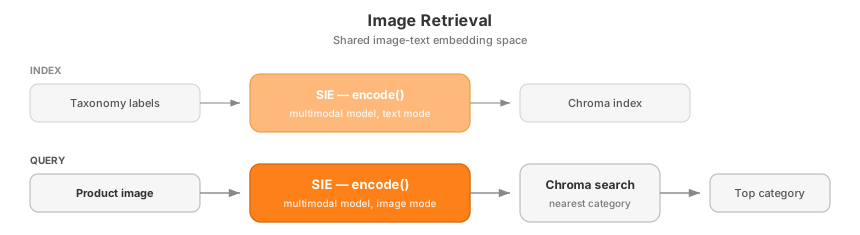
Here is the same hat example, this time starting from an image:
```python
query = client.encode(
"laion/CLIP-ViT-H-14-laion2B-s32B-b79K",
Item(
images=[
{
"data": Path("assets/sample-images/03.jpg").read_bytes(),
"format": "jpeg",
}
]
),
)
categories = client.encode(
"laion/CLIP-ViT-H-14-laion2B-s32B-b79K",
[
Item(text="Apparel & Accessories > Clothing Accessories > Hats"),
Item(text="Home & Garden > Decor > Coat & Hat Racks"),
Item(text="Sporting Goods > Outdoor Recreation > Camping & Hiking"),
],
is_query=False,
)
# After cosine similarity on the returned vectors:
# Apparel & Accessories > Clothing Accessories > Hats: 0.25
# Home & Garden > Decor > Coat & Hat Racks: 0.12
# Sporting Goods > Outdoor Recreation > Camping & Hiking: 0.06
```
CLI scripts for running full evaluation and one-off predictions:
```bash
# eval
uv run eval-image-retrieval \
--model laion/CLIP-ViT-H-14-laion2B-s32B-b79K \
--variant full-path \
--index-dir .cache/chroma \
--output eval/image-retrieval/laion-CLIP-ViT-H-14-laion2B-s32B-b79K-full-path.json
# predict
uv run predict-image-retrieval \
--model laion/CLIP-ViT-H-14-laion2B-s32B-b79K \
--variant full-path \
--index-dir .cache/chroma \
--image-path assets/sample-images/03.jpg \
--top-k 5
```
We evaluated two multimodal models in both indexing variants:
| Approach | Model | Model size | hF1 (strict) | hF1 (lenient) | Variant |
| --------------- | --------------------------------------- | ---------: | -----------: | ------------: | ----------- |
| image-retrieval | `laion/CLIP-ViT-H-14-laion2B-s32B-b79K` | `1B` | `0.353` | `0.451` | `full-path` |
| image-retrieval | `laion/CLIP-ViT-H-14-laion2B-s32B-b79K` | `1B` | `0.325` | `0.420` | `leaf` |
| image-retrieval | `openai/clip-vit-base-patch32` | `150M` | `0.208` | `0.258` | `full-path` |
| image-retrieval | `openai/clip-vit-base-patch32` | `150M` | `0.189` | `0.245` | `leaf` |
The best image-only result comes from `laion/CLIP-ViT-H-14-laion2B-s32B-b79K` with `full-path` indexing (`0.353` strict, `0.451` lenient). That is clearly better than the smaller CLIP model, but still below the best text retriever, so text remains the strongest signal in these runs.
Since text retrieval is our best base method, the final question is whether a second-stage reranker can improve it.
### Retrieval + Reranking
[Section titled “Retrieval + Reranking”](#retrieval--reranking)
Reranking starts with the best text retriever, keeps its top-5 candidates, and asks a cross-encoder to rescore them with `sie.score()`. The hope is that a more expensive second pass can fix mistakes from nearest-neighbor retrieval.

In the full pipeline, the candidates come from Stella full-path retrieval. The reranking call itself looks like this:
```python
result = client.score(
"mixedbread-ai/mxbai-rerank-base-v2",
Item(text="Handwoven straw Panama hat with a cotton ribbon."),
[
Item(
id="Apparel & Accessories > Clothing Accessories > Hats",
text="Apparel & Accessories > Clothing Accessories > Hats",
),
Item(
id="Home & Garden > Decor > Coat & Hat Racks",
text="Home & Garden > Decor > Coat & Hat Racks",
),
Item(
id="Sporting Goods > Outdoor Recreation > Camping & Hiking",
text="Sporting Goods > Outdoor Recreation > Camping & Hiking",
),
],
)
for score in result["scores"]:
print(f"{score['item_id']}: {score['score']:.2f}")
# Apparel & Accessories > Clothing Accessories > Hats: 1.00
# Home & Garden > Decor > Coat & Hat Racks: 0.04
# Sporting Goods > Outdoor Recreation > Camping & Hiking: 0.02
```
CLI scripts for running full evaluation and one-off predictions:
```bash
# eval
uv run eval-reranking \
--retrieval-model NovaSearch/stella_en_1.5B_v5 \
--reranker-model mixedbread-ai/mxbai-rerank-base-v2 \
--variant full-path \
--index-dir .cache/chroma \
--top-k 5 \
--output eval/reranking/NovaSearch-stella_en_1.5B_v5-full-path-mixedbread-ai-mxbai-rerank-base-v2.json
# predict
uv run predict-reranking \
--retrieval-model NovaSearch/stella_en_1.5B_v5 \
--reranker-model mixedbread-ai/mxbai-rerank-base-v2 \
--variant full-path \
--index-dir .cache/chroma \
--description "Handwoven straw Panama hat with a cotton ribbon." \
--top-k 5
```
We compare the base Stella retriever against two rerankers:
| Setup | Models | hF1 (strict) | hF1 (lenient) |
| ------------------ | ----------------------------------------------------------------------- | -----------: | ------------: |
| retrieval baseline | `NovaSearch/stella_en_1.5B_v5` | `0.425` | `0.553` |
| reranking | `NovaSearch/stella_en_1.5B_v5` + `mixedbread-ai/mxbai-rerank-base-v2` | `0.425` | `0.548` |
| reranking | `NovaSearch/stella_en_1.5B_v5` + `cross-encoder/ms-marco-MiniLM-L-6-v2` | `0.315` | `0.424` |
Reranking does not help in these runs. `mixedbread-ai/mxbai-rerank-base-v2` almost ties the baseline, but still lands slightly lower on the lenient metric (`0.548` vs `0.553`). `cross-encoder/ms-marco-MiniLM-L-6-v2` drops much further. So the simple Stella `full-path` retriever remains the best overall setup.
## Results
[Section titled “Results”](#results)
### Summary
[Section titled “Summary”](#summary)
* Best overall hierarchical result: `text-retrieval` with `NovaSearch/stella_en_1.5B_v5` and `variant=full-path` (`strict hF1 0.425`, `lenient hF1 0.553`).
* Reranking does not beat the base Stella full-path retriever in these runs. `mixedbread-ai/mxbai-rerank-base-v2` comes closest but is still slightly lower, while `cross-encoder/ms-marco-MiniLM-L-6-v2` drops more (`strict hF1 0.315`, `lenient hF1 0.424`).
* Best image-only result: `image-retrieval` with `laion/CLIP-ViT-H-14-laion2B-s32B-b79K` and `variant=full-path` (`strict hF1 0.353`, `lenient hF1 0.451`).
* NLI is shown separately because it reports L1 macro F1, not hierarchical F1. Within NLI, `knowledgator/gliclass-large-v3.0` beats `cross-encoder/nli-deberta-v3-base`.
* `full-path` wins for Stella and both image models; `leaf` helps `all-MiniLM-L6-v2` and improves lenient F1 for `multilingual-e5-large`.
### Metrics tables
[Section titled “Metrics tables”](#metrics-tables)
**L3 classification:**
| Approach | Model | Model size | hF1 (strict) | hF1 (lenient) | Variant |
| --------------- | ---------------------------------------- | ---------: | -----------: | ------------: | ----------- |
| text-retrieval | `NovaSearch/stella_en_1.5B_v5` | `1.5B` | `0.425` | `0.553` | `full-path` |
| reranking | `mixedbread-ai/mxbai-rerank-base-v2` | `0.5B` | `0.425` | `0.548` | `full-path` |
| image-retrieval | `laion/CLIP-ViT-H-14-laion2B-s32B-b79K` | `1B` | `0.353` | `0.451` | `full-path` |
| text-retrieval | `NovaSearch/stella_en_1.5B_v5` | `1.5B` | `0.334` | `0.450` | `leaf` |
| image-retrieval | `laion/CLIP-ViT-H-14-laion2B-s32B-b79K` | `1B` | `0.325` | `0.420` | `leaf` |
| reranking | `cross-encoder/ms-marco-MiniLM-L-6-v2` | `23M` | `0.315` | `0.424` | `full-path` |
| text-retrieval | `intfloat/multilingual-e5-large` | `0.6B` | `0.301` | `0.356` | `full-path` |
| text-retrieval | `intfloat/multilingual-e5-large` | `0.6B` | `0.295` | `0.385` | `leaf` |
| text-retrieval | `sentence-transformers/all-MiniLM-L6-v2` | `23M` | `0.253` | `0.344` | `leaf` |
| text-retrieval | `sentence-transformers/all-MiniLM-L6-v2` | `23M` | `0.239` | `0.312` | `full-path` |
| image-retrieval | `openai/clip-vit-base-patch32` | `150M` | `0.208` | `0.258` | `full-path` |
| image-retrieval | `openai/clip-vit-base-patch32` | `150M` | `0.189` | `0.245` | `leaf` |
**L1 classification:**
| Approach | Model | Model size | L1 F1 (strict) | L1 F1 (lenient) |
| -------- | ----------------------------------- | ---------: | -------------: | --------------: |
| nli | `knowledgator/gliclass-large-v3.0` | `0.5B` | `0.302` | `0.384` |
| nli | `cross-encoder/nli-deberta-v3-base` | `200M` | `0.204` | `0.285` |
## Conclusion
[Section titled “Conclusion”](#conclusion)
We tried several very different model families on the same taxonomy task: NLI for top-level classification, text embeddings for retrieval, image embeddings for multimodal retrieval, and rerankers for second-stage rescoring. That kind of exploration is the main point of this example.
With SIE, the interesting part was the modeling, not the infrastructure. We could switch between `extract`, `encode`, and `score` without rebuilding the serving stack each time, which makes rapid iteration on ML ideas much smoother.
There is still a lot of room to push these results further. A few directions we did not cover here:
* **LLM-enriched category names**: generate richer descriptions for taxonomy nodes, then embed those instead of bare category names.
* **Hierarchical cascade**: predict L1 first, then L2 inside the chosen branch, then L3.
* **Fine-tuned embeddings**: train a contrastive model directly on `(product, category)` pairs from the dataset.
If you want to take this further, try improving the current baselines or inventing a new approach entirely. That is the real takeaway: SIE makes it easy to explore the space quickly.
By Andrey Pikunov.
# Build a multimodal wine recommender with OCR
> A demo that pairs preference-based retrieval and reranking with OCR-style label detection in one UI.
[View on GitHub ](https://github.com/superlinked/sie/tree/main/examples/wine-recommender)examples/wine-recommender
## What this is
[Section titled “What this is”](#what-this-is)
Real product flows often need search and extraction at the same time. A user might know they want “something fruity and not too tannic” or they might just have a photo of a bottle they liked. Most stacks would solve those with two separate services and two separate codebases.
This demo wires both into one app on SIE. Type taste preferences and get ranked wine recommendations, or upload a bottle photo and get the wine identified from its label. The recommendation flow uses `encode` and `score`. The label flow uses `extract` for OCR. Both run through one [SIE](/docs) endpoint, behind a single Next.js UI.
The demo is structured so each half can also be run standalone. That makes it a useful reference if you want to lift either the retrieval logic or the OCR matching into your own product flow.
## How it is wired
[Section titled “How it is wired”](#how-it-is-wired)
* [`wine_flavor/`](https://github.com/superlinked/sie/tree/main/examples/wine-recommender/wine_flavor): retrieval and reranking from flavor + structure preferences. Uses [encode](/docs/encode) and [score](/docs/score).
* [`wine_picture_detection/`](https://github.com/superlinked/sie/tree/main/examples/wine-recommender/wine_picture_detection): OCR-based wine label detection. Uses [extract](/docs/extract).
* Root [`app.py`](https://github.com/superlinked/sie/blob/main/examples/wine-recommender/app.py): FastAPI app that joins the two flows and serves the Next.js frontend.
The duplicated database files (`wine_flavor.db`) and local `.env` setup are intentional, so each subproject can be run in isolation without depending on the full root app.
## What you can do
[Section titled “What you can do”](#what-you-can-do)
* Enter flavor and structure preferences to get wine recommendations
* Compare recommendation behavior across different reranking approaches
* Upload a wine label image and inspect the OCR-driven bottle matching flow
* Use the combined app as a reference for wiring multiple SIE primitives into one user-facing demo
## Project structure
[Section titled “Project structure”](#project-structure)
* [`app.py`](https://github.com/superlinked/sie/blob/main/examples/wine-recommender/app.py): demo backend that wires OCR and retrieval into one FastAPI app
* [`app/`](https://github.com/superlinked/sie/tree/main/examples/wine-recommender/app): Next.js frontend for the demo UI
* [`wine_flavor/`](https://github.com/superlinked/sie/tree/main/examples/wine-recommender/wine_flavor): standalone retrieval and reranking prototype
* [`wine_picture_detection/`](https://github.com/superlinked/sie/tree/main/examples/wine-recommender/wine_picture_detection): standalone OCR and label-matching prototype
## SIE features used
[Section titled “SIE features used”](#sie-features-used)
* `encode` for retrieval embeddings
* `score` for reranking candidate wines
* `extract` for OCR-based wine label detection
## Why the OCR flow matters
[Section titled “Why the OCR flow matters”](#why-the-ocr-flow-matters)
The OCR side of the demo shows that SIE is not only useful for text retrieval. In this example, `extract` is used to pull readable text from a bottle label image, then that text is matched against the local wine catalog to identify the bottle.
This is important because real product flows often combine search and extraction rather than using only one primitive. A user may not know the exact wine name, but they may still have a label photo. The OCR path turns that image into usable text and then connects it back to the recommendation and catalog experience.
The OCR pipeline is also intentionally model-flexible. You can use this example to try different OCR-capable extraction models through SIE without rewriting the application flow, which makes it a useful reference for developers who want to evaluate image-to-text approaches quickly.
## Schema design
[Section titled “Schema design”](#schema-design)
### Wine recommendation
[Section titled “Wine recommendation”](#wine-recommendation)
```mermaid
flowchart TD;
A1["User preferences"] --> B["Normalization"];
A2["Wine structural and flavor Attributes"] --> B;
B --> C["Vectorization from user preferences and wine attributes"];
C --> D["1st Retrieval - List of N candidates"];
D --> E["Pull reviews for candidate wines"];
E --> F1["Standard reranking on candidate reviews"];
E --> F2["Custom reranking with embeddings on flavor profiles and reviews"];
F1 --> G1["Final Wine List"];
F2 --> G2["Final Wine List"];
```
### Wine identification
[Section titled “Wine identification”](#wine-identification)
```mermaid
flowchart TD;
A["Image upload"] --> B["Analysis of image quality"];
B --> C["OCR / Text extraction"];
C --> D["Score wines against the extracted content"];
D --> E["Wine identification"];
```
## Prerequisite
[Section titled “Prerequisite”](#prerequisite)
Start an SIE server first
This demo talks to a running SIE server. Follow the [SIE quickstart](/docs/quickstart) to spin one up locally or point at a cluster. The app needs `CLUSTER_URL` so it knows where SIE is running. `API_KEY` is optional and should stay blank for a local unauthenticated SIE server.
## Running the full demo
[Section titled “Running the full demo”](#running-the-full-demo)
The full app runs through Docker Compose:
* `backend`: FastAPI on `http://localhost:8000`
* `frontend`: Next.js on `http://localhost:3000`
From the repo root:
```bash
cd examples/wine-recommender
cp .env.example .env
# If SIE is not running on your host at port 8080, edit CLUSTER_URL in .env.
docker compose up --build
```
Make sure ports `3000` and `8000` are free before starting the stack.
App URLs:
* Frontend: `http://localhost:3000`
* Backend: `http://localhost:8000`
Stop it with:
```bash
docker compose down
```
## Environment files
[Section titled “Environment files”](#environment-files)
* The root app and `wine_flavor/` subproject use the root `.env`
* `wine_picture_detection/` can also use its own local `.env` / `.env.example`
* The duplicated setup is intentional so both subprojects can be run individually
If you are running the full demo, put the required backend keys in the root `.env`. For local or self-hosted SIE without auth, leave `API_KEY=` blank.
## What to try
[Section titled “What to try”](#what-to-try)
1. Start the full app and open `http://localhost:3000`.
2. Try recommendation queries with different structure preferences such as: `high acidity + low sweetness`, `full-bodied + high tannin`.
3. Upload the sample wine label or your own label image and inspect the detected wine match.
4. Compare how the recommendation and OCR flows use different SIE primitives inside the same app.
5. Pay attention to the OCR output quality and matching behavior. The image path is useful for understanding how extraction can support search and retrieval when the user starts from a photo instead of structured text.
## Notes
[Section titled “Notes”](#notes)
* This repo is optimized for demoing the product idea, not for production deployment or large-scale operation.
* The main app is intentionally simple: `app.py` wires together the OCR module and the retrieval module rather than hiding them behind a larger service architecture.
By Valentin Marek.
# OCR
> Convert document images and PDFs to Markdown with OCR models, plus flat-text OCR via Florence-2.
SIE supports OCR via five dedicated models plus Florence-2’s `` task:
* **OCR models** (`zai-org/GLM-OCR`, `lightonai/LightOnOCR-2-1B`, `PaddlePaddle/PaddleOCR-VL-1.5`, `opendatalab/MinerU2.5-Pro-2604-1.2B`, `docling`). Convert document images or PDFs to Markdown, preserving tables and headings.
* **Florence-2** (`microsoft/Florence-2-base`). Flat-text OCR via the `` and `` task tokens.
For image captioning, object detection, and document QA, see [Vision Tasks](/docs/extract/vision/).
Pick by what you need to extract: use one of the five dedicated OCR models for structured Markdown for downstream chunking; use Florence-2 for flat text or bounding-box OCR over a single image.
## OCR Models
[Section titled “OCR Models”](#ocr-models)
For converting document images or PDFs to Markdown, use one of the five dedicated OCR models. They preserve tables, headings, and reading order; Florence-2’s `` task only returns flat text.
| Model | Input | Best for | Notes |
| ------------------------------------- | ------------------------ | -------------------------------------------------------------- | -------------------------------------------- |
| `zai-org/GLM-OCR` | Image | High-quality multilingual OCR | CogViT + GLM-0.5B; bfloat16 only |
| `lightonai/LightOnOCR-2-1B` | Image | Larger model, 2.1B params | Pixtral encoder + Qwen3 decoder |
| `PaddlePaddle/PaddleOCR-VL-1.5` | Image | 109 languages, multi-mode (table/formula/chart) | 0.9B params; smallest |
| `opendatalab/MinerU2.5-Pro-2604-1.2B` | Image | Document parsing VLM, multi-mode (table/equation/chart/layout) | 1.2B params; Qwen2-VL architecture; bfloat16 |
| `docling` | Document (PDF/DOCX/HTML) | Multi-page documents, layout-aware | Composite pipeline; OCR is opt-in |
Note
Quality and latency benchmarks for these models are in flight and will be published when the eval-matrix work lands. The recommendations above reflect input shape and feature differences, not measured performance.
### GLM-OCR
[Section titled “GLM-OCR”](#glm-ocr)
GLM-OCR returns a single Markdown string per page in `entities[0].text`.
* Python
```python
from sie_sdk import SIEClient
from sie_sdk.types import Item
client = SIEClient("http://localhost:8080")
with open("page.png", "rb") as f:
page_bytes = f.read()
result = client.extract(
"zai-org/GLM-OCR",
Item(images=[{"data": page_bytes, "format": "png"}]),
)
markdown = result["entities"][0]["text"]
print(markdown)
```
* TypeScript
```typescript
import { SIEClient } from "@superlinked/sie-sdk";
const client = new SIEClient("http://localhost:8080");
const result = await client.extract(
"zai-org/GLM-OCR",
{ images: [pageBytes] }, // Uint8Array of PNG/JPEG data
{ labels: [] }, // labels is required; OCR models ignore it
);
const markdown = result.entities[0].text;
console.log(markdown);
await client.close();
```
### LightOnOCR-2-1B
[Section titled “LightOnOCR-2-1B”](#lightonocr-2-1b)
Same call shape as GLM-OCR: one image per item, Markdown returned in `entities[0].text`.
* Python
```python
result = client.extract(
"lightonai/LightOnOCR-2-1B",
Item(images=[{"data": page_bytes, "format": "png"}]),
)
markdown = result["entities"][0]["text"]
```
* TypeScript
```typescript
const result = await client.extract(
"lightonai/LightOnOCR-2-1B",
{ images: [pageBytes] },
{ labels: [] },
);
const markdown = result.entities[0].text;
```
### PaddleOCR-VL-1.5
[Section titled “PaddleOCR-VL-1.5”](#paddleocr-vl-15)
PaddleOCR-VL supports six task modes via `options.task`: `ocr` (default), `table`, `formula`, `chart`, `spotting`, `seal`.
* Python
```python
# Default OCR mode
result = client.extract(
"PaddlePaddle/PaddleOCR-VL-1.5",
Item(images=[{"data": page_bytes, "format": "png"}]),
)
markdown = result["entities"][0]["text"]
# Table-extraction mode
result = client.extract(
"PaddlePaddle/PaddleOCR-VL-1.5",
Item(images=[{"data": table_image, "format": "png"}]),
options={"task": "table"},
)
```
* TypeScript
```typescript
const result = await client.extract(
"PaddlePaddle/PaddleOCR-VL-1.5",
{ images: [pageBytes] },
{ labels: [], adapterOptions: { task: "table" } }, // or "ocr", "formula", "chart", "spotting", "seal"
);
const markdown = result.entities[0].text;
```
### Docling (multi-page documents)
[Section titled “Docling (multi-page documents)”](#docling-multi-page-documents)
Docling parses entire PDF/DOCX/HTML files in one call, preserving layout, tables, and headings. Output goes to `data` (not `entities`):
| Field | Type | Description |
| ---------- | ------ | ------------------------------------------------- |
| `text` | `str` | Plain-text rendering |
| `markdown` | `str` | Markdown with tables and headings preserved |
| `document` | `dict` | Full DoclingDocument JSON for downstream chunkers |
Docling ships two profiles:
| Profile | What it does | When to use |
| --------- | -------------------------------------------------------------- | ----------------------------------------- |
| `default` | Layout + table-structure parsing; uses embedded text from PDFs | Born-digital PDFs and DOCX/HTML (fastest) |
| `ocr` | Same as default + runs OCR on rasterized pages | Scanned PDFs or images-only documents |
* Python
```python
from sie_sdk import SIEClient
from sie_sdk.types import Item
client = SIEClient("http://localhost:8080")
with open("report.pdf", "rb") as f:
pdf_bytes = f.read()
# Default profile: fast, no OCR (born-digital PDFs only)
result = client.extract(
"docling",
Item(document={"data": pdf_bytes, "format": "pdf"}),
)
markdown = result["data"]["markdown"]
# OCR profile: needed for scanned PDFs
result_ocr = client.extract(
"docling",
Item(document={"data": pdf_bytes, "format": "pdf"}),
options={"profile": "ocr"},
)
```
* TypeScript
```typescript
import { SIEClient } from "@superlinked/sie-sdk";
const client = new SIEClient("http://localhost:8080");
const result = await client.extract(
"docling",
{ document: { data: pdfBytes, format: "pdf" } },
{ labels: [] },
);
const markdown = result.data?.markdown as string;
// OCR profile: needed for scanned PDFs
const resultOcr = await client.extract(
"docling",
{ document: { data: pdfBytes, format: "pdf" } },
{ labels: [], adapterOptions: { profile: "ocr" } },
);
await client.close();
```
## OCR (Text from Images)
[Section titled “OCR (Text from Images)”](#ocr-text-from-images)
For flat-text OCR without layout, the `microsoft/Florence-2-base` model exposes an `` task token:
* Python
```python
result = client.extract(
"microsoft/Florence-2-base",
Item(images=[{"data": document_image, "format": "png"}]),
options={"task": ""}
)
for entity in result["entities"]:
print(entity["text"])
# Extracted text from the document image
```
* TypeScript
```typescript
const result = await client.extract(
"microsoft/Florence-2-base",
{ images: [documentImage] }, // Uint8Array of PNG data
{ labels: [], adapterOptions: { task: "" } }
);
for (const entity of result.entities) {
console.log(entity.text);
}
```
### OCR with Regions
[Section titled “OCR with Regions”](#ocr-with-regions)
To get text with bounding box positions (the default task):
* Python
```python
result = client.extract(
"microsoft/Florence-2-base",
Item(images=[{"data": document_image, "format": "png"}]),
options={"task": ""}
)
for entity in result["entities"]:
print(f"{entity['text']} at {entity['bbox']}")
```
* TypeScript
```typescript
const result = await client.extract(
"microsoft/Florence-2-base",
{ images: [documentImage] },
{ labels: [], adapterOptions: { task: "" } }
);
for (const entity of result.entities) {
console.log(`${entity.text} at ${JSON.stringify(entity.bbox)}`);
}
```
Caution
Passing `instruction` overrides the configured task. A free-text `instruction` is treated as a question and answered via ``; an `instruction` that starts with a task token (like ``) is used verbatim as the prompt. To select a task explicitly, use `options={"task": ""}` in Python or `adapterOptions: { task: "" }` in TypeScript.
See [Vision Tasks](/docs/extract/vision/#florence-2-task-prompts) for the full list of Florence-2 task tokens.
## What’s Next
[Section titled “What’s Next”](#whats-next)
* [Vision Tasks](/docs/extract/vision/) - image captioning, object detection, and document understanding
* [NER & Entity Extraction](/docs/extract/) - named entity recognition
* [Relations & Classification](/docs/extract/relations/) - relation extraction and text classification
* [Full model catalog](/models#task=extract) - all supported models
# Relations & Classification
> Extract relationships between entities and classify text with zero-shot models.
GLiREL and GLiClass models extract relationships and classify text with zero-shot label support.
## Relation Extraction
[Section titled “Relation Extraction”](#relation-extraction)
GLiREL models extract relationships between entities. Relation types are passed via the `labels` parameter. Entities must be pre-extracted (e.g. with GLiNER) and passed in `item.metadata`:
* Python
```python
from sie_sdk import SIEClient
from sie_sdk.types import Item
client = SIEClient("http://localhost:8080")
text = "Tim Cook is the CEO of Apple Inc."
# Step 1: Extract entities with GLiNER
ner_result = client.extract(
"urchade/gliner_multi-v2.1",
Item(text=text),
labels=["person", "organization"]
)
# Step 2: Pass entities to GLiREL for relation extraction
result = client.extract(
"jackboyla/glirel-large-v0",
Item(text=text, metadata={"entities": ner_result["entities"]}),
labels=["works_for", "ceo_of", "founded"]
)
for relation in result["relations"]:
print(f"{relation['head']} --{relation['relation']}--> {relation['tail']}")
# Tim Cook --ceo_of--> Apple Inc.
```
* TypeScript
```typescript
import { SIEClient } from "@superlinked/sie-sdk";
const client = new SIEClient("http://localhost:8080");
const text = "Tim Cook is the CEO of Apple Inc.";
// Step 1: Extract entities with GLiNER
const nerResult = await client.extract(
"urchade/gliner_multi-v2.1",
{ text },
{ labels: ["person", "organization"] }
);
// Step 2: Pass entities to GLiREL for relation extraction
const result = await client.extract(
"jackboyla/glirel-large-v0",
{ text, metadata: { entities: nerResult.entities } },
{ labels: ["works_for", "ceo_of", "founded"] }
);
for (const relation of result.relations) {
console.log(`${relation.head} --${relation.relation}--> ${relation.tail}`);
}
// Tim Cook --ceo_of--> Apple Inc.
await client.close();
```
### Relation Fields
[Section titled “Relation Fields”](#relation-fields)
| Field | Type | Description |
| ---------- | ------- | ---------------- |
| `head` | `str` | Source entity |
| `tail` | `str` | Target entity |
| `relation` | `str` | Relation type |
| `score` | `float` | Confidence score |
## Text Classification
[Section titled “Text Classification”](#text-classification)
GLiClass models classify text into categories:
* Python
```python
result = client.extract(
"knowledgator/gliclass-base-v1.0",
Item(text="I absolutely loved this movie! The acting was superb."),
labels=["positive", "negative", "neutral"]
)
for classification in result["classifications"]:
print(f"{classification['label']}: {classification['score']:.2f}")
# positive: 0.94
# neutral: 0.04
# negative: 0.02
```
* TypeScript
```typescript
const result = await client.extract(
"knowledgator/gliclass-base-v1.0",
{ text: "I absolutely loved this movie! The acting was superb." },
{ labels: ["positive", "negative", "neutral"] }
);
for (const classification of result.classifications) {
console.log(`${classification.label}: ${classification.score.toFixed(2)}`);
}
// positive: 0.94
// neutral: 0.04
// negative: 0.02
```
### Overflow policy
[Section titled “Overflow policy”](#overflow-policy)
GLiClass models (`gliclass-{small,base,large}-v1.0`) have a 512-token fused context; `text` and the `<