
Scale-from-Zero & Autoscaling
SIE clusters scale GPU worker pods to zero when idle and provision them on-demand. Each worker pod runs the SIE server sidecar beside a Python sie-server adapter container. The sidecar pulls from NATS JetStream; the adapter runs the model. This page explains the full lifecycle, cold start expectations, and how to handle 202 responses.
How Scale-from-Zero Works
Section titled “How Scale-from-Zero Works”When all worker pods are scaled to zero and a request arrives:
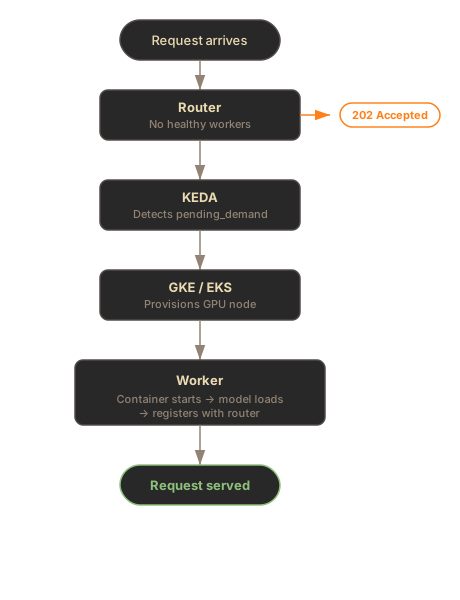
Key point: The X-SIE-MACHINE-PROFILE header (or SDK gpu parameter) selects the worker pool when you need a specific machine profile. If it is omitted, the gateway can still resolve the model’s default route; scale-from-zero still returns 202 Accepted when capacity is not yet available.
Cold Start Timeline
Section titled “Cold Start Timeline”Cold start from zero has three phases:
| Phase | Duration | What Happens |
|---|---|---|
| Node provisioning | 2-5 min | GKE finds a GPU node (spot takes longer if scarce) |
| Container startup | 20-40s | Pull the Python sie-server image and sie-server-sidecar image, start containers, health checks pass |
| Model loading | 10-120s | Download weights (if not cached) and load to GPU |
Total cold start: 3-7 minutes depending on model size and spot availability.
Once a worker pod and model are warm, repeat requests for that model are fast. The SIE server sidecar keeps pulling from JetStream; the sie-server adapter either serves from GPU memory or loads a new model from local cache in 10-120s.
The 202 Flow
Section titled “The 202 Flow”HTTP Clients
Section titled “HTTP Clients”When the cluster is scaled to zero, HTTP requests receive a 202 Accepted response:
curl -X POST http://sie.example.com/v1/encode/BAAI/bge-m3 \  -H "Content-Type: application/json" \  -H "X-SIE-MACHINE-PROFILE: l4" \  -d '{"items": [{"text": "Hello world"}]}'
# Response: 202 Accepted# Headers: Retry-After: 120
Your HTTP client should retry after the Retry-After interval. Keep retrying for at least 7 minutes on a cold start.
If the requested machine profile is not configured, you get 503:
# Unknown X-SIE-MACHINE-PROFILE → 503curl -X POST http://sie.example.com/v1/encode/BAAI/bge-m3 \  -H "X-SIE-MACHINE-PROFILE: h100" \  -H "Content-Type: application/json" \  -d '{"items": [{"text": "Hello world"}]}'
# Response: 503 Service Unavailable# {"status": "gpu_not_configured", "gpu": "h100", "configured_gpu_types": ["l4", "a100-80gb"], "message": "GPU type 'h100' is not configured in this cluster."}
SDK Clients (Recommended)
Section titled “SDK Clients (Recommended)”The SDK handles 202 retries automatically with wait_for_capacity=True:
from sie_sdk import SIEClientfrom sie_sdk.types import Item
client = SIEClient("http://sie.example.com", api_key="YOUR_KEY")
# Automatically retries 202s with exponential backoffresult = client.encode(    "BAAI/bge-m3",    Item(text="Hello world"),    gpu="l4",    wait_for_capacity=True,    provision_timeout_s=420,  # 7 minutes for cold start)
import { SIEClient } from "@superlinked/sie-sdk";
const client = new SIEClient("http://sie.example.com", { apiKey: "YOUR_KEY",});
// Automatically retries 202s with exponential backoffconst result = await client.encode( "BAAI/bge-m3", { text: "Hello world" }, { gpu: "l4", waitForCapacity: true, provisionTimeout: 420000, // 7 minutes for cold start (milliseconds) });Per-Bundle Scaling
Section titled “Per-Bundle Scaling”Each (machine_profile, bundle) combination has its own KEDA ScaledObject and scales independently.
| Bundle | Models Served | Example ScaledObject |
|---|---|---|
default | BGE-M3, E5, Stella, ColBERT, rerankers, GLiNER, GLiREL, GLiClass, Florence-2, Donut, and the rest of the standard catalog | l4-spot-default |
sglang | Large 4B+ parameter LLM embedding models | a100-80gb-sglang |
What this means in practice: If you have encode, score, and extract working on the default bundle worker pod, but then call encode with a large SGLang-served model (e.g. gte-Qwen2-7B-instruct), a separate sglang bundle worker pod needs to scale up. This is a new cold start - expect another 5-7 minutes.
# This uses the default bundle worker pod (already warm)client.encode("BAAI/bge-m3", Item(text="hello"), gpu="l4")
# This needs the sglang bundle worker pod (may trigger cold start)client.encode(    "Alibaba-NLP/gte-Qwen2-7B-instruct",    Item(text="Tim Cook leads Apple."),    gpu="a100-80gb",    wait_for_capacity=True,    provision_timeout_s=420,)
KEDA Scaling Metrics
Section titled “KEDA Scaling Metrics”KEDA uses Prometheus metrics to make scaling decisions:
| Metric | Purpose | Used For |
|---|---|---|
sie_gateway_pending_demand | Requests waiting for a worker type | Scale-from-zero activation |
sie_gateway_worker_queue_depth | Queue depth reported by the SIE server sidecar inside worker pods | Scale-up (add more replicas) |
sie_gateway_active_lease_gpus | GPUs reserved by active resource-pool leases | Keep leased pools provisioned |
sie_gateway_rejected_requests_total | Gateway rejected-request rate | Scale when rejected traffic indicates pressure |
sie_gateway_requests_total | Gateway request rate | Gateway Deployment autoscaling |
Configuration
Section titled “Configuration”autoscaling: enabled: true pollingInterval: 15 # Check metrics every 15 seconds cooldownPeriod: 900 # 15 minutes before scaling to zero scaleDownStabilization: 300 # 5 minute stabilization window queueDepthThreshold: 10 # Add replicas at 10 queued items per pod queueDepthActivation: 2 # Start the warm queue-depth trigger at 2 queued itemsCooldown Behavior
Section titled “Cooldown Behavior”After no requests arrive for the cooldownPeriod (default: 15 minutes), KEDA scales worker pods back to zero. The next request triggers a full cold start again.
- Consistent traffic: Lower cooldown (300s) to keep worker pods warm
- Bursty traffic: Higher cooldown (900s) to avoid repeated cold starts
- Cost-sensitive: Default 900s balances cost and responsiveness
Machine Profiles
Section titled “Machine Profiles”The X-SIE-MACHINE-PROFILE header (HTTP) or gpu parameter (SDK) determines which worker pool receives the request.
| Profile | GPU | Typical Use |
|---|---|---|
l4 | NVIDIA L4 (24GB) | Standard inference, best price/performance |
l4-spot | NVIDIA L4 (spot) | 60-70% cheaper, may be preempted |
a100-40gb | NVIDIA A100 (40GB) | Large models, high throughput |
a100-80gb | NVIDIA A100 (80GB) | Very large models (7B+ params) |
Spot instances offer significant cost savings but may take longer to provision if capacity is scarce.
Troubleshooting
Section titled “Troubleshooting”503 for unconfigured machine profile
Section titled “503 for unconfigured machine profile”Cause: The request pins a machine profile that is not configured in the cluster.
Fix: Use one of the configured machine profiles:
curl -X POST http://sie.example.com/v1/encode/BAAI/bge-m3 \ -H "X-SIE-MACHINE-PROFILE: l4" \ -H "Content-Type: application/json" \ -d '{"items": [{"text": "Hello world"}]}'Or omit gpu and let the gateway resolve the model’s default route:
client.encode("BAAI/bge-m3", Item(text="hello"))202 responses that never resolve
Section titled “202 responses that never resolve”Possible causes:
- Too short timeout - Cold starts take 5-7 minutes. Use
provision_timeout_s=420in the SDK - Spot GPU unavailable - Try a different machine profile (e.g.,
l4instead ofl4-spot) - KEDA not configured - Check that KEDA is installed and ScaledObjects exist:
kubectl get scaledobjects -n sie - Prometheus down - KEDA needs Prometheus for gateway and SIE server sidecar metrics. Check:
kubectl get pods -n monitoring
Workers scale up then immediately scale down
Section titled “Workers scale up then immediately scale down”Cause: Requests stopped before the worker became ready. KEDA sees demand drop to 0 and begins cooldown.
Fix: Keep sending requests (or use the SDK with wait_for_capacity=True) for the full cold start duration. The SDK handles this automatically with retry logic.
Models from different bundles not available
Section titled “Models from different bundles not available”Cause: Each bundle runs in a separate worker pod. Your standard models (default bundle) may be warm, but a large LLM embedding model (sglang bundle) needs its own worker pod to scale up.
Fix: Send requests with wait_for_capacity=True and a sufficient timeout. The target bundle’s worker pod will scale up independently.
What’s Next
Section titled “What’s Next”- Kubernetes in GCP - full GKE deployment setup
- Monitoring - metrics for tracking autoscaling behavior
- Bundles - understanding dependency isolation