
Kubernetes in GCP
Deploy SIE to GKE with GPU node pools, KEDA autoscaling, and Terraform automation.
Prerequisites
Section titled “Prerequisites”There are two install paths for GKE. Confirm the items under the path you plan to take before running any commands.
Path A. Terraform and Helm (module provisions the cluster)
Section titled “Path A. Terraform and Helm (module provisions the cluster)”-
GCP project with billing enabled.
-
IAM permissions on the project sufficient to create VPC, GKE, IAM, and Artifact Registry resources.
roles/ownerworks; for a least-privilege setup combineroles/container.admin,roles/compute.admin,roles/iam.serviceAccountAdmin,roles/resourcemanager.projectIamAdmin, androles/artifactregistry.admin. -
Required GCP APIs enabled:
gcloud services enable \container.googleapis.com \compute.googleapis.com \artifactregistry.googleapis.com \iam.googleapis.com -
GPU quota for
nvidia-l4in your region. Thedev-l4-spotexample uses spot, so checkPREEMPTIBLE_NVIDIA_L4_GPUS. Anything ≥ 4 covers the example’s max of 5 nodes × 1 GPU. This command requires the Compute Engine API enabled in the previous step.gcloud compute regions describe REGION \--format='table(quotas.filter(metric:NVIDIA))' -
Local tooling: Terraform ≥ 1.14,
gcloudCLI,kubectl, andhelm≥ 3.13. -
Authenticated:
gcloud auth application-default login
Path B. Helm into an existing GKE cluster
Section titled “Path B. Helm into an existing GKE cluster”- Cluster meets the generic Kubernetes Cluster Prerequisites (k8s version, GPU device plugin, ingress controller, network egress).
- GPU node pool with the
nvidia-l4,nvidia-tesla-a100, ornvidia-a100-80gbaccelerator and thecloud.google.com/gke-acceleratornode label. The chart’s pool defaults match GKE-managed GPU pool labels. - Workload Identity enabled on the cluster, with a GCP service account that can read your model-cache GCS bucket. The chart’s Kubernetes ServiceAccount is named
sie-serverand must be annotated withiam.gke.io/gcp-service-account=<your-gsa-email>. - Artifact Registry decision. Let the chart’s images pull from public GHCR (default), or mirror to a private Artifact Registry repo and override
image.repositoryper component. kubectlauthenticated against the target cluster (gcloud container clusters get-credentials ...).
Architecture
Section titled “Architecture”SIE runs as gateway, config, and worker-pod components on Kubernetes:
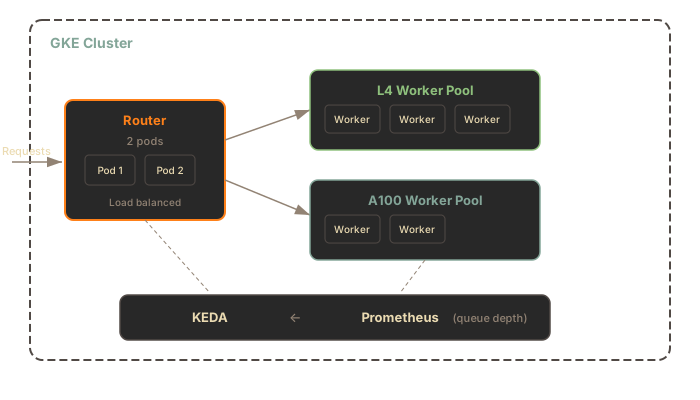
Components:
- Gateway - Stateless Rust inference edge that publishes work to NATS JetStream
- Config service - Single-writer control plane for runtime model configuration
- NATS Core and JetStream - Runtime bus for queued work, result inboxes, SIE server sidecar health, and config deltas
- Worker pods - StatefulSet pods with the SIE server sidecar beside the Python
sie-serveradapter container - KEDA and Prometheus - Scale worker pools from zero based on gateway and queue metrics
Gateway
Section titled “Gateway”The gateway is a stateless Rust service that handles GPU-aware routing:
| Feature | Description |
|---|---|
| GPU Routing | Routes requests to appropriate GPU pool via X-SIE-MACHINE-PROFILE header |
| Pool Routing | Supports tenant isolation via X-SIE-Pool header |
| Queue Routing | Publishes work to the selected pool’s NATS JetStream queue, consumed by the SIE server sidecar inside the worker pod |
| Config Reads | Mirrors model and bundle state from sie-config |
| 202 Responses | Returns Retry-After when GPU capacity is provisioning |
The gateway runs as a Deployment with 2+ replicas for high availability.
gateway: replicas: 2 resources: requests: cpu: "500m" memory: "512Mi" limits: cpu: "2" memory: "2Gi"Worker Pools
Section titled “Worker Pools”Each GPU type runs as a separate StatefulSet. A worker pod contains the SIE server sidecar and the Python sie-server adapter container.
Helm renders the sidecar container as worker-sidecar.
The sidecar pulls work from JetStream, forms batches, calls the adapter over Unix domain socket IPC, publishes results, and sends health heartbeats back through NATS.
| Pool | GPU | VRAM | Use Case |
|---|---|---|---|
l4 | NVIDIA L4 | 24GB | Standard inference, best price/performance |
a100-40gb | NVIDIA A100 | 40GB | Large models, high throughput |
a100-80gb | NVIDIA A100 | 80GB | Very large models (7B+ parameters) |
Worker configuration:
workers:  common:    workerSidecar:      enabled: true
  pools:    l4:      enabled: true      minReplicas: 0        # Scale to zero when idle      maxReplicas: 10      gpuType: l4      nodeSelector:        cloud.google.com/gke-accelerator: nvidia-l4      gpu:        count: 1        product: NVIDIA-L4      resources:        requests:          cpu: "4"          memory: "16Gi"
Worker pods use a 300Gi emptyDir volume for model cache. Models load on first request.
GPU Selection
Section titled “GPU Selection”Specify the target GPU type using the X-SIE-MACHINE-PROFILE header or SDK parameter.
HTTP Header
Section titled “HTTP Header”curl -X POST http://sie.example.com/v1/encode/BAAI/bge-m3 \ -H "Content-Type: application/json" \ -H "X-SIE-MACHINE-PROFILE: l4" \ -d '{"items": [{"text": "Hello world"}]}'SDK Parameter
Section titled “SDK Parameter”from sie_sdk import SIEClientfrom sie_sdk.types import Item
client = SIEClient("http://sie.example.com")
# Route to L4 poolresult = client.encode( "BAAI/bge-m3", Item(text="Hello world"), gpu="l4")
# Route to A100 pool for large modelsresult = client.encode( "intfloat/e5-mistral-7b-instruct", Item(text="Hello world"), gpu="a100-40gb")import { SIEClient } from "@superlinked/sie-sdk";
const client = new SIEClient("http://sie.example.com");
// Route to L4 poollet result = await client.encode( "BAAI/bge-m3", { text: "Hello world" }, { gpu: "l4" },);
// Route to A100 pool for large modelsresult = await client.encode( "intfloat/e5-mistral-7b-instruct", { text: "Hello world" }, { gpu: "a100-40gb" },);Available GPU Types
Section titled “Available GPU Types”| GPU Type | Header Value | Machine Type |
|---|---|---|
| NVIDIA L4 | l4 | g2-standard-8 |
| NVIDIA A100 40GB | a100-40gb | a2-highgpu-1g |
| NVIDIA A100 80GB | a100-80gb | a2-ultragpu-1g |
Resource Pools
Section titled “Resource Pools”Resource pools provide tenant isolation by reserving dedicated worker pods.
Create a Pool via SDK
Section titled “Create a Pool via SDK”Create a pool explicitly (created lazily on first request):
from sie_sdk import SIEClientfrom sie_sdk.types import Item
# Client with dedicated pool (2 L4 worker pods reserved)client = SIEClient("http://sie.example.com")client.create_pool("tenant-abc", {"l4": 2})
# First request creates the pool, subsequent requests reuse itresult = client.encode(    "BAAI/bge-m3",    Item(text="Hello world"),    gpu="tenant-abc/l4"  # pool_name/gpu_type)
# Check pool statusinfo = client.get_pool("tenant-abc")print(f"Pool {info['name']}: {info['status']['state']}")
# Explicit cleanup (optional - pools are GC'd after inactivity)client.delete_pool("tenant-abc")
Route to Pool via HTTP
Section titled “Route to Pool via HTTP”Use the X-SIE-Pool header:
curl -X POST http://sie.example.com/v1/encode/BAAI/bge-m3 \ -H "Content-Type: application/json" \ -H "X-SIE-MACHINE-PROFILE: l4" \ -H "X-SIE-Pool: tenant-abc" \ -d '{"items": [{"text": "Hello world"}]}'The SDK handles lease renewal automatically. Pools are garbage collected after inactivity.
KEDA Autoscaling
Section titled “KEDA Autoscaling”KEDA scales worker pools from Prometheus metrics: pending demand for scale-from-zero, queue depth for warm scale-up, active leases for reserved capacity, and rejected-request rate for pressure.
Scale-from-Zero
Section titled “Scale-from-Zero”When no worker pods are running and a request arrives:
- Gateway returns
202 AcceptedwithRetry-After: 120header - Gateway records pending demand for the target machine profile and bundle
- KEDA detects pending demand and activates the matching worker pool
- GKE provisions GPU node (60-120 seconds)
- Worker pod starts; the SIE server sidecar pings the
sie-serveradapter over IPC and publishes NATS health - Client retries and request succeeds
Configuration
Section titled “Configuration”autoscaling: enabled: true prometheusAddress: http://prometheus-operated.monitoring.svc:9090 pollingInterval: 15 # Check metrics every 15s cooldownPeriod: 900 # Wait 15 min before scaling to zero scaleDownStabilization: 300 # 5 min stabilization window queueDepthThreshold: 10 # Add replicas at 10 queued items per pod queueDepthActivation: 2 # Start the warm queue-depth trigger at 2 queued items fallbackReplicas: 2 # Replicas if Prometheus is unavailableCold Start Expectations
Section titled “Cold Start Expectations”When scaling from zero, expect these timelines:
| Phase | Duration | What Happens |
|---|---|---|
| Node provisioning | 2-5 min | GKE finds a GPU node (spot may take longer) |
| Container startup | 20-40s | Pull image, start process |
| Model loading | 10-120s | Load weights to GPU (from cache or HuggingFace) |
Total: 3-7 minutes from first request to first response. See Scale-from-Zero for the full flow and troubleshooting.
Cost Optimization
Section titled “Cost Optimization”GPU nodes scale to zero during idle periods. Configure cooldown based on your traffic patterns:
- Consistent traffic: Lower cooldown (300s) for responsive scaling
- Bursty traffic: Higher cooldown (900s) to avoid thrashing
- Dev/test: Use spot instances for 60-70% cost savings
Terraform Setup
Section titled “Terraform Setup”The examples/dev-l4-spot example in superlinked/terraform-google-sie provisions a complete GKE cluster with an L4 spot GPU pool via the published superlinked/sie/google Terraform registry module.
Prerequisites
Section titled “Prerequisites”See Path A. Terraform and Helm in the Prerequisites section at the top of this page.
Initialize
Section titled “Initialize”git clone https://github.com/superlinked/terraform-google-sie.gitcd terraform-google-sie/examples/dev-l4-spot
# Set project IDexport TF_VAR_project_id="your-project-id"
# Initialize Terraformterraform initPlan and Apply
Section titled “Plan and Apply”# Review changesterraform plan
# Deploy cluster (15-20 minutes)terraform applyConfigure kubectl
Section titled “Configure kubectl”# Get credentials$(terraform output -raw kubectl_command)
# Verify clusterkubectl get nodesVariables
Section titled “Variables”Key configuration options for the superlinked/sie/google module:
| Variable | Default | Description |
|---|---|---|
project_id | (required) | GCP project ID |
region | us-central1 | GKE cluster region |
cluster_name | sie-dev | Name of the GKE cluster |
gpu_node_pools | L4 pool | List of GPU node pool configurations |
create_artifact_registry | true | Provision an Artifact Registry for custom images |
deployer_service_account | "" | Email of the SA running Terraform (optional, for CI/CD) |
Example: Production Multi-GPU
Section titled “Example: Production Multi-GPU”module "sie_gke" { source = "superlinked/sie/google" version = "0.6.6"
project_id = "my-project" region = "us-central1" cluster_name = "sie-prod"
gpu_node_pools = [ { name = "l4-pool" machine_type = "g2-standard-8" gpu_type = "nvidia-l4" gpu_count = 1 min_node_count = 1 # Keep 1 warm max_node_count = 20 spot = false }, { name = "a100-pool" machine_type = "a2-highgpu-1g" gpu_type = "nvidia-tesla-a100" gpu_count = 1 min_node_count = 0 max_node_count = 10 spot = true } ]}Helm Installation
Section titled “Helm Installation”Deploy SIE to an existing GKE cluster using Helm. The chart packages KEDA, kube-prometheus-stack, DCGM Exporter, Loki, and Alloy as optional sub-charts; they default to install: false. The smoke test below works with the core services: gateway, config, NATS, and GPU worker pods running the SIE server sidecar beside the Python sie-server adapter. To enable KEDA autoscaling and the observability stack described elsewhere on this page, add the following to the install command:
--set keda.install=true \--set autoscaling.enabled=true \--set kube-prometheus-stack.install=true \--set dcgm-exporter.install=truePrerequisites
Section titled “Prerequisites”See Path B. Helm into an existing GKE cluster at the top of this page. For gated models, export HF_TOKEN first; optional for the BAAI/bge-m3 smoke test. Omit both --set hfToken.create=true and --set hfToken.value=... entirely if you do not need it (leaving HF_TOKEN unset with the flags present creates an empty-token secret that will fail later on any gated-model request).
Install
Section titled “Install”Extract the Workload Identity service-account email from the terraform output and wire it into the chart via --set. The example also enables the L4 worker pool explicitly; the chart’s worker pools default to enabled: false.
# The `workload_identity_annotation` output is the full `key=email` pair;# strip the prefix to get just the SA email for the --set value.WI_SA=$(terraform output -raw workload_identity_annotation | cut -d= -f2)
helm upgrade --install sie oci://ghcr.io/superlinked/charts/sie-cluster \  --version 0.6.6 \  -n sie --create-namespace \  --set "serviceAccount.annotations.iam\.gke\.io/gcp-service-account=$WI_SA" \  --set workers.pools.l4.enabled=true \  --set workers.pools.l4.minReplicas=1 \  --set hfToken.create=true \  --set hfToken.value="$HF_TOKEN"
# Wait for rolloutkubectl -n sie get pods -w
minReplicas: 1 keeps one L4 worker pod always running, which is the simplest path to a working smoke test without KEDA installed. For scale-from-zero, pass --set keda.install=true --set autoscaling.enabled=true and set minReplicas: 0.
Custom Values
Section titled “Custom Values”# custom-values.yamlgateway: replicas: 3
workers: common: bundle: default cacheVolumeSize: 100Gi clusterCache: enabled: true url: gs://my-bucket/models
pools: l4: enabled: true minReplicas: 1 maxReplicas: 20
autoscaling: enabled: true cooldownPeriod: 300
ingress: enabled: true host: sie.example.com tls: enabled: true secretName: sie-tls
auth: enabled: true oauth2Proxy: oidcIssuerUrl: https://auth.example.com/realms/sie
serviceMonitor: enabled: trueUpgrade
Section titled “Upgrade”helm upgrade sie oci://ghcr.io/superlinked/charts/sie-cluster \ --version 0.6.6 \ -n sieVerify
Section titled “Verify”# Check podskubectl get pods -n sie
# Check gateway logskubectl logs -n sie -l app.kubernetes.io/component=gateway
# Port-forward the gateway and run a smoke testkubectl -n sie port-forward svc/sie-sie-cluster-gateway 8080:8080 &
# Install the Python SDK. Requires Python 3.12; see the SDK README for newer or older Python notes.pip install sie-sdk
python3 -c "from sie_sdk import SIEClient
client = SIEClient('http://localhost:8080')result = client.encode('BAAI/bge-m3', {'text': 'hello world'}, gpu='l4', wait_for_capacity=True, provision_timeout_s=600)print(result['dense'].shape) # (1024,)"The first request after scale-from-zero takes ~5–10 minutes (node provisioning + image pull + model loading). See Scale-from-Zero for the full flow.
Cleanup
Section titled “Cleanup”helm uninstall sie -n sieterraform destroyAccess + Auth
Section titled “Access + Auth”- Ingress controller: use ingress-nginx for public or private access.
- Public vs private: set ingress-nginx service annotations for internal LBs on GKE.
- Auth options:
- OIDC (oauth2-proxy) with external IdP or Dex.
- Static token (gateway-level) for OSS/self-hosted without IdP.
- No auth + private ingress (internal LB).
# Static token mode for self-hosted clusterskubectl create secret generic sie-auth-tokens -n sie \  --from-literal=SIE_AUTH_TOKEN="key1,key2,key3"
helm upgrade sie oci://ghcr.io/superlinked/charts/sie-cluster \  --version 0.6.6 \  -n sie \  --set gateway.auth.mode=static \  --set gateway.auth.tokenSecretName=sie-auth-tokens
Debug-only access via port-forward is still possible, but production paths should use ingress.
What’s Next
Section titled “What’s Next”- Upgrade Runbook - pre-upgrade checklist, rolling updates, and rollback
- Scale-from-Zero - understanding the 202 flow and cold starts
- Kubernetes in AWS - equivalent EKS deployment
- Monitoring & Observability - metrics, logging, and dashboards